Make sure Google shows the right details for your business
Wrong phone number on Google? Opening hours your website never tells Google about? These invisible mistakes cost you customers every single day.
Sound familiar?
A customer called the old phone number on one of your listings and ended up booking somewhere else
Your opening hours are different on Google, Facebook, and your website
You have no idea which directories list your business, or whether the info is correct
Someone told you about 'schema markup' and you have absolutely no idea what that means
Without Local Brand Hub
A restaurant's number wrong on Google for months
"I didn't even know we were listed there"
Google can't read your hours or services
No idea which errors are costing you customers
With Local Brand Hub
Your Google listing checked against your details in one click
A Get listed link for every directory worth claiming
Schema markup that helps Google understand you
Priority-ranked fixes with clear instructions
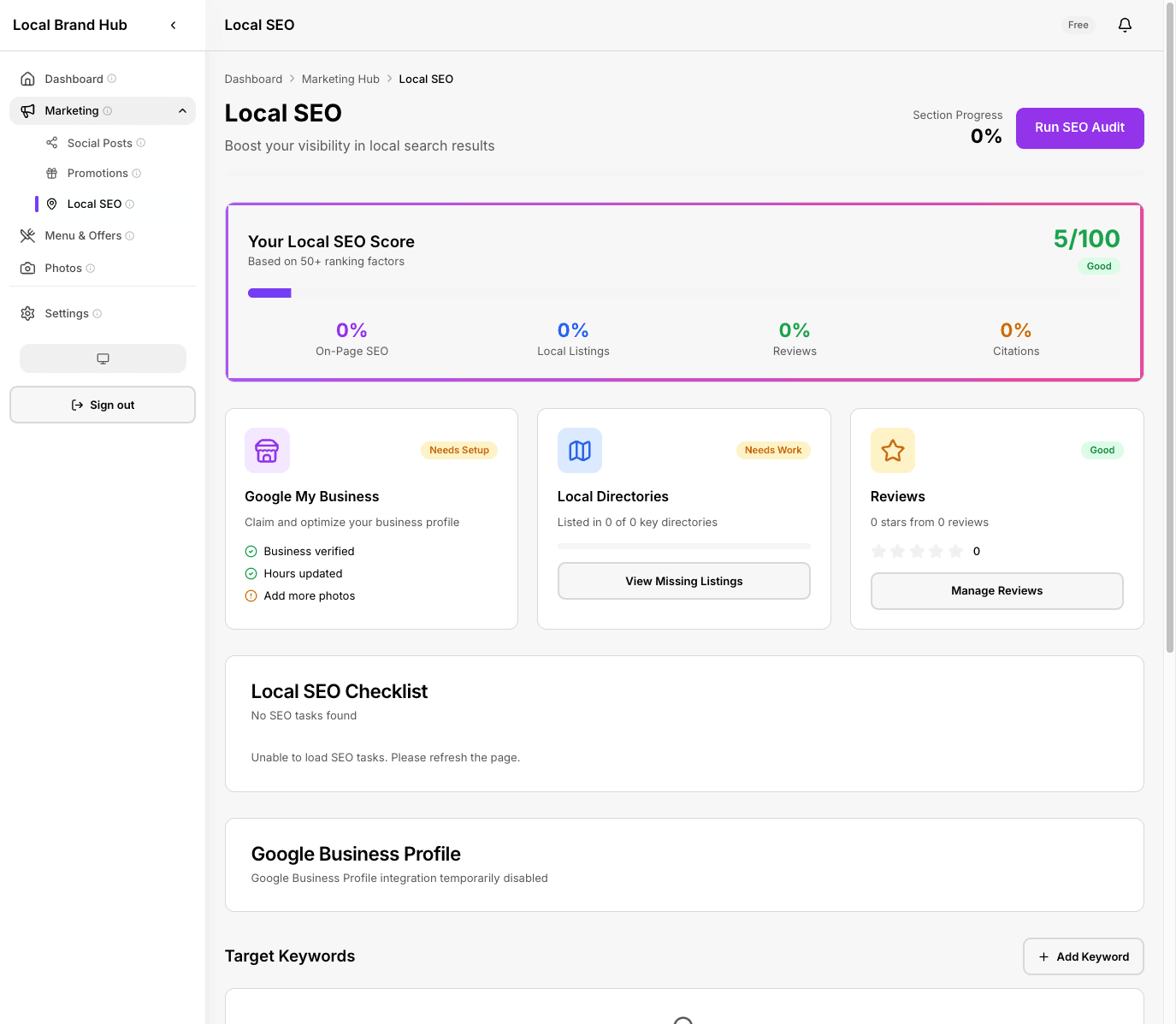
Check that Google has your details right, and fix errors in minutes
What this fixes for you
Check your Google listing in one click
We compare the name, address and phone number on your Google Business Profile with your own details and flag any mismatch. For the other directories, we link you straight to each claim page so you can check them by hand.
Fix errors Google penalises you for
A name, address or phone number that differs between your listings hurts your search ranking. We show you exactly what differs on Google, and where to fix the rest.
Help Google read what you offer
Schema markup tells search engines exactly what your business offers. We check if it's set up correctly and tell you how to fix it.
See your full visibility breakdown
Understand exactly how visible your business is across Google search, Maps, reviews and your own website.
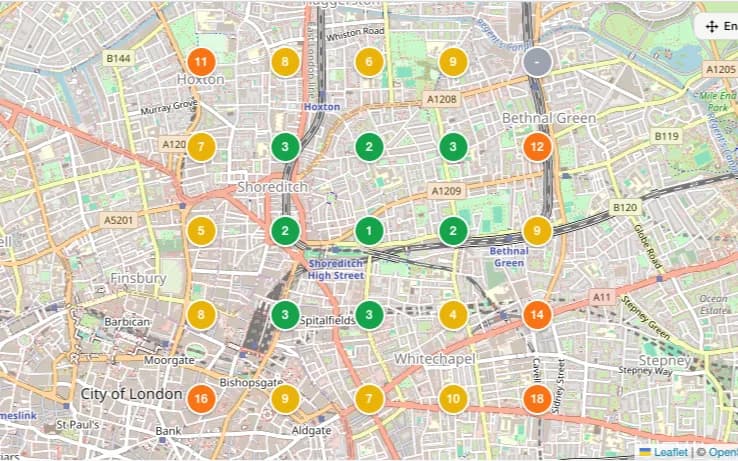
See your rank street by street
The Local Rank Map checks one search from a grid of points around your business and shows your Google Maps position at each one - on every plan.
How it works
Run a scan
Click Run the check and we look up your Google Business Profile, then compare its name, address and phone number with your own details. Takes about 30 seconds.
See what's wrong
Get a clear report: a name, address or phone number that does not match on Google, and any schema markup missing from your website.
Fix and rescan
Fix what we found, use the Get listed links to bring the other directories into line by hand, then re-run the check to confirm everything matches.
A closer look
Local Rank Map: your Google Maps rank, street by street
Google results change with where the searcher is standing. The Local Rank Map checks one search term from a grid of points around your business and plots your position at each one, so you can see exactly where you win and where a rival takes over.
- Colour-coded pins show your Google Maps position at every point
- Tap any pin to see the top 10 businesses ranking right there
- Coverage stats show the share of your area where you rank top 3
- Included on every plan: 3x3 grid monthly on Free, 5x5 monthly on Standard, up to 11x11 weekly on Growth
- Service-area business? Re-centre the scan anywhere within 30 km of your listing
Business details check: does Google match your details?
NAP stands for Name, Address, Phone: the three pieces of information that must be identical everywhere your business appears online. Even small differences hurt your search ranking. We check the listing that matters most, your Google Business Profile, against the details you hold.
- Compares your Google Business Profile with your own name, address and phone number
- Flags a business name that does not match
- Spots a wrong phone number or address
- Scores how closely each detail matches, so you know what to fix first
- Links to the claim pages for Yelp, TripAdvisor, Bing, Apple and Yell, plus trade directories like Checkatrade and MyBuilder where they apply, so you can bring the other directories into line by hand
Schema markup validation
Schema markup is code on your website that helps Google understand your business: your services, opening hours, location, and more. We check if it's there and if it's correct.
- Validates your business's schema markup (Restaurant, Store, ProfessionalService and more)
- Checks for opening hours, location, and contact data
- Identifies missing required fields
- Provides code snippets for your developer
- Re-run it any time: we keep your latest result
0% of consumers lose trust in a business with inconsistent contact details online
Wrong phone number on Google? Different hours on your website? These invisible mistakes drive customers straight to your competitors.
Source: BrightLocal Consumer Survey
What you get on each plan
See how this feature differs across plans
Swipe to see all plans
No credit card required
Frequently asked questions
What is a NAP audit?
NAP stands for Name, Address, Phone number. These three details should be identical everywhere your business appears online, because mismatches confuse search engines and hurt your ranking. Our business details check compares the listing that matters most, your Google Business Profile, with the details you hold, and links you to the other directories so you can check those by hand.
What is schema markup?
Schema markup is invisible code on your website that helps Google understand your business. It tells search engines what type of business you are, your opening hours, services, prices, and location, so they can show rich results when someone searches for you.
Do I need a developer to fix schema issues?
For NAP inconsistencies, no. You can update most directory listings yourself. For schema markup, you may need someone with access to your website code, but we provide the exact code snippets needed.
What is the Local Rank Map?
Your Google Maps ranking is not one number - it changes street by street. The Local Rank Map checks one search term from a grid of points around your business and plots your position at each point, with the top 10 businesses visible at every pin. Every plan includes it: a 3x3 grid monthly on Free, a 5x5 grid monthly on Standard, and up to 11x11 weekly on Growth.
How often should I run a scan?
We recommend a monthly check. Google lets anyone suggest an edit to a listing, so your details can change without you being told, and it is worth re-checking the other directories by hand at the same time.
Is this only available on the Growth plan?
The business details check and schema validation are Growth plan features. Every plan includes a basic SEO checklist and the Local Rank Map, with bigger grids and weekly scans on Growth. The Standard plan adds the visibility score and Google Business Profile auditing.
Learn more about local SEO
Florist Local SEO: Win 'Florist Near Me' in the UK
How a local flower shop can beat the chains in local search. The same tactics work for any high-street business.
Read articleSEO for Beauty Salon: How to Get Found on Google
Step-by-step local SEO for salon owners: Google Business Profile, reviews, and citations.
Read articleRun your first SEO audit in 2 minutes
Find the invisible mistakes costing you customers. Start free, no card required.
Start freeNo credit card required