72% of venues use POS-to-KDS systems. Compare UK kitchen display system pricing from £300 and cut order errors by 40%. Full buyer's guide.
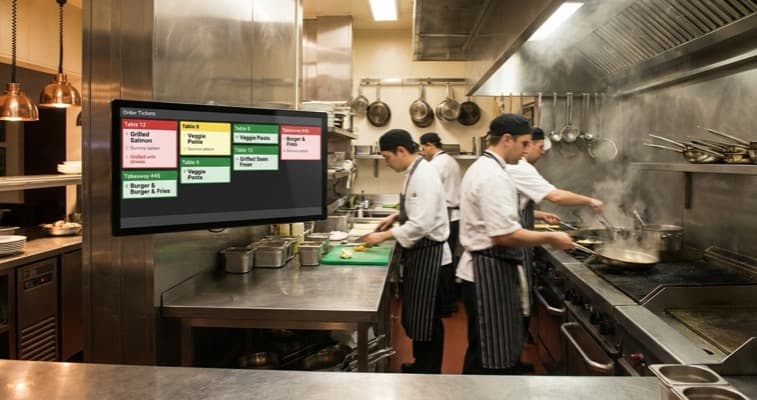
Friday night. Twenty tickets hanging from the pass. A waiter calls out a modification but nobody hears it over the extractor fan. The ticket falls behind the fryer. Table 12 gets onions. A restaurant kitchen display system replaces those paper tickets with a screen your team can actually read.
Around 72% of food service establishments already have synchronised POS-to-KDS systems in place (Fresh Technology, 2025). If your kitchen still runs on paper tickets or shouted orders, you're operating with a disadvantage that compounds every busy service. This guide covers what a kitchen display system does, what it costs, and whether it makes sense as part of your restaurant management software setup.
Info
Related: Restaurant Management Software: our complete hub covering all management software options for UK restaurants.
What You'll Learn
- What a restaurant kitchen display system does and how it connects to your POS
- UK pricing for hardware and software
- How KDS reduces order errors and speeds up ticket times
- Which systems suit different venue types
- A practical checklist for evaluating KDS options
What Is a Kitchen Display System?
First, let's cover the basics. A restaurant kitchen display system (KDS) is a method that replaces paper order tickets with a digital screen mounted in the kitchen. When a server enters an order at the POS terminal, it appears instantly on the kitchen display.
Orders are organised by time, station, or priority, so your grill chef sees grill items and your pastry section sees desserts.
For example, a busy Italian restaurant in Manchester using a kitchen display system for restaurant operations can route pasta orders to one station, pizza orders to the oven, and dessert orders to the cold section, simultaneously, without anyone shouting or shuffling paper slips.
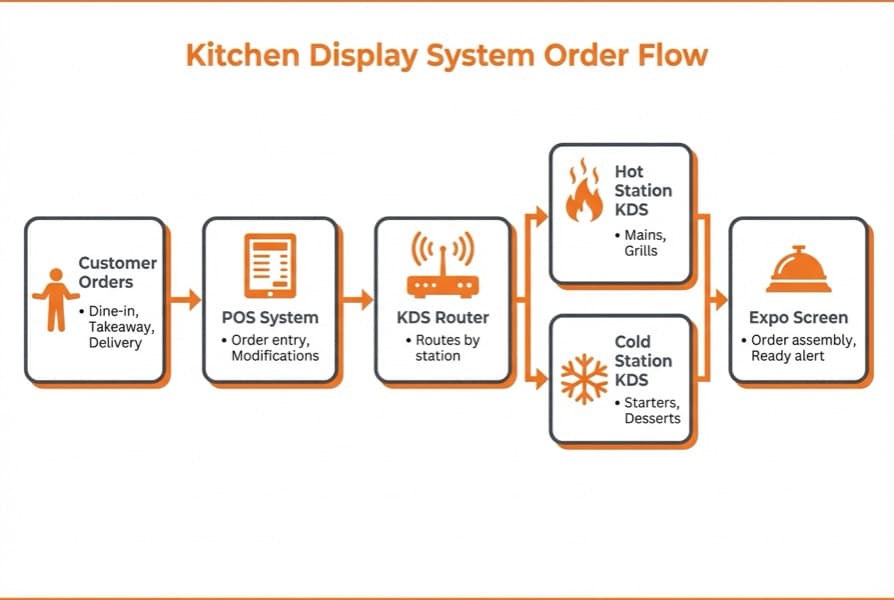
Order flow from POS to kitchen display system stations
How It Works
The process is straightforward:
- Server enters order at POS terminal or tablet
- Order transmits instantly to kitchen display screen
- KDS organises orders by station, time, or priority
- Kitchen staff mark items as started, cooking, or complete
- System tracks ticket times and flags delays
- Modifications update in real time: no lost tickets
The key advantage over paper? Everything stays visible. Modifications don't get lost.
If table 12 changes their order from rare to well-done after the ticket prints, the update appears on screen immediately. No scribbled amendments. No missed changes.
76% of restaurant operators report that using technology gives them a competitive edge (Apicbase, 2025). For kitchen operations specifically, a KDS is often where that edge is most visible: faster service, fewer errors, happier customers.
How KDS Improves Kitchen Operations
Now that you understand the basics, here's why it matters. The benefits of a restaurant kitchen display system aren't theoretical. They show up in measurable operational improvements.
Fewer order errors and faster ticket times
Restaurants implementing KDS report up to a 40% increase in order accuracy (Astuteanalytica, 2025). Paper tickets smudge, fall, get obscured by steam. Screens don't. Every order displays clearly with allergen notes, modifications, and special requests highlighted.
KDS also tracks how long each order takes from receipt to completion. Colour-coded alerts flag when tickets exceed target times: green for on track, amber for approaching the limit, red for overdue.
For instance, a gastro pub in Leeds installed a kitchen display system and discovered their average starter-to-table time was 18 minutes, well above their 12-minute target. The visual tracking pushed staff to prioritise better. Within two weeks, average times dropped to 13 minutes.
Station coordination and real-time modifications
- Better station coordination: In a multi-station kitchen, timing matters. You need starters leaving the pass together, mains firing at the right moment. KDS coordinates this automatically, showing each station what to prepare and when.
- Real-time modifications: Customer changes their mind? Allergy flagged after ordering? Updates appear on the restaurant kitchen display system instantly. No runner needed. No shouted corrections lost in kitchen noise.
Ask yourself: how many order errors did your kitchen make last week? If you can't answer with a specific number, that's usually a sign your kitchen needs better tracking. A restaurant kitchen display system gives you that data automatically.
Info
If you're only relying on paper tickets you'll always lose to competitors who see every order, modification, and timing alert on screen.
Data and analytics
Advanced kitchen display systems track preparation times, peak-hour loads, station throughput, and order accuracy. This data feeds into staffing decisions and menu engineering. If your fish dish consistently takes 22 minutes while everything else takes 12, you know to either simplify the recipe or adjust customer expectations.
Restaurant Kitchen Display System Pricing
Next, let's talk money. Kitchen display system costs in the UK vary based on hardware quality, software features, and whether you're buying standalone or as part of a POS package.
Hardware costs:
| Component | Price Range | Notes |
|---|---|---|
| KDS screen (15-21 inch) | £300-£800 | IP54-rated for kitchen environments |
| Bump bar/controller | £80-£200 | For marking orders complete |
| Mounting hardware | £30-£80 | Wall or shelf mount |
| Network equipment | £50-£150 | If kitchen needs separate network point |
Hardware accounts for approximately 71% of total KDS investment (GII Research, 2025). The screens need to withstand heat, steam, grease, and the occasional bump from a busy chef.
Software costs:
- Included with POS: £0 extra (Square, Lightspeed, Toast)
- Standalone KDS software: £20-£60/month
- Enterprise solutions: £80-£200/month
Total first-year estimate for a single-screen setup:
- Hardware: £400-£1,000
- Software: £0-£720/year (often included with POS)
- Installation: £100-£300
- Total: £500-£2,020
Pro Tip
Many UK POS providers include restaurant kitchen display system software free with their restaurant plans. If you're already using Square, Toast, or Lightspeed, check whether kitchen display is included before buying separate software.
If you're thinking "that's expensive for a screen," consider what order errors cost you. One wrong dish costs £5-£15 in food waste plus the intangible cost of a disappointed customer. A kitchen doing 200 covers daily with even a 5% error rate wastes significant money weekly. The KDS typically pays for itself within 3-6 months. Before you buy, work out how quickly the savings would cover the cost for your own cover count.
Top UK KDS Options Compared
With that pricing context, here's how popular kitchen display system options stack up for UK restaurants.
Square and Lightspeed KDS
- Square KDS: Ideal for small independents. Included free with Square for Restaurants plans. Uses an iPad as the display. Simple setup, limited customisation. Works well for cafes and small restaurants already on Square POS.
- Lightspeed KDS: Ideal for full-service restaurants. Included with Lightspeed Restaurant plans. Offers station-based routing and course management. Good integration with Lightspeed's ordering and payment ecosystem.
UK-focused and enterprise options
- EPOS Direct KDS: Ideal UK-focused option. UK-based provider offering purpose-built KDS hardware. Screens designed specifically for commercial kitchen environments with IP54 ratings. Competitive pricing for UK independents.
- Kobas KDS: Ideal for UK hospitality groups. UK hospitality management platform with integrated KDS. Covers ordering, kitchen management, and reporting in one system.
- Oracle MICROS KDS: Ideal for enterprise chains. Industry-standard for large restaurant groups. Highly customisable with advanced routing. Enterprise pricing only.
| System | Starting Price | POS Required | Ideal For |
|---|---|---|---|
| Square KDS | Free (with POS) | Square | Small cafes/restaurants |
| Lightspeed KDS | Included (with POS) | Lightspeed | Full-service restaurants |
| EPOS Direct | ~£500 hardware | Compatible | UK independents |
| Kobas | Quote-based | Kobas | UK hospitality groups |
| Oracle MICROS | Enterprise pricing | Oracle | Large chains |
For most UK independents already using a cloud POS, checking whether your provider includes restaurant kitchen display system functionality is the fastest and cheapest starting point.
What to Look for When Buying
When it comes to choosing the right restaurant kitchen display system, not every option suits every kitchen. Here's what to evaluate.
- Screen durability: Kitchen screens face steam, heat, grease splashes, and the occasional elbow. Look for IP54-rated displays designed for commercial kitchen environments. Consumer tablets work as a stopgap but don't last.
- POS integration: Your restaurant kitchen display system must connect seamlessly to your POS. If orders don't transmit instantly, you've created a slower system than paper.
- Station routing: Multi-station kitchens need orders routed to the right screen. The grill section sees grill items. The cold section sees salads. If your KDS can't route by station, every order appears on every screen, which defeats the purpose.
- Modification handling: How does the system display modifications and allergen alerts? These need to be visually prominent. A "no nuts" flag buried in small text could be dangerous.
- Offline capability: If your internet drops during service, can the KDS still receive orders from the POS over the local network? Most cloud-based systems maintain local connectivity even without internet.
Restaurant Kitchen Display System Evaluation Checklist
- Checked whether current POS includes KDS functionality
- Assessed kitchen layout for screen placement and mounting
- Verified KDS screen has IP54 or higher rating
- Confirmed POS-to-KDS integration works with your system
- Tested station routing for multi-station kitchen
- Checked allergen and modification display prominence
- Verified offline/local network capability
- Calculated ROI based on current error rate
- Compared hardware-only vs POS-bundled options
- Asked about warranty and replacement terms for kitchen hardware
Common Mistakes to Avoid
However, even the right restaurant kitchen display system can fail if you make these mistakes.
- Buying a consumer tablet as a permanent solution. iPads work for testing. They don't survive a year in a commercial kitchen. The £200 you save on a consumer device costs more when it fails mid-service.
- Ignoring screen placement. Mount the KDS where chefs naturally look, at eye level near their station. A screen mounted too high, too low, or behind a door gets ignored.
- Overcomplicating the setup. If you're a 30-cover bistro, you don't need five screens with station routing. One screen at the pass handles most small venues.
- Skipping staff training. Even a simple restaurant kitchen display system needs a 30-minute walkthrough with your kitchen team. Don't assume they'll figure it out.
For example, a pizza restaurant in Glasgow bought a high-spec KDS with multi-station routing for their 25-cover venue. Within a week, they'd turned off station routing and were using a single screen at the pass, which was all they needed.
If you're reading this thinking "my team will resist any change," start with a trial during a quiet shift. Let them see the benefit before a busy service.
91% of restaurateurs prioritise kitchen automation (Astuteanalytica, 2025). But automation only works when staff trust it. Involve your team early.
If You Only Have 30 Minutes This Week
If you only have 30 minutes a week, here's how to evaluate whether a restaurant kitchen display system fits your venue:
- Day 1-2: Track your errors. Keep a simple tally of order errors during two service periods. Wrong dish? Missing modification? Late course? Note each one. This gives you a baseline to calculate potential ROI from a KDS.
- Day 3-4: Check your POS. Log into your POS provider's website or call their support line. Ask one question: "Does your system include kitchen display functionality?" Many UK providers include it free. If it's included, you might only need hardware.
- Day 5-7: Assess your kitchen. Spend 5 minutes looking at your kitchen layout. Where would a screen go? Is there a power point nearby? Would chefs actually look at it from their station? Take a photo and mark the ideal position.
That's enough to know whether a KDS is practical for your venue. No commitment, no cost, just information gathering.
The right kitchen display system doesn't just show orders. It shows your team that mistakes are trackable, and that makes everyone more careful.
Frequently Asked Questions
Here's what UK restaurant operators ask most often when evaluating a restaurant kitchen display system.
How much does a restaurant kitchen display system cost in the UK?
A basic single-screen setup costs approximately £500-£1,200 for hardware, with software often included free with your POS plan. Purpose-built kitchen screens range from £300-£800 each, plus mounting hardware and bump bars. Monthly software costs run £0-£60 depending on whether your POS includes KDS. For a typical UK independent, budget £800-£1,500 for a complete restaurant kitchen display system installation.
Can I use a tablet as a kitchen display system?
You can use an iPad or Android tablet as a temporary or budget KDS solution. Square and several other POS providers support tablet-based kitchen displays. However, consumer tablets aren't designed for kitchen environments: heat, steam, and grease shorten their lifespan significantly. For long-term use, invest in IP54-rated commercial screens that withstand kitchen conditions. Use a tablet for a trial period to confirm the concept works for your team.
Do I need a kitchen display system for a small restaurant?
Not necessarily. A 20-cover cafe with two staff members likely doesn't need a KDS. Verbal communication works fine at that scale. A KDS becomes valuable when your kitchen handles 50+ covers per service, runs multiple stations, or processes delivery orders alongside dine-in. The 40% improvement in order accuracy matters most in busy, complex kitchens where paper tickets create bottlenecks.
How does a KDS connect to my POS system?
Most KDS platforms connect to your POS over your local network (WiFi or ethernet). When a server enters an order at the POS, it transmits instantly to the kitchen display. The connection is typically configured during initial setup, linking your POS software to the KDS application. Cloud-based systems maintain this connection through online services, while local setups use your internal network. Always verify compatibility between your specific POS and the KDS you're considering.
What's the difference between KDS and kitchen printers?
Kitchen printers produce paper tickets. A KDS replaces those tickets with a digital screen. The practical differences: KDS updates in real time (printers can't modify a printed ticket), KDS tracks ticket times automatically, KDS routes orders to specific stations digitally, and KDS eliminates paper waste and smudged tickets. Kitchen printers cost less upfront (£100-£200) but lack the tracking, routing, and modification capabilities that make KDS valuable for busy operations.
If you run a restaurant and want to see how Local Brand Hub can support your marketing, explore our restaurant marketing tools.
Key Takeaway
Key Takeaways
A restaurant kitchen display system replaces paper tickets with a digital screen that displays orders in real time, routes them to the right station, and tracks preparation times automatically.
Remember:
- 72% of food service venues already synchronise POS and KDS
- KDS can improve order accuracy by up to 40%
- Basic UK setups cost £500-£1,500 including hardware
- Many POS providers include KDS software free
- Purpose-built kitchen screens outlast consumer tablets significantly
The right restaurant kitchen display system won't just reduce errors. It gives your kitchen team clarity during the chaos of a Friday night rush: every order visible, every modification highlighted, every ticket timed. That's less stress for your team and fewer disappointed customers sending back plates.
For more on building your kitchen technology stack, explore our restaurant management software hub or see how KDS connects with your restaurant inventory management software for a fully integrated back-of-house operation.
For restaurants, salons, and local businesses
Need help with your marketing?
We help UK businesses turn social media into real results, not busywork.
Start freeGet More Marketing Tips
Practical marketing tips for UK business owners, straight to your inbox. No spam, unsubscribe anytime.
About the Author
Local Brand Hub
Empowering UK Businesses
Local Brand Hub provides comprehensive business management tools designed specifically for UK local businesses to streamline operations, automate marketing, and grow revenue.
More articlesRelated Articles
 Industry Insights
All-in-One Restaurant Software: UK Comparison
Compare all-in-one restaurant software for UK venues. See top platforms, UK pricing, and what to look for when choosing an integrated system.
 Industry Insights
Cloud Restaurant Management Software: Complete UK Guide
Cloud restaurant management software accounts for 60% of the market. Cut costs and streamline UK restaurant operations with our complete guide.
 Industry Insights
Restaurant Scheduling Software: UK Staff Rota Guide
72% of restaurants use digital scheduling. Compare UK restaurant scheduling software from free to £90/month. Cut rota admin by 55%.