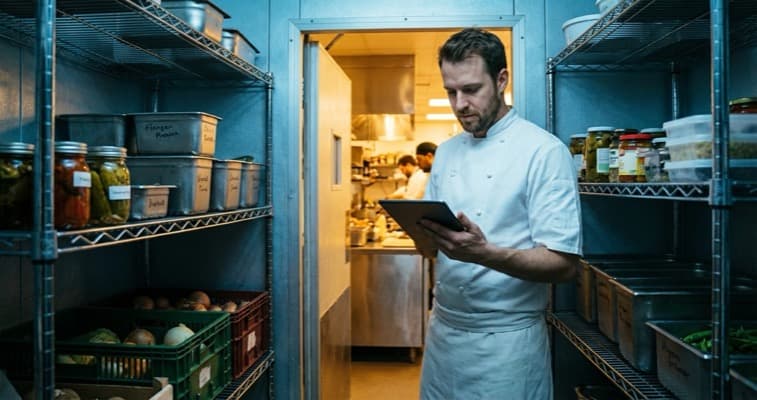
Compare the best restaurant inventory management software for UK restaurants. MarketMan, Restaurant365, free options with pricing and recommendations.
It's midnight on a Sunday. You're in the walk-in, clipboard in hand, counting tins of tomatoes for the third time. Sound familiar? Your food costs have crept up again this month, but you can't pinpoint where the money is going. Meanwhile, your competitor down the road checks stock from their phone in under a minute.
Info
Restaurant inventory management software replaces manual counting and paper ordering with automated tracking that connects to your POS and suppliers.
We tested dozens of inventory platforms for UK hospitality venues. The global market reached USD 2.18 billion in 2025 (Cognitive Market Research, 2025), and it's growing fast because the return on investment is hard to ignore.
Related: Restaurant Management Software: our complete hub guide
What You'll Learn
- What restaurant inventory management software actually does
- The top platforms available to UK restaurants in 2026
- How to compare free vs paid options realistically
- Real savings you can expect from switching to automated inventory
- Which system suits your restaurant type and budget
What Is Restaurant Inventory Management Software?
Restaurant inventory management software is a framework that tracks stock, monitors food costs, automates ordering, and cuts waste. It connects to your POS and supplier network in real time. It replaces spreadsheets, paper counts, and the guesswork that leads to over-ordering and missed shortages.
Here's why it matters. Food costs are one of your biggest expenses. Manual inventory creates blind spots that quietly drain margins. A dish that looks profitable on paper might lose money once you account for waste, portion drift, and supplier price changes you missed.
Research shows 47% of restaurant operators plan to invest in inventory management software in 2025 (National Restaurant Association (US), 2025). If you're still relying on a clipboard and a calculator, your competitors are pulling ahead.
Core capabilities of inventory software in 2026:
- Real-time stock tracking synced to your POS: stock updates automatically when you sell a dish
- Automated purchase ordering based on par levels and usage patterns
- Recipe costing calculating exact ingredient costs for every menu item
- Waste tracking identifying spoilage patterns and portion issues
- Supplier management comparing prices across multiple vendors
- Mobile access for counting and ordering from your phone
For example, a busy Thai restaurant running manual counts might order 20% more prawn than needed "just in case." With automated tracking, they'd order based on actual usage data, cutting waste and freeing up cash for other priorities.
Pro Tip
Before committing to any platform, check if your current POS already includes inventory features you're not using. Many owners pay for tools they already have.
Ask yourself: do you know the exact food cost percentage for each dish on your menu? If not, that's usually a sign that your inventory management needs an upgrade.
What Is the Best Restaurant Inventory Software?
Now let's look at the top options. Restaurant inventory software is a framework that automates stock counting, ordering, and waste tracking so you can manage food costs from your phone. There's no single "best", but several platforms stand out for UK restaurants in 2026. Let's break them down honestly.
MarketMan
Ideal for: Mid-size restaurants and small chains wanting robust inventory control.
MarketMan ranks high across review sites, scoring 5/5 for features and ease of use (TheRestaurantHQ, 2025). Trusted by Hard Rock Cafe and Taco Del Mar.
Strengths:
- Excellent real-time tracking via mobile
- Strong supplier management with automated ordering
- Detailed food cost and waste analysis
- Clean, intuitive interface
Limitations:
- Starting price around £150/month may stretch small independents
- Some advanced features have a learning curve
For instance, a seafood restaurant using MarketMan could set automatic reorder points for fresh fish, cutting waste from over-ordering and avoiding missed sales from running out.
Restaurant365
Ideal for: Multi-site operations needing accounting and inventory together.
Restaurant365 is an all-in-one cloud platform. It bundles inventory, accounting, scheduling, and reporting. A KFC and Taco Bell franchisee saved about 20 hours per month on bank tasks after switching (Restaurant365, 2025).
Strengths:
- Unified accounting and inventory
- Recipe costing with mobile access
- Vendor integration with hundreds of suppliers
- Enterprise-level reporting dashboards
Limitations:
- Starting around £375/month: built for multi-site, not small independents
- Limited UK presence compared to MarketMan
- Complex setup requires dedicated onboarding
Kitchen CUT
Ideal for: UK hospitality groups managing multiple suppliers.
Kitchen CUT focuses on supply chain management with live supplier pricing and multi-channel ordering. Trusted by BrewDog and Accor Hotels (Galley Solutions, 2025).
Strengths:
- Excellent UK availability and support
- Real-time supplier pricing integration
- Strong for hospitality groups with complex supply chains
- Menu engineering tools
Limitations:
- Custom pricing makes comparison difficult
- Less suited for single-site operations
Galley Solutions
Ideal for: High-volume catering and recipe-first operations.
Galley Solutions uses a recipe-first approach with modular recipe blocks and automated unit conversions. Used by Aramark and DoorDash (Galley Solutions, 2025).
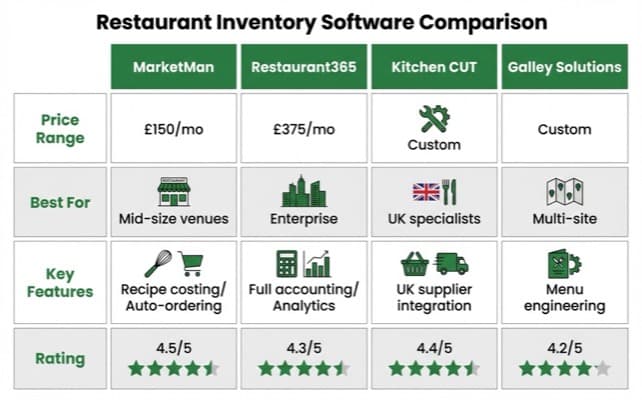
Restaurant inventory management software comparison showing MarketMan, Restaurant365, Kitchen CUT and Galley Solutions features
Read more: Best Restaurant Management Software
What Do Restaurants Use to Manage Inventory?
Let's look at how UK restaurants handle inventory in practice. The reality is messier than the software brochures suggest.
The shift from paper to digital is well under way, but many independents are still catching up.
Current inventory management methods across UK restaurants:
| Method | Still Used By | Accuracy | Time Required |
|---|---|---|---|
| Paper counting | Many independents | Low | 3-5 hours/week |
| Spreadsheets | Small chains | Medium | 2-3 hours/week |
| POS basic tracking | Growing segment | Medium-high | 1-2 hours/week |
| Dedicated software | Progressive operators | High | Under 30 min/week |
| AI-powered platforms | Enterprise chains | Very high | Minimal |
The Shift to Digital
The shift toward dedicated software is speeding up. Within the broader market, inventory management holds about 20% of market share as restaurants focus on waste reduction and cost control (Maximize Market Research, 2025).
However, the reality for many independent restaurants is different from the enterprise picture. If you're thinking "we've managed fine with spreadsheets for years," that's understandable. But consider what "fine" actually costs you.
For example, a multi-location pizza chain that used integrated inventory software saw a 10% increase in revenue and a 15% drop in food waste (Strategic Market Research, 2025).
Even a fraction of that improvement would transform margins for a single-site restaurant. Before committing to a platform, it's worth taking a few minutes to work out the potential savings for your own venue.
Key integration requirements for UK restaurants:
Your inventory software needs to work with your existing tools. At minimum, look for:
- POS integration (Square, Epos Now, Lightspeed, or your current system)
- Supplier ordering capability (ideally compatible with your existing suppliers)
- Accounting software sync (Xero, QuickBooks, or Sage)
- Mobile access for real-time counting
Read more: Restaurant Management Software | Cloud Restaurant Management
What Software Works for Restaurant Management?
Next, here's how inventory fits within the broader landscape. Restaurant management software is a framework that bundles POS, stock tracking, and reporting in one system. You don't need to choose between dedicated inventory software and an all-in-one platform: the decision depends on your current setup.
By Your Current Setup
- If you already have a POS you like: Add dedicated inventory software (MarketMan, Kitchen CUT) that integrates with it. This is usually cheaper and less disruptive than switching everything.
- If you're starting from scratch: Consider an all-in-one platform (Lightspeed, Restaurant365) that includes inventory alongside POS, scheduling, and reporting.
- If you're a small independent on a tight budget: Your POS's built-in inventory features (Square, Epos Now) may cover a simple menu. Don't pay for enterprise tools when basic tracking meets your needs.
Here's a framework for matching solutions to restaurant types:
| Restaurant Type | Recommended Approach | Examples |
|---|---|---|
| Small cafe (1 site) | POS with built-in tracking | Square, Epos Now |
| Independent restaurant | POS + dedicated inventory | Lightspeed + MarketMan |
| Small chain (2-5 sites) | Integrated platform | Lightspeed or TouchBistro |
| Multi-site group (5+) | Enterprise all-in-one | Restaurant365, Crunchtime |
| Catering operation | Recipe-first platform | Galley Solutions |
If you're only tracking stock monthly you'll always lose to competitors who see their numbers in real time. If you can't name your food cost percentage off the top of your head, that's usually a sign that your inventory process needs rethinking.
Tip
For most UK independents, start with your POS's built-in tracking and upgrade only when food costs become a clear problem.
For instance, a single-site gastropub might use Epos Now for POS and payments, with its built-in tracking handling basic stock counts. Only when food costs become a real concern, or they open a second site, would a tool like MarketMan pay for itself.
Which Software Handles Inventory Management?
Here's the detailed comparison for UK restaurant operators in 2026.
Feature-by-Feature Comparison
| Feature | MarketMan | Restaurant365 | Kitchen CUT | xtraCHEF | Square |
|---|---|---|---|---|---|
| Real-time tracking | Yes | Yes | Yes | Yes | Basic |
| Recipe costing | Yes | Yes | Yes | Yes | No |
| Automated ordering | Yes | Yes | Yes | Limited | No |
| Waste tracking | Yes | Yes | Limited | Yes | No |
| Supplier management | Excellent | Good | Excellent | Basic | No |
| Mobile counting | Yes | Yes | Yes | Yes | Yes |
| AI forecasting | Basic | Basic | No | Yes (ML) | No |
| UK availability | Yes | Limited | Yes | Limited | Yes |
| Approx. monthly cost | ~£150 | ~£375 | Custom | Varies | Free-£60 |
Our Recommendation for UK Restaurants
- Strong overall: MarketMan, broad feature set with strong UK availability
- Strong for accounting: Restaurant365, saves significant admin time but higher cost
- Strong for UK groups: Kitchen CUT, excellent supplier management with local support
- Strong on a budget: Square's built-in inventory, free, but limited to basic tracking
85% of operators say integration is the top factor when buying software (Hospitality Tech, 2025). Whatever you choose, make sure it talks to your POS.
What Are the Free Options for Inventory Management?
Let's be honest about free options. Free inventory software is a framework that offers basic stock tracking without a monthly fee, but shifts costs elsewhere. They exist, but they come with trade-offs.
Info
Free doesn't mean zero cost: it means the cost shows up somewhere else.
Square for Restaurants (Free Plan)
Often the strongest free option for UK restaurants. Includes basic inventory tracking, unlimited products, and POS integration. You pay only transaction fees (1.75% per card payment).
Suitable for small cafes and food trucks with simple menus. Not suitable for restaurants needing recipe costing, automated ordering, or waste tracking.
TouchBistro (Free Trial)
Offers a 30-day free trial with inventory cost accounting, profit margin calculations, and low stock alerts. After the trial, you'll need a paid subscription. For example, a new cafe could use the trial period to test recipe costing before committing to a monthly plan.
Spreadsheet Templates
Free forever, but manual. If you're using spreadsheets, at minimum set up:
- A daily stock count sheet
- Weekly food cost calculation
- Monthly supplier price comparison
- Waste log
This costs nothing but requires discipline. For a small restaurant with a limited menu, spreadsheets can work, but they don't scale, and they're only as accurate as the person entering data. If you're only counting stock weekly you'll always lose to competitors who track in real time.
Tip
If you're thinking "I'll start with free and upgrade later," that's a reasonable strategy. Just set a trigger point. When food costs exceed 30% of revenue or you find yourself spending more than two hours per week on inventory, it's time for dedicated software.
Actionable Checklist
- Calculate your current food cost percentage (total food purchases / total food revenue x 100)
- Time how long your weekly stock count takes
- Identify your top three food waste categories
- Check whether your current POS offers inventory features you aren't using
- Request demos from two dedicated inventory platforms
- Compare costs: current waste + time vs software subscription
- Start a 30-day trial of one platform during a quiet period
- Train at least two team members on the new system
If You Only Have 30 Minutes This Week
Weekly Action
This week, calculate your true food cost:
- Day 1-2: Gather your food purchase invoices from last month. Add them up. This is your total food cost.
- Day 3-4: Check your POS or till for total food revenue last month. Divide food cost by food revenue, then multiply by 100. That's your food cost percentage.
- Day 5-7: If it's above 30%, you have a food cost problem. If you don't know the number at all, that tells you everything about whether you need inventory software.
If you only have 30 minutes a week, knowing your food cost percentage is the one number every restaurant owner should track. Everything else flows from there.
Frequently Asked Questions
Does Google have an inventory management system?
Google does not offer a dedicated restaurant inventory system. Google Sheets works for basic tracking, but it lacks automation, POS links, and real-time features. For cloud-based inventory, look at MarketMan, Kitchen CUT, or your POS's built-in features.
Is there any free POS software with inventory management?
Yes. Square for Restaurants offers a free POS plan with basic inventory tracking. You pay only transaction fees (1.75% per card). However, free plans lack recipe costing, automated ordering, and waste tracking.
For serious inventory control, expect to invest in paid software. See our best restaurant management software guide for full comparisons.
What is the best restaurant inventory software for small restaurants?
Small restaurant inventory software is a framework that handles basic stock counts without heavy costs. For small UK venues with limited budgets, Square's free POS with built-in inventory is a strong place to start. If you need recipe costing and automated ordering, MarketMan offers a strong balance of features and ease of use, though it requires a monthly fee. Restaurant staff management software can also integrate with these platforms.
How much does restaurant inventory management software cost?
Costs vary widely. Square's free plan covers basic tracking. MarketMan starts around £150/month. Restaurant365 begins around £375/month. Cloud-based tools dominate the market (SNS Insider, 2025), so most options use monthly pricing rather than large upfront costs.
What's the ROI of restaurant inventory management software?
Data from over 2,000 venues shows significant drops in food costs and time spent on inventory tasks (Supy, 2025). For most restaurants, the monthly savings far exceed the software subscription cost.
If you run a restaurant and want to see how Local Brand Hub can support your marketing, explore our restaurant marketing tools.
Key Takeaway
Key Takeaway
- Food cost is the number to know: if you can't state your food cost percentage, inventory software should be your first investment
- MarketMan is the strongest all-round option for UK restaurants needing dedicated inventory management
- Free options exist but have limits: Square's free plan works for small operations, but serious inventory control requires paid software
- Integration matters most: 85% of operators say system integration is the top factor (Hospitality Tech, 2025)
- The ROI is substantial: meaningful savings on food costs make this one of the clearest technology investments for restaurants
Your restaurant's profitability isn't determined by how full the dining room is. It's determined by what happens between the delivery van and the plate. Inventory management software makes that gap visible.
For restaurants, salons, and local businesses
Need help with your marketing?
We help UK businesses turn social media into real results, not busywork.
Start freeGet More Marketing Tips
Practical marketing tips for UK business owners, straight to your inbox. No spam, unsubscribe anytime.
About the Author
Local Brand Hub
Empowering UK Businesses
Local Brand Hub provides comprehensive business management tools designed specifically for UK local businesses to streamline operations, automate marketing, and grow revenue.
More articlesRelated Articles
 Industry Insights
All-in-One Restaurant Software: UK Comparison
Compare all-in-one restaurant software for UK venues. See top platforms, UK pricing, and what to look for when choosing an integrated system.
 Industry Insights
Cloud Restaurant Management Software: Complete UK Guide
Cloud restaurant management software accounts for 60% of the market. Cut costs and streamline UK restaurant operations with our complete guide.
 Industry Insights
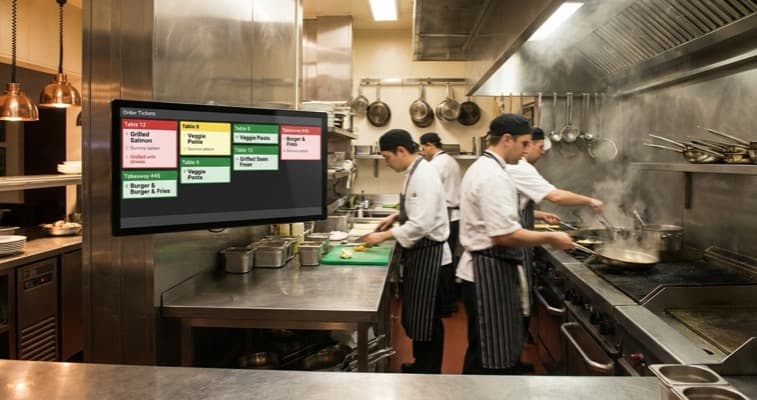
Restaurant Kitchen Display System: UK Buyer's Guide
72% of venues use POS-to-KDS systems. Compare UK kitchen display system pricing from £300 and cut order errors by 40%. Full buyer's guide.