
Compare restaurant staff management software for UK venues. See how 80% of adopters cut overtime, review key features and find the right platform.
How long did you spend building next week's rota? You've spent 45 minutes on a spreadsheet. Then someone texts in sick. You start again. Meanwhile, your overtime bill creeps up and nobody notices until the month-end figures land. This is the reality for most independent restaurant owners across the UK.
Restaurant staff management software automates scheduling, tracks hours, and handles payroll compliance so you can stop wrestling with spreadsheets. 80% of restaurant owners who use labour management software report a reduction in overtime costs (KnowApp, 2025). That is not a marginal improvement. It is the difference between a profitable month and a stressful one.
Info
Related: Restaurant Management Software - our complete hub guide to restaurant tech
What You'll Learn
- Core features of restaurant staff management software and what actually matters
- UK-specific requirements including payroll compliance and rota regulations
- Cost comparisons from free tiers to enterprise platforms
- Decision framework to choose the right tool for your team size
- Implementation tips to get your staff onboard without chaos
What Is Restaurant Staff Management Software?
Restaurant staff management software is a framework that centralises scheduling, time tracking, payroll integration, and team communication into one digital platform. It replaces paper rotas, spreadsheet chaos, and WhatsApp group confusion with a single dashboard.
Think of it this way. Your POS handles orders. Your restaurant inventory management software handles stock. Staff management software handles your people. And your people are typically your biggest cost.
For example, a gastropub in Leeds running 15 staff across split shifts might spend three hours a week on scheduling alone. Software cuts that to 20 minutes because it remembers availability, flags conflicts, and calculates labour costs in real time.
Why It Matters Now
The numbers tell a clear story. 51% of restaurant operators plan to invest in workforce management software that supports hiring, scheduling, training, and payroll (National Restaurant Association, 2025) (US data). This is not a niche trend. It is mainstream.
Staff recruitment and retention remain the top challenge for 31% of operators, with 39% experiencing turnover rates between 11% and 25% (Apicbase, 2025). When you lose a team member, replacement costs climb to around £850 for front-of-house and £1,200 for back-of-house positions. Software that helps you schedule fairly, communicate clearly, and pay accurately reduces the friction that drives good staff away.
Quick Check
Ask yourself: how many hours did you spend on scheduling last month? If the answer is more than four, that's usually a sign you need a better system.
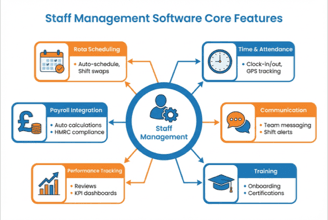
Core features comparison across restaurant staff management software platforms
Key Features That Matter for UK Restaurants
Now that you understand what this software does, here is what to prioritise based on how UK restaurants actually operate.
Scheduling and Rota Management
This is the core function. Good restaurant scheduling software should:
- Auto-generate rotas based on demand patterns and staff availability
- Handle shift swaps without you playing middleman
- Flag overtime before it happens, not after
- Show labour costs alongside the schedule in real time
For instance, a busy Indian restaurant with variable weekday and weekend demand might set rules like "minimum two experienced staff on Fridays" and the software builds around those constraints automatically.
Time Tracking and Attendance
Paper timesheets belong in the past. Digital time tracking means:
- Staff clock in via tablet, phone, or PIN
- Break compliance is tracked automatically
- Late arrivals get flagged without awkward conversations
- Hours feed directly into payroll
Automated scheduling has reduced overtime costs by double digits for restaurants that adopt these tools (Workforce.com, 2025). That is real money back in your pocket.
Payroll Integration
This is where UK-specific features become critical. Your software should handle:
- PAYE compliance and National Insurance calculations
- Holiday accrual tracking under UK employment law
- Tronc scheme management for tips and service charges
- Pension auto-enrolment tracking
Lightspeed Commerce expanded its payroll connector capabilities in 2025, enabling restaurants to process compliance-ready payslips directly within software systems (Technavio, 2025). Look for similar integration in whichever platform you choose.
Communication Tools
If you're thinking 'my team already uses WhatsApp' - fair point. But work communication mixed with personal messages creates problems. Dedicated channels mean:
- Shift reminders go to the right people
- Policy updates have read receipts
- Nobody misses an announcement buried in a 200-message group chat
Restaurant Staff Management Software: Free vs Paid
Next, let's look at the honest comparison. Free options exist, but they come with trade-offs.
| Feature | Free Tiers | Paid Platforms (£25-£100+/month) |
|---|---|---|
| Basic scheduling | Yes | Yes |
| Auto-scheduling | Limited | Full |
| Payroll integration | Rarely | Standard |
| UK compliance tools | Basic | Comprehensive |
| Staff limit | Often capped (5-15) | Unlimited |
| Support | Community/email | Phone + dedicated |
| Reporting | Basic | Advanced analytics |
As a rule of thumb, these ratings reflect general market positioning based on publicly available information. Your experience may vary by plan and provider.
When Paid Makes Sense
Cloud-based workforce management tools are now accessible to 2-20 unit restaurant chains at monthly SaaS pricing rather than six-figure capital expenditure (Workforce.com, 2025). That means enterprise-grade scheduling analytics are within reach even if you run two sites.
For most UK restaurants with 10+ staff, paid software typically pays for itself within the first month through overtime reduction alone.
If you're only running a small team of five or fewer, a free tier from Deputy or Planday might be enough to start. But if you're only using free tools when your team grows past ten you'll always lose to competitors who invest in proper workforce management.
How to Choose the Right Platform
Now that you have seen the features and pricing, here is a decision framework to match the right platform to your restaurant.
By Restaurant Size
- 1-10 staff: Start with free tiers. Focus on scheduling and basic time tracking.
- 11-30 staff: Mid-range paid plans. You need payroll integration and automated scheduling.
- 30+ staff or multi-site: Enterprise platforms with analytics, forecasting, and compliance tools.
For example, a family-run curry house with eight staff only needs basic shift scheduling. But a 25-cover brasserie running breakfast, lunch, and dinner shifts across 20 staff needs automated rota building and labour cost tracking to avoid scheduling blind spots.
By Priority
| Your Biggest Pain Point | Prioritise This Feature |
|---|---|
| Overtime costs too high | Real-time labour cost tracking |
| Scheduling takes hours | Auto-scheduling with rules |
| Payroll errors | Direct payroll integration |
| Staff keep leaving | Fair scheduling, shift swap tools |
| Multi-site chaos | Centralised dashboard |
Your priorities may vary based on your restaurant size and operational complexity.
What to Look For in UK-Specific Platforms
If you can't tell whether your current system saves time or just creates a different kind of admin, that's usually a sign you need something purpose-built. Cloud solutions account for 60.87% of restaurant management software revenue in 2025 and are growing at 14.94% annually (Mordor Intelligence, 2025). Cloud is the default. But confirm these UK-specific requirements:
- HMRC-compatible payroll exports
- UK holiday entitlement calculations (including pro-rata for part-time)
- Support for tipping legislation changes
- Sterling pricing without currency conversion surprises
Pro Tip
If you are thinking 'this is a lot to evaluate' - you are not alone. The reality for most restaurant owners is that comparing software feels impossible after a 12-hour shift. Narrow your shortlist to three, request demos, and test with a small team first.
Getting Your Team Onboard
However, even a well-chosen platform fails if your staff won't use it. Here is how to avoid that.
The Two-Week Rollout
Week 1: Run the old system and new system side by side. Let staff download the app and explore without pressure.
Week 2: Switch to the new system. Have one staff member per shift designated as the "go-to" for questions.
For example, a pizza restaurant in Birmingham introduced Deputy by asking two senior staff to trial it first. Those two became informal trainers. Within a month, the entire team had switched without a single missed shift.
Common Mistakes to Avoid
- Forcing the switch overnight - staff resist sudden change
- Not explaining the "why" - show them how shift swaps become easier
- Ignoring feedback - if the clock-in process is clunky, fix it fast
The industry is moving quickly. 67% of restaurant managers are optimistic about 2025, indicating confidence in technology-driven solutions (Modern Restaurant Management, 2025). Your team will adapt faster than you expect if the tool genuinely makes their work life easier.
Pro Tip
The biggest predictor of adoption is whether staff see personal benefit. Show them how shift swaps become one-tap instead of three phone calls, and resistance drops overnight.
Your Staff Management Checklist
Here's your implementation checklist to guide the decision process.
- Audit current scheduling process (time spent, errors, overtime frequency)
- List your non-negotiable features (payroll integration, UK compliance, staff count)
- Research three platforms that match your size and budget
- Request demos and ask about UK-specific compliance features
- Trial with a small team before full rollout
- Set up payroll integration and test one pay cycle
- Train shift leads first, then the wider team
- Review labour cost reports after the first full month
For example, a fish and chip shop in Bristol completed this checklist in one week, trialling Deputy's free tier with their five-person team before upgrading to a paid plan once they added evening staff.
If You Only Have 30 Minutes This Week
Finally, if you only have 30 minutes a week to spend on this, here is your realistic path forward:
Info
This week, audit your restaurant's staff management setup:
- Day 1-2: Calculate how many hours you spent on scheduling last month. Write down the number.
- Day 3-4: List your top three frustrations with your current system (overtime surprises, shift conflicts, payroll errors).
- Day 5-7: Sign up for one free trial. Deputy and Planday both offer UK-focused free tiers. Spend 15 minutes exploring the scheduling interface.
That is it. One week. No commitment. Just information.
Freeing up hours is the whole point, and the same logic applies to your marketing admin, where you can work out how much time you could save with the right tools.
Frequently Asked Questions
How much does restaurant staff management software cost in the UK?
Prices range from free (basic scheduling for small teams) to £100+ per month for comprehensive platforms with payroll integration, analytics, and multi-site management. Most independent restaurants spend £25-£60 per month. Cloud-based SaaS models mean you pay monthly rather than committing to large upfront costs.
Can staff management software handle UK payroll compliance?
Yes, but not all platforms do it equally well. Look for PAYE calculation support, National Insurance integration, holiday accrual tracking, and pension auto-enrolment features. Some platforms export directly to HMRC-compatible formats. Always confirm UK compliance before committing.
Will my staff actually use it?
Adoption depends on two things: ease of use and clear benefit. If the app makes shift swaps easier and gives staff more control over their availability, they will use it. Run a two-week parallel trial and designate shift leads as informal trainers. Most restaurant teams adapt within a month.
Is free restaurant staff management software good enough?
For teams of five or fewer with simple scheduling needs, free tiers work fine. Once you pass 10 staff, need payroll integration, or want automated scheduling, paid plans deliver measurable returns. 80% of adopters report reduced overtime costs (KnowApp, 2025), so the investment typically pays for itself.
How long does implementation take?
Most cloud-based platforms can be set up in one to two weeks. The software itself takes hours to configure. The real time investment is in training your team and running parallel systems during transition. Budget two weeks for a smooth switch.
If you run a restaurant and want to see how Local Brand Hub can support your marketing, explore our restaurant marketing tools.
Key Takeaway
Key Takeaways
- 80% of restaurants using labour management software report reduced overtime costs - the ROI case is strong
- Cloud-based platforms dominate with 60.87% market share, offering accessibility and real-time updates
- UK compliance matters - confirm PAYE, holiday tracking, and tipping legislation support before choosing
- Start small - free tiers and trials let you test before committing budget
- Staff adoption is the real challenge - invest two weeks in a structured rollout rather than forcing an overnight switch
Restaurant staff management software is not about replacing your judgement. It is about giving you better information faster. The owner who knows their labour cost in real time makes better decisions than the one who finds out at month end. Based on our experience reviewing these platforms, the hands-on setup is simpler than most restaurant owners expect.
Your competitors are investing. 51% of operators plan workforce management software purchases in 2025 (National Restaurant Association, 2025) (US data). The question is not whether to adopt, but how quickly you can get started.
For restaurants, salons, and local businesses
Need help with your marketing?
We help UK businesses turn social media into real results, not busywork.
Start freeGet More Marketing Tips
Practical marketing tips for UK business owners, straight to your inbox. No spam, unsubscribe anytime.
About the Author
Local Brand Hub
Empowering UK Businesses
Local Brand Hub provides comprehensive business management tools designed specifically for UK local businesses to streamline operations, automate marketing, and grow revenue.
More articlesRelated Articles
 Industry Insights
Restaurant Scheduling Software: UK Staff Rota Guide
72% of restaurants use digital scheduling. Compare UK restaurant scheduling software from free to £90/month. Cut rota admin by 55%.
 Industry Insights
All-in-One Restaurant Software: UK Comparison
Compare all-in-one restaurant software for UK venues. See top platforms, UK pricing, and what to look for when choosing an integrated system.
 Industry Insights
Cloud Restaurant Management Software: Complete UK Guide
Cloud restaurant management software accounts for 60% of the market. Cut costs and streamline UK restaurant operations with our complete guide.