72% of restaurants use digital scheduling. Compare UK restaurant scheduling software from free to £90/month. Cut rota admin by 55%.
It's 11pm on Sunday. You're sitting at the kitchen table with a notepad, trying to piece together next week's rota. Sarah can't do Tuesday. Ahmed wants to swap Friday. Two new starters need training shifts. Restaurant scheduling software exists to make this entire process take minutes instead of hours.
Around 72% of medium-to-large restaurants use digital scheduling tools, nearly double the 41% adoption rate reported five years earlier (Market Growth Reports, 2025). That shift isn't just about convenience. Scheduling automation cuts manual rota planning time by 55-65% and reduces overtime incidents by 34% (Market Growth Reports, 2025). For a UK restaurant management software setup, scheduling is often where the biggest time savings hide.
Info
Related: Restaurant Management Software, our complete hub covering all management software options for UK restaurants.
What You'll Learn
- Which restaurant employee scheduling software options suit UK venues
- Real pricing from free to £90+/month
- How scheduling tools cut labour costs and admin time
- Whether Microsoft Teams, 7shifts, or Homebase fits your operation
- A practical checklist for choosing the right platform
What Is Restaurant Scheduling Software?
First, let's define the basics. At its core, restaurant scheduling software is a method that automates employee shift planning, time tracking, and labour management through a digital platform. Instead of spreadsheets, whiteboards, or paper rotas, you create schedules in an app.
Staff see their shifts on their phones. Swaps happen with a tap. Everyone stays informed.
The restaurant scheduling software market was valued at $1.46 billion in 2025 and is projected to reach $3.12 billion by 2035 (Market Growth Reports, 2025). That growth tells you something: operators are voting with their wallets.
For example, a curry house in Birmingham using restaurant staff scheduling software might build next week's rota in 15 minutes instead of 90. The software flags conflicts automatically: Ahmed can't work Tuesday because he already requested it off three weeks ago. No more awkward phone calls the night before.
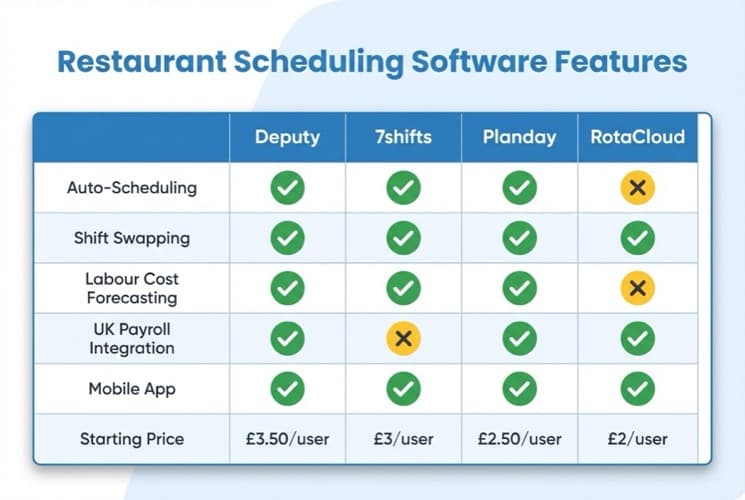
Key features compared across leading restaurant scheduling software platforms
Why Paper Rotas Cost You More Than You Think
If you're thinking "my paper rota works fine", it might. But consider what it can't do:
- Flag scheduling conflicts before they happen
- Track actual hours against planned hours
- Calculate labour cost as a percentage of projected sales
- Let staff swap shifts without phoning you
- Generate compliance records automatically
Cloud-based restaurant scheduling software handles 78% of deployments globally (Market Growth Reports, 2025). The shift from paper to digital isn't about technology for its own sake. It's about getting your Sunday nights back. The same logic applies to your marketing: a social media content calendar lets you schedule a week of posts in one sitting instead of scrambling for something to publish each day.
Top Scheduling Apps for UK Restaurants
Now that you understand what restaurant scheduling software does, here's how the leading platforms compare. There's no single ideal restaurant scheduling software: the right choice depends on your venue size, budget, and what keeps going wrong with your current approach.
7shifts: Ideal for restaurant-specific features
7shifts is built exclusively for the hospitality industry. Pricing starts around £35/month for basic scheduling, with advanced plans around £70/month per location. It includes sales-driven scheduling, team messaging, labour compliance tools, and integrations with most UK POS systems. Around 70% of restaurants using digital scheduling tools report improved labour productivity (TimeForge, 2025).
Homebase, Sling, Deputy, and HotSchedules
- Homebase: Ideal for small UK restaurants on a budget. Free tier supporting up to 20 employees at one location. Paid plans start from £16/month per location. If you're a single-site independent, this is often the most practical starting point.
- Sling: Ideal for cost-conscious multi-site operators. Unlimited scheduling on its free tier. Premium features start at £1.50-£3/month per user. For instance, a fish and chip chain with four sites could schedule all staff for free, then add time tracking at roughly £60-£120/month total.
- Deputy: Ideal for complex shift patterns. Excels at managing irregular schedules across multiple locations with AI-powered demand forecasting. Pricing starts around £3/month per user.
- HotSchedules (Fourth): Ideal for larger UK restaurant groups. Enterprise-grade labour forecasting using historical sales, local events, and weather data. Quote-based pricing for groups with 5+ locations.
| Platform | Free Tier | Starting Price | Ideal For |
|---|---|---|---|
| 7shifts | Limited | ~£35/month/location | Restaurant-specific features |
| Homebase | Yes (20 staff) | ~£16/month/location | Small independents |
| Sling | Yes (unlimited) | ~£1.50/user/month | Budget multi-site |
| Deputy | No | ~£3/user/month | Complex scheduling |
| HotSchedules | No | Quote-based | Enterprise groups |
For most UK independent restaurants, Homebase or Sling typically offers the strongest combination of affordability and essential features. Start there and upgrade only when you genuinely need more.
Features That Actually Matter
When it comes to choosing between platforms, restaurant employee scheduling software platforms compete on feature lists. But what does a tired restaurant owner actually need at 11pm on a Sunday?
Shift creation, swapping, and cost forecasting
- Shift creation and publishing: Build rotas quickly using templates. Copy last week's schedule and adjust. Publish with one tap so staff get instant notifications.
- Shift swapping and availability: Staff request swaps through the app. You approve or decline from your phone. No more group text chains at 6am.
- Labour cost forecasting: The strongest restaurant scheduling software connects shifts to projected sales. If Tuesday's forecast is £1,200 and you've scheduled £800 in labour, you can see you're at 67% labour cost before the week starts. That's usually a sign you need to adjust.
Time tracking, compliance, and mobile access
- Time clock and attendance: Staff clock in and out through the app or a tablet at the venue. Hours sync automatically to your payroll system. Around 61% of operators integrate scheduling with payroll, reducing wage discrepancies by 33% (Market Growth Reports, 2025).
- Compliance tracking: UK employment law requires specific record-keeping. Restaurant scheduling software tracks working hours, break times, and holiday accrual automatically. This matters more than most owners realise until an HMRC inspection arrives.
- Mobile access: 83% of hourly workers aged 18-35 prefer mobile-first scheduling solutions (Market Growth Reports, 2025). If your restaurant scheduling software doesn't work well on phones, your staff won't use it.
Pro Tip
If you're only using a WhatsApp group to manage shift changes you'll always lose to competitors who track everything automatically. It's not about being high-tech: it's about not losing money to scheduling mistakes you didn't spot.
Is 7shifts Only for Restaurants?
This is one of the most common questions, so let's address it directly. Yes. 7shifts is exclusively designed for the restaurant and beverage industry. According to the company's CEO, restaurants comprise 100% of their customer base, and the platform is "exclusively built for the industry" (7shifts, 2025).
This specialisation is deliberate. Rather than building a generic tool and hoping restaurants adapt to it, 7shifts focuses entirely on hospitality-specific challenges:
- Sales-driven scheduling that connects POS data to staffing levels
- Tip management and payroll designed for tipped employees
- Labour compliance for restaurant-specific regulations
- POS integrations with Square, Toast, Lightspeed, and other restaurant systems
The trade-off? If you also run a retail shop or office alongside your restaurant, 7shifts won't cover those. You'd need a separate tool for non-restaurant staff. Don't just pick the cheapest option because it covers all your businesses: if it doesn't track labour costs against sales, you'll overspend on staffing. For pure restaurant operations, though, the industry focus means fewer workarounds and better feature fit.
For instance, a restaurant group in Manchester running 7shifts across three locations can see real-time labour costs against sales at each venue, flag when a site is overstaffed for a quiet Tuesday, and manage compliance across different local council requirements, all from one dashboard that was built for exactly this scenario.
Does Microsoft Have a Staff Scheduling Tool?
Next, let's cover another frequent question. Yes. Microsoft Teams includes a feature called Shifts that handles staff scheduling, shift management, and time tracking. It's included with Microsoft 365 Business plans, so if your restaurant already pays for Teams, you have access to scheduling at no extra cost.
Microsoft Teams Shifts offers:
- Schedule creation and management
- Open shift posting for staff to claim
- Shift swap requests and approvals
- Time and attendance tracking
- Mobile access for staff
Where Shifts falls short for restaurants:
Microsoft Shifts was designed for general frontline workers, not specifically for restaurants. It lacks restaurant-specific features like sales-driven scheduling, POS integration, tip management, and labour cost forecasting.
Info
The verdict: Use Microsoft Shifts if you already have Microsoft 365 and your scheduling needs are straightforward. Switch to restaurant-specific restaurant scheduling software like 7shifts or Homebase when you need POS integration or labour cost tracking.
For example, a pub chain in Leeds tried using Microsoft Teams Shifts across four locations. Within a month, managers switched to 7shifts because Shifts couldn't connect to their EPOS data, meaning they scheduled blindly without knowing which nights actually needed extra staff.
Ask yourself: does your current scheduling approach connect to your sales data? If the answer is no, you're scheduling blind.
How to Choose the Right Platform
With that comparison in mind, here's a practical framework for choosing restaurant scheduling software that fits your operation. It doesn't need to be complicated.
Step-by-step selection process
- Define your problem. What specifically frustrates you about scheduling? List the top three issues. Common ones: rotas take too long, shift swaps create chaos, labour costs creep up without warning, or compliance records don't exist.
- Match to venue size. 1-15 staff? Homebase or Sling free tier. 15-50 staff? 7shifts or Deputy. 50+ staff or multi-site? HotSchedules or Deputy.
- Check integrations. Does the restaurant scheduling software connect to your POS system? Your payroll provider? Your restaurant staff management software? Integration matters more than features you'll never use.
- Test before committing. Every platform listed offers free trials or free tiers. Run a two-week test during normal operations. If your team doesn't adopt it naturally, the software isn't right, no matter how good the feature list.
If you're reading this thinking "I don't have time to test three platforms", you're not alone. If you're only scheduling based on gut feel you'll always lose to competitors who use data-driven forecasting.
Pick one that matches your budget and venue size. Test it for two weeks. For example, a tapas bar in Bristol trialled Homebase's free tier for two weeks and cut their weekly rota-building time from 75 minutes to 12 minutes. If it works, keep it. If it doesn't, try the next option on the list.
Restaurant Scheduling Software Evaluation Checklist
- Listed top 3 scheduling frustrations
- Identified venue size category (small / mid / enterprise)
- Checked integration with current POS system
- Compared free tier options (Homebase, Sling)
- Requested demo from top 2 choices
- Tested mobile app usability with 2-3 staff members
- Verified UK employment law compliance features
- Confirmed payroll integration compatibility
- Calculated total annual cost per employee
- Checked contract terms and cancellation policy
If You Only Have 30 Minutes This Week
If you only have 30 minutes a week, here's how to start fixing your scheduling:
- Day 1-2: Time your current process. Next time you build a rota, time how long it takes. Include interruptions: calls from staff, checking availability, resolving conflicts. Write down the total. This is your baseline.
- Day 3-4: Sign up for a free tier. Create an account on Homebase or Sling (both free). Add your staff names and availability. Build next week's rota in the tool. Compare the time against your baseline.
- Day 5-7: Get staff feedback. Ask two or three team members to check their shifts on the app. Can they see their schedule? Request a swap? Note any confusion. Their adoption matters more than your opinion of the interface.
Quick Win
That's enough to know whether digital restaurant scheduling software is worth pursuing. You haven't spent any money. You've invested 30 minutes to potentially save hours every week.
The right restaurant scheduling software isn't the one with the most features. It's the one your team actually uses.
Frequently Asked Questions
Is there an app that schedules waiters at a restaurant?
Yes, several apps handle waiter and front-of-house scheduling specifically. 7shifts, Homebase, Sling, and Deputy all support role-based scheduling where you can assign shifts by position: waiters, bartenders, hosts, kitchen staff. The apps let staff set availability, request time off, and swap shifts through their phones. Around 75% of UK restaurants rely on digital tools for scheduling operations (TimeForge, 2025).
What is the difference between 7shifts and Homebase?
The difference is a framework that comes down to specialisation versus flexibility. 7shifts focuses exclusively on restaurants with deeper POS integration and labour cost forecasting. Homebase serves multiple industries with a generous free tier (20 employees, one location).
For a single-site UK restaurant under 20 staff, Homebase's free option is hard to beat. For multi-location restaurant groups needing sales-driven restaurant scheduling software, 7shifts offers more relevant features. Cloud-based solutions dominate both platforms, accounting for over 54% of the employee scheduling market (Grand View Research, 2025).
Does Google have a free scheduler?
Google doesn't offer a dedicated staff scheduling tool. Google Calendar can be used for basic shift planning, but it lacks features like shift swapping, time tracking, labour cost management, and compliance reporting. For a free restaurant-specific option, Homebase and Sling both offer free tiers with proper scheduling features that go well beyond what a calendar app provides.
Is Homebase free for employees to use?
Yes. Homebase's free tier allows unlimited employees to view schedules, clock in and out, request time off, and swap shifts through the mobile app at no cost. The free plan supports up to 20 employees at one location. Paid plans (from approximately £16/month) add features like advanced scheduling, labour cost controls, and multi-location support.
How much does restaurant scheduling software cost in the UK?
UK pricing ranges from free to over £90/month per location. Homebase and Sling offer free tiers for basic scheduling. Mid-range options like 7shifts and Deputy run £35-£70/month per location. Enterprise platforms like HotSchedules use quote-based pricing. The restaurant employee scheduling software market was valued at approximately £320 million in 2025 (Cognitive Market Research, 2025), reflecting strong demand across all price tiers.
If you run a restaurant and want to see how Local Brand Hub can support your marketing, explore our restaurant marketing tools.
Key Takeaway
Key Takeaway
Restaurant scheduling software automates shift planning, time tracking, and labour management, replacing paper rotas, spreadsheets, and midnight phone calls.
Remember:
- Most mid-to-large restaurants use digital scheduling tools
- Automation cuts rota-building time significantly
- Free options exist for small UK venues (Homebase, Sling)
- Restaurant-specific tools like 7shifts outperform generic schedulers for POS integration
- Mobile access is essential: most young hourly workers expect it
The right restaurant scheduling software won't just save you time on Sunday nights. It gives you visibility into labour costs before they become a problem, keeps your team informed without endless group chats, and creates compliance records you'd otherwise forget about until someone asks for them.
For more on managing your restaurant team, explore our restaurant staff management software guide or see how scheduling fits into your restaurant management software stack.
For restaurants, salons, and local businesses
Need help with your marketing?
We help UK businesses turn social media into real results, not busywork.
Start freeGet More Marketing Tips
Practical marketing tips for UK business owners, straight to your inbox. No spam, unsubscribe anytime.
About the Author
Local Brand Hub
Empowering UK Businesses
Local Brand Hub provides comprehensive business management tools designed specifically for UK local businesses to streamline operations, automate marketing, and grow revenue.
More articlesRelated Articles
 Industry Insights
Restaurant Staff Management Software: UK Guide
Compare restaurant staff management software for UK venues. See how 80% of adopters cut overtime, review key features and find the right platform.
 Industry Insights
All-in-One Restaurant Software: UK Comparison
Compare all-in-one restaurant software for UK venues. See top platforms, UK pricing, and what to look for when choosing an integrated system.
 Industry Insights
Cloud Restaurant Management Software: Complete UK Guide
Cloud restaurant management software accounts for 60% of the market. Cut costs and streamline UK restaurant operations with our complete guide.