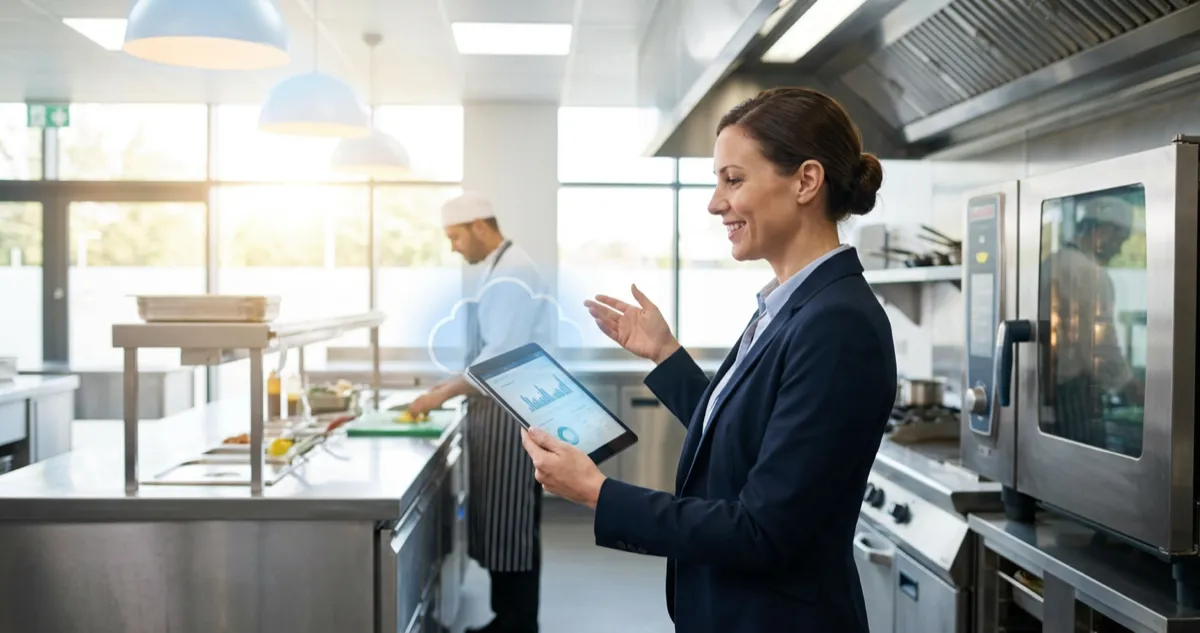
Cloud restaurant management software accounts for 60% of the market. Cut costs and streamline UK restaurant operations with our complete guide.
You're juggling three delivery apps, a paper diary for reservations, and a spreadsheet you haven't updated since last Tuesday. Your sous chef just texted asking about tomorrow's specials, but the menu file is on the office computer you can't reach. That frustration has a fix: cloud restaurant management software.
Cloud-based solutions account for over 60% of the restaurant management software market (Mordor Intelligence, 2025). That's not a trend. It's the standard. This guide explains what that shift actually means for your venue, what it costs, and whether it makes sense for an independent UK operator.
Info
Related: Restaurant Management Software, our complete hub covering all management software options for UK restaurants.
What You'll Learn
- What the software does and how it differs from traditional systems
- Real costs and pricing models for UK venues
- Key features that matter for independent restaurants
- How to evaluate whether your current setup needs upgrading
- A practical checklist to start your cloud migration
What Is Cloud Restaurant Management?
First, let's clarify what this actually means. At its core, it is a strategy that stores your restaurant's operational data (orders, inventory, staff schedules, sales reports) on remote servers rather than a computer in your back office. You access everything through a web browser or app on any device with an internet connection.
For example, a bistro owner in Edinburgh using this software can check last night's sales figures from her phone at the school run, adjust tonight's menu from a tablet at home, and see real-time stock levels without stepping foot in the venue.
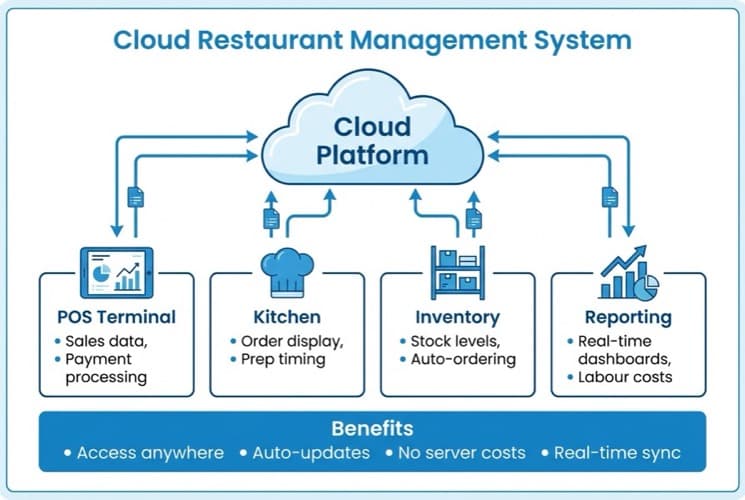
How cloud restaurant management connects all your systems in one place
Key Difference
The key difference from traditional systems is where your data lives. Traditional software stores everything on a local server. If that server fails, you lose access. Cloud systems spread your data across multiple secure servers, so one failure doesn't shut you down.
How Cloud Restaurant Management Works
- Staff enter orders through tablets or terminals
- Data syncs instantly to cloud servers
- Kitchen display screens update in real time
- Inventory adjusts automatically as items sell
- You view reports, schedules, and analytics from anywhere
If you're thinking "this sounds like every other software pitch", fair. The difference is practical. Cloud means no server room, no IT maintenance, and no driving back to the restaurant at midnight because the system crashed.
Why Cloud Systems Dominate the Market
Now that you understand the basics, here's why this matters. Cloud-based solutions accounted for 60.87% of total restaurant management software revenue in 2025, growing at a 14.94% CAGR (Mordor Intelligence, 2025). That growth isn't accidental.
Three forces are driving the shift:
- Cost accessibility. Traditional systems required five- or six-figure capital investments. Cloud platforms converted that into manageable monthly subscriptions. Small chains with 2-20 sites are the fastest-growing adopters, accessing enterprise-grade analytics for double-digit monthly fees instead of massive upfront outlays (Mordor Intelligence, 2025).
- Remote access became non-negotiable. Since the pandemic, restaurant operators expect to manage operations from anywhere. Cloud delivers that. Menu updates, staff scheduling, and sales reporting all happen from your phone.
- Integration demands increased. Restaurants use delivery apps, reservation platforms, accounting software, and loyalty programmes. Cloud systems connect these tools through APIs. On-premise systems struggle to keep up.
Ask yourself: can you check your restaurant's performance right now, from wherever you're reading this? If not, that's usually a sign your current setup is falling behind.
Key Features for UK Restaurants
When it comes to choosing features, not every capability matters equally for UK operators. Here's what to prioritise.
POS integration with kitchen display
Orders flow directly from front-of-house to kitchen screens. No paper tickets getting lost or smudged. Around 72% of food service establishments already have synchronised POS-to-KDS systems in place (Fresh Technology, 2025). If you haven't made this connection, you're behind.
Real-time inventory tracking
Cloud systems track stock as items sell. You know exactly how many portions of tonight's special remain without counting manually. Set alerts when stock runs low.
For instance, a gastropub in Bristol using a cloud system spotted that their fish supplier's delivery was late by 10am, because the system flagged zero stock automatically. They switched to a backup dish before the lunch rush, avoiding a "sorry, we're out" conversation with 30 covers.
Staff scheduling, multi-location, and compliance
- Staff scheduling and labour management: Schedule shifts, track hours, and manage holiday requests from one dashboard. This connects directly to your restaurant staff management software, reducing double-entry and payroll errors.
- Multi-location management: If you run more than one venue, cloud systems let you compare performance across sites. Standardise menus, pricing, and processes from a single dashboard.
- Compliance and reporting: HMRC-ready reporting, allergen tracking, and food safety logs, all stored in the cloud with proper audit trails. No more scrambling for paperwork when inspectors arrive.
Start Small
If you're thinking "we don't need all that", you probably don't. Start with POS and inventory. Add features as you grow.
Cloud vs On-Premise: Honest Comparison
However, cloud isn't automatically the right choice for everyone. The reality for most independent restaurants is that cloud wins on convenience but isn't perfect.
| Feature | Cloud | On-Premise |
|---|---|---|
| Upfront cost | Low (£500-£1,500) | High (£3,000-£15,000) |
| Monthly fees | £50-£150/month | £0 (but maintenance costs) |
| Remote access | Yes, any device | No, on-site only |
| Updates | Automatic, free | Manual, often paid |
| Internet required | Yes (offline mode available) | No |
| Data ownership | Provider's servers | Your servers |
| Scalability | Easy | Expensive |
| IT support needed | Minimal | Significant |
As a rule of thumb, these figures reflect typical UK independent restaurant experiences. Your costs and requirements may vary based on venue size and existing infrastructure.
When cloud doesn't work well:
- Areas with genuinely unreliable internet (check 4G coverage as backup)
- Venues with strict data sovereignty requirements
- Operators who prefer full hardware ownership
When cloud excels:
- Multi-site operations needing central control
- Owners wanting remote access to sales and stock
- Venues integrating with delivery platforms
- Restaurants wanting lower upfront investment
If you're only relying on one desktop for everything you'll always lose to competitors who access their data from anywhere. The restaurant management software market reached USD 7.49 billion in 2026 and cloud is where the investment flows (Mordor Intelligence, 2025).
What Does It Cost?
Next, let's talk money. UK pricing for these systems varies by features and venue size.
Monthly software costs:
- Basic plans: £30-£60/month
- Standard restaurant plans: £60-£100/month
- Advanced plans: £100-£200/month (multi-site, advanced reporting)
- Enterprise: Custom pricing
Hardware costs (one-time):
- Tablets/terminals: £200-£600 per device
- Kitchen display screens: £300-£500
- Card readers: £39-£200
- Receipt printers: £150-£300
Total first-year estimate for a typical independent:
- Software: £720-£1,200/year
- Hardware: £500-£1,500 (one-time)
- Total year one: £1,220-£2,700
Compare that to on-premise systems costing £5,000-£15,000 upfront before monthly maintenance.
Budget Tip
Most providers offer free trials. Test during a quiet week before committing. And always ask for the "all-in" annual price: vendors quote base rates that double once you add essential modules.
The subscription model is what makes the cloud accessible to smaller operators. You're not gambling £10,000 on a system you might not like. You're paying £60-£100/month to test and adjust.
Choosing the Right System
So you've decided the cloud makes sense. Here's a decision framework, because not every system fits every venue.
- For single-site independents: Look for simplicity. You need POS, basic inventory, and reporting. Square, SumUp, and Lightspeed offer solid UK options.
- For multi-site operators: Prioritise centralised reporting and menu management across locations. Toast, MarketMan, and Restaurant365 handle multi-venue operations well.
- For delivery-heavy venues: Integration with Deliveroo, Just Eat, and Uber Eats is essential. Check which delivery platforms your shortlisted systems support natively versus through paid add-ons.
For example, a seafood restaurant in Brighton running three delivery apps found that their cloud system automatically consolidated orders into one kitchen queue, eliminating the two tablets taped to the wall and the constant order mix-ups.
If you're only comparing platforms on price you'll always lose to competitors who evaluate integration depth and long-term scalability.
Cloud Restaurant Management Evaluation Checklist
- Listed current system frustrations and pain points
- Defined must-have vs nice-to-have features
- Researched 2-3 cloud providers suitable for your venue size
- Requested demos or free trials
- Calculated total annual cost (software + hardware + transaction fees)
- Confirmed offline mode capability
- Verified integration with your delivery platforms
- Checked UK HMRC compliance features
- Asked about data export options if switching later
- Confirmed contract length and cancellation terms
If You Only Have 30 Minutes This Week
If you only have 30 minutes a week, here's how to start evaluating your options:
- Day 1-2: Audit your current setup. Spend 10 minutes listing every frustration with your current system. Manual stock counts? Reports only available on-site? Delivery orders you re-type manually? Write them all down.
- Day 3-4: Research two providers. Pick two cloud platforms that fit your venue size. Visit their websites, check UK pricing pages, and note which features match your frustration list. Look at all-in-one restaurant software options if you want everything in one place.
- Day 5-7: Book one demo. Most providers offer free 15-minute walkthroughs. Book one during a quiet morning. See if the interface makes sense to you, not just the salesperson's pitch.
Get Started
That's enough to know whether the cloud deserves serious consideration. You don't need to commit yet. Just gather information.
Cloud software isn't about chasing new technology. It's about getting home before midnight because you don't need to be in the building to know what's happening.
The same logic applies to your marketing: if admin is eating your evenings, it is worth taking a moment to work out how much time you could save before deciding where to invest next.
Frequently Asked Questions
Here's what UK restaurant operators ask most often when weighing up a switch to the cloud.
What is a cloud restaurant and how does it differ from cloud management software?
A cloud restaurant is a food preparation facility designed exclusively for delivery orders with no physical dining area, also called a ghost kitchen or dark kitchen. Cloud management software, by contrast, is a strategy that any restaurant uses to manage operations online.
- Cloud restaurant: A business model (delivery-only, no dining area)
- Cloud restaurant management: A technology tool (any restaurant, operations online)
Both rely on cloud-based technology for ordering, inventory, and delivery coordination.
Do I need reliable internet for cloud restaurant management?
Yes, but most cloud systems include offline mode. If your internet drops during service, the system continues recording orders locally and syncs everything once the connection returns.
Pro Tip
Test your venue's internet reliability during a busy service before committing. If it drops more than twice per shift, arrange a 4G backup first.
Real-time features like remote reporting and multi-location dashboards require active internet. If your venue has genuinely poor connectivity, check 4G backup options before committing.
Can cloud restaurant management software integrate with my existing POS?
Most of these platforms either include their own POS or integrate with popular UK POS systems through APIs. Check compatibility before purchasing.
- Some systems like Square and Lightspeed offer POS as part of their management suite
- Others connect to your existing hardware through API integrations
- Always confirm integration with your specific POS model during the demo
How secure is my restaurant data in the cloud?
Cloud providers typically offer stronger security than on-premise systems. Your data is encrypted, backed up across multiple servers, and protected by security teams that independent restaurants couldn't afford in-house.
- Look for providers with ISO 27001 certification
- Confirm GDPR compliance, standard for reputable UK-serving platforms
- Ask about data backup frequency and recovery procedures
Is cloud restaurant management worth it for a single-site restaurant?
Yes, particularly if you want remote access to sales data and automatic inventory tracking. The monthly cost of £50-£100 often pays for itself through reduced food waste and fewer order errors.
For example, a single-site curry house spending £75/month on a cloud system cut its food waste noticeably, because real-time stock alerts prevented over-ordering.
The real question is whether your current approach costs you time you could spend elsewhere. If your system works and you never need remote access, switching purely for the sake of it doesn't make sense.
If you run a restaurant and want to see how Local Brand Hub can support your marketing, explore our restaurant marketing tools.
Key Takeaway
Key Takeaway
Cloud restaurant management software stores your operational data online, giving you access to orders, inventory, staff schedules, and reports from any device.
Remember:
- Cloud solutions account for over 60% of the restaurant management software market
- UK pricing typically runs £50-£150/month plus hardware
- Cloud systems offer lower upfront costs versus on-premise alternatives
- Remote access, automatic updates, and easy integrations are the main advantages
- Most venues see payback within 6-12 months through time savings and fewer errors
The right system won't transform your restaurant overnight. But it removes friction from daily operations: the kind that keeps you at the venue until midnight doing admin that should take minutes. Time you could spend improving your food, training staff, or simply getting home earlier.
For more on choosing the right system for your venue, explore our restaurant management software hub or compare restaurant table management software options for front-of-house operations.
For restaurants, salons, and local businesses
Need help with your marketing?
We help UK businesses turn social media into real results, not busywork.
Start freeGet More Marketing Tips
Practical marketing tips for UK business owners, straight to your inbox. No spam, unsubscribe anytime.
About the Author
Local Brand Hub
Empowering UK Businesses
Local Brand Hub provides comprehensive business management tools designed specifically for UK local businesses to streamline operations, automate marketing, and grow revenue.
More articlesRelated Articles
 Industry Insights
All-in-One Restaurant Software: UK Comparison
Compare all-in-one restaurant software for UK venues. See top platforms, UK pricing, and what to look for when choosing an integrated system.
 Industry Insights
Restaurant Kitchen Display System: UK Buyer's Guide
72% of venues use POS-to-KDS systems. Compare UK kitchen display system pricing from £300 and cut order errors by 40%. Full buyer's guide.
 Industry Insights
Restaurant Scheduling Software: UK Staff Rota Guide
72% of restaurants use digital scheduling. Compare UK restaurant scheduling software from free to £90/month. Cut rota admin by 55%.