See your whole month of content at a glance
Click, write, done. Plan your posts for the week in one sitting, then get back to what matters.
Does this sound like your week?
You post when you remember, which means you forget more often than not
You've no idea what you posted last week, let alone last month
Bank holidays and events sneak up and you miss the marketing window
Your social media feels random because there's no plan behind it
Without Local Brand Hub
Posting whenever you remember, usually never
Double-posting or missing holidays entirely
No idea what went out last week
Scattered notes in 3 different apps
With Local Brand Hub
Whole month planned in one quiet sitting
Calendar shows every gap and overlap
Visual timeline of everything published
One simple calendar for everything
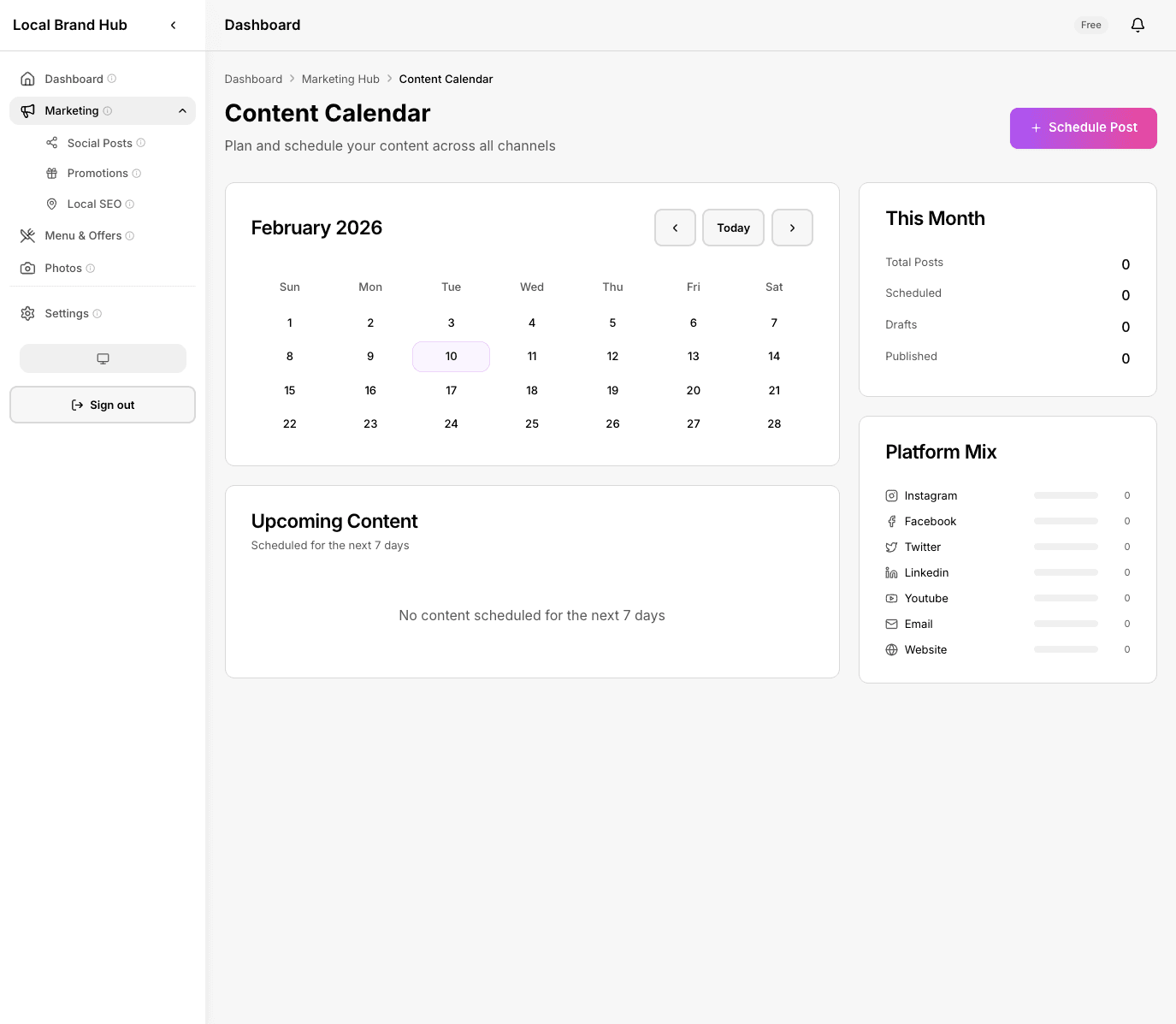
Your entire posting schedule, one click away from perfect
The difference you'll feel
Batch your content in one quiet hour
Plan Monday to Sunday in a single sitting. No more scrambling for something to post every day.
Never double-post or leave a gap
See gaps instantly, so nothing gets posted twice or forgotten.
Move posts to a new date
Plans change. Your calendar flexes with you. On Standard, open a post and pick a new date in seconds.
Mark as Published in one click
Track what's actually gone live. No guessing whether Tuesday's post made it out.
How it works
Open your calendar
See the week or month view with all your planned posts, colour-coded by platform.
Slot posts into place
Move content around until the schedule looks right. Gaps are highlighted so nothing slips through.
Mark as done
When a post goes live, mark it as Published with one click. Your weekly report tracks the rest.
A closer look
Week and month views
Switch between a detailed week view and a bird's-eye month overview. See exactly what's going out and when, no surprises.
- Week view with time slots
- Month overview with post counts
- Colour-coded by platform
- Status on every post: draft, scheduled, published
Plan around your schedule
Quiet Monday afternoon? Perfect for batching content. The calendar works around your working week, not the other way round.
- Click any day to add a post
- Drafts kept until you are ready
- Add a photo to any post
- Weekly post ideas for your industry
0% of small business owners spend 6+ hours a week on social media
A big chunk of that time goes on deciding what to post and when. Planning your week in one sitting claws those hours back.
Source: VerticalResponse Small Business Survey
What you get on each plan
See how this feature differs across plans
Swipe to see all plans
No credit card required
Frequently asked questions
Does the calendar post to social media for me?
Not yet: it's a planning and tracking tool. You copy the post text and paste it into Instagram, Facebook, or X. Automated posting is on our roadmap.
Can I see previous months?
Yes. Scroll back through your calendar history to see what you posted and when. Great for spotting patterns and reusing content that worked.
Is this different from the post generator?
They work together. The post generator creates the content; the calendar helps you plan when and where to publish it.
Do I need the calendar if I only post a few times a week?
That's exactly who it's for. Even 3 posts a week need planning: the calendar makes sure they're spaced out and varied.
What happens if I miss a scheduled date?
Nothing breaks. The post stays in your calendar marked as ready, so you can post it when you get a moment or open it and pick a new date. No penalties, no drama.
Learn more about planning your social media
The 5-3-2 Rule for Social Media
A simple content mix that keeps your feed varied, and makes planning a week of posts much faster.
Read articleHow to Build a Content Calendar: A Worked Example
A restaurant walks through planning a month of posts: the same approach works for any local business.
Read articlePlan your whole month in one sitting
Click, write, done. See your content plan at a glance. No credit card needed.
Start freeNo credit card required