
A restaurant content calendar that survives service. Copy the seven column UK template, plan what you shoot before what you say, and start this week.
A restaurant content calendar fixes in advance what you will post, when it goes out, and what has to be photographed to make it. The photography column is the one that matters: ideas are cheap at 10pm, and a picture of Tuesday's special is not, once Tuesday is over.
Service ends, the drafts folder is empty, and you scroll the camera roll hoping something in it is postable. Eleven photos of a delivery crate and one of the dog.
That is a supply problem, not a failure of imagination. The post you wanted needed a photograph that existed for ninety seconds, between the pass and table nine, four hours ago.
If the template you copied is a grid of days with a theme written into each box, it is a caption planner. It assumes the hard part is deciding what to say. In a restaurant it is having something to say it with, and that exists only while the kitchen runs.
Related: Restaurant Content Marketing
What is a restaurant content calendar?
A restaurant content calendar is a shared document answering four questions for every planned post: when it goes live, what it is about, what needs capturing, and who is capturing it. Those four are the load bearing ones; the rest of the sheet earns its place later.
A calendar that survives a busy fortnight is small enough to fill in over a coffee and specific enough that nobody asks a follow up. "Tuesday: menu content" is a wish. "Tuesday 12:30, three shots of the lamb dish, Sam, before the second sitting" is an instruction.
What runs out first: ideas or photographs?
Photographs. An idea keeps: the one you have tonight still works next month, while a photograph of Tuesday's special cannot be taken on Thursday. Sequence follows from that. Plan the shot, and writing the caption becomes the easy half. Plan the caption, and you spend Tuesday inventing a photograph you can no longer take.
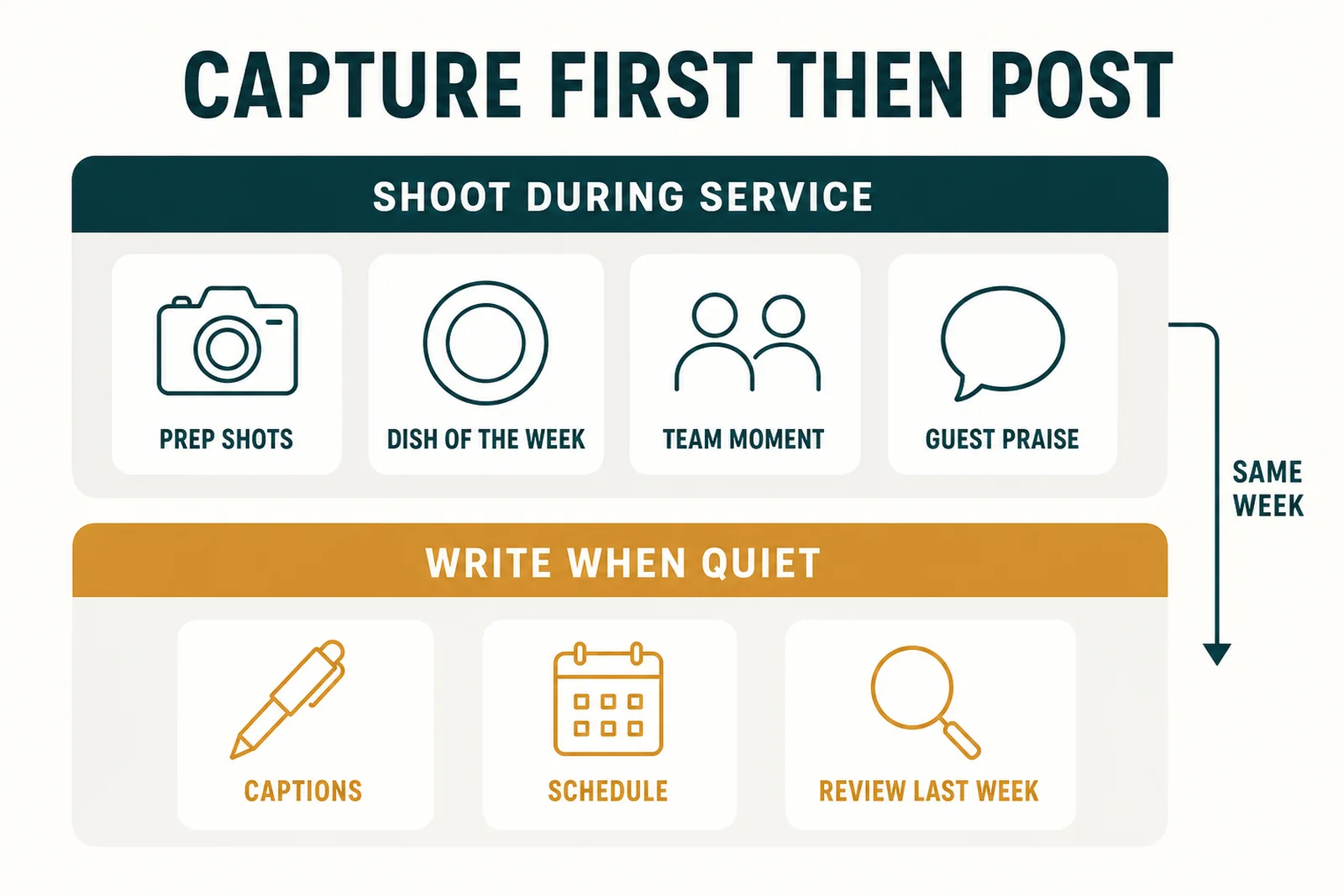
Two passes, not one. The kitchen fills the top band while it is working; the desk pass empties it.
Split the week into two passes:
- The capture pass happens during service. Three or four booked moments: a prep shot, the dish you want to sell more of, someone doing something skilful, one guest reaction you have permission to use. Minutes of a shift, not an afternoon.
- The desk pass happens when it is quiet: captions, scheduling, a few minutes on what last week's posts did.
Keep them apart. Nobody stops mid Saturday to write a caption. Mixed together, the two become a job nobody starts.
Related: DIY Restaurant Photography
The template: seven columns and a fortnight of rows
Copy this into a spreadsheet. Seven columns; the eighth is where these things go to die.
| Date and time | Slot | What to shoot | Who shoots it | Caption note | Advert | Status |
|---|---|---|---|---|---|---|
| [DD/MM] 12:30 | Lunch | [DISH NAME], three angles, natural light | [STAFF NAME] | Price and the one ingredient worth naming | No | Shot |
| [DD/MM] 17:00 | Evening | [EVENT OR OFFER], room shot before doors | [STAFF NAME] | Booking line, [DEADLINE DATE] | Yes, paid boost | Planned |
Every square bracket is a placeholder. Replace all of them (dates, dishes, prices, names, deadlines) against your own menu and diary before any of it goes near a public account. Nothing invented in a template should reach a customer. The two rows are a rule of thumb, not a prescription.
Two columns do the real work:
- What to shoot names the subject and the number of frames, because "food photo" tends to produce one blurry plate, while "three angles of the lamb" gives you a choice.
- Advert gets answered at planning time, for reasons the next section explains.
Start by filling a fortnight at a time and stretch it from there; a month of detailed rows is a month of deleting rows. Seasonal dates go on a separate tab: bank holidays, the awareness days that suit your menu, your own anniversary. Confirm each from a primary source for the year you are planning, because they move and the lists online copy each other.
Which rows are adverts?
Some rows are not just posts. They are marketing communications in the regulatory sense, and far easier to spot at planning than after publishing.
The CAP Code, the UK rulebook for non broadcast advertising, states at rule 2.1 that marketing communications must be obviously identifiable as such. Rule 2.3 adds that they must make clear their commercial intent, if that is not apparent from the context. That second one is the trap: a creator's warm write up of a free meal reads as an independent opinion unless somebody says otherwise.
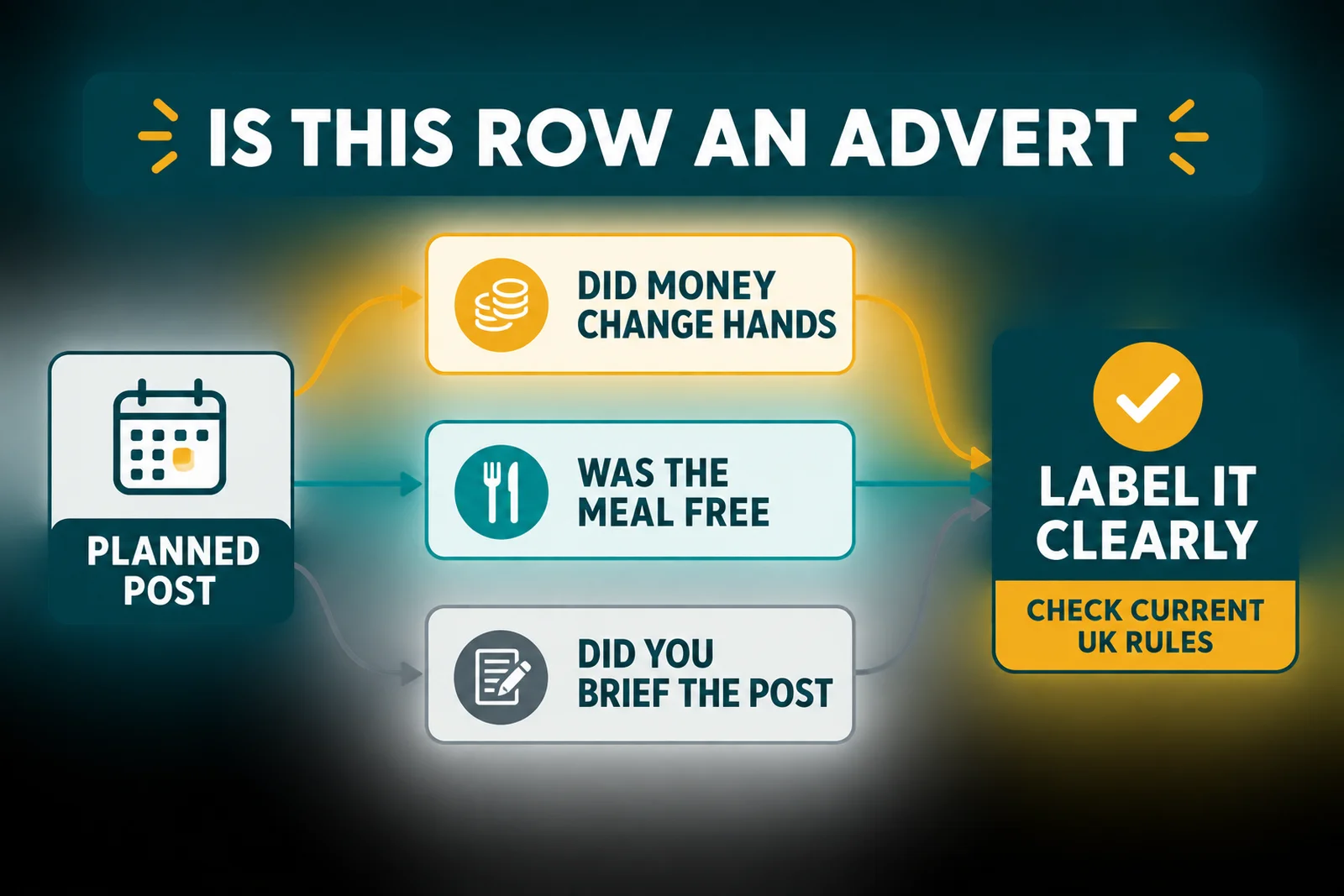
Three questions at planning time, answered in the Advert column before anyone writes a caption.
One more rule, before you pay for reach. Section 368Z14 of the Communications Act provides that a person must not pay for advertisements for an identifiable less healthy food or drink product to be placed on the internet. Government guidance gives 5 January 2026 as the UK wide commencement date for those advertising regulations. Crucially, that subsection does not apply where the person paying is, at the time the payment is made, a food or drink SME. That definition sits in regulations rather than in assumption, so check where you fall, and take advice, before buying paid placement.
Why this matters: the CAP rules are about an outcome, that a reader can tell an advert is an advert. Nothing in them obliges you to keep a spreadsheet column. That column is ours, because the alternative is remembering while posting, which is exactly when you will not.
Related: Restaurant Influencer Marketing
What is the 50/30/20 rule for social media?
The 50/30/20 rule is a content mix guideline: roughly half your posts original value, a third curated, the rest promotional. It says nothing about whether that mix sells one more Sunday roast in your postcode. The 4-1-1 rule and the 5-3-2 rule are the same idea in different trousers.
The honest position: these are rules of thumb passed between marketers, not measured minimums, and we have found no published evidence that any named ratio produces any particular result for a restaurant. A useful starting shape if your feed is an unbroken run of offers; not a standard you are failing.
What earns its keep is the record. After two months of filled rows, the Advert column alone tells you what share of your feed was selling, which is more than any borrowed ratio knows about your restaurant. Set your own from that. Note what those seven columns track, though: what you shipped, not what it earned. Add a results column if you want the second thing.
More on the published content ratios, and restaurant social media ideas if you are short of things for the slots. Restaurant social media posts shows what the finished thing looks like.
Frequently Asked Questions
What should be in a restaurant content calendar?
A date, a slot, the shot the post needs, the person holding the camera, a caption note, whether the row is an advert, and a status. The shot column is the one caption planners leave out, and the one that decides whether the post happens.
What is the 4-1-1 rule in social media?
A circulated rule of thumb: for every promotional post, share several pieces of other people's content and a few useful ones of your own. Treat any named ratio as a starting experiment, not a minimum that works.
Where can I create a content calendar?
Anywhere your team will actually open on a phone mid shift. A shared spreadsheet is the usual choice: free, sortable and it survives a staff change. The tool matters far less than whether the shoot column is filled in.
How far ahead should a restaurant plan content?
Plan themes and known dates a season out, but fill specific rows a fortnight ahead as a guide, then adjust to how far out your menu actually holds still. Menus change and suppliers let you down, so a rigid month of rows becomes a month of deleting them.
Do restaurant social media posts count as advertising in the UK?
Some do. The CAP Code requires marketing communications to be obviously identifiable as such, and to make their commercial intent clear where the context does not. If money or a free meal changed hands, or you briefed the post, flag the row at planning time.
Start with next Tuesday
Key Takeaway
Start smaller than feels serious; give the sheet four weeks. Build it and fill seven days of rows, three posts only, with every capture moment booked into the rota like any other task. Run that first week exactly as written. Spend the third on the shots that never got taken, fixing whichever it was: the time, the person or the dish. Add a fourth post in week four, and only if the middle two weeks happened.
- Seven columns in a shared sheet
- Three rows, shoot column first
- One named person per capture moment
- Advert answered yes or no on every row
- Status updated on Sunday
Would you follow your own restaurant's account? If not, the calendar is not the problem, and better to know that first. If you would rather not keep the sheet yourself, LocalBrandHub has a free social media calendar, a post generator for the caption pass, and ready made seasonal campaigns on the Growth plan.
Good restaurant accounts are not built on better ideas. They are built on somebody knowing, at half twelve on a Tuesday, exactly which plate to point a phone at.
For restaurants, salons, and local businesses
Need help with your marketing?
We help UK businesses turn social media into real results, not busywork.
Start freeSources
Get More Marketing Tips
Practical marketing tips for UK business owners, straight to your inbox. No spam, unsubscribe anytime.
About the Author
Local Brand Hub
Empowering UK Businesses
Local Brand Hub provides comprehensive business management tools designed specifically for UK local businesses to streamline operations, automate marketing, and grow revenue.
More articlesRelated Articles
 Marketing Tips
Content Marketing for Restaurants: A Practical Guide
Master content marketing for restaurants using the 5 C's framework and the 30/30/30 rule. Actionable ideas that bring more diners through your door weekly.
 Marketing Tips
Restaurant Blog Ideas Only Your Kitchen Could Write
Restaurant blog ideas a rival two streets away could not copy: the test that kills weak topics, where the material sits, and a twenty minute method.
 Marketing Tips
Restaurant Content Marketing: A Guide for UK Owners
Learn restaurant content marketing strategies that attract customers. This UK guide covers the 7 P's, 4 P's, 3-3-3 rule, and the 30/30/30 budget framework.