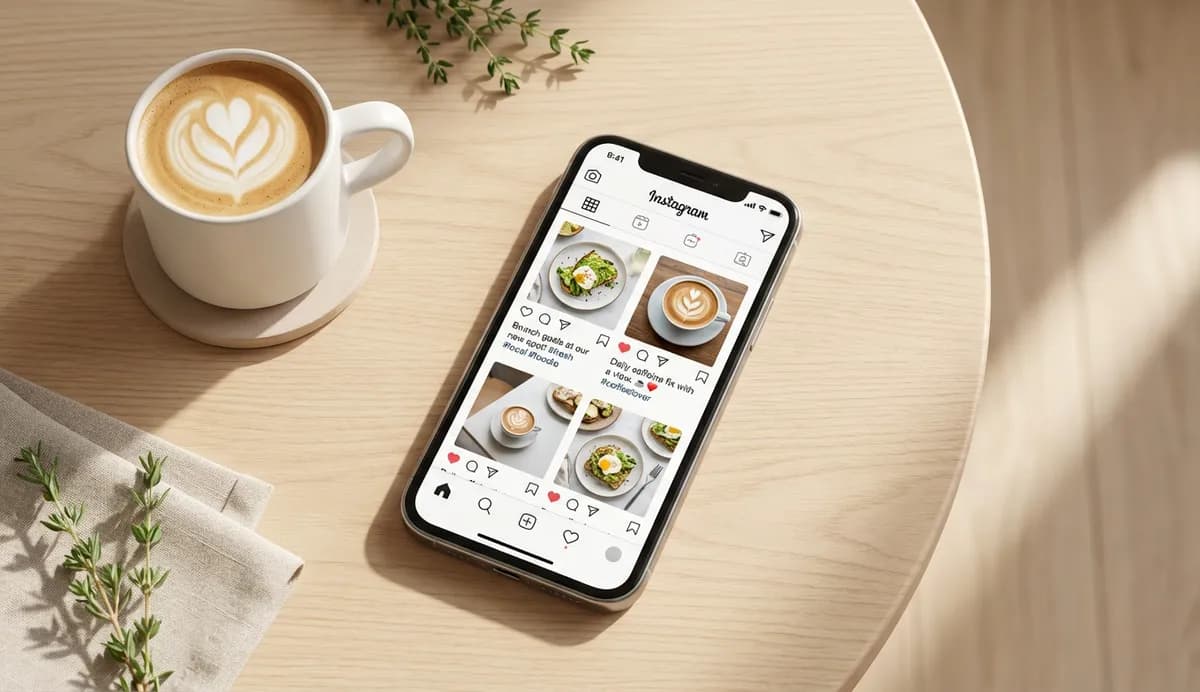
50+ ready-to-use restaurant social media posts for every occasion. Copy, customise, and post in seconds with proven templates.
You've taken a great photo of the day's special. You're staring at the caption box, cursor blinking, wondering what to write. Sound familiar? These restaurant social media posts are ready to copy, adapt, and use: no staring at blank screens required.
Related: Restaurant Social Media Marketing (hub page)
For broader strategy, see our restaurant social media strategy guide. For content ideas beyond captions, check our restaurant social media ideas guide. For leveraging customer photos, see our restaurant user generated content guide.
Restaurant social media posts are the captions, copy, and messaging you use alongside your food photos and videos. The right words often turn a scroll into a stop, a like into a booking. 68% of customers check a restaurant's social media before visiting (ElectroIQ). Your captions are part of that first impression.
What You'll Learn
- Ready-to-use captions for food and menu posts
- Behind-the-scenes post templates
- Promotional post formulas that drive bookings
- Engagement posts that spark conversations
- Customer appreciation templates
- Quick caption formulas you can adapt to anything
Why Captions Matter More Than You Think
Let's start with the reality. Before diving into templates, understand why restaurant social media posts deserve your attention. 74% of people use social media to decide where to eat (MenuTiger). Your caption isn't just words: it's the difference between a scroll and a booking.
If you're thinking "nobody reads captions", the data disagrees. Restaurants that actively engage with followers see 40% or more increase in spending (ElectroIQ). Engagement starts with captions that give people a reason to respond.
Why this matters
A great photo gets attention. A great caption converts that attention into action: whether that's a comment, a save, or a table booking.
Food and Menu Posts
If you're reading this during a slow afternoon wondering what to post, start here. Food content is why people follow you. These restaurant social media posts templates work for daily specials, signature dishes, and menu updates.
Daily Specials
Template 1: "Today's special: [Dish Name]. [One sentence about what makes it special]. Available until it's gone."
Template 2: "[Day] calls for [Dish]. Our chef's pick today? [Brief description]. First come, first served."
Template 3: "This is what [Day] looks like. [Dish Name]: [key ingredient] + [key ingredient] + [preparation method]. On the specials board now."
Ready-to-use examples:
- "Today's special: Slow-braised lamb shank. Eight hours in the oven. Worth every minute. Available until it's gone."
- "Friday calls for fish. Our chef's pick today? Beer-battered haddock with triple-cooked chips. First come, first served."
- "This is what Thursday looks like. Mushroom risotto: wild porcini + aged parmesan + truffle oil. On the specials board now."
New Menu Items
Template 1: "NEW: [Dish Name]. [What inspired it or what makes it different]. On the menu now."
Template 2: "We've been working on this one. [Dish Name] joins the menu today. [Brief description of flavours or experience]."
Template 3: "Meet [Dish Name]. [One-sentence description]. [Call to action]."
Ready-to-use examples:
- "NEW: Korean Fried Chicken Burger. Gochujang mayo, pickled daikon, sesame slaw. On the menu now."
- "We've been working on this one. The Seafood Tower joins the menu today. Oysters, prawns, crab, and more, served on ice."
- "Meet the Espresso Martini Tiramisu. Coffee lovers, this one's for you. Book a table to try it this weekend."
Signature Dish Spotlights
Template 1: "The dish that started it all: [Dish Name]. [Brief story or fact]. Still our most ordered."
Template 2: "If you haven't tried our [Dish Name], have you really been here? [Brief description]."
Template 3: "[X] years and counting. Our [Dish Name] hasn't left the menu since day one. Here's why."
Example in practice: A neighbourhood Italian might post their signature carbonara with: "The dish that started it all: Nonna's Carbonara. The recipe hasn't changed since 1987. Still our most ordered, and we're not surprised." The story element gives followers something to connect with beyond just the photo.
Behind-the-Scenes Posts
Moving on to content that builds connection. Behind-the-scenes restaurant social media posts show the humans behind the food. They perform consistently because they feel authentic.
Kitchen Prep
Template 1: "[Time]am. Before we open, this is what's happening. [Brief description of prep work]."
Template 2: "The [dish] you order starts here. [Brief description of prep process]."
Template 3: "This is what [X hours] of prep looks like. Ready for service."
Ready-to-use examples:
- "6am. Before we open, this is what's happening. Fresh pasta dough, simmering stocks, and enough garlic to scare off vampires."
- "The sourdough you order starts here. 48-hour ferment, hand-shaped this morning."
- "This is what 4 hours of prep looks like. Ready for service."
Staff Spotlights
Template 1: "Meet [Name], our [role]. [Fun fact or favourite dish]. [X years/months] and counting."
Template 2: "The person behind your [dish/drink]: [Name]. [Brief background or specialty]."
Ready-to-use examples:
- "Meet Sarah, our head chef. Her favourite thing to cook? 'Anything with too much butter.' 3 years and counting."
- "The person behind your cocktails: Marco. 15 years of bartending and he still invents new drinks every week."
Ingredient Stories
Template 1: "This is where our [ingredient] comes from. [Supplier name], [location]. [Brief fact]."
Template 2: "Just in: [Ingredient] from [Supplier/Location]. [Why it matters or what you'll do with it]."
Example in practice: A farm-to-table gastropub might photograph their vegetable delivery and post: "Just in: Heritage tomatoes from Johnson's Farm, 12 miles away. These beauties are going straight into tonight's caprese." It tells a story without being preachy about sourcing.
Promotional Posts
Next, let's cover posts that drive action. Promotional restaurant social media posts need to balance value with urgency, without sounding desperate.
Special Offers
Template 1: "[Offer]. [Time limit]. [How to claim]."
Template 2: "This week only: [Offer]. [Brief reason why]. Book now: [urgency element]."
Template 3: "[Day] deal: [Offer]. No catch. [Time/availability limit]."
Ready-to-use examples:
- "Two courses for £25. Weekday lunches only. Book via the link in bio."
- "This week only: Free dessert with any main. We're testing new puddings and want your feedback. Book now: limited availability."
- "Tuesday deal: 50% off bottles of wine. No catch. Tables fill up fast."
Event Announcements
Template 1: "[Event Name]. [Date]. [One sentence about what to expect]. [How to book/attend]."
Template 2: "Save the date: [Date]. We're hosting [Event]. [Key details]. [Booking info]."
Ready-to-use examples:
- "Wine & Cheese Night. Thursday 28th November. Six wines, six cheeses, one great evening. Book via the link in bio."
- "Save the date: New Year's Eve. We're hosting a four-course feast with live jazz. £75 per person. Booking now open."
Holiday Promotions
Template 1: "[Holiday] at [Restaurant Name]. [Brief description of offering]. [Booking CTA]."
Template 2: "Mother's Day sorted. [What you're offering]. [Date]. Book now before tables go."
Ready-to-use examples:
- "Christmas at The Oak. Three courses, crackers, and carols. £45 per head. Book your party now."
- "Valentine's Day sorted. Candlelit dinner, special menu, complimentary champagne. 14th Feb. Book now before tables go."
Example in practice: A seaside fish restaurant might post their Easter offering six weeks early: "Easter Sunday at The Catch. Fresh seafood platter, stunning harbour views, and a complimentary glass of fizz for mum. April 20th. Booking now open: last year we sold out." The early timing and scarcity reference drive urgency.
Don't do this: Posting promotional content only when you're quiet is a common trap. Your competitors who post consistently, whether busy or not, build the audience that fills their tables on slow nights. Treat captions as part of operations, not an afterthought.
Engagement Posts
Here's where you turn followers into a community. Engagement restaurant social media posts invite responses. They're low-effort to create but high-impact for algorithm visibility.
Ask yourself: would you engage with your own posts? If the answer is "probably not," you've found the problem.
Question Posts
Template 1: "[Simple question about food preferences]? Tell us in the comments."
Template 2: "Settle a debate: [Option A] or [Option B]? Our kitchen is divided."
Ready-to-use examples:
- "Chips: crispy or fluffy inside? Tell us in the comments."
- "Settle a debate: pineapple on pizza, yes or absolutely not? Our kitchen is divided."
- "What's the first thing you order when you sit down here? We're curious."
This or That Posts
Template 1: "[Option A] or [Option B]? [Brief context if needed]."
Template 2: "Quick: [Option A] or [Option B]? No wrong answers."
Ready-to-use examples:
- "Starter or dessert? (If you had to pick one.)"
- "Quick: Red wine or white? No wrong answers."
- "Roast dinner or Sunday brunch? You can only choose one."
Poll and Vote Posts
Template 1: "Help us decide: [Choice A] or [Choice B] for next month's special?"
Template 2: "You choose: [Options]. Most votes wins a spot on the menu."
Ready-to-use examples:
- "Help us decide: Beef Wellington or Duck Confit for next month's special?"
- "You choose: Salted Caramel Cheesecake or Chocolate Fondant. Most votes wins a spot on the menu."
Customer Appreciation Posts
Finally, posts that build loyalty. Customer appreciation restaurant social media posts turn one-time visitors into regulars. They're also your easiest content: customers create it for you.
Review Highlights
Template 1: ""[Quote from review]." Thank you, [Name]. Reviews like this make our day."
Template 2: "We couldn't have said it better. [Quote]. Thanks for the kind words, [Name]."
Ready-to-use examples:
- ""Best Sunday roast in Manchester, hands down." Thank you, Sarah. Reviews like this make our day."
- "We couldn't have said it better. "Finally, a restaurant that gets vegetarian food." Thanks for the kind words, James."
UGC Reshares
Template 1: "When [customer/your guests] capture it perfectly. Thanks for sharing, [tag]."
Template 2: "Photo by [tag]. Thanks for dining with us, and for this gorgeous shot."
Ready-to-use examples:
- "When our guests capture it perfectly. Thanks for sharing, @foodiejane."
- "Photo by @manchestereats. Thanks for dining with us, and for this gorgeous shot."
Milestone Celebrations
Template 1: "[Number] [milestone]. Thank you to everyone who's been part of the journey."
Template 2: "[X] years ago today, we opened our doors. [Brief reflection]. Here's to the next [X]."
Ready-to-use examples:
- "10,000 followers. Thank you to everyone who's been part of the journey."
- "5 years ago today, we opened our doors. From three staff to twenty, 50 covers to 150, what a ride. Here's to the next 5."
Quick Caption Formulas
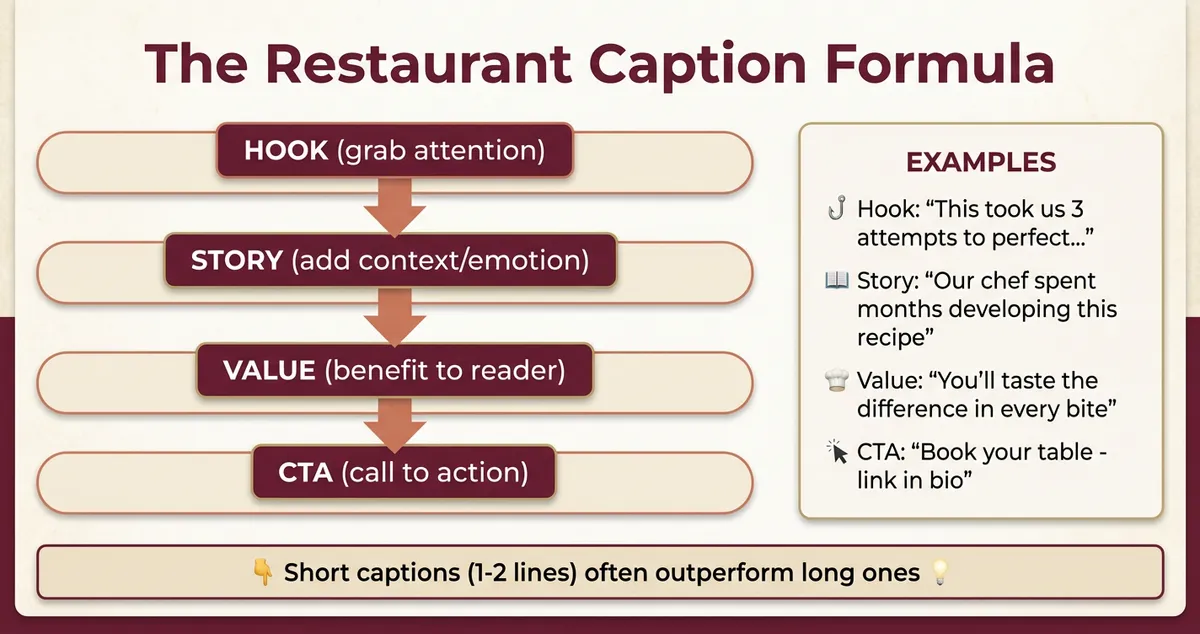
With those templates covered, here are formulas you can adapt to anything. When you're slammed and need a caption fast, these structures work every time.
The Dish + Benefit Formula
Structure: [Dish name]. [What it gives the customer]. [Optional CTA].
Examples:
- "Truffle mac and cheese. Comfort in a bowl. Book your table."
- "Acai bowl. Your healthy Monday start. Takeaway available."
The Question Hook Formula
Structure: [Rhetorical question]? [Answer with your offering].
Examples:
- "Know what pairs perfectly with Friday? Our Happy Hour. 5-7pm, all cocktails £6."
- "Ever tried our secret menu? Ask your server. If you know, you know."
The Urgency Formula
Structure: [Limited element]. [What's available]. [Action required].
Examples:
- "Last weekend before we change the menu. Get your favourites while you can."
- "Only 3 tables left for Saturday. Book via the link in bio."
Don't do this: Post the same "urgency" message every week. We've seen restaurants lose credibility by claiming "Only 3 tables left!" for three months straight. Use scarcity for actual scarcity, not as your default caption strategy.
The Story Formula
Structure: [Origin/context]. [The dish/event]. [Why it matters].
Examples:
- "This recipe came from our head chef's grandmother in Naples. Handmade gnocchi, just like she made it. Nonna would approve."
- "We first met our wine supplier at a tiny vineyard in Burgundy. This bottle is the result. Limited stock, ask your server."
Putting It All Together
These restaurant social media posts work because they solve the blank screen problem. You don't need to be a copywriter; you need caption templates that match your voice and your restaurant social media strategy.
Social media captions aren't about selling food; they're about making people hungry before they're hungry. If you would rather generate captions on demand than adapt templates by hand, an AI social post generator can draft them in your restaurant's voice in seconds.
If you pick just one thing: Use the Dish + Benefit formula. It works for 80% of food posts and takes five seconds to write.
Caption Checklist
Before you post, run through this:
- Does it match the photo? (Don't describe what they can already see)
- Is there a reason to engage? (Question, opinion, CTA)
- Would I stop scrolling for this?
- Is the first line strong enough to expand?
- Have I included a booking path somewhere?
Quick Reference: Post Frequency
| Platform | Recommended | Content Type |
|---|---|---|
| 3-5 feed posts/week | Food, behind-scenes, engagement | |
| Stories | Daily | Real-time, casual, polls |
| 3-5 posts/week | Events, promotions, reviews | |
| TikTok | 3-7 videos/week | Trending, behind-scenes, personality |
Source: Hootsuite Social Media Trends 2025
For most restaurants with limited time, focus on Instagram + Facebook (3-5 restaurant social media posts per week combined). This gives you visual appeal and local community reach. Add TikTok and Stories once your core posting rhythm is consistent.
Weekly Action
This week, upgrade your restaurant social media posts:
- Day 1-2: Pick 3 templates from this guide that match your style
- Day 3-4: Schedule a week of posts using the Dish + Benefit formula
- Day 5-7: Track engagement and note which restaurant social media posts perform best
If you run a restaurant and want to see how Local Brand Hub can support your marketing, explore our restaurant marketing tools.
Key Takeaways
- 68% of customers check your social media before visiting
- 74% use social to decide where to eat
- Caption formulas are faster than starting from scratch
- Engagement posts boost algorithm visibility
- 3-5 posts per week is sustainable for most restaurants
If you can't tell whether your posts bring bookings or just likes, that's usually a sign the captions need work: start with these templates and track what resonates.
Ready to build a complete social media system? Start with our restaurant social media strategy guide for the framework: when to post, which platforms matter, and how to turn likes into bookings. Then come back here for the captions.
Social media moves fast. We keep this guide updated regularly.
Frequently Asked Questions
How often should restaurants post on social media?
Most restaurants find 3-5 posts per week sustainable. Consistency matters more than volume: three strong posts outperform seven rushed ones. Focus on quality over quantity and adjust based on your analytics.
What's the ideal caption length for restaurant posts?
For Instagram feed posts, aim for 125-300 characters for highest engagement. Longer captions work for storytelling posts, but your first line should hook readers. Stories and Reels can be shorter: sometimes just a few words work.
Should I use the same caption on all platforms?
Adapt rather than copy-paste. Instagram users expect hashtags and emojis; Facebook users prefer conversational tone; TikTok captions should be brief since people focus on video. The core message can stay the same, but adjust the style.
How do I get more engagement on my restaurant posts?
Ask questions, create polls, and respond to every comment within 24 hours. Posts that invite responses get prioritised by algorithms. The templates in this guide include engagement hooks built in.
Can I reuse these caption templates multiple times?
Yes, that's the point. Rotate through formulas with different dishes, staff, or events. Your followers won't notice or mind repetition if the content varies. Consistency in structure actually builds brand recognition.
Related reading: Restaurant Social Media Strategy | Restaurant Social Media Ideas | Instagram Marketing for Restaurants
For UK restaurants
Need help creating restaurant captions that convert?
Local Brand Hub helps UK restaurants write, schedule, and optimise social media posts that actually drive bookings.
Start freeGet More Marketing Tips
Practical marketing tips for UK business owners, straight to your inbox. No spam, unsubscribe anytime.
About the Author
Local Brand Hub
Empowering UK Businesses
Local Brand Hub provides comprehensive business management tools designed specifically for UK local businesses to streamline operations, automate marketing, and grow revenue.
More articlesRelated Articles
 Marketing Tips
Content Marketing for Restaurants: A Practical Guide
Master content marketing for restaurants using the 5 C's framework and the 30/30/30 rule. Actionable ideas that bring more diners through your door weekly.
 Marketing Tips
Restaurant Blog Ideas Only Your Kitchen Could Write
Restaurant blog ideas a rival two streets away could not copy: the test that kills weak topics, where the material sits, and a twenty minute method.
 Marketing Tips
Restaurant Content Calendar: A Free UK Template for 2026
A restaurant content calendar that survives service. Copy the seven column UK template, plan what you shoot before what you say, and start this week.