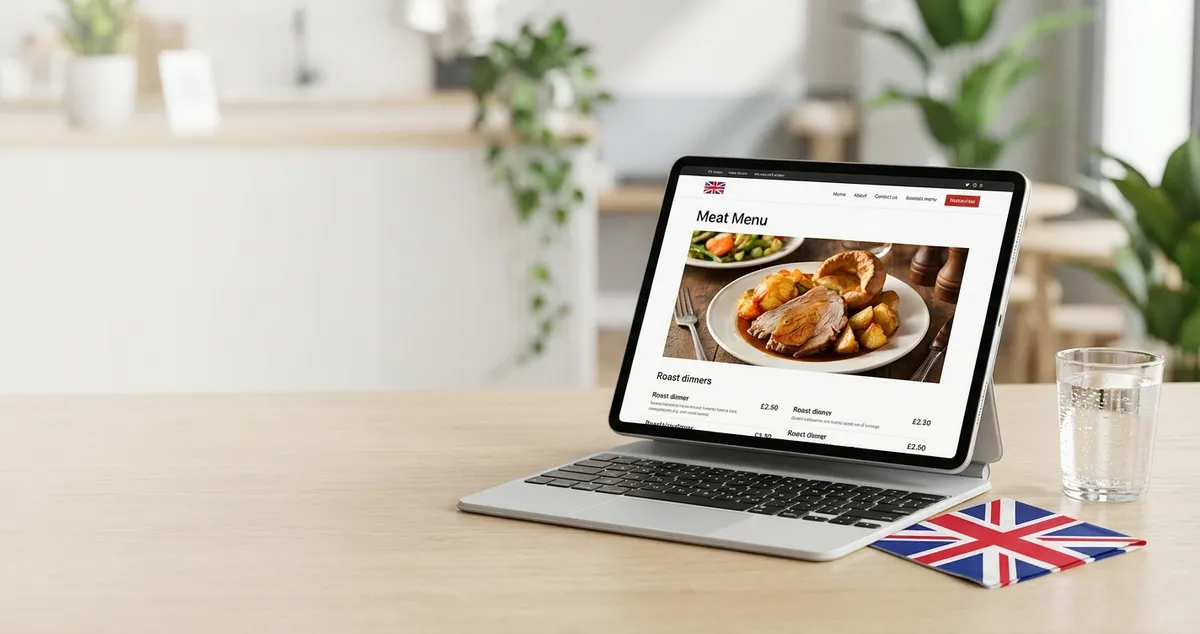
Design a restaurant menu page that converts browsers into diners. Step-by-step guidance on layout, UX, and mobile optimisation for UK restaurants.
Your menu page is doing the heavy lifting on your restaurant website. When 77% of customers check your website before deciding where to eat, your menu page becomes the make-or-break moment that determines whether they book or bounce (Restaurant Times).
Info
Related: Restaurant Website Design - Complete guide to building your restaurant's online presence
If you're reading this after a quiet Wednesday night wondering why bookings are down, it might not be your food. For most independent restaurants, getting your restaurant website design right starts with the menu page. If you can't tell whether your menu page is helping or hurting conversions, that's usually a sign it needs attention.
What You'll Learn About Restaurant Menu Page Design
- Why your menu page matters more than your homepage
- The Rule of Seven framework and how it reduces decision fatigue
- How to structure your website menu for mobile-first visitors
- Template options that work without costing a fortune
- Quick wins you can implement this week (even with 30 minutes)
How to Design a Website Menu?
To design a website menu, start with a clean structure that prioritises scannability over style. Use clear category headings, consistent fonts, and ensure every dish is easy to find within seconds.
Here's a practical approach. A gastropub in Manchester might apply these steps by first grouping their dishes into starters, mains, and Sunday roasts, then adding descriptions like "slow-braised lamb shoulder with rosemary jus" to justify their £18 price point.
Step 1: Choose Categories That Make Sense
Group dishes the way your customers think, not how your kitchen organises them. Many diners look for starters, mains, desserts, and drinks. If you run a specialist restaurant, adapt accordingly. For example, a pizza place might separate classic pizzas from gourmet options, while an Indian restaurant could group by region or heat level.
Step 2: Write Descriptions That Sell
Descriptive language enhances perceived worth. Phrases like "house-made," "chef's signature," or "locally sourced" help justify premium pricing (Orders.co). Keep descriptions concise but evocative. Instead of "chicken curry," try "slow-cooked chicken in a fragrant coconut curry with toasted cashews."
Step 3: Optimise for Mobile First
With over 62% of global internet traffic coming from mobile devices (Altametrics), your menu must work on small screens. Avoid PDF menus. They're a triple downside: not mobile-friendly, not SEO-friendly, and definitely not conversion-friendly (DoorDash).
Step 4: Add High-Quality Images Strategically
Professional food photography can increase orders of specific dishes by up to 30% (MenuTiger). You don't need photos of every dish. Pick your stars: the highest-margin items you want customers to order.
Step 5: Make Prices Easy to Find
Align prices neatly. Some restaurants remove currency signs to take emphasis away from cost, which can encourage customers to spend up to 30% more (Aaron Allen). At minimum, keep pricing clear and consistent.
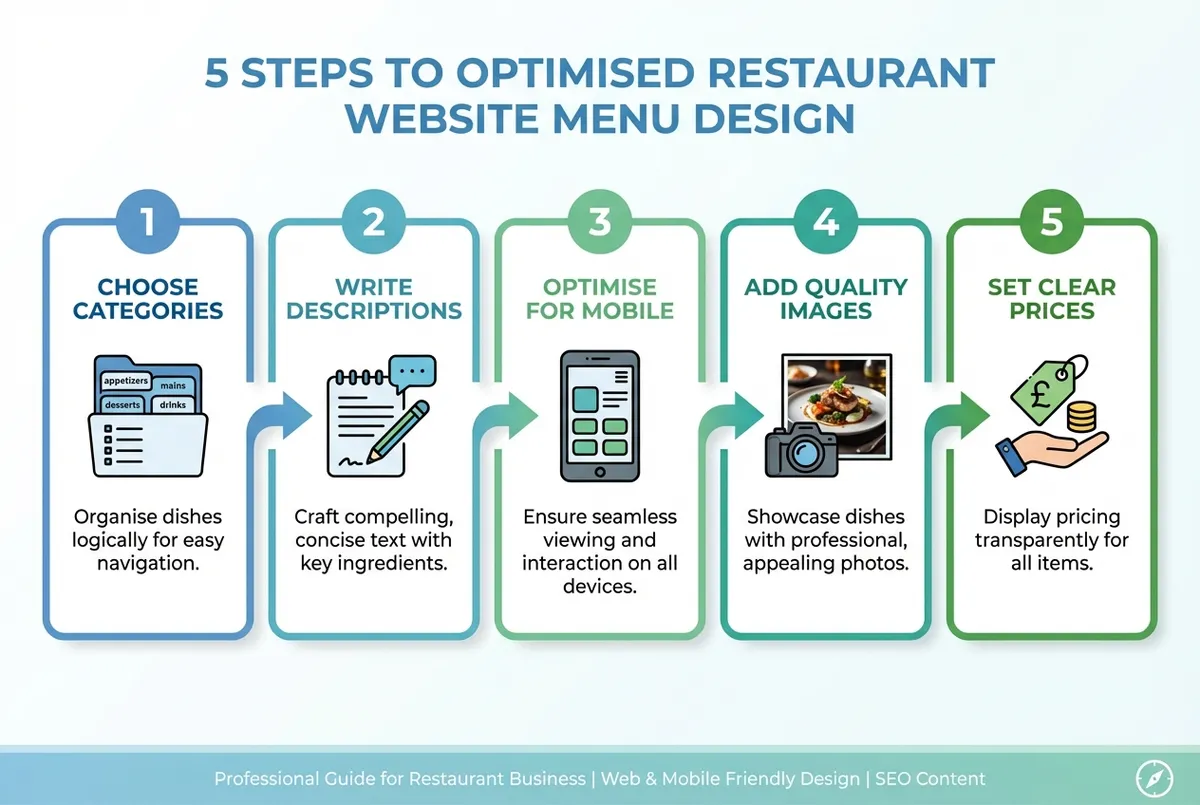
Follow this process to design an effective menu page
What Is a Basic Rule When Creating a Restaurant Menu?
The basic rule when creating a restaurant menu is the Rule of Seven: limit options per category to around seven items. The Rule of Seven is a framework that prevents decision fatigue by keeping menus focused. Psychologists suggest that more than seven options can overwhelm customers and lead to slower ordering and lower satisfaction (Yumpingo).
Why This Matters
If you're only offering 15+ dishes per category you'll always lose to competitors who curate their menus for quick decisions.
When faced with too many choices, diners often default to their "usual" instead of trying something new. That means your seasonal special or high-margin dish gets ignored. If you're thinking "but we have 15 pasta dishes," consider grouping them differently. For instance, a tratoria might feature "Chef's Selection" (5 dishes) and "Classic Favourites" (7 dishes) rather than one overwhelming list.
Why This Matters for Your Website
On a physical menu, customers might scan the whole page. On a website, attention spans are shorter. Studies show customers spend an average of just 109 seconds looking at a menu (WebstaurantStore). Your menu page needs to work even faster.
The Golden Triangle principle suggests that eyes move to the middle first, then top right, then top left. These three areas are where restaurants place dishes with the highest profit margins. On a digital menu, this translates to:
- Feature your best dishes at the top of each section
- Use visual hierarchy: slightly larger fonts or subtle highlights for star items
- Keep your most profitable items visible without scrolling
If you only have 30 minutes a week, do this audit:
- Day 1-2: Count items in each category. Flag any section with more than 7-9 items.
- Day 3-4: Identify your 3 highest-margin dishes. Are they visible without scrolling?
- Day 5-7: Check mobile display. Can customers find key items in under 10 seconds?
Quick Check
If any section has more than seven to nine items, that's usually a sign the menu needs tightening.
Common Mistakes to Avoid
- Cluttered layouts: A cramped menu causes confusion. Use negative space to let key items breathe.
- Inconsistent fonts: Stick to two fonts maximum. One for headings, one for body text.
- Hidden prices: Don't make customers hunt for costs. Frustration leads to abandoned visits.
Common Mistake
If you're only updating your menu when you remember you'll always lose to competitors who treat it as a weekly task.
Restaurant Website Menu Page Design Template: What You Need to Know
You don't need to build from scratch. A good restaurant website menu page design template saves time and delivers proven results. Let's look at what separates useful templates from flashy ones that rarely deliver.
What Makes a Good Template?
Mobile responsiveness: With 68% of diners admitting they've skipped a restaurant because of a poor website (MGH), your template must work flawlessly on phones.
Fast loading: Each additional second of page load delay can reduce conversions by up to 20% (Studio36 Digital). Avoid templates with heavy animations or oversized images.
SEO-friendly structure: Search engines can easily crawl HTML-based menu pages, meaning when people search for specific dishes, your menu has a better chance of showing up.
Easy editing: You need to update prices, add seasonal items, and remove sold-out dishes. If editing requires a web developer, the template isn't practical for busy restaurant owners. If you're only updating prices once a quarter you'll always lose to competitors who keep their menus fresh weekly.
Menu Template Comparison
| Feature | Free Templates (Wix/Squarespace) | Paid Templates (£30-150) |
|---|---|---|
| Mobile optimisation | ✓ Built-in | ✓ Advanced |
| Drag-and-drop editing | ✓ Simple | ✓ Full customisation |
| Online ordering integration | Limited | ✓ Full support |
| Performance | Standard | Optimised |
| Typically suits | Independents getting started | Restaurants with delivery |
Note: Results vary based on implementation quality and your specific needs.
Free vs Paid Templates
Free templates from platforms like Wix or Squarespace work well for most independent restaurants. For instance, a café in Bristol used Squarespace's free template to showcase their brunch menu, and found that simply adding dish descriptions increased average order value by £3.50.
Template Advice
For most UK restaurants, a free template combined with good content outperforms an expensive template with poor execution. Would I recommend this approach to a friend opening a restaurant? Yes, start free and upgrade when you outgrow it.
The Minimum Viable Approach
If you only have 30 minutes a week, do this:
- Day 1-2: Audit your current menu page. Is it mobile-friendly? Load it on your phone.
- Day 3-4: Pick your top five dishes. Ensure they have descriptions and at least one photo.
- Day 5-7: Update your prices and remove anything out of stock.
That's enough to start. You can refine the design later. A simple, accurate menu page outperforms a beautiful but outdated one, so keep your dishes and offers current with our menu and offer management.
Quick Menu Page Checklist
Use this checklist before you publish any menu update:
- All prices current and accurate
- No more than 7-9 items per category
- Hero dishes visible without scrolling
- Loads in under 3 seconds on mobile
- Descriptions evoke taste and texture
- Contact/booking link visible on menu page
Key Takeaways: Restaurant Menu Page Design
If you run a restaurant and want to see how Local Brand Hub can support your marketing, explore our restaurant marketing tools.
Key Takeaways: Restaurant Menu Page Design
Your restaurant menu page is often the first real interaction customers have with your business. A well-designed menu page can increase sales by up to 15% by making items easier to find and highlighting the right dishes (Altametrics). Would I recommend investing time in your menu page over other website sections? Absolutely.
Remember these principles:
- Keep it scannable: Customers spend less than two minutes on your menu. Make every second count.
- Apply the Rule of Seven: Around seven items per category reduces decision fatigue and increases orders.
- Prioritise mobile: Over 60% of your visitors are on phones. PDF menus aren't good enough.
- Use descriptions wisely: Evocative language increases perceived value without changing your costs.
- Test and update: Your menu page isn't a "set and forget" task. Review it monthly.
Pro Tip
Pro Tip: The restaurants that win aren't the ones with the fanciest websites. They're the ones where customers can find what they want, get hungry looking at it, and book a table: all within a minute.
Weekly Action
This week, audit your restaurant menu page design with this focus:
- Load your menu page on your phone. Time how long it takes to find your signature dish.
- Count items in each category. Any section over 7? Flag it.
- Check your top 3 photos. Do they make you hungry?
Start small. Consistency beats perfection, especially when you're down two staff on a Friday night. Ask yourself: Would I book a table at my own restaurant after viewing my menu page?
For UK restaurants
Need Help With Your Menu Page?
Local Brand Hub helps UK restaurants build menu pages that convert browsers into bookings.
Start freeGet More Marketing Tips
Practical marketing tips for UK business owners, straight to your inbox. No spam, unsubscribe anytime.
About the Author
Local Brand Hub
Empowering UK Businesses
Local Brand Hub provides comprehensive business management tools designed specifically for UK local businesses to streamline operations, automate marketing, and grow revenue.
More articlesRelated Articles
 Marketing Tips
Restaurant Homepage Design: 7 Elements That Convert
Learn 7 essential restaurant homepage design elements that convert visitors into diners. Mobile-first layouts and booking buttons.
 Marketing Tips
Restaurant Landing Pages: Convert Visitors to Bookings
Build restaurant landing pages that turn visitors into bookings. Covers mobile layout, page speed, CTAs, and social proof with UK examples.
 Marketing Tips
Restaurant Website Examples: The Twenty Second Test
Restaurant website examples judged the way a hungry stranger judges them: on a phone, against a timer. Patterns worth copying, and those to leave alone.