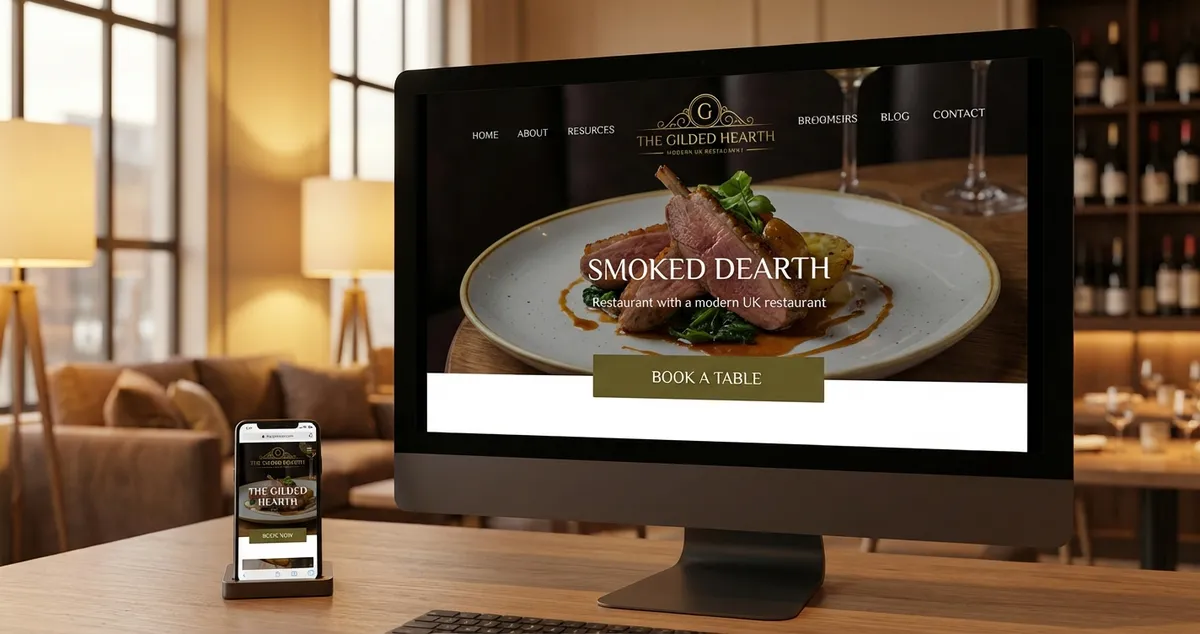
Watch the visual overview· 90 seconds
Restaurant website design essentials for UK restaurants. Templates vs custom, must-have features, costs, practical checklist.
You've spent months perfecting your menu, but potential customers are clicking away before they taste what you're cooking. Restaurant website design determines whether visitors book a table or leave. A well-designed site loads quickly on mobile, displays menus clearly, and makes booking effortless.
The lighting is right. Service is sharp. But your website looks outdated. If you are reading this thinking "my website is fine," ask yourself: when did you last try booking on mobile? That first digital impression matters more than most restaurant owners realise.
What You'll Learn
- Why restaurant website design directly affects bookings and revenue
- The essential features every restaurant website needs in 2025
- How to choose between templates and custom design
- What to prioritise if you only have 30 minutes a week
Nearly 75% of people use mobile phones to order food, according to Restolabs research. Your restaurant website is not just a digital menu. It is your front door for customers who will never walk past your actual one.
Info
Related: Restaurant Marketing Ideas - the complete guide to growing your restaurant business
Why Restaurant Website Design Matters
Let's start with why this matters to your bottom line.
If you are reading this after a quiet Wednesday night wondering where the bookings went, your website might be part of the answer.
If you are thinking "I do not have time for this," you are not alone. Here is the reality for most independent restaurants: you are competing against chains with dedicated marketing teams and larger budgets. Your website is often the one place where you can level the playing field.
For example, a neighbourhood bistro with a fast-loading, mobile-friendly site can outrank a chain restaurant with a bloated, slow website in local search results. Would you trust your business to a website you would not use yourself?
The numbers tell the story:
- 67% of consumers prefer to use a restaurant's own website for delivery, according to Lightspeed
- Customers who order online visit restaurants 67% more frequently than those who do not
- Digital order values average 23% higher than in-person transactions
That is not a marketing stat. That is the difference between a slow Tuesday and a profitable one.
A gastropub owner might look at their booking calendar and wonder why the new place down the road is always full. The answer is often simpler than expected: their website works on mobile, loads quickly, and makes booking a table take 30 seconds instead of three minutes.
Measuring Success
If you cannot tell whether your website brings in bookings or just looks pretty, that is usually a sign the strategy needs tightening.
Why This Matters
Your website works 24 hours a day, taking bookings while you sleep. A broken or slow site is like leaving your front door locked during opening hours.
Essential Features for Restaurant Websites
Here is what actually moves the needle for bookings and orders.
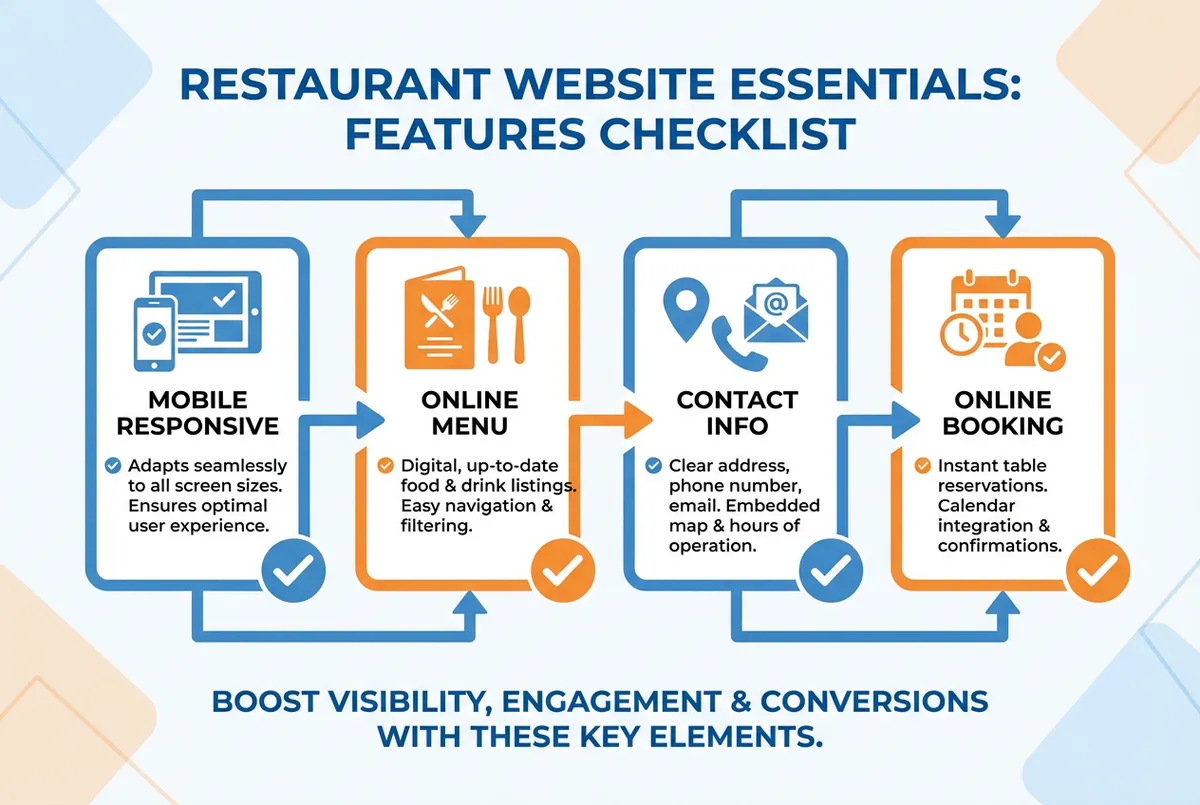
Essential features every restaurant website needs
Not every feature deserves your time or budget. Focus on what actually brings customers through the door.
Must-Have Features (Non-Negotiable)
Mobile-Responsive Design
Over 60% of restaurant orders come through mobile devices. If your website does not work properly on a phone, you are turning away more than half your potential customers before they even see your menu.
Online Menu
Your menu should load quickly, be easy to read, and include prices. PDF menus that require downloading are a conversion killer. People want to scan your offerings in under 10 seconds.
Clear Contact and Location
Address, phone number, and opening hours should be visible without scrolling. Consider embedding Google Maps for easy directions. A link to your Google Business Profile helps with local search visibility.
Online Booking or Ordering
60% of restaurant operators say that offering delivery has generated incremental sales, according to Toast research. Whether it is reservations, click-and-collect, or delivery, make it easy for customers to take action.
Nice-to-Have Features
- Photo gallery of your best dishes
- About page with your story
- Email signup for special offers
- Links to social media profiles
- Customer reviews or testimonials
Common Mistake
If you're only updating your site during quiet moments you'll always lose to competitors who treat website maintenance as part of daily operations.
Would you trust a restaurant with an outdated menu on the door? That is exactly how customers feel about outdated websites.
Restaurant Website Design Templates vs Custom
Furthermore, the template versus custom debate comes down to three factors: budget, time, and how unique your brand positioning needs to be.
| Factor | Template | Custom |
|---|---|---|
| Cost | £0-70/month | £3,000-10,000+ |
| Launch Time | Days | Weeks to months |
| Customisation | Limited | Full control |
| Technical Skill Needed | Basic | None (agency handles) |
| Typically suits | Single locations, tight budgets | Multi-site, complex needs |
Template Websites
Works well for: Restaurants with budgets under £500, those who need a site quickly, and owners comfortable with basic technology. For instance, a family-run curry house can launch a professional-looking site on Squarespace in a weekend.
Cost: £0-70 per month for platforms like Wix, Squarespace, or Canva.
Pros:
- Launch in days, not months
- No coding knowledge required
- Built-in mobile responsiveness
- Regular security updates included
Cons:
- Limited customisation options
- Your site may look similar to competitors
- Some platforms charge transaction fees
A family-run Italian restaurant using a template might find it perfectly adequate. Clean layout, menu displayed clearly, booking widget integrated. Done.
Custom Website Design
Works well for: Restaurants with strong brand identity, multiple locations, or complex ordering requirements.
Cost: £3,000-£4,600 for a simple custom site in the UK, according to BluCactus. More complex builds with online ordering integration can reach £10,000+.
Pros:
- Completely unique design
- Scalable as your business grows
- Full control over functionality
- Better for SEO long-term
Cons:
- Higher upfront investment
- Longer development time
- Ongoing maintenance costs
If you are reading this thinking "I cannot afford either option at the moment," you are not alone. Many restaurant owners start with a free Canva site and upgrade later when revenue allows.
Which Should You Choose?
If you pick just one approach, start with a template. For most UK restaurants, templates are the sensible starting point. The money saved can go toward marketing, better photography, or that new extraction system you have been putting off.
Consider custom design only when:
- Your restaurant group has 3+ locations
- You need complex integrations with existing POS systems
- Your brand positioning requires a completely unique digital experience
Restaurant Website Design Best Practices
Let's look at what separates effective restaurant websites from forgettable ones. Whether you choose template or custom, these principles apply.
Visual Design
Keep it simple. Your food is the star, not animated menus or background music. Use high-quality photos of your actual dishes, not stock images of food that looks nothing like yours. For example, a fish and chip shop might photograph their signature cod in natural lighting, with the paper wrapping visible for authenticity.
Colour choices matter. Warm colours like red and orange stimulate appetite. Cool blues work for seafood restaurants. Whatever you choose, ensure text remains readable.
User Experience
Speed is everything. A one-second delay in page load time can reduce conversions by 7%, according to industry research. Compress images, minimise plugins, and choose a reliable hosting provider.
Make booking obvious. Your call-to-action should be visible on every page. "Book a Table" or "Order Now" buttons should contrast with your background colour.
Analytics Check
If you can't tell whether your website converts visitors into bookings or just looks nice, that's usually a sign you need better analytics in place.
Basic SEO
Let's be honest: SEO can feel overwhelming. But for most restaurants, the basics are enough. Your restaurant website should appear when locals search for what you serve. Focus on:
- Including your location in page titles
- Adding your address consistently across all pages
- Creating separate pages for different services (dine-in, delivery, private hire)
- Building links from local directories and food blogs
For a deeper dive into local visibility, see our guide on restaurant local SEO strategies, or work through our step-by-step local SEO checklist.
Info
Related: Restaurant Google Business Profile - essential for local search visibility
Minimum Viable Website Checklist
If you only have 30 minutes a week, here is your floor:
This week, audit your restaurant website:
- Day 1-2: Check your site on mobile. Can you find the menu, book a table, and see the address within 10 seconds?
- Day 3-4: Test your page speed at Google PageSpeed Insights. Score below 50? Contact your web provider.
- Day 5-7: Update your menu if anything has changed. Out-of-date prices erode trust faster than almost anything else.
That is enough to start. A restaurant website that works on mobile and loads quickly beats a fancy site that does neither.
Would you book a table at your own restaurant based on your website alone? If the answer gives you pause, that is where to focus first.
Key Takeaways
If you run a restaurant and want to see how Local Brand Hub can support your marketing, explore our restaurant marketing tools.
Key Takeaways
This sounds great in theory, but the reality is simpler: restaurant website design does not need to be complicated or expensive. What matters is:
- Mobile-first design: Most customers will find you on their phones
- Clear calls-to-action: Make booking or ordering obvious
- Speed over features: A fast, simple site beats a slow, fancy one
- Accurate information: Outdated menus and hours cost you customers
Your website is working 24 hours a day, even when you are not. Make sure it is earning its keep.
Weekly Action
This week, take these three steps:
- Today: Open your website on your phone and try to book a table. Time how long it takes.
- Tomorrow: Check your menu is accurate and prices are current.
- This weekend: Test your site speed at Google PageSpeed Insights and note your score.
If you complete these three steps, you will know exactly where your website stands. Most restaurant owners never get this far, which means you will already be ahead.
For restaurants ready to take the next step, explore our guides on restaurant social media marketing and how to get more Google reviews.
Frequently Asked Questions
How much does restaurant website design cost in the UK?
Restaurant website design in the UK ranges from free (using platforms like Canva) to several thousand pounds for custom designs. Template-based sites typically cost under £100 per month, while professional custom builds start around £3,000. A small cafe might pay a modest monthly fee for Squarespace, while a restaurant group might invest more in a custom build with integrated booking across all sites.
What features should a restaurant website have?
Every restaurant website needs: mobile-responsive design, a clear and readable menu with prices, contact information visible without scrolling, and an easy way to book or order. A pub might prioritise their beer menu and live music calendar, while a fine dining restaurant focuses on reservation booking and tasting menu presentation. Nice-to-have features include photo galleries, email signup forms, and integration with your Google Business Profile.
Should I use a template or custom design for my restaurant website?
For most independent UK restaurants, templates are the practical choice. They launch faster, cost less, and include mobile responsiveness by default. Consider custom design only if you have multiple locations, need complex integrations, or require a completely unique brand experience. A single-location pizza shop typically does well with a template; a growing chain with a loyalty programme often needs custom.
How do I make my restaurant website show up on Google?
Include your location in page titles, keep your address consistent across all pages, create separate pages for different services, and ensure your site loads quickly on mobile. A Manchester curry house, for instance, should have "Manchester" in their homepage title, menu page, and Google Business Profile. Claim your profile and build links from local directories. These fundamentals matter more than advanced SEO tactics.
For UK restaurants
Ready to Improve Your Restaurant's Online Presence?
Local Brand Hub helps UK restaurants build their digital marketing strategy with AI-powered tools designed for busy owners.
Start freeGet More Marketing Tips
Practical marketing tips for UK business owners, straight to your inbox. No spam, unsubscribe anytime.
About the Author
Local Brand Hub
Empowering UK Businesses
Local Brand Hub provides comprehensive business management tools designed specifically for UK local businesses to streamline operations, automate marketing, and grow revenue.
More articlesRelated Articles
 Marketing Tips
Restaurant Marketing Agency: Guide to Choosing
Compare restaurant marketing agencies by cost, specialism, and results. UK agency shortlist, pricing guide, and a framework to pick the right partner.
 Marketing Tips
Digital Marketing for Restaurants: A Practical UK Guide
Learn how digital marketing helps UK restaurants attract more customers. Covers the 4 P's, 70/20/10 rule, and practical strategies you can start this week.
 Marketing Tips
Restaurant Digital Marketing: A Guide for UK Restaurants
Build a digital marketing plan for your UK restaurant with budget-friendly tactics, proven frameworks, and realistic cost breakdowns.