Practical restaurant SEO tips you can implement this week without technical skills. Focus on Google Business Profile, reviews, and local visibility basics.
It's Sunday evening. You've just finished a quiet service that should have been busier. You open Google, search for "restaurants near me," and watch competitors appear while your restaurant stays invisible. Your phone sits quiet. Their tables fill up. That's the reality when local SEO gets ignored.
72% of diners use Google to find restaurants. You've heard the word "SEO" a hundred times. But where do you actually start?
These 15 restaurant SEO tips are practical actions that make the biggest difference. No jargon. No technical expertise. Just specific restaurant seo tips you can do this week to help hungry customers find you when they search for what you serve.
Related: Restaurant SEO
What You'll Learn
- Restaurant SEO tips that drive real customer discovery
- Quick wins you can complete in 30 minutes or less
- The Google Business Profile optimisations that matter most
- How to get more reviews without feeling pushy
- Website basics that improve visibility
Contents:
- Google Business Profile Tips
- Review Strategy Tips
- Website and Content Tips
- Quick Win Tips
- Minimum Viable Plan
Restaurant SEO Priority Comparison
| Area | Time Investment | Impact Level | Difficulty | Start When |
|---|---|---|---|---|
| Google Business Profile | 30 mins/week | Very High | Easy | Week 1 |
| Reviews | 20 mins/week | High | Easy | Week 1 |
| Website NAP | 1 hour (one-time) | High | Easy | Week 2 |
| Photo Uploads | 15 mins/week | Medium | Easy | Week 1 |
| Directory Listings | 2 hours (one-time) | Medium | Easy | Week 3 |
| Menu SEO | 3 hours (one-time) | Medium | Moderate | Week 4 |
Impact levels are approximate and vary by market: treat as a rule of thumb for prioritising these restaurant SEO tips.
For most UK restaurants, Google Business Profile and reviews often offer the best combination of quick wins and long-term visibility improvement.
Google Business Profile Tips
First, let's focus on your Google Business Profile, where most restaurant SEO results come from. These restaurant SEO tips start here because Google Business Profile signals account for approximately 32% of local pack ranking factors.
Tip 1: Claim and Verify Your Profile
If you haven't claimed your Google Business Profile, do this first. Go to Google Business Profile, search for your restaurant, and follow the verification process. This typically takes a few days for postcard verification or minutes if you verify by phone.
Without claiming your profile, you can't control what information appears when customers search for you. Once you've claimed it, the next step is optimising that profile properly.
Tip 2: Choose the Right Primary Category
Google lets you select categories that describe your business. Your primary category matters most.
Be specific. "Italian Restaurant" ranks better than just "Restaurant." If you're only using the generic "Restaurant" category you'll always lose to competitors who select specific categories like "Italian Restaurant" or "Thai Restaurant." Choose your cuisine type as primary, then add "Restaurant" and "Takeaway Restaurant" as secondary categories.
For example, a fish and chip shop in Leeds might set "Fish and Chips Restaurant" as primary, with "Takeaway Restaurant" and "Seafood Restaurant" as secondary options.
Tip 3: Complete Every Profile Field
Google rewards complete profiles. Fill in:
- Business hours (including bank holidays)
- Phone number
- Website URL
- Menu link
- Service options (dine-in, takeaway, delivery)
- Attributes (outdoor seating, wheelchair accessible, accepts card payments)
If you're thinking "I'll get to this later", that's usually a sign you should do it now. If you're only completing half your profile fields you'll always lose to competitors who fill in every detail.
Tip 4: Upload Photos Weekly
Restaurants with more than 100 photos receive significantly more website clicks and direction requests than those with fewer images.
Aim for at least one new photo weekly. Include:
- Food close-ups with good lighting
- Interior shots
- Exterior showing your signage
- Staff photos (with permission)
- Seasonal specials
Additionally, Google rewards restaurants that post regularly.
Tip 5: Post Weekly Updates
Google Business Profile posts keep your listing active. Post about:
- Daily specials
- New menu items
- Events
- Behind-the-scenes moments
- Seasonal promotions
Posts expire after seven days. If you're only posting when it's quiet in the restaurant, you'll always lose to competitors who treat this as part of their weekly operations, not an afterthought. Consistency matters more than perfection.
Related: Restaurant Google Business Profile
Review Strategy Tips
Now that your profile is optimised, let's move to the second pillar: reviews. These restaurant SEO tips for reviews help you build social proof that convinces both Google and customers to choose you.
Tip 6: Create a Simple Review Request System
Most satisfied customers would leave a review if asked. They just need a nudge.
What works:
- A small card with your bill that includes a QR code linking to your Google review page
- A follow-up text or email thanking customers for their visit with a review link
- Asking verbally when you know someone enjoyed their meal
For instance, a gastropub in Bristol doubled their monthly review count by simply adding a card to every bill. Nothing complicated, just a thank you message and a QR code.
Now that you're getting reviews, the next step is responding to them.
Tip 7: Respond to Every Review Within 48 Hours
Responding to reviews shows Google (and potential customers) that you're engaged. Restaurants that respond to reviews see 30% higher ranking improvements than those that ignore them. Thank positive reviewers specifically. Address negative reviews professionally.
When responding to criticism, acknowledge the feedback, apologise for their experience, and offer to make it right offline. Never argue publicly.
Moreover, when it comes to review platforms, one stands out above the rest.
Tip 8: Focus on Google First
TripAdvisor, Yelp, and Facebook reviews all matter. But Google reviews have the biggest impact on local search rankings.
If you're only collecting reviews on TripAdvisor while ignoring Google you'll always lose to competitors who prioritise the platform that directly affects local rankings. Focus on Google reviews first. Once you have a steady flow there, expand to other platforms.
However, there's one crucial rule most restaurants break.
Tip 9: Never Offer Incentives for Reviews
It might seem tempting to offer a free dessert for a review. Don't. Google's terms prohibit incentivised reviews, and if caught, your reviews could be removed or your listing penalised.
Ask for honest feedback. For most restaurants, that's all you need.
Related: Restaurant Google Reviews
Website and Content Tips
Finally, let's cover your website. Reviews are the social proof that sells bookings. Your website is what closes the sale. These restaurant SEO tips for your website help potential customers find exactly what they need.
Tip 10: Include Your Address and Phone on Every Page
Your name, address, and phone number (NAP) should appear in your website footer on every page. Use the exact same format you use on Google Business Profile.
Consistency across the web helps Google trust your information.
Furthermore, you need geographic targeting.
Tip 11: Create a Location Page
If you serve a specific area, create a dedicated location page. For example, if you're in Manchester, create a page titled "Italian Restaurant in Manchester" that describes what you serve and why locals choose you.
Include:
- Your full address
- Embedded Google Map
- Directions from major landmarks
- Parking information
- Nearest public transport
Next, the critical element is your menu itself.
Tip 12: Make Your Menu Searchable
Many restaurants upload their menu as a PDF or image. Google can't read these formats well.
If you're only uploading PDF menus to your website you'll always lose to competitors whose dishes appear in Google searches. Create an HTML menu page with your dishes listed as text instead. Include descriptions with relevant keywords like "hand-stretched pizza" or "locally sourced beef."
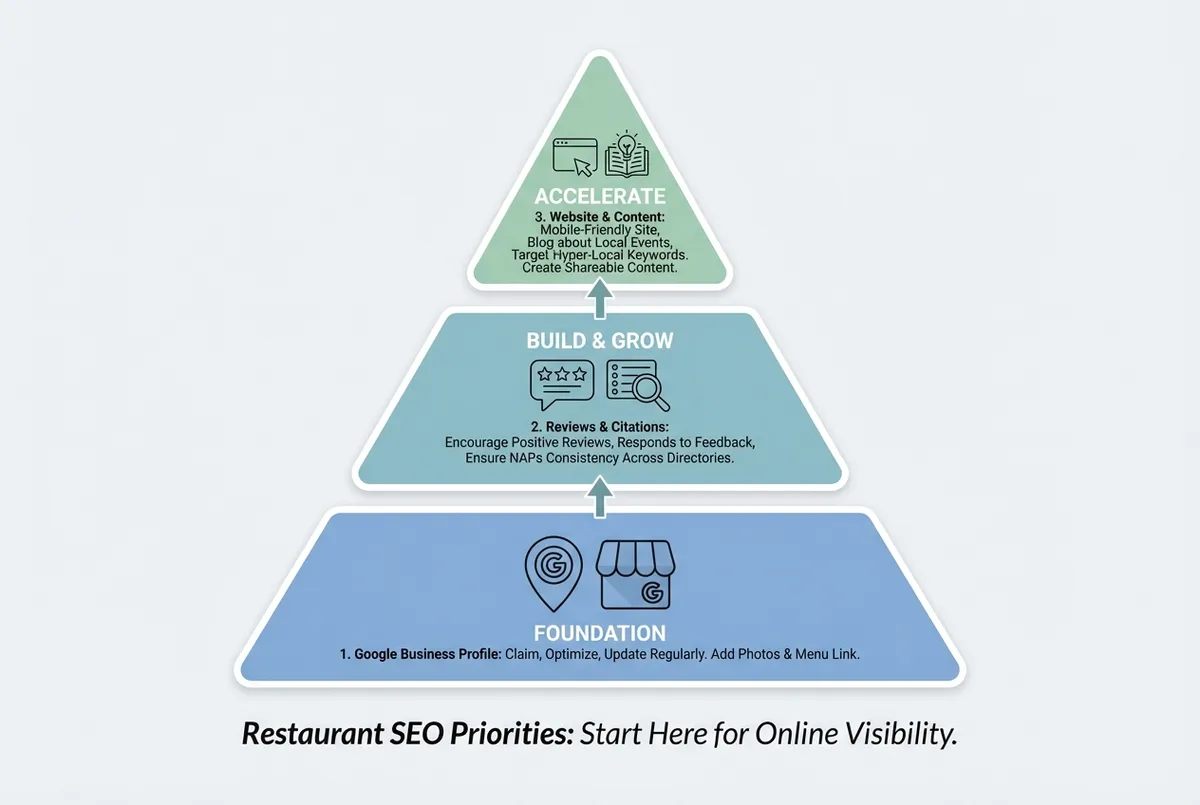
Restaurant SEO priority areas
However, if your site takes 10 seconds to load, all that effort is wasted.
Tip 13: Speed Up Your Mobile Site
Most restaurant searches happen on mobile phones. If your website loads slowly, visitors leave before seeing your menu.
If your site scores below 50 on mobile speed tests, consider:
- Compressing images
- Removing unnecessary plugins
- Asking your web host about faster options
If you can't tell whether slow loading times are costing you customers or just making things slightly inconvenient, that's usually a sign to check your speed score first before guessing. If you're only loading your site slowly on mobile, you'll always lose customers to competitors whose sites open instantly.
Quick Win Tips You Can Do Today
Now let's look at quick wins you can implement this week. These tips take 15 minutes or less and can make an immediate difference.
Your Restaurant SEO Checklist
Complete these foundational tasks in order. You can also work through our local SEO checklist to track your progress:
- Claim and verify Google Business Profile
- Choose specific primary category (e.g., "Italian Restaurant" not just "Restaurant")
- Complete every profile field (hours, phone, website, menu, attributes)
- Upload at least 10 high-quality photos
- Create weekly posting schedule
- Set up review request system (QR code or follow-up email)
- Respond to all reviews from past month
- Add NAP (name, address, phone) to website footer
- Check information consistency across top 10 Google results
- List on TripAdvisor, Yell.com, and local directories
Tip 14: Check Your Information Consistency
Google your restaurant name. Click through the first 10 results. Check that your name, address, and phone number match exactly everywhere. Inconsistent information is a signal to Google that your business isn't trustworthy: businesses with conflicting information rank 25% lower on average.
If you find inconsistencies (different phone numbers, old addresses, misspelled names), note them. Fix what you can directly. For listings you can't edit, contact the platform.
Tip 15: Add Your Restaurant to Key UK Directories
If you're not listed on these platforms, add yourself:
- TripAdvisor
- Yell.com
- OpenTable
- The Good Food Guide
- Time Out (if in a major city)
- Local council business directory
Each listing creates a citation that helps Google verify your business information.
Related: Restaurant Citations
Pro Tip: Start with Google Business Profile, then TripAdvisor. These two platforms often drive significant local discovery for most UK restaurants.
If You Only Have 30 Minutes a Week
Here's the reality: if you're reading this thinking "I barely have time to eat lunch, let alone do SEO", you're not alone. These restaurant SEO tips work best with consistency. Most restaurants that improve their local visibility do so with less than an hour per week. If you can dedicate just 30 minutes weekly, here's how to spend that time.
This week, start your SEO foundation:
Day 1 (10 mins): Log into Google Business Profile. Update your hours if needed. Upload 2-3 recent food photos.
Day 3 (10 mins): Respond to any reviews from the past week. Write a quick Google Business Profile post about your current special.
Day 5 (10 mins): Check one directory listing (TripAdvisor, Yell, etc.) and ensure your information is correct.
Repeat this weekly. After three months of consistency, you'll typically see measurable improvement in your local visibility.
Key Takeaways
If you run a restaurant and want to see how Local Brand Hub can support your marketing, explore our restaurant marketing tools.
Key Takeaways
- Google Business Profile is the highest-impact area among all restaurant SEO tips
- Weekly photo uploads and posts keep your profile active
- Reviews influence both rankings and customer decisions
- Consistency matters more than perfection with these restaurant SEO tips
- All restaurant SEO tips listed here require no technical skills
The reality for most independent restaurants is that SEO competes with a hundred other priorities. You don't need to do everything. You need to do these restaurant SEO tips consistently.
Here's what separates restaurants that show up from those that don't: It's not bigger budgets or technical knowledge. It's treating these simple restaurant SEO tips as a small weekly habit rather than a big occasional project.
With LocalBrandHub, a platform built by restaurant marketing experts, you can automate much of this work with AI-powered tools designed specifically for restaurants, saving time while maintaining the consistency that search engines reward.
Weekly Action
This week, complete these restaurant SEO tips:
Monday (10 mins): Claim or verify your Google Business Profile if you haven't already. Log in and update your hours.
Wednesday (10 mins): Upload 3 food photos to your Google Business Profile. Make sure lighting is good and food looks appealing.
Friday (10 mins): Ask 3 customers to leave a Google review. A simple card with your bill works best.
Ask yourself: "Would I find my own restaurant if I searched for what we serve?" If the answer is no, these tips are your starting point.
Frequently Asked Questions
How long do restaurant SEO tips take to show results?
Most restaurants see initial improvements within 4-8 weeks of consistent effort, with more significant results appearing after 3-6 months. Local SEO often moves faster than traditional SEO because you're competing against a smaller pool of local businesses.
Do I need technical skills to improve my restaurant's SEO?
No. The highest-impact restaurant SEO tips, Google Business Profile optimisation, review management, and citation building, require no technical skills. Website improvements help but are secondary to local search factors.
How often should I update my Google Business Profile?
Aim for weekly updates at minimum. Upload new photos, post about specials, and respond to reviews at least once per week. Google rewards active profiles with better visibility.
What's the single most important restaurant SEO tip?
Among all restaurant SEO tips, claiming and fully completing your Google Business Profile is the most important. If you do nothing else from these restaurant SEO tips, this single action has the biggest impact on local search visibility for restaurants.
Get More Marketing Tips
Practical marketing tips for UK business owners, straight to your inbox. No spam, unsubscribe anytime.
About the Author
Local Brand Hub
Empowering UK Businesses
Local Brand Hub provides comprehensive business management tools designed specifically for UK local businesses to streamline operations, automate marketing, and grow revenue.
More articlesRelated Articles
 Marketing Tips
Google Restaurant Reviews: Complete UK Guide
Discover why 75% of consumers regularly check reviews before dining out. Get actionable tips to boost reviews, respond professionally, and handle fakes.
 Marketing Tips
Restaurant SEO Audit: Check Your Local Search Visibility
Run a full restaurant SEO audit in 30 minutes. Step-by-step checks for your Google Business Profile, citations, and local rankings.
 Marketing Tips
Can You Delete Google Reviews? Honest UK Answer
Can you delete Google reviews as a business? No, but here's what UK restaurants can do about unfair reviews, removal costs, and reputation.