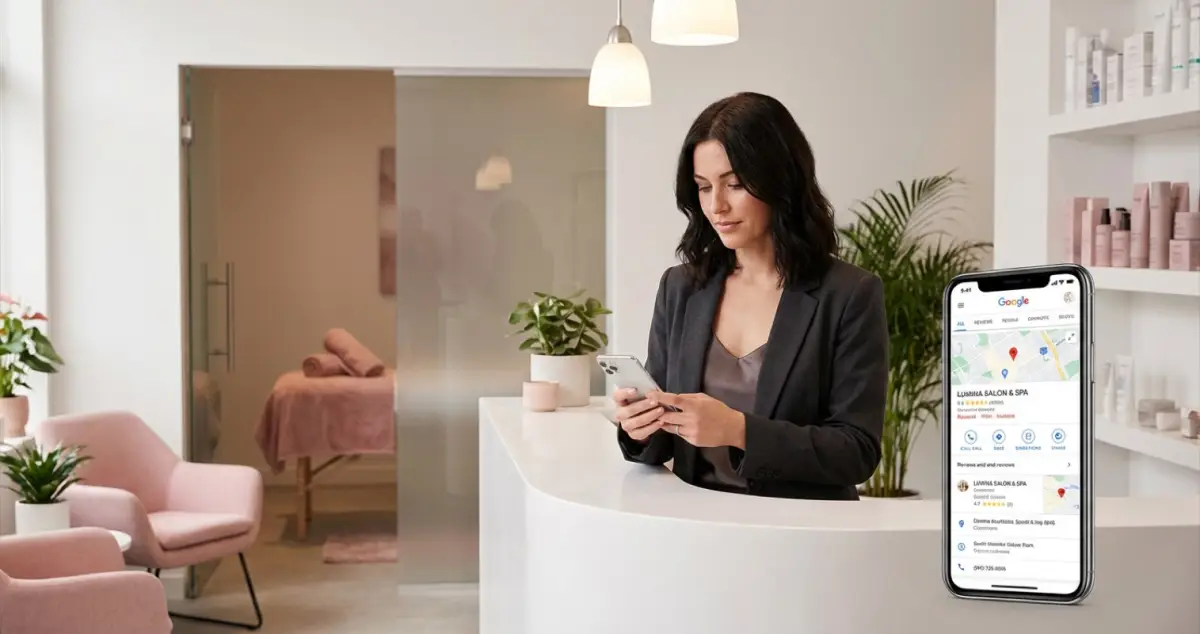
Set up your beauty salon Google My Business profile in seven steps. Claim, optimise, add treatments, upload photos, and get reviews. UK beginner guide.
A beauty salon Google My Business profile (now called Google Business Profile) is a free listing that controls how your salon appears on Google Search and Google Maps when someone nearby searches for treatments you offer. Setting one up takes roughly 30 minutes and directly affects whether new clients find you or find the salon down the road instead.
You've spent years perfecting your lash lifts. Your aftercare advice is second to none. But when a new client moves to your area and types "beauty salon near me," the results show three salons, and yours isn't one of them. That's not a reflection of your skill. It's because Google doesn't know enough about your business to recommend it. A complete Google Business Profile fixes that.
If you're reading this between appointments, wondering where to start, this guide is for you. Seven steps, no jargon, no marketing degree required. Just the practical setup that gets your treatment rooms appearing when it matters.
For more on building your salon's online presence, see our salon website and SEO hub.
What You'll Learn
- How to claim or create your beauty salon Google My Business profile from scratch
- Which categories and services to add so Google shows you for the right searches
- How to upload photos that convince potential clients to book
- Getting Google reviews without awkward conversations
- Using Google Posts to stay visible in local search results
Why Your Beauty Salon Google My Business Profile Matters
Seventy-six percent of people who search for a local business on their phone visit or contact that business within 24 hours (Google, 2025). For a beauty salon, that means someone searching "nail salon near me" at lunchtime could be sitting in your treatment room by teatime, but only if your profile exists and looks trustworthy.
Here's the problem: according to the NHBF, many UK beauty salon owners have yet to claim their Google Business Profile (NHBF, 2025). Only around 35% of small businesses have actually claimed their listing (BrightLocal, 2026). That's a gap you can walk straight through.
Businesses appearing in Google's Local Pack, the three-result map section at the top of search results, receive 126% more traffic than those ranked below it (SOCi, 2025). Your beauty salon Google My Business profile is what determines whether you appear there.
If you're only relying on Instagram and word-of-mouth, you'll always lose to competitors who've spent 30 minutes claiming their free listing. That's usually a sign your online presence needs attention, not your treatments. Your profile is the biggest single item on any local SEO checklist, but reviews, citations and on-page basics all build on it.
Step 1: Search for Your Salon on Google
Before creating anything, check whether Google already has a listing for your business. Many beauty salons already have an unclaimed profile created automatically from directory data.
What to do:
- Open Google Maps on your phone or computer
- Type your exact salon name and town: for example, "Glow Beauty Studio Croydon"
- If a listing appears with your salon name and address, it already exists and needs claiming
- If nothing appears, you'll create a new listing in the next step
A nail salon or aesthetics clinic that's been open for more than a year almost certainly has an auto-generated listing. If someone else has claimed it (a previous owner, for instance), Google has a process to request ownership transfer.
Step 2: Claim or Create Your Listing
Once you know whether a listing exists, the next step is taking ownership. Head to google.com/business and sign in with a Google account. This should be one you'll have long-term access to, not a personal account you might lose.
If your salon already appeared in Step 1:
- Search for it on the Google Business Profile page
- Click "Claim this business"
- Google will verify you own it, typically by sending a postcard to your salon address with a PIN code (takes five to seven days)
If your salon didn't appear:
- Click "Add your business to Google"
- Enter your salon name, address, and phone number exactly as they appear on your website
- Complete the verification process
For example, a beauty salon that has moved premises would need to update their address and re-verify; otherwise their beauty salon Google My Business listing shows the old location, sending potential clients to the wrong place.
Pro Tip
According to Google, businesses with verified profiles are twice as likely to be considered reputable by consumers (Google, 2025). Don't skip verification.
Step 3: Choose Your Categories Carefully
Google uses categories to decide which searches trigger your listing. Get this wrong and you'll appear for the wrong searches, or not appear at all.
Primary category: Choose "Beauty Salon" if that describes your main business. This is the single most important ranking factor for Local Pack placement.
Secondary categories: Add every relevant type. A beauty salon offering nails and lashes might add:
- Nail Salon
- Eyelash Salon
- Waxing Service
- Facial Spa
For instance, a beauty studio in Manchester offering facials, brows, and lashes would set "Beauty Salon" as primary and add "Eyelash Salon" and "Skin Care Clinic" as secondary categories. The more accurately you categorise, the more searches you qualify for.
Don't add categories for services you don't offer. Getting your beauty salon Google My Business categories right is one of the highest-impact changes you can make. Google notices, and clients who book expecting a service you can't deliver leave negative reviews.
Step 4: Add Every Treatment as a Service
With your categories set, the next step is telling Google exactly what you offer. This is where many beauty salons stop, and it's exactly where you should keep going. The services section works like a searchable treatment menu inside Google.
For each treatment, add:
- Treatment name (e.g., "Gel Manicure," "Lash Lift and Tint," "Dermaplaning Facial")
- Brief description (two to three sentences about what it involves)
- Price or price range
A brow bar adding individual services sees each treatment become a potential search trigger. Someone searching "lash lift near me" is more likely to see your profile if "Lash Lift and Tint" is listed as a named service with a description.
Think of every treatment you offer. Even patch test appointments: listing them signals to Google that you take aftercare seriously and offer a full range of services. For more on structuring your treatment pages, see our website for beauty salon guide.
Step 5: Upload Photos That Show Real Salon Life
Your services are listed. Now show potential clients what your salon actually looks like. Ninety-seven percent of consumers read reviews when considering a local business, and 36% say photos accompanying a listing influence their decision (BrightLocal, 2026). Your photos are doing a job: they're convincing someone to book.
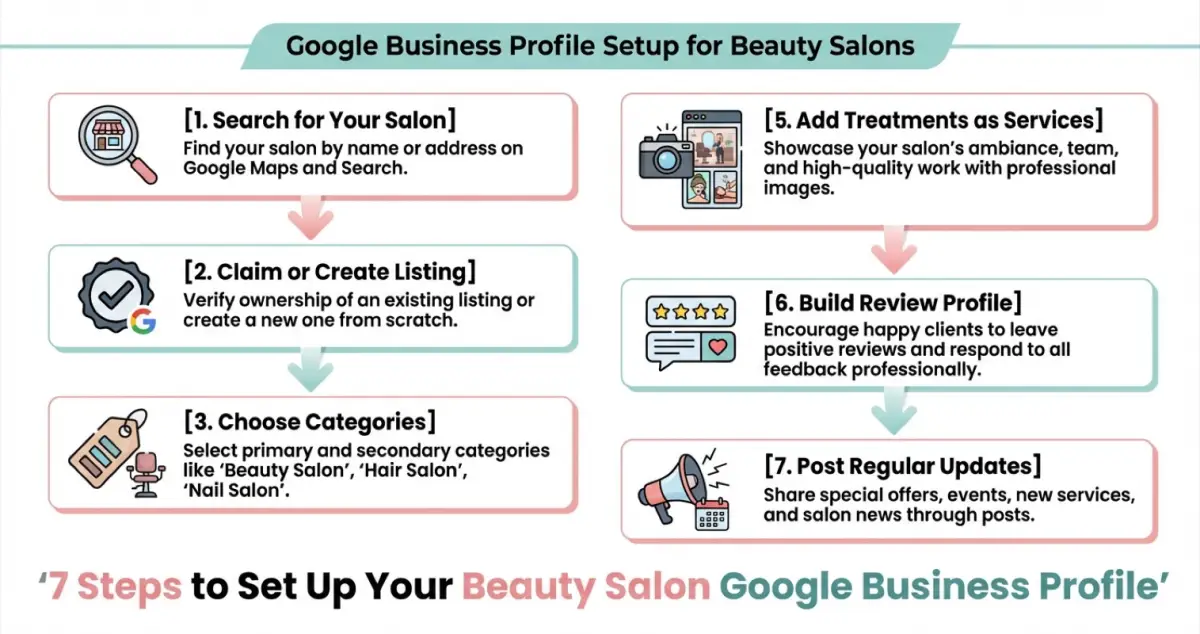
The seven steps to a complete Google Business Profile for your beauty salon
Minimum photos to upload:
| Photo Type | What to Show | Why It Matters |
|---|---|---|
| Exterior | Your salon frontage and signage | Helps clients find you in person |
| Interior | Treatment rooms, clean workstations | Shows professionalism |
| Team | You and your staff at work | Builds trust before the first visit |
| Results | Before-and-after transformations | Proves your skill |
| Products | Retail products you stock | Signals quality |
Upload at least 10 photos to start. Businesses with more than 100 photos receive notably more calls and direction requests than the average listing (Google, 2025). You don't need professional photography. Phone photos taken in good lighting are absolutely fine.
For design guidance on your photos and website visuals, see our salon website design guide.
What not to upload: Stock images, heavily filtered selfies, or photos with text overlays. Google can detect stock images and may flag them.
Step 6: Build Your Review Profile
Your beauty salon Google My Business reviews aren't optional. They're the first thing potential clients look at, and 97% of consumers check them before choosing a local business (BrightLocal, 2026). Forty-seven percent won't even consider a business with fewer than 20 reviews.
How to get reviews without being pushy:
- After a great appointment: "I'm really glad you love your nails! Would you mind leaving us a quick Google review? It genuinely helps other people find us." Send a direct review link via text or WhatsApp
- On your aftercare card: Add a QR code linking to your Google review page
- At rebooking: "Thanks for rebooking, if you have a spare minute, a Google review would mean the world"
Always respond to every review, positive and negative. According to BrightLocal (2026), 88% of consumers are more likely to use a business that replies to all its reviews, compared with just 47% for businesses that don't respond.
A late cancellation or a no-show is frustrating enough without a negative review on top of it. If you're thinking "I don't have the energy to deal with complaints online", you're not alone. But respond calmly and professionally. Your reply is really for the hundreds of potential clients reading it, not just the reviewer.
Info
Self-reflection question: If you searched for your own salon on Google, would the reviews and photos convince you to book?
Step 7: Post Regular Updates with Google Posts
So your listing is live and reviews are coming in. The final step to a strong beauty salon Google My Business presence is staying active. Google Posts are short updates that appear on your Business Profile: think of them as mini social media posts that show up directly in search results. Most beauty salons ignore this feature entirely, which means using it puts you ahead.
Post ideas that work for salons:
- Seasonal offers: "Prom season lash packages, book before May"
- New treatments: "Now offering dermaplaning facials. Here's what to expect"
- Availability updates: "Cancellation this Thursday at 2pm, gel nails or brow lamination available"
- Tips and advice: "How to make your gel manicure last longer between appointments"
Post once a week. Google Posts expire after seven days, so regular posting signals to Google that your business is active, which can improve your beauty salon Google My Business ranking in local search results. For example, a nail salon posting weekly availability updates ("Cancellation Thursday 2pm, gel nails available") consistently appeared higher in local results than competitors who hadn't posted in months.
If You Only Have 30 Minutes a Week
If you're thinking "I barely have time to eat lunch between clients, let alone do all this", here's the minimum viable version for your beauty salon Google My Business setup:
- Day 1-2 (15 minutes): Search for your salon on Google Maps. If a listing exists, start the claim process. If not, create one at google.com/business
- Day 3-4 (10 minutes): Add your primary category (Beauty Salon), opening hours, and phone number
- Day 5-7 (5 minutes): Upload three photos: your salon exterior, one treatment room, and one result photo
That's it. For instance, a beauty studio that followed this exact three-day plan went from invisible on Google Maps to appearing for "beauty salon near me" searches within two weeks. You can add services, respond to reviews, and start posting updates in the following weeks. The most important step for your beauty salon Google My Business presence is typically claiming your listing; everything else builds on that foundation.
Weekly Action
- This week: Claim or verify your beauty salon Google My Business listing and upload at least three photos
- Next week: Add all your treatments as individual services with prices and descriptions
Your treatment rooms should be earning around the clock, not just during opening hours. A complete Google Business Profile works 24/7, putting your salon in front of every local search that matches your services.
Would you follow your own salon on social media based on what's there? Apply the same standard to your Google listing; it's often the first thing potential clients see.
If managing your online presence alongside a full appointment book feels like too much, LocalBrandHub helps salon owners automate their local marketing, so you can focus on your clients while your profile keeps working. Explore our beauty salon tools to see how we can help.
FAQ
Is Google My Business free for beauty salons?
Yes. A beauty salon Google My Business profile (Google Business Profile) is completely free to create, claim, and manage. There are no charges for listing your salon, adding photos, responding to reviews, or publishing Google Posts. It's one of the most valuable free marketing tools available to UK beauty salon owners.
How long does it take to set up a beauty salon Google My Business profile?
The initial setup takes roughly 30 minutes. Verification typically takes five to seven days, as Google sends a postcard with a PIN code to your salon address. Once verified, adding services, photos, and responding to reviews is an ongoing 10-15 minute weekly task.
Can I have Google My Business for a home-based beauty salon?
Yes, but with restrictions. If you visit clients at their location, you can list as a "service area business" without displaying your home address. If clients visit your home, you can show your address. Google requires that your home is set up as a professional workspace, not a kitchen table operation.
Key Takeaway
Your beauty salon Google My Business profile is often the single most impactful free marketing tool: claim it, verify it, complete it. Choose your categories carefully with "Beauty Salon" as primary and every relevant secondary category. List individual treatments as services with prices so each one becomes a potential search trigger. Upload at least 10 authentic photos and add new ones monthly. Automate review requests through your booking system and post weekly Google updates to signal that your business is active. The salons filling their appointment books from Google aren't doing anything complicated. They've just made sure Google knows they exist.
For restaurants, salons, and local businesses
Need help with your marketing?
We help UK businesses turn social media into real results, not busywork.
Start freeGet More Marketing Tips
Practical marketing tips for UK business owners, straight to your inbox. No spam, unsubscribe anytime.
About the Author
Local Brand Hub
Empowering UK Businesses
Local Brand Hub provides comprehensive business management tools designed specifically for UK local businesses to streamline operations, automate marketing, and grow revenue.
More articlesRelated Articles
 Marketing Tips
SEO for Beauty Salon: How to Get Found on Google
Step-by-step SEO for beauty salon owners who want to rank on Google. Covers Google Business Profile, keywords, reviews, and local citations.
 Marketing Tips
Salon Website and SEO: Complete Guide for UK Salons
How to build a salon website and SEO strategy that ranks on Google and fills your diary. Design, templates, builders, and local SEO for UK salons.
 Marketing Tips
Marketing a Beauty Salon: Week-by-Week Action Plan
A week-by-week plan for marketing your beauty salon. Google, social media, email, and referrals with templates you can use today.