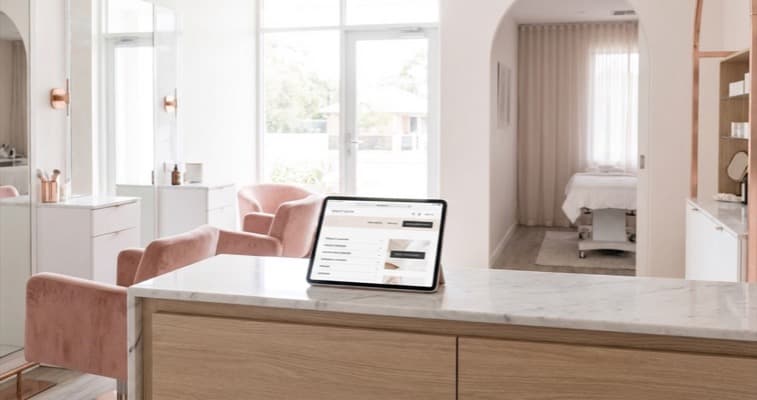
Build a website for beauty salon bookings that converts. Which pages you need, what content to include, and how to set up online booking for UK salons.
A website for a beauty salon is a set of pages designed to showcase your treatments, build trust with potential clients, and convert visitors into bookings. At minimum, it needs a treatment menu with pricing, an online booking widget, a portfolio gallery, an about page, and clear contact information, all optimised for mobile.
You've got the skills, the treatment room, and a loyal client base. But when someone searches "beauty salon near me" at 9pm on a Sunday, your Instagram bio isn't going to close that booking. A website does.
If you're thinking "I already get clients through word-of-mouth and social media," that's brilliant, and this guide isn't about replacing those channels. It's about adding one that captures the clients who search Google and gives potential clients the confidence to book, even at 10pm on a Tuesday.
This guide walks you through building a website for your beauty salon, step by step: from essential pages to the details that turn browsers into bookings. Part of our salon website and SEO series.
What You'll Learn
- The six essential pages every beauty salon website needs (and why each one matters)
- How to structure your treatment menu so clients find what they want in seconds
- Setting up online booking that handles bookings during treatment hours
- Beauty-specific pages most salon websites miss: skin concern quizzes, patch test info, aftercare
- How to make your website work on mobile (where most of your clients will see it)
Step 1: Create Your Treatment Menu Page
This is the most important page on any website for beauty salon owners. It's the page potential clients visit to answer two questions: "Do they offer what I want?" and "How much does it cost?"
What to include:
- Every treatment you offer: organised by category (facials, lashes, nails, waxing, etc.)
- Clear pricing: exact prices, not "from £30." Clients who see vague pricing often assume the worst and leave
- Treatment duration: so clients can plan their visit
- Brief description: one or two sentences explaining what the treatment involves. Not marketing copy, useful information
- Book now button: next to every treatment or category section
For example, a beauty salon offering lash services might structure it like this:
| Treatment | Duration | Price |
|---|---|---|
| Classic Lash Extensions (Full Set) | 90 min | £65 |
| Hybrid Lash Extensions (Full Set) | 105 min | £80 |
| Volume Lash Extensions (Full Set) | 120 min | £95 |
| Lash Infill (2-3 weekly) | 45 min | £35 |
| Lash Lift & Tint | 45 min | £40 |
Common mistake: Listing everything on a single page without categories. If your menu has more than 15 treatments, split it into separate pages: one for lashes, one for nails, one for facials. This helps both clients and Google find specific treatments.
Pro Tip
According to the NHBF, transparent pricing is one of the top factors UK clients consider when choosing a new salon (NHBF, 2025). If a potential client has to message you on Instagram to ask "how much for gel nails?" You've already lost them to the salon with pricing on their website.
Step 2: Set Up Online Booking
Online booking is the feature that turns a website for beauty salon visitors into actual clients. Without it, potential clients have to call during your working hours, which usually means mid-treatment when you can't answer the phone.
How to add it:
Most salon booking systems integrate directly with your website. For example, a beauty salon using Fresha can embed a booking widget on their treatment page: clients pick a service, choose a date, and confirm in under 60 seconds. Here are the main options:
- Fresha: free booking widget, embeds on any website
- Timely: professional booking system, strong salon features
- Treatwell: booking platform with built-in discovery
- Square Appointments: good for simpler setups
The booking widget typically sits as a "Book Now" button that opens a calendar where clients choose their treatment, therapist (if applicable), date, and time. Most take 10-15 minutes to set up.
Where to place booking links:
- A persistent "Book Now" button in your navigation bar (visible on every page)
- Next to each treatment on your menu page
- At the bottom of your about page
- In your contact page
If you can't tell whether your website is bringing in new clients or just keeping you busy, that's usually a sign you're missing a clear booking path. Count how many clicks it takes to go from your homepage to a confirmed booking, if it's more than three, simplify.
For more on choosing a platform, see our salon website builder and salon website template guides.
Step 3: Build Your Portfolio Gallery
Before-and-after photos are typically the most persuasive content on any website for beauty salon professionals. They let potential clients see your actual work: not stock images, not promises, but real results.
How to organise it:
- By treatment type: separate galleries for lashes, nails, facials, brows
- Latest work first: keep it current. Galleries with outdated photos suggest you're not busy
- High-quality images: good lighting, consistent backgrounds, close-up shots of the treatment area. You don't need a professional photographer: a ring light and your phone camera are enough
For instance, a nail salon might organise their gallery by design style: classic French, nail art, gel extensions, seasonal designs. A beauty studio offering facials might show skin transformation series over multiple sessions.
Avoid stock photos. According to BABTAC, clients increasingly expect authentic imagery from beauty professionals (BABTAC, 2025). Potential clients can spot stock photos immediately, and they undermine trust. One authentic before-and-after photo of your own work is typically worth more than ten professional stock images. Would you trust a beauty salon whose website showed the same generic models you've seen on five other salon sites?
Step 4: Write Your About Page
People book people, not businesses. Your about page is where potential clients decide whether they feel comfortable coming to your salon. On a website for beauty salon bookings, this is often the second most-visited page after the treatment menu.
What to include:
- Your story: why you started, what you specialise in, what you love about the work. Keep it to two or three short paragraphs
- Qualifications: training, certifications, and specialisms. For beauty treatments especially, clients want to know you're qualified
- Team photos: real photos of you and your team. Names, specialisms, and a line about each person
- Your salon: photos of the interior, the treatment rooms, the waiting area. Clients want to know what to expect before they arrive
The reality for most independent beauty salons is that clients choose you as much as they choose your services. If you're reading this thinking "but I'm not good at writing about myself," keep it simple. Three sentences about how you got started, your qualifications, and what you enjoy most about your work.
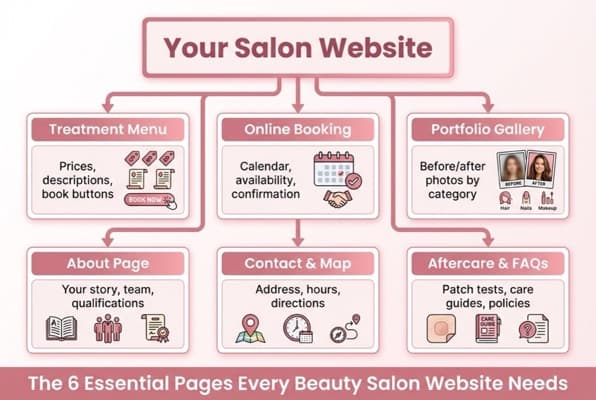
The six essential pages every beauty salon website needs
Step 5: Add Beauty-Specific Pages Most Salons Miss
This is where a website for beauty salon owners goes from basic to genuinely useful. These pages solve problems clients have before and after their appointment.
Patch test information. If you offer lash extensions, tinting, or any treatment requiring a patch test, create a dedicated page explaining the process, timing (usually 24-48 hours before the appointment), and how to book one. This reduces no-shows from clients who didn't know about the requirement.
Aftercare guides. Create aftercare pages for your main treatments: lash extension care, gel nail maintenance, post-facial skincare. These pages serve two purposes: they help clients (reducing messages asking the same questions) and they rank in Google for searches like "how to look after lash extensions."
Skin concern or treatment quiz. An interactive quiz that helps visitors choose the right facial or treatment based on their skin type or concern. For example, "Not sure which facial is right for you? Answer three questions and we'll recommend the best option." This is particularly effective for aesthetics clinics offering multiple facial treatments.
FAQ page. Answer the questions clients ask every week: parking, cancellation policy, what to wear, whether they can bring children, accessibility information. Every question you answer on your website is one fewer phone call during a treatment.
For more on what makes a great design, check out our salon website design and salon website examples guides.
Step 6: Make It Work on Mobile
Over 60% of local searches happen on mobile devices (Google, 2025). When building a website for beauty salon clients, that number is likely even higher: your potential clients are scrolling during their commute, on a lunch break, or in bed at 10pm. If your website doesn't work perfectly on a phone, you're invisible to most of your audience.
Mobile essentials:
- Tap-to-call button: one tap to phone you. Don't make people copy and paste your number
- Booking button visible without scrolling: the "Book Now" button should be visible the moment someone lands on your site. If you're only relying on a "Contact Us" form you'll always lose bookings to salons with one-tap booking
- Treatment menu that's easy to scan: no tiny text or tables that require horizontal scrolling
- Fast loading: compress your images. A gallery full of 5MB photos will make your site load slowly on mobile data
- Maps integration: a tappable map showing your salon location
Test your website on your own phone. Can you find your treatment menu in under five seconds? Can you book in under three taps? If not, neither can your clients.
If You Only Have 30 Minutes a Week
Building a full website for beauty salon bookings sounds like a weekend project, and honestly, with platforms like Wix and Squarespace, it can be. But if you're between a late cancellation and your next client, start with the minimum:
- Week 1 (30 min): Choose a platform (Wix or Squarespace for most salons) and pick a salon template. Don't customise anything yet, just get the structure up
- Week 2 (30 min): Add your treatment menu with prices and a booking link. This single page is the most valuable part of your website
- Week 3 (30 min): Upload five portfolio photos and write your about page (three paragraphs maximum)
- Week 4 (30 min): Add your contact details, opening hours, and a Google Maps embed. Connect your Google Business Profile and work through a local SEO checklist so new clients searching nearby can actually find you
Would you book a treatment at your own salon based on what your website shows? If the answer makes you hesitate, your potential clients are hesitating too.
FAQ
How much does a beauty salon website cost?
Most beauty salon owners spend between £10 and £30 per month on a website builder like Wix or Squarespace, which includes hosting, templates, and basic booking integration. A custom-built website from a developer typically costs £500 to £2,000+ upfront. For most independent beauty salons, a DIY website builder typically offers the strongest balance of cost, quality, and ease of updates.
What should a beauty salon website include?
At minimum: a treatment menu with pricing, online booking, a portfolio gallery of your work, an about page with qualifications and team photos, and contact information with a map. Beyond the basics, beauty-specific pages like patch test information, aftercare guides, and a skin concern quiz help clients and improve your Google rankings.
Do I need a website if I have Instagram?
Yes. Instagram is excellent for showcasing your work and engaging existing clients, but it doesn't appear in Google search results when someone searches "beauty salon near me." A website ranks in Google, holds your complete treatment menu, and lets clients book 24/7, including 10pm on a Sunday when your Instagram DMs are off. Think of Instagram as your portfolio and your website as your booking engine.
Which website builder is best for a beauty salon?
For most beauty salon owners, Wix or Squarespace typically offers the best combination of salon-specific templates, booking integration, and ease of use. Wix tends to be easier for beginners with stronger booking tools, while Squarespace offers more polished design templates. WordPress gives more flexibility but requires more technical knowledge. For how to check which builder actually takes bookings on a domain you own, see our salon website builder guide.
Weekly Action
- Check your current online presence on mobile. Search your salon name on Google using your phone. Can a new client find your treatment list, prices, and a way to book within 10 seconds? Note every friction point: those are your priorities.
- List your top five treatments. Write down the five services you want to be known for online. These become the first pages or sections to build on your website.
If you're a beauty salon owner looking for tools to strengthen your online presence, explore what Local Brand Hub offers for beauty salons.
Key Takeaway
Here's what matters most when building a website for beauty salon success:
- Your treatment menu with clear pricing is often the single most important page: it's what clients visit first and where they decide whether to book
- Online booking removes friction between interest and action: hours when you're unreachable by phone are typically lost booking opportunities
- Authentic before-and-after photos typically outperform stock images for building client trust
- Beauty-specific pages (patch tests, aftercare, skin quizzes) separate professional salons from basic listings
- Mobile-first isn't optional: most of your potential clients will see your website on a phone
- You can build a functional beauty salon website in four weeks at 30 minutes per week
Your website doesn't need to be perfect. It needs to exist, load on a phone, show your treatments with prices, and let people book.
For restaurants, salons, and local businesses
Need help with your marketing?
We help UK businesses turn social media into real results, not busywork.
Start freeGet More Marketing Tips
Practical marketing tips for UK business owners, straight to your inbox. No spam, unsubscribe anytime.
About the Author
Local Brand Hub
Empowering UK Businesses
Local Brand Hub provides comprehensive business management tools designed specifically for UK local businesses to streamline operations, automate marketing, and grow revenue.
More articlesRelated Articles
 Tutorials
Nail Salon Website: What You Need to Stand Out Online
Build a nail salon website that showcases your designs and fills your appointment book. Galleries, booking, pricing, and mobile tips for UK nail bars.
 Tutorials
Hair Salon Website: Complete Guide for UK Salons
How to build a hair salon website that books clients 24/7. Stylist portfolios, colour galleries, pricing and mobile design for UK salons.
 Marketing Tips
SEO for Beauty Salon: How to Get Found on Google
Step-by-step SEO for beauty salon owners who want to rank on Google. Covers Google Business Profile, keywords, reviews, and local citations.