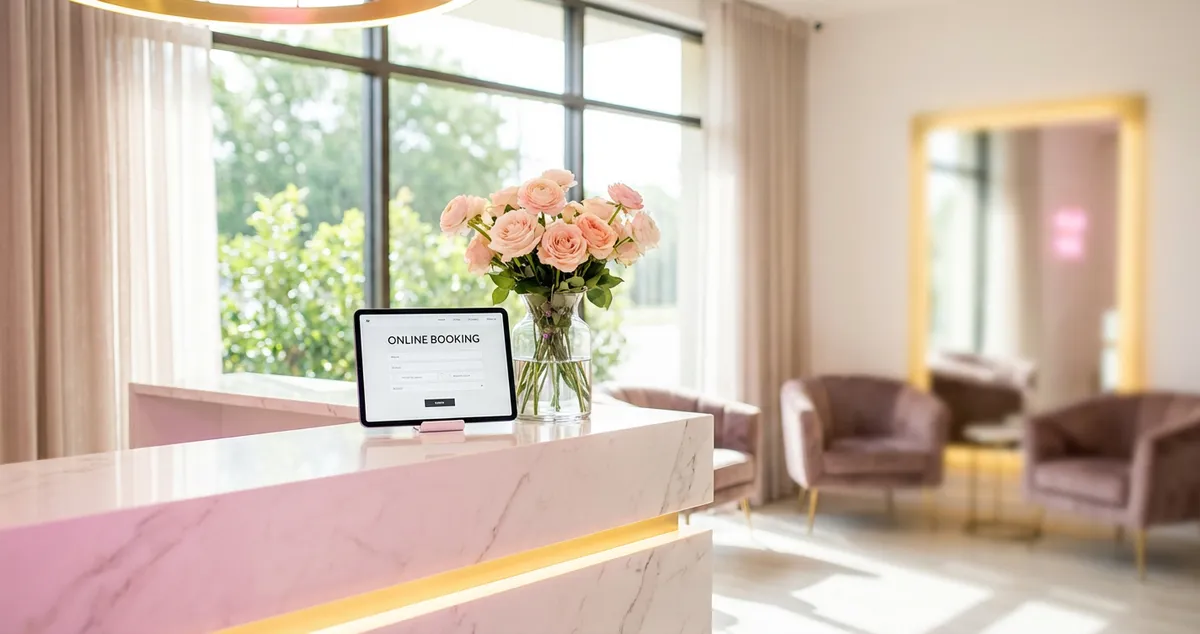
Salon website design principles that turn visitors into bookings. Colour psychology, mobile UX, booking CTAs and typography tips for UK beauty salons.
Salon website design is the process of building a website for beauty salons, nail bars, and aesthetics clinics that combines visual appeal with mobile-first layout and clear booking pathways to turn visitors into appointments. Effective salon website design balances colour, typography, mobile speed, and a prominent booking CTA.
You're scrolling through your booking app between clients. Three enquiries last month. None actually booked. Your lash work is flawless, your treatment room is immaculate, but your site takes six seconds to load and the booking button is buried under three menus. The nail bar down the road has a clean one-page site and a waitlist.
This guide covers the salon website design principles that fill treatment rooms: colour psychology, typography, mobile UX, image quality, and above-the-fold booking CTAs.
What You'll Learn About Salon Website Design
- Why colour choices shape how clients perceive your salon before they visit
- How to structure your homepage so the booking button is impossible to miss
- What mobile UX mistakes typically cost beauty salons the most appointments
- Which image strategies build trust faster than written testimonials
- A weekly action plan to improve your salon website in 30-minute blocks
Colour Psychology: Setting the Mood Before They Walk In
Colour is often the first thing a visitor registers on your salon website, before they read a word. The wrong palette can make an aesthetics clinic look like a children's party.
| Colour Family | Feeling | Best For |
|---|---|---|
| Soft pinks and mauves | Warmth, femininity, calm | Beauty salons, lash studios |
| Charcoal and gold | Premium, luxury | Aesthetics clinics, brow bars |
| White and sage green | Clean, natural, fresh | Organic or wellness-focused salons |
| Bold coral or teal | Energy, confidence | Nail bars, trend-led studios |
For example, a beauty studio targeting lunch-break appointments might use clean whites with a coral accent, signalling speed and energy. An aesthetics clinic offering premium treatments might lean into charcoal with gold accents to communicate luxury.
According to Google's UX research, high-contrast button colours, a booking CTA that stands out from the background, typically improve click-through rates compared to buttons that blend with the page (Google, 2025).
Pro Tip
According to the NHBF (National Hair & Beauty Federation), consistent branding across your website and salon interior helps build client trust before their first visit (NHBF, 2025).
For more on building a complete beauty salon website, see our guide on website for beauty salon.
Typography That Builds Trust in Salon Website Design
So your colour palette sets the mood. But what happens when visitors start reading?
The two-font rule for salon websites:
- Heading font: One expressive font for your salon name and section headings. Script fonts suit elegant brands; bold sans-serifs suit trend-focused studios.
- Body font: One readable sans-serif (Inter, Open Sans, or Lato) for treatment descriptions and prices. Readability matters more than personality in body text.
If you're reading this thinking "fonts can't matter that much," try loading your website on your phone and reading your treatment descriptions. If you squint, your clients squint too. And clients who squint don't book.
A nail salon might pair a playful script heading with a clean body font, while a brow bar offering semi-permanent treatments would likely choose something more clinical. Match the typography to the experience your clients expect when they walk through the door.
Image Quality: Your Portfolio Is Your Proof
So you've got the colours and fonts right. But here's where many salon websites fall apart. No amount of clever salon website design compensates for blurry photos. For beauty salons, images are your portfolio, doing the same job as a consultation.
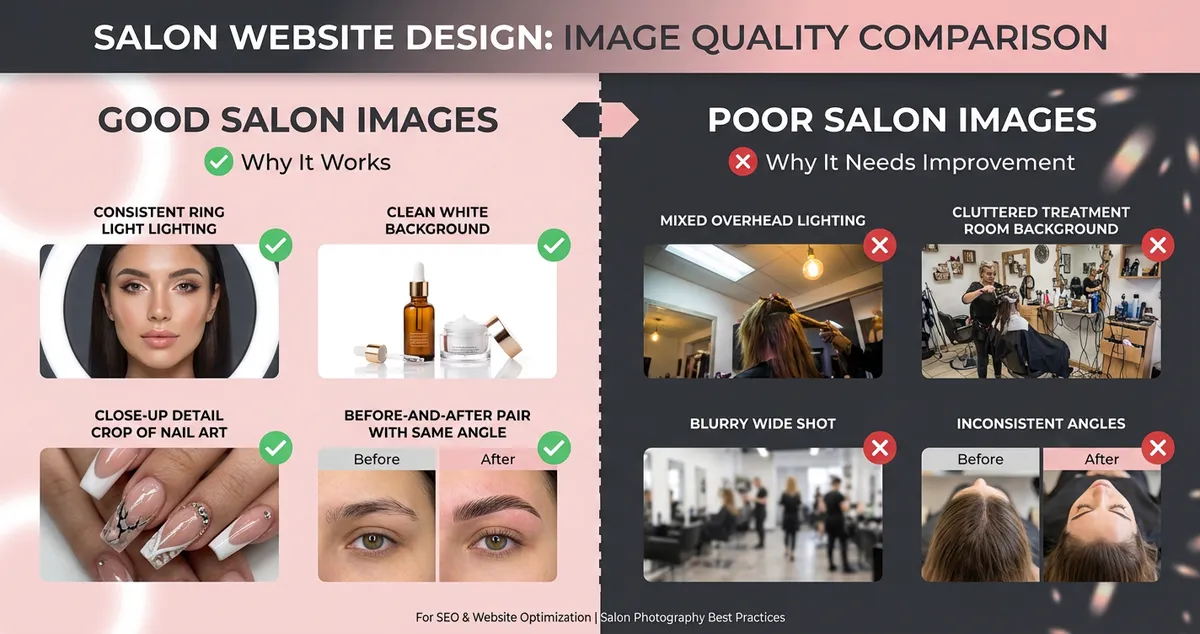
Good salon photography uses consistent lighting, clean backgrounds, and close-up detail shots
- Consistent lighting. Natural light or a ring light: pick one and use it for every photo.
- Clean backgrounds. A cluttered treatment room behind a perfect set of lashes undermines the result.
- Close-up detail shots. A tight crop on a lash line or nail design speaks louder than a wide shot.
- Before-and-after pairs. Often the most persuasive images for beauty businesses. Same angle, same lighting, same distance.
According to BABTAC (British Association of Beauty Therapy and Cosmetology), salons that regularly update their online portfolio with quality images typically report stronger enquiry rates (BABTAC, 2025).
For example, a beauty studio specialising in bridal packages might feature a curated gallery of wedding season looks, each shot consistent in style and lighting. That consistency signals professionalism before a client reads a single review. If you can't tell whether your portfolio images are helping or hurting your bookings, that's usually a sign your photography needs a refresh.
For inspiration, take a look at our roundup of salon website examples.
Mobile UX: Where Most Salon Bookings Happen
If you're only designing for desktop screens you'll always lose to competitors who prioritise the device clients actually use. For many beauty businesses, the majority of website traffic comes from mobiles, clients searching "beauty salon near me" between errands.
Five mobile UX essentials for salon website design:
- Tap-friendly booking button. Minimum 48px height, visible without scrolling.
- Click-to-call phone number. A tappable link that dials directly, not text.
- Treatment menu in HTML. Avoid PDF menus. Use text that loads instantly and is searchable by Google.
- Sticky navigation bar. A floating "Book Now" button removes friction at every stage.
- Page speed under three seconds. According to Google, 53% of mobile visitors leave a site that takes longer than three seconds to load (Google, 2025).
If your site looks great on your laptop but awkward on your phone, that's usually a sign it was built desktop-first, which is backwards for how salon clients browse. When someone is searching during a lunch break or between a late cancellation and their next appointment, every extra tap is a reason to try the salon down the road.
Would you book a treatment at your own salon based on how your website looks on your phone? If you have to zoom or tap three times to find the booking page, the answer tells you everything.
For help choosing the right platform, see our guides on salon website builders and salon website templates.
Above-the-Fold Booking CTA: The Conversion Principle
Now that your site looks right and works on mobile, here's the principle that ties everything together. Often the most important element of salon website design is what clients see before they scroll.
What belongs above the fold on a salon homepage:
- A one-line value proposition. Not "Welcome to our website", something specific like "Award-winning nail art in South London."
- A booking CTA button. Prominent, high-contrast, action-oriented. "Book Your Appointment" typically outperforms "Contact Us."
- One hero image. A single striking image of your best work. Not a carousel: carousels often slow page load.
- Availability indicator. "Next available: Tomorrow, 10am" creates urgency and removes guesswork.
For instance, a nail salon might redesign their homepage to show three elements above the fold: a hero image of their nail art, the line "Book Your Manicure: Next Available Tomorrow," and a single coral "Book Now" button. That kind of focused salon website design change takes under an hour.
If you're only treating your website as a brochure you'll always lose to competitors who treat it as a booking machine. Pretty websites that never convert are expensive decoration.
For a complete overview of how design fits into your broader online strategy, read our salon website and SEO hub guide.
Builder vs Custom: Choosing Your Salon Website Design Approach
You've got the principles. Now, how do you build the site itself?
| Factor | Website Builder (Wix, Squarespace) | Custom Design (Agency/Freelancer) |
|---|---|---|
| Cost | £10-£30/month | £1,500-£5,000+ upfront |
| Setup time | 1-2 days | 4-8 weeks |
| Booking integration | Built-in or plugin | Custom integration |
| Ongoing updates | DIY (often free) | Typically charged per update |
| Best for | New salons, tight budgets | Established salons with strong brand |
For most UK beauty salons, a website builder often provides the best starting point. For instance, a beauty therapist launching a lash business might start with Squarespace at £16/month, then invest in a custom salon website design once the team grows.
For a deeper look at marketing strategies that complement your website, see our guide to beauty salon marketing.
If You Only Have 30 Minutes This Week
In practice, when you're running between a late cancellation and your next rebooking, a full website redesign isn't happening. So start small:
- Day 1-2 (10 min): Open your website on your phone. Can you find the booking button within five seconds? If not, move it above the fold.
- Day 3-4 (10 min): Replace your three weakest portfolio images with recent, well-lit before-and-after shots from this week.
- Day 5-7 (10 min): Check your page speed at PageSpeed Insights. If it scores below 50, compress your images: that single fix often makes the biggest difference.
The reality for most independent beauty salons is that there's never a perfect week for a redesign. Small, consistent improvements to your salon website design compound faster than waiting for the perfect overhaul. If you're thinking "I don't have time for this," you're not alone, but even one change per week adds up.
If you're a beauty salon owner looking for tools to strengthen your online presence, LocalBrandHub for beauty salons can help you manage your website, marketing, and local visibility in one place. Take a look at the plans and pricing to find the level that suits your salon.
FAQ
What makes a good salon website design?
A good salon website design combines visual appeal with clear functionality: a colour palette that reflects your brand, quality portfolio images, mobile-friendly layout, fast page speed, and a booking button visible without scrolling. Effective salon websites treat design as a conversion tool, not just aesthetics.
How much does salon website design cost in the UK?
Website builders like Wix or Squarespace typically cost £10-£30 per month with salon templates included. A custom-designed salon website from a UK agency typically ranges from £1,500 to £5,000 or more, depending on features like online booking integration and bespoke design.
Should I use a website builder or hire a designer for my salon?
For most independent beauty salons and nail bars, a website builder often offers a strong balance of cost, speed, and professional results. Consider hiring a designer when your brand needs fully bespoke visuals or complex custom functionality.
How often should I update my salon website?
Update portfolio images monthly, check your treatment menu quarterly, and review your overall salon website design annually. Stale content, particularly outdated photos or incorrect prices, erodes trust. Wedding season, prom season, and Christmas party bookings are natural triggers for seasonal updates.
Key Takeaway
Key Takeaways
- Colour psychology shapes client perception before they read a word; choose your palette intentionally
- Two fonts maximum: one expressive heading font, one readable body font
- Portfolio images need consistent lighting, clean backgrounds, and close-up detail
- Mobile UX is where most bookings happen; test your site on a phone, not a desktop
- The booking CTA belongs above the fold, in high contrast, with action-oriented text
- Website builders often suit most beauty salons well; custom builds suit established brands
- Small weekly improvements outperform waiting for a complete redesign
Good salon website design isn't about making your site prettier. It's about removing every obstacle between a stranger and a booking.
For restaurants, salons, and local businesses
Need help with your marketing?
We help UK businesses turn social media into real results, not busywork.
Start freeGet More Marketing Tips
Practical marketing tips for UK business owners, straight to your inbox. No spam, unsubscribe anytime.
About the Author
Local Brand Hub
Empowering UK Businesses
Local Brand Hub provides comprehensive business management tools designed specifically for UK local businesses to streamline operations, automate marketing, and grow revenue.
More articlesRelated Articles
 Marketing Tips
SEO for Beauty Salon: How to Get Found on Google
Step-by-step SEO for beauty salon owners who want to rank on Google. Covers Google Business Profile, keywords, reviews, and local citations.
 Marketing Tips
Salon Website Examples: What Good Looks Like
See salon website examples that convert visitors into bookings. Annotated examples covering beauty salons, hair salons, nail bars and mobile design.
 Marketing Tips
Salon Website Builder: Which One Actually Takes Bookings
Which salon website builder actually takes bookings? A UK guide to Wix, Squarespace, GoDaddy and WordPress, and what the plan price leaves out.