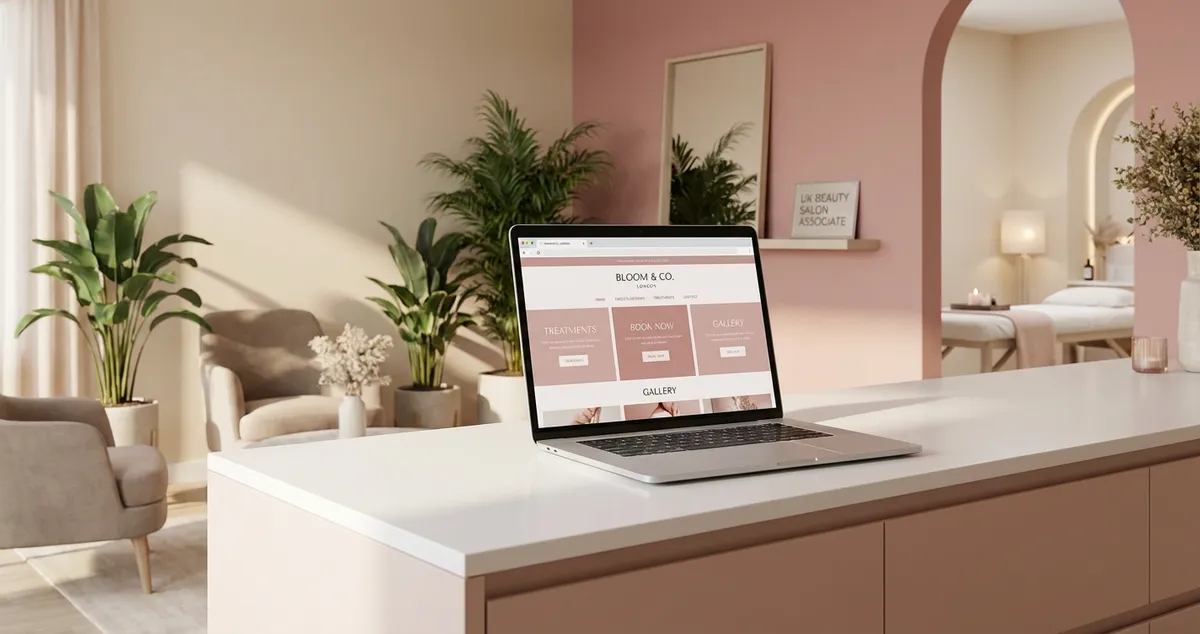
Compare the 7 best salon website templates for UK beauty salons. Reviewed for mobile responsiveness, booking integration, and ease of customisation.
A salon website template is a pre-designed website layout built for beauty businesses, featuring treatment menus, online booking integration, portfolio galleries, and mobile-responsive design. The best templates let you launch a professional site in hours rather than weeks, with built-in features that convert visitors into bookings.
You're booked solid all week, your rebooking rate is strong, and your treatment room looks immaculate. Then a potential client searches "beauty salon near me" on a Sunday evening, and finds your competitor instead. Why? Because they have a website that loads on a phone and takes bookings at 10pm. You don't.
If you're thinking "I don't have time to learn web design", you're not alone. Most beauty salon owners trained in treatments, not technology. That's exactly why the right salon website template matters. It does the design work for you.
This guide compares the best salon website templates across Wix, Squarespace, and WordPress, evaluated on the features that matter for UK beauty salons.
Read the full hub guide: Salon Website and SEO
What You'll Learn
- Which salon website templates offer the strongest booking integration for beauty businesses
- How each platform compares on mobile responsiveness, portfolio display, and customisation
- The best free and paid options across Wix, Squarespace, and WordPress
- What to look for in a salon website template before committing to a platform
- A default recommendation for most UK beauty salon owners
What Makes a Good Salon Website Template
So you've decided you need a website. But before choosing a template, you need to know what separates a salon-ready template from a generic one. Not all website templates are built for beauty businesses. A generic business template might look polished, but if it doesn't handle online booking, treatment galleries, or mobile-first design, it's creating work rather than saving it.
Here are the four features every salon website template should deliver:
- Mobile responsiveness: over 60% of local searches happen on mobile. Your template must look and function perfectly on a phone without any manual adjustments
- Booking integration: the template should support embedded booking widgets from systems like Fresha, Timely, or the platform's native booking tool. If a client has to leave your website to book, that's usually a sign the template isn't built for service businesses
- Portfolio display: before-and-after galleries, treatment showcases, and image grids are essential. Authentic imagery is one of the strongest trust signals for beauty professionals
- Customisation: you need to adjust colours, fonts, and layout without touching code. A template that locks you into a rigid structure will make your salon look identical to every other business using the same theme
See also: Salon Website Design | Salon Website Examples
Salon Website Template Comparison: Platform by Platform
With those criteria clear, here's how the three leading platforms compare for beauty salon owners looking for the right template.
Comparison Table
| Feature | Wix | Squarespace | WordPress (Starter Theme) |
|---|---|---|---|
| Salon-specific templates | 15+ beauty/salon templates | 5-8 salon-suitable templates | 20+ via ThemeForest/Starter |
| Mobile responsiveness | Excellent (auto-optimised) | Excellent (all templates responsive) | Good (theme-dependent) |
| Booking integration | Wix Bookings (built-in) | Acuity Scheduling (built-in) | Plugin-based (Amelia, Bookly) |
| Portfolio/gallery | Strong gallery app + grids | Beautiful gallery layouts | Plugin-dependent |
| Customisation | Drag-and-drop, full control | Structured editor, design-led | Full control (steeper learning curve) |
| Pricing | Free plan available; £13-30/mo | £12-33/mo (no free plan) | Free themes + hosting from £3/mo |
| Ease of use | Beginner-friendly | Intermediate | Advanced |
| SEO tools | Built-in SEO Wiz | Strong built-in SEO | Excellent with plugins (Yoast/RankMath) |
1. Wix Salon Website Templates
With the comparison table as your reference, let's break down each platform in detail. Wix offers one of the largest selections of salon website templates, with over 15 designs built specifically for beauty salons, nail bars, and spas. The drag-and-drop editor means you can rearrange sections, swap images, and add booking buttons without any technical knowledge.
Standout features for beauty salons:
- Wix Bookings is built into the platform, no third-party plugins needed. Clients can book treatments, choose a therapist, and pay online directly from your template
- Portfolio galleries with grid, slider, and masonry layouts specifically designed for before-and-after images
- Mobile editor lets you customise the mobile version separately, so your salon website template looks perfect on every screen size
For example, a nail salon using the "Beauty Salon" template can have a fully functional booking site live within an afternoon. Add your treatment list, upload a few portfolio photos, connect Wix Bookings, and you're taking appointments by evening.
Often best for: Solo beauty therapists and small salons who want the quickest path from nothing to a professional booking website. If you're between a late cancellation and your next client and want to get something live fast, Wix is typically the strongest starting point.
Pricing: Free plan available (with Wix branding). Premium plans from £13/month for a custom domain and no ads.
2. Squarespace Salon Website Templates
If Wix is the practical choice, Squarespace is the design-led option. Every template is visually polished out of the box, which makes it a strong choice for beauty salons where aesthetics matter as much as functionality.
Standout features for beauty salons:
- Acuity Scheduling is included on business plans, a professional booking system that handles deposits, cancellation policies, and automated reminders. This is particularly valuable for reducing no-shows
- Gallery sections are built for visual businesses. The portfolio layouts showcase treatment work with clean, elegant presentation
- Consistent design quality: unlike platforms where template quality varies wildly, Squarespace maintains a high design standard across all templates
A beauty studio specialising in aesthetics and facials might choose Squarespace specifically for its image-forward design. The clean layouts let your portfolio photography do the talking, which is often more persuasive than any marketing copy.
Often best for: Beauty salons and aesthetics clinics where visual presentation is a priority and you want a polished, professional look without hiring a designer.
Pricing: From £12/month (Personal) to £33/month (Business with Acuity Scheduling). No free plan, but 14-day free trial available.
3. WordPress Salon Website Templates
Both Wix and Squarespace simplify the process, but what if you need more control? WordPress powers roughly 43% of all websites globally, and its flexibility makes it arguably the most customisable option for salon owners who want full control.
Standout features for beauty salons:
- Thousands of salon themes available through ThemeForest, starter template libraries, and free directories, ranging from £0 to £59
- Plugin ecosystem: booking plugins like Amelia (from £59/year) or Bookly handle everything from treatment scheduling to client management
- SEO advantage: WordPress with RankMath or Yoast generally offers more granular SEO control than most website builders, which can make a difference for competitive local search terms
The trade-off is complexity. WordPress requires separate hosting (from £3/month with providers like SiteGround), theme installation, plugin management, and occasional updates. If your salon website looks outdated within six months because nobody is managing updates, that's usually a sign WordPress isn't the right fit for your situation. If you're comfortable with technology or have someone who can help with setup, the long-term flexibility is worth the initial learning curve.
For instance, a beauty salon with multiple locations might choose WordPress because it handles multi-location pages, separate booking systems per branch, and complex treatment menus more effectively than drag-and-drop builders.
Often best for: Established beauty salons with multiple locations, large treatment menus, or specific functionality requirements. Also strong for salon owners who plan to invest in SEO and content marketing long-term.
Pricing: Free themes available. Premium themes £30-59. Hosting from £3/month. Booking plugins from £59/year.
How to Choose the Right Salon Website Template
You've seen the platforms. But which one is right for your salon? If you're only choosing templates for looks you'll always lose to competitors who choose based on functionality. A beautiful template that doesn't support booking, loads slowly on mobile, or can't display your portfolio properly is costing you clients.
Ask these questions before committing:
- Does it integrate with your booking system? For example, a nail bar already using Fresha should check that the template supports embedded booking widgets; otherwise you'll need clients to leave your site to book, which typically drops conversion rates
- Does the mobile version work without extra tweaks? Load the template demo on your phone. Can you find the treatment menu and book in under three taps?
- Can you update it yourself? After the initial setup, you'll need to add new treatments, update prices, and refresh portfolio photos. For instance, a beauty salon launching a new facial package should be able to add it to the menu in minutes, not days
- Does it support your growth? If you plan to add a second location, start a blog, or sell products online, make sure the platform can handle it
Ask yourself: would you book a treatment at a salon whose website took 30 seconds to load and didn't show prices? Neither would your clients.
Pro Tip
The NHBF recommends that salon websites include transparent pricing, online booking, and professional imagery as minimum standards. Use this as your baseline when evaluating any salon website template.
See also: Website for Beauty Salon | Beauty Salon Marketing
Default Recommendation: Which Salon Website Template to Pick
So which platform deserves your time? For most UK beauty salon owners, Wix typically offers the best combination of salon-specific templates, built-in booking, and ease of use. It's the fastest path from no website to a professional booking page, and the free plan lets you test before committing.
For example, a solo lash technician who needs a simple site with a treatment menu, before-and-after gallery, and online booking could have a Wix site live in a single afternoon, no developer, no monthly fee to start.
If visual design is your top priority and you're willing to pay from day one, Squarespace is often the stronger choice, particularly for aesthetics clinics and beauty studios where imagery drives bookings.
Choose WordPress only if you have technical confidence (or support) and need flexibility beyond what builders offer. The reality for most independent beauty salons is that a Wix or Squarespace site launched this week is more valuable than a perfect WordPress site that takes three months to build. Whichever template you pick, keeping the marketing behind it consistent is what fills the treatment room: compare the plans to see how Local Brand Hub fits alongside your new site.
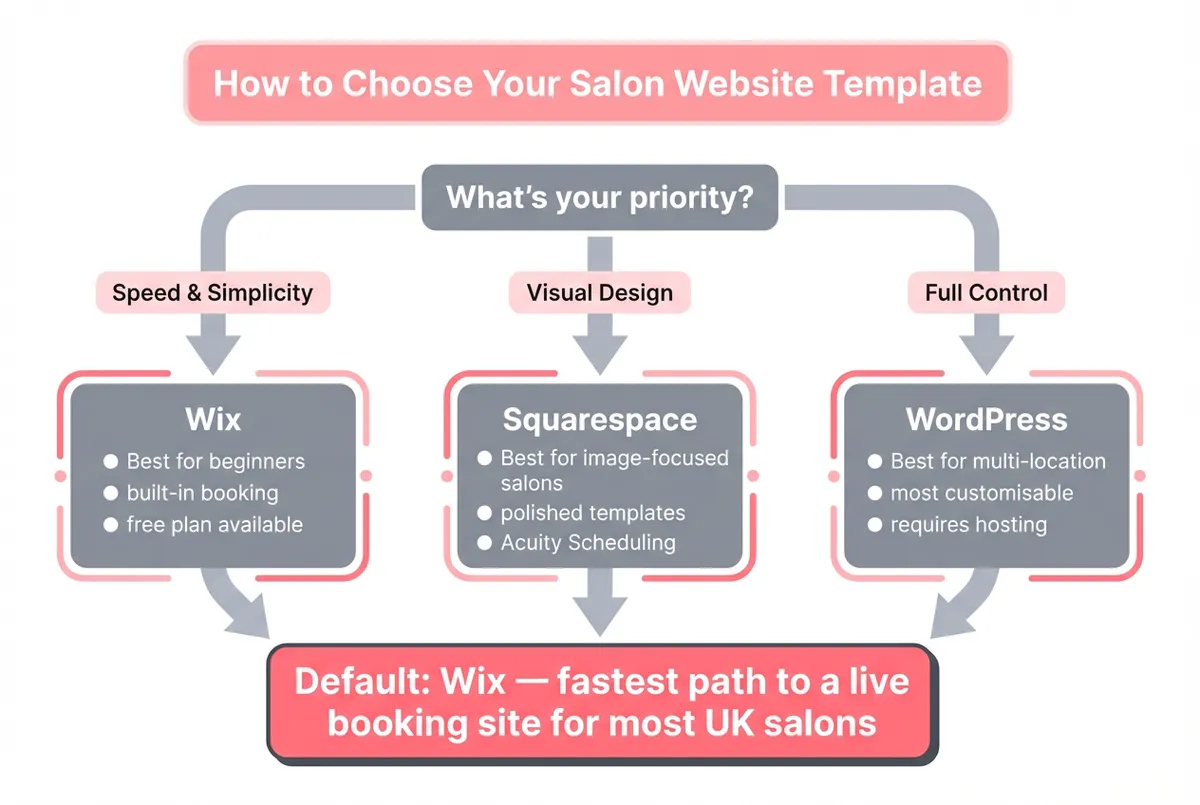
Salon website template decision flowchart
If You Only Have 30 Minutes a Week
You've picked your platform. Here's the practical bit. Getting a salon website template live doesn't require a full weekend. You can build a functional booking website in four focused sessions:
- Week 1 (30 min): Sign up for Wix (free plan). Browse the "Beauty & Wellness" salon website templates. Pick one and claim your salon name as the URL
- Week 2 (30 min): Add your top 10 treatments with prices and durations. Connect Wix Bookings or embed your existing Fresha/Timely link
- Week 3 (30 min): Upload five of your best before-and-after photos. Write three sentences for your about section: who you are, what you specialise in, and your qualifications
- Week 4 (30 min): Add contact details, opening hours, and a Google Maps embed. Test the booking flow on your phone. Share the link on your Instagram bio
Would you book a treatment at your own salon based on what your current website looks like? If the answer makes you pause, that's exactly why spending 30 minutes this week on a proper salon website template is worth it.
FAQ
What is the best free salon website template?
Wix offers the strongest free salon website templates for UK beauty salons. The free plan includes access to all beauty and wellness templates, the drag-and-drop editor, and basic booking functionality. The trade-off is Wix branding on your site and a Wix subdomain rather than a custom URL. For a professional look, upgrading to a premium plan (from £13/month) removes the branding and lets you use your own domain.
Can I use a salon website template with my existing booking system?
Yes. Most salon website templates on Wix, Squarespace, and WordPress support embedded booking widgets from third-party systems like Fresha, Timely, and Treatwell. You typically add the widget as an embedded code block or a direct link. If your current booking provider offers an embeddable widget, it will usually work with any well-built template.
How do I make my salon website template look unique?
Start by replacing all placeholder content with your own photography, treatment descriptions, and brand colours. Upload genuine before-and-after photos rather than stock images. Adjust fonts and colours to match your salon branding. Add your logo, write your about page in your own voice, and include specific treatment details. Most clients will never see the original template; your content is what makes it yours.
Do I need a salon-specific template or can I use a general business template?
A salon-specific template typically saves significant setup time because it already includes treatment menu layouts, gallery sections, and booking integration. A general business template can work, but you'll spend more time adapting it, adding gallery pages, configuring booking widgets, and restructuring the layout for service-based content. For most beauty salon owners, starting with a salon-specific template is usually the more practical choice.
If you run a beauty salon and want help getting your online marketing sorted, Local Brand Hub for beauty salons is built to help businesses like yours grow their local presence.
Key Takeaway
Key Takeaways
- The right salon website template saves weeks of design work while giving you a professional online presence that converts visitors into bookings
- Wix, Squarespace, and WordPress each serve different salon needs: choose based on booking integration, mobile design, and your technical comfort level
- Mobile responsiveness and built-in booking are typically essential features. A template without them is often not suitable for a modern beauty salon
- Authentic portfolio galleries with real treatment photos build more trust than stock imagery
- For most UK beauty salon owners, Wix often provides the fastest, most practical route to a live booking website
- You can have a functional salon website live in four weeks at 30 minutes per week
The best salon website template is the one you actually launch. A simple, functional site that takes bookings is worth infinitely more than a perfect design that stays in draft forever.
For restaurants, salons, and local businesses
Need help with your marketing?
We help UK businesses turn social media into real results, not busywork.
Start freeGet More Marketing Tips
Practical marketing tips for UK business owners, straight to your inbox. No spam, unsubscribe anytime.
About the Author
Local Brand Hub
Empowering UK Businesses
Local Brand Hub provides comprehensive business management tools designed specifically for UK local businesses to streamline operations, automate marketing, and grow revenue.
More articlesRelated Articles
 Marketing Tips
SEO for Beauty Salon: How to Get Found on Google
Step-by-step SEO for beauty salon owners who want to rank on Google. Covers Google Business Profile, keywords, reviews, and local citations.
 Marketing Tips
Salon Website Builder: Which One Actually Takes Bookings
Which salon website builder actually takes bookings? A UK guide to Wix, Squarespace, GoDaddy and WordPress, and what the plan price leaves out.
 Marketing Tips
Salon Website and SEO: Complete Guide for UK Salons
How to build a salon website and SEO strategy that ranks on Google and fills your diary. Design, templates, builders, and local SEO for UK salons.