
The best website builder for florists, compared for UK flower shops: Squarespace, Shopify, Wix and WordPress weighed up on galleries, ordering and budget.
The best website builder for florists is the one that shows your flowers beautifully and takes orders without a developer. For most UK flower shops that's Squarespace for a showcase-and-enquiry site or Shopify for serious online selling. The right pick depends on whether you mainly take orders or bookings.
You're between deliveries, twelve browser tabs open, every platform claiming to be perfect for "small businesses." Sound familiar? The reality for most florists is that any of the big builders can work, so the real question isn't which is best overall, but which fits how you actually sell. 8 min read.
What You'll Learn
- The best website builders for florists, compared head to head
- Which platform suits ordering vs enquiry-led florists
- Realistic monthly costs for a UK flower shop
- How to choose without wasting a weekend on the wrong one
- The platform mistakes that trap florists in a site they outgrow
Related: Florist Website: A UK Owner's Guide
The Florist Website Builders, Compared
First, the shortlist. Four platforms cover almost every florist, and they split neatly by what you need them to do.
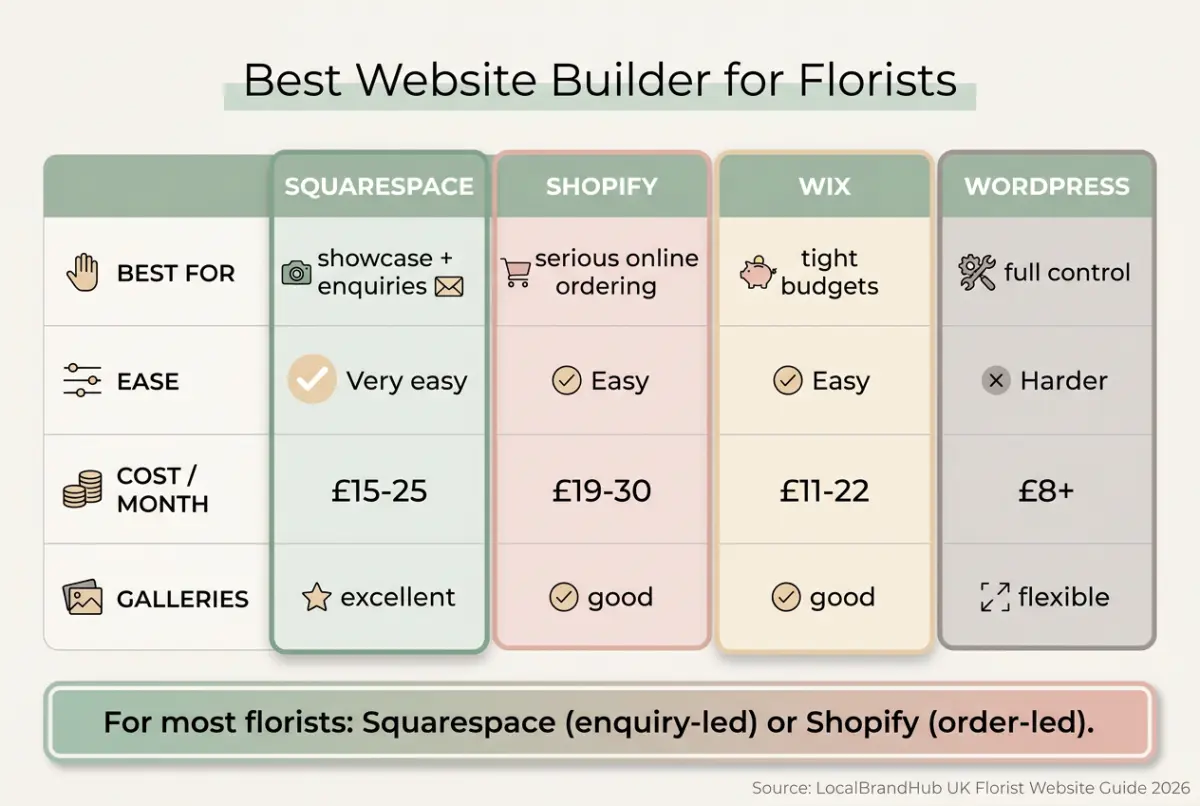
| Builder | Best for | Ease | Rough cost/mo |
|---|---|---|---|
| Squarespace | Beautiful showcase + enquiries | Very easy | £15-£25 |
| Shopify | Serious online ordering | Easy | £19-£30 |
| Wix | Tight budgets, flexibility | Easy | £11-£22 |
| WordPress | Full control (more work) | Harder | £8+ |
Rule of thumb only: these suit most florists, but your trade decides: a wedding studio and a same-day high-street shop want different things, so weigh ordering against showcasing.
For example, a wedding-led florist in Cornwall chose Squarespace for its gallery and a simple enquiry form, while a busy high-street shop nearby picked Shopify to take 30+ online orders a week. Both made the right call for their trade.
Squarespace vs Shopify: The Real Decision
Next, the choice most florists actually agonise over. It comes down to one question: are you taking orders or enquiries?
- Squarespace wins on looks and simplicity. Gorgeous galleries, easy drag-and-drop pages, and enough shop features for steady orders. Ideal for wedding, event and bespoke florists who sell on visual impact and take enquiries. You can have a genuinely beautiful five-page site live in a weekend, and the templates are designed so flowers photograph well against clean layouts.
- Shopify wins on selling. If online ordering is your engine (same-day bouquets, subscriptions, delivery zones, click-and-collect), its checkout and product tools are stronger and built for volume. It handles 50 orders on Valentine's Day as easily as five on a Tuesday, with stock limits, delivery rules and abandoned-cart recovery built in.
If you can't tell which camp you're in, look at last month's orders. If most were bespoke quotes and consultations, lean Squarespace. If most were "send this bouquet to this address," lean Shopify. That's usually a sign of where your website should focus.
For example, a florist doing 80% weddings found Squarespace let them show a stunning portfolio and take enquiries with zero fuss, while a same-day-delivery shop two towns over needed Shopify's checkout to handle 40-plus orders in a Mother's Day weekend without the website buckling. Same trade, two right answers, because they sell differently.
Related: Florist Website Design: A UK Guide
If you're reading this overwhelmed by options and worried about choosing wrong, you're not alone. Most florists feel that, and the truth is several platforms will serve you well.
What About Wix and WordPress?
Now that the two front-runners are clear, the other two have their place.
Wix is the budget-friendly all-rounder: flexible and cheap, from around £11 a month, though the editor can get fiddly the more you add. It suits a florist who wants more layout freedom than Squarespace and isn't fussed about pixel-perfect templates. For example, a small market-stall florist used Wix to get a simple, cheap site live for under £15 a month and grew into it slowly.
WordPress with WooCommerce gives you total control and low core costs: the software is free, and you only pay for hosting from around £8 a month plus any plugins. But it's genuinely more work to build, secure and maintain, closer to a project than a weekend. Unless you enjoy the tinkering or have someone who does, most florists are better served elsewhere.
Why this matters: the "most powerful" platform is worthless if you never finish building it. A florist who launches a simple Squarespace site in a weekend beats one with a half-built WordPress site nine months later.
For the design side once you've chosen, see our florist website design guide; for the shop setup, the online shop guide.
Can I Switch Platforms Later?
Now, the worry that keeps florists stuck: "what if I pick wrong?" The honest answer is that switching is possible but a faff, so it's worth choosing for where you'll be in two years, not just today.
You can always move: export your content, rebuild on the new platform, and redirect your old pages so you keep your Google ranking. But it costs a weekend you'd rather spend conditioning stems. For example, a florist who started on a free Wix plan and grew to 30 orders a week ended up rebuilding on Shopify within a year, work they'd have skipped by starting with ordering in mind.
The practical rule: if you can see yourself taking real online orders within a year, start on a platform built for it. If you're enquiry-led and likely to stay that way, a showcase builder is the cheaper, simpler home for the long run.
Features That Actually Matter for a Florist
Now that you know the contenders, here's what to actually check, because the best website builder for florists isn't the one with the longest feature list, it's the one that handles flowers well. A platform can be brilliant for a clothing shop and clumsy for a florist.
- Gallery quality. Flowers sell on looks, so the platform must show big, fast, beautiful images. Squarespace leads here; Wix is flexible; a poorly set-up WordPress site can drown in slow photos.
- Delivery rules by postcode. You sell to a local radius, not the nation. Shopify handles zones, fees and minimum orders cleanly; on simpler builders you may bolt this on manually.
- Same-day cut-off times. A platform that lets you stop same-day orders at 1pm saves your afternoons. Order-led builders do this natively.
- Subscriptions. If you want recurring weekly or monthly flowers, a brilliant florist revenue stream, Shopify's subscription apps make it simple.
- Local SEO basics. You need editable page titles, headings and a Google Business Profile link. All four platforms allow this, but check it's not buried. Then work through a local SEO checklist so your shop shows up when locals search for flowers nearby.
- Mobile performance. Most flower orders happen on phones, so test the mobile checkout before you commit.
For example, a florist who chose purely on price picked a cheap plan with no delivery-zone control and spent months manually refunding out-of-area orders, a feature gap that cost far more than the few pounds saved. Match the platform to the way flowers actually sell, not to a generic feature list.
Related: How to Set Up a Florist Online Shop
How Much Should a Florist Spend?
However, don't let price alone decide. The difference between the platforms is a few pounds a month, far less than a single lost wedding order, which can be £300 or more. Most florists land between £15 and £30 a month all in, including hosting, plus roughly £10 a year for a domain.
A worked example: a florist on Squarespace at £20 a month pays £240 a year. If that site wins just two extra wedding enquiries a year, it has paid for itself many times over. That's the right way to think about the cost, not as an expense to minimise, but as a tool that should earn. Spend the saved energy on photography and ordering, not on chasing the cheapest plan. A £15 site that takes orders beats a free one that doesn't.
Florist Website Platform Mistakes to Avoid
Knowing what to avoid saves you a painful rebuild. The biggest mistake is choosing on features you'll never use instead of how you actually sell.
- Over-buying. If you're only picking the most powerful platform you'll always lose months you should have spent taking orders.
- Under-buying. A free plan with no proper checkout costs you every online sale.
- Ignoring mobile. Whatever you choose, it must look perfect on a phone first.
- No exit plan. Pick a platform you can grow with, not one you'll fight to leave.
The question isn't which builder has the most features. It's which one gets your flowers selling fastest.
Frequently Asked Questions
What is the best website builder for a florist?
For most UK florists, Squarespace is best for a beautiful showcase with enquiries and steady orders, while Shopify is best if online ordering is your main engine. Wix suits tight budgets and WordPress suits those wanting full control with more setup effort.
Is Squarespace or Shopify better for florists?
Squarespace if you're enquiry-led (weddings, events, bespoke) and want the prettiest site with least effort; Shopify if you're order-led (same-day bouquets, subscriptions) and need stronger checkout and delivery tools. Check last month's orders to decide.
How much does a florist website builder cost?
Most florists pay £15 to £30 a month all in, including hosting. The platforms are close on price, so choose on fit rather than saving a few pounds: a site that takes orders easily pays for itself fast.
Can I build a florist website myself?
Yes, Squarespace, Shopify and Wix are all no-code and designed for non-technical owners. Most florists can launch a solid site over a few quiet afternoons. WordPress is the exception, needing more technical setup.
Do I need Shopify if I only take wedding enquiries?
No, if your work is bespoke and enquiry-led, Squarespace (or even Wix) is simpler and cheaper, because you don't need a full checkout. Reserve Shopify for when online ordering of ready-made products becomes a real part of your trade.
Which website builder is cheapest for florists?
Wix and WordPress have the lowest entry prices (from around £8-£11 a month), but "cheapest" isn't the goal: a slightly dearer platform that takes orders easily earns far more than it costs. Choose on fit first, price second.
Your Next Step
Choosing a builder is a one-time decision you shouldn't overthink: pick the fit, then start selling.
Weekly Action
Once you've chosen, work this builder checklist as you set up:
- Confirm the platform matches how you sell (orders vs enquiries)
- Test the checkout or enquiry form on your phone
- Add your own photography, not the template's stock
- Set your delivery area and same-day cut-off
- Connect your Google Business Profile
If you only have 30 minutes a week, do this: sign up for a free trial of the platform that fits your trade and build just your homepage. That's enough; momentum beats endless comparison.
Ask yourself: are you picking a platform to sell flowers or to admire its features? If it's the features, step back. Turning whichever builder you choose into steady local orders is the weekly, done-for-you marketing LocalBrandHub handles for independent florists.
If you run a florist and want to see how Local Brand Hub can support your marketing, explore our florist marketing tools.
For restaurants, salons, and local businesses
Need help with your marketing?
We help UK businesses turn social media into real results, not busywork.
Start freeKey Takeaway
Key Takeaways: Best Website Builder for Florists
The best website builder for florists is the one that fits how you sell and that you'll actually finish, not the most powerful on paper.
- Squarespace for showcase-and-enquiry florists; Shopify for order-led shops.
- Wix for tight budgets; WordPress for full control with more work.
- Cost is close (£15-£30/mo): choose on fit, not price.
- Mobile-first, always, whatever you pick.
- Finished and selling beats powerful and half-built.
Get More Marketing Tips
Practical marketing tips for UK business owners, straight to your inbox. No spam, unsubscribe anytime.
About the Author
Local Brand Hub
Empowering UK Businesses
Local Brand Hub provides comprehensive business management tools designed specifically for UK local businesses to streamline operations, automate marketing, and grow revenue.
More articlesRelated Articles
 Tutorials
How to Set Up a Florist Online Shop: A UK Guide
How to set up a florist online shop in the UK: a step-by-step guide to products, payments, delivery zones and same-day cut-offs that win local orders.
 Business Growth
Office Flower Subscriptions: Build a Round That Pays
Office flower subscriptions are a delivery round, not a bouquet. How UK florists set the cadence, price the route and deal with last week's flowers.
 Business Growth
Florist Website Mistakes: 9 That Cost UK Shops Orders
The florist website mistakes that quietly lose UK flower shops orders to the chains: nine common errors, why they happen, and the simple fix for each one.