
Compare UK cafe POS systems: Square, Clover, Toast costs and fees explained. Find the best system for your coffee shop with our practical comparison guide.
You're making great coffee. Customers keep coming back. But every Saturday morning, the queue snakes past the door, orders get muddled, and you're scribbling on notepads while someone waits for change. The difference often comes down to one thing: a proper cafe POS system.
Info
Related: Our restaurant POS system guide covers broader hospitality needs, while this article focuses specifically on UK cafes and coffee shops.
The right system handles payments, tracks inventory, manages orders, and gives you data for smarter decisions. For independent coffee shops, it turns Saturday chaos into Saturday profits. This guide covers everything UK cafe owners need to know about choosing and setting one up.
What You'll Learn in This Guide
- The best options for UK cafes - with specific recommendations by cafe type
- Real costs - software, hardware, and transaction fees broken down
- Free and low-cost options - what's genuinely free and what the catch is
- Which system has the lowest fees - comparing Clover, Square, Toast, and others
- Small cafe recommendations - when you don't need enterprise features
What is the Best POS System for a Cafe?
First, let's define what we're looking for. The best choice matches your needs to the right software features and hardware setup. The "best" system depends on your cafe's specific needs.
Key factors to consider:
- Your cafe's size and transaction volume
- Whether you serve food or just drinks
- How much flexibility you need with payment processors
Square Restaurant POS typically ranks among the best overall options for many UK cafes due to its ease of use, free software plan, and customer-facing display features.
If you're thinking "I just need something simple that works" - you're not alone. Many cafe owners tend to want reliability over features. According to a 2025 Hospitality Tech study, integration with other systems is often a top factor driving POS purchases.
Quick Comparison: Top POS Systems
| System | Best For | Starting Cost |
|---|---|---|
| Square | Small-medium cafes, retail + food | Free software, low hardware |
| Clover | Payment processor flexibility | Free starter plans |
| Toast | Larger cafes with food prep | Paid plans, financing available |
| TouchBistro | Customer loyalty focus | Mid-range pricing |
| Lightspeed | Complex inventory management | Mid-range pricing |
Recommendations by Cafe Type
Now that we've covered the basics, let's look at which system works best for different cafe setups.
Just drinks and simple snacks: Square's free plan handles this well. The interface is clean, order entry is fast, and you can add retail items like coffee beans without switching systems. For example, a small espresso bar in Manchester might use Square's basic reader (£120) and process 80 transactions daily without paying any software fees.
Drinks plus made-to-order food: Consider Toast. Its kitchen display system helps keep the baristas and the kitchen in sync, and offline mode means a Wi-Fi dropout during the Saturday rush typically won't stop you taking orders. A brunch cafe serving both coffee and cooked breakfasts would benefit from Toast's order routing.
High-volume with long queues: Clover's handheld Flex device (around £600) lets staff take orders anywhere in the queue. For instance, a busy city-centre cafe doing 200+ transactions during the morning rush could cut queue times significantly with mobile ordering.
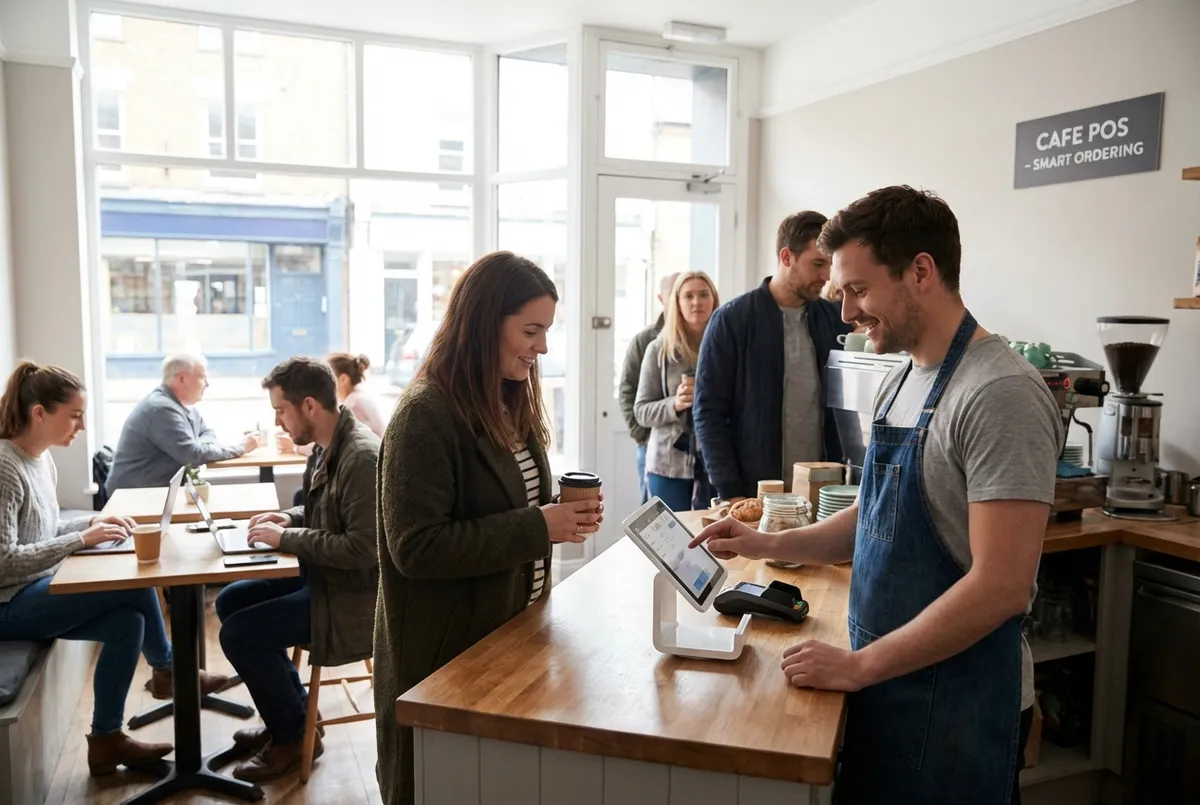
Diagram comparing cafe POS system features and pricing tiers
How Much Does a POS System Cost for a Cafe?
Now that you understand the options, let's talk money. So you've decided you need one, but what will it actually cost?
Expect to pay £40-£240 per month for software, plus £1,200-£3,200 in upfront hardware costs, with transaction fees adding 2.3%-3.5% per card payment.
If you're reading this thinking "that's quite a range" - you're right. The total cost comes from three things:
- Software subscriptions
- Hardware purchases
- Ongoing transaction fees
Here's what drives the actual cost.
Software Costs
Software subscriptions typically range from free to several hundred pounds monthly, depending on features:
- Basic tier: Order entry, basic reporting, simple inventory
- Standard tier: Loyalty programmes, advanced inventory, staff management
- Advanced tier: Multiple locations, detailed analytics, integrations
Many cafes typically fall somewhere in the standard tier. If you're only serving drinks, basic might be enough. If you've got complex food prep and multiple staff, you'll want the extra features.
Hardware Costs
Moving from software to hardware, the one-time hardware investment varies significantly by setup:
- Basic setup (tablet + reader + printer): under £1,000
- Standard setup (countertop terminal + accessories): £1,000 to £2,000
- Full setup (multiple terminals + kitchen display): over £2,000
For example, a small neighbourhood cafe might start with Square's basic reader plus an iPad they already own, while a busier operation with food service would invest in a dedicated countertop terminal.
Transaction Fees (The Hidden Cost)
Now here's what catches many cafe owners out: transaction fees add up faster than the monthly subscription. If you're only looking at the software price and ignoring transaction fees, you'll always lose to competitors who've done the full maths.
Many UK cafes typically pay between 1.75% and 2.5% per card transaction. On a typical monthly card volume, that can often exceed your software subscription costs.
First-Year Budget Example
To put this in perspective, for a typical small UK cafe processing moderate card volumes, expect several thousand pounds in total first-year costs (hardware + software + fees). That's roughly equivalent to selling a few hundred extra coffees over the year.
For instance, a coffee shop in Bristol using Square's free plan with basic hardware might spend around £2,000 in year one - significantly less than cafes using paid plans with higher transaction rates.
What is the Free POS for Cafes?
With that pricing context, you might wonder if there's a genuinely free option.
A free plan eliminates the monthly subscription fee, though you'll typically pay for hardware and transaction processing instead. Several providers offer free software tiers, but "free" usually means you're paying through transaction fees or hardware purchases. Understanding this trade-off helps you decide if free actually saves money.
Genuinely Free Options
Before we dive into the specifics, here's what "free" actually means with the main providers:
Square for Restaurants (Free Plan): No monthly software fee, free online ordering page included, low-cost hardware available, competitive transaction rates around 1.75%.
Clover Go Starter: No monthly software fee, basic POS functionality, hardware required, transaction fees vary by processor.
Toast Starter Kit: No monthly software fee, limited features, hardware often included with financing agreement, slightly higher transaction rates.
The "Free" Catch
However, with free plans, providers make money somewhere. That somewhere is usually:
- Higher transaction fees - You save on software but pay more per transaction
- Hardware financing - "Free" hardware often means a long-term contract with locked-in processing rates
- Feature limitations - Free tiers lack loyalty programmes, advanced reporting, or inventory tracking
- Locked payment processing - You can't shop around for better card processing rates
For example, a cafe on a free plan with higher transaction rates might pay similar monthly totals to a cafe on a paid plan with lower rates - but the paid plan includes inventory tracking and loyalty features.
The Honest Calculation
If you process significant card payments monthly, paying for a mid-tier plan with lower transaction fees often works out cheaper than a free plan with higher fees.
What POS Has the Lowest Fees?
Beyond the free vs paid debate, let's look at total costs across the major providers.
Pro Tip
Quick answer: The lowest-fee systems typically combine free software with competitive transaction rates - Square at 1.75% is often the best value for UK cafes.
Clover and Toast often offer the lowest entry-level monthly fees at £0, though transaction processing fees typically vary from 2.3% to 3.5% per card transaction.
Fee Comparison: Software + Transaction
Building on the free options discussion, let's compare total costs across providers.
Comparing total costs, not just software fees.
| Provider | Software Cost | Transaction Approach |
|---|---|---|
| Square | Free plan available | Lowest UK rates |
| Clover | Free to paid tiers | Mid-range, flexible |
| Toast | Free to paid tiers | Slightly higher rates |
Which Provider Wins on Value?
The lowest total cost depends on your volume. Square's UK rates are notably competitive at 1.75% for chip and PIN.
- If your priority is minimising costs, Square often offers good value
- Optimise your cafe marketing alongside your POS investment
- If you can't tell whether your current provider brings value or just takes a cut, that's usually a sign you're paying too much
For example, a cafe owner in Leeds switched from a higher-rate provider to Square and saved significantly each month.
What is the Best POS System for a Small Cafe?
Moving on to small cafes specifically - with all these options, what works for smaller operations?
A small cafe POS prioritises simplicity over features. It's designed for independent coffee shops with:
- One location
- Limited menu complexity
- Typically fewer than 100 daily transactions
Square POS is often a strong choice for many small cafes, combining an easy-to-use interface, fast order entry, built-in payment processing, and a free software plan with online ordering.
If you're running a small operation - say, one or two staff, under 100 transactions a day - you don't need an enterprise system. You need something that works and doesn't require a training manual.
Avoid paying for features you'll never use. That's one of the most common mistakes small cafe owners make when choosing a system.
Free Trial First
Ask for a free trial before committing. Many providers typically offer 14-30 days to test their system with your actual menu and workflow.
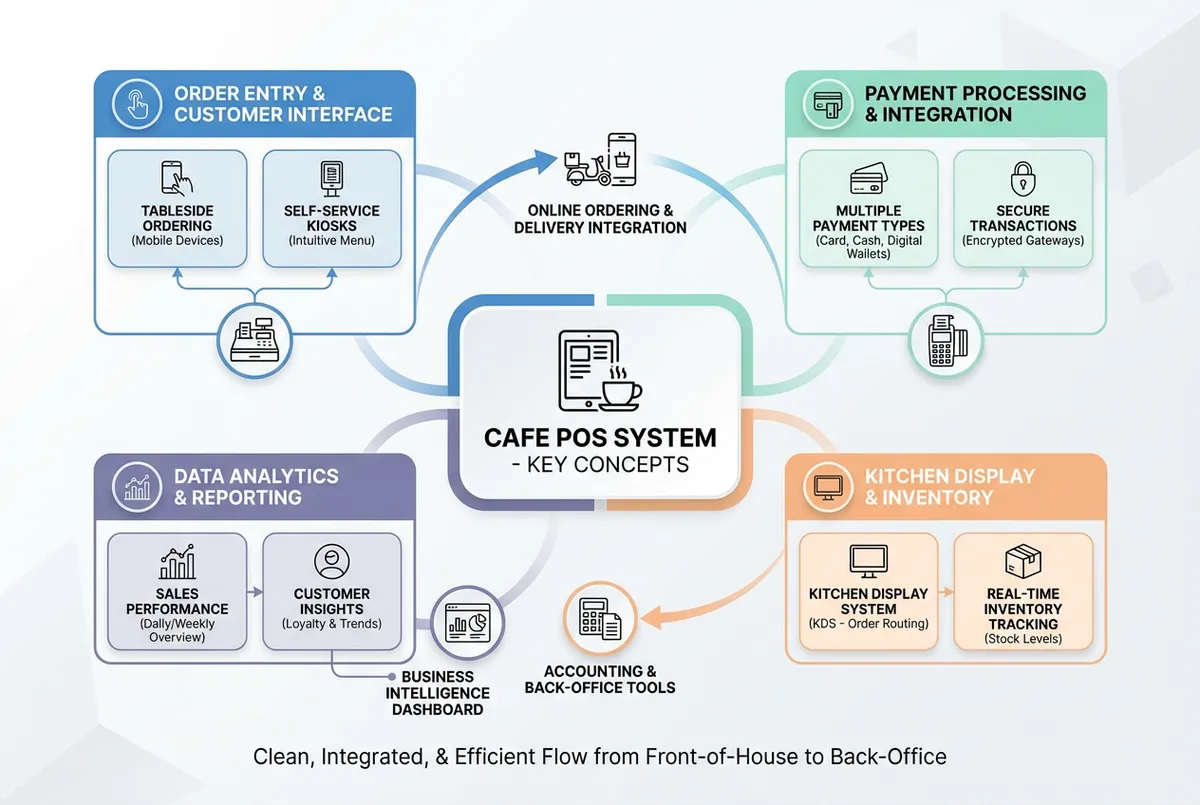
Illustration of a simple cafe POS system setup for small coffee shops
What Small Cafes Actually Need in a Cafe POS System
Based on how small cafes operate, prioritise these features. For example, a neighbourhood coffee shop in Edinburgh using Square found that modifier handling alone saved them several minutes per rush hour.
- Fast order entry - Clean interface, minimal taps to complete a sale
- Simple modifier handling - Different milks, shot counts, syrup options
- Basic inventory alerts - Know when you're running low on oat milk
- End-of-day reports - Sales, popular items, card vs cash breakdown
- Reliability - Works even when your Wi-Fi wobbles
If you're only using your POS for basic transactions and ignoring the reporting features, you'll always lose insight to competitors who track their data daily.
Small Cafe Recommendations
With that context, here's a quick guide based on your specific situation:
| If You Need... | Choose | Why |
|---|---|---|
| Simplest setup | Square | Free plan covers basics, affordable hardware |
| Drinks + retail sales | Square | Handles coffee beans, merchandise seamlessly |
| Growing queue problem | Clover | Handheld devices let you take orders anywhere |
| Food alongside drinks | Toast | Kitchen display keeps orders organised |
Features You Can Skip
Small cafes often don't need these features:
- Multi-location management - You've got one location
- Advanced labour scheduling - You know who's working
- Complex loyalty programmes - Simple punch cards often work better
- Detailed ingredient-level costing - Until you're optimising margins seriously
The global POS market continues to grow, but much of that growth tends to be in enterprise features small cafes don't need yet. Focus on what solves your problems today. Explore UK-specific options in our restaurant POS system guide.
Key Takeaways: Choosing Your System
If you run a restaurant and want to see how Local Brand Hub can support your marketing, explore our restaurant marketing tools.
Key Takeaways: Choosing Your Cafe POS System
Finally, let's summarise.
Warning
The key question: Which costs more - the time you waste with a bad system or the investment in a good one?
Choosing a cafe POS system comes down to three questions: What's your transaction volume? Do you serve food or just drinks? How much do you want to spend upfront versus monthly?
- Often best overall for many UK cafes: Square - free plan, low transaction fees (1.75%), simple to use
- Often best for payment flexibility: Clover - choose your own payment processor
- Typically best for cafes with food prep: Toast - kitchen display system and offline mode
- Lowest starting cost: Square or Clover free plans
- Lowest transaction fees: Square at 1.75% for chip and PIN
Ask yourself: would you recommend your cafe's current checkout experience to a friend opening their own place? If the answer is no, that's all the motivation you need to make a change.
Budget Planning
These estimates are based on typical UK cafe transaction volumes and may vary by location and payment mix.
| Cafe Size | Typical Monthly Cost | First Year Investment |
|---|---|---|
| Very small | Under £100/month | £1,500-£2,000 |
| Small | £150-£300/month | £3,000-£5,000 |
| Medium | Higher range | £5,000 or more |
Weekly Action: Your Cafe POS Audit
If you only have 30 minutes a week, do this:
- Day 1-2: Calculate your current monthly card processing costs (check your statements)
- Day 3-4: List the three features causing you the most pain (slow checkout? inventory guesswork? no sales data?)
- Day 5-7: Request demos from Square and one other provider - many offer free trials
Build your cafe's online presence with our restaurant local SEO guide to complement your POS investment, and work through a local SEO checklist so new customers can find you as easily as a faster till serves them.
The right cafe POS system won't transform your business overnight. But it will turn Saturday morning chaos into Saturday morning confidence. And that's worth more than any feature list.
Frequently Asked Questions
Here's where we answer the common questions we receive.
Pro Tip
Most asked: Setup time, payment processor flexibility, and offline mode are the top concerns for UK cafe owners.
How long does it take to set up a POS system? Basic systems like Square can often be running within a day. More complex setups with multiple terminals, kitchen displays, and integrations typically take 3-5 days including staff training. For example, a cafe in Birmingham set up their Square system on a Monday morning and was taking orders by lunchtime.
Can I keep my existing card payment processor? It depends on the system. Square and Toast typically require their own processing. Clover offers more flexibility to bring your own processor.
What happens if my internet goes down? Many modern systems offer offline mode, storing transactions until connectivity returns. Toast is particularly good at this. It's worth checking offline capabilities before committing.
Should I buy or lease POS hardware? For small cafes, buying outright usually works out cheaper over 3+ years. Leasing often makes sense if you need multiple terminals and want to preserve cash flow. Compare options in our restaurant POS system guide.
Do I need a cafe-specific POS or will any retail system work? While general retail POS systems handle basic transactions, cafe-specific systems offer modifier handling (oat milk, extra shot), tip management, and kitchen display integration that generic systems typically lack.
Can I switch POS systems later if I'm not happy? Yes, though there's typically 1-2 weeks of transition time. Many systems typically allow data export. The typical challenge is retraining staff and updating any integrated services.
What's a common mistake cafe owners make with POS systems? Choosing based on the lowest upfront cost without calculating total first-year costs including transaction fees. A "free" system with higher fees can often cost more than a paid one.
Want more guidance on restaurant technology? Read our complete restaurant POS system guide for the full comparison and buying advice.
Get More Marketing Tips
Practical marketing tips for UK business owners, straight to your inbox. No spam, unsubscribe anytime.
About the Author
Local Brand Hub
Empowering UK Businesses
Local Brand Hub provides comprehensive business management tools designed specifically for UK local businesses to streamline operations, automate marketing, and grow revenue.
More articlesRelated Articles
 Technology
EPOS Systems for Restaurants UK: A Practical Guide for 2026
Find the right EPOS system for your UK restaurant. Compare features, costs, and key benefits that help streamline your operations and serve more customers.
 Technology
Hospitality POS Systems: The Complete UK Guide for 2026
Compare UK hospitality POS systems: cloud, mobile, and kiosk options. Discover real costs, key features, and find which system fits your restaurant or bar.
 Technology
POS Meaning: Point of Sale, Slang & Banking (2026)
What does POS mean? Guide to POS in retail, banking, and Gen Z slang. Learn how point of sale systems work for UK hospitality.