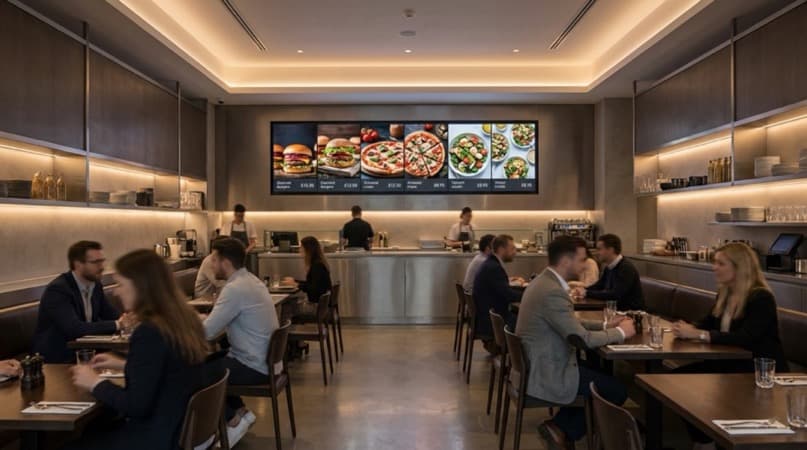
How to set up digital restaurant signage in the UK. Covers screens, digital menu boards, software platforms, realistic costs and installation.
You've been reprinting menus every month, but the prices are already wrong by the time the ink dries. Digital restaurant signage uses electronic screens to display menus, promotions and branding you can update instantly from a laptop or phone, replacing static boards with dynamic displays.
What You'll Learn
- What digital signage is and how it differs from traditional restaurant signs
- The types of digital screens and menu boards available for UK restaurants
- Realistic hardware, software, and installation costs
- How to set up digital signage step by step
- The 7 key elements of effective digital signage
- UK suppliers and free vs paid software options
What Is Digital Restaurant Signage
First, let's clarify what we mean. You have printed new menus three times this month. The printer ink is costing a fortune, the specials board has a permanent smudge, and your prices are already out of date. Meanwhile, the chain restaurant down the road updates their entire menu display in 30 seconds from a tablet.
That is the gap digital restaurant signage closes. Digital restaurant signage is a framework that replaces printed menus and static boards with electronic displays managed through cloud software.
In practical terms, digital signage for restaurants means using electronic screens, typically commercial-grade displays ranging from 32 to 55 inches, connected to a media player and managed through software. You design or upload your content, schedule when it appears, and the screens do the rest. For example, a burger restaurant might display lunch deals at noon, switch to dinner specials at 5pm, and show a reduced late-night menu after 9pm, all automatically.
88% of quick-service restaurants are planning to switch to digital menu boards (DotSignage, 2025). The shift is not just about looking modern. It is about operational efficiency, revenue optimisation, and giving customers the visual experience they expect in 2026.
The global hospitality digital signage market was valued at roughly USD 2.5 billion in 2025, projected to reach USD 4.1 billion by 2032 (Congruence Market Insights, 2025). That growth reflects restaurants worldwide recognising that static signs cannot compete with dynamic content.
Digital displays are one part of the picture. Our complete restaurant signage guide covers physical signs, materials, costs and UK regulations, and there are quick placement wins in these restaurant signage ideas.
Benefits of Digital Signage for Restaurants
Now that you understand what digital signage is, here is why it matters for your bottom line.
Revenue Impact
Digital menu boards increase average sales by 3-5% across restaurant categories (DotSignage, 2025). That sounds modest until you run the numbers. For a restaurant turning over £500,000 annually, a 4% uplift means an extra £20,000 per year from a technology investment that typically costs £2,000-£5,000 to set up.
8 out of 10 people who view digital menu boards make unplanned purchases (DotSignage, 2025). Dynamic visuals of food photography, animated promotions, and highlighted specials drive impulse decisions in ways that printed boards cannot replicate.
Operational Efficiency
- Instant menu updates: Change prices, remove sold-out items, or add specials in minutes
- Dayparting: Automatically show breakfast menus in the morning, lunch menus at midday, and dinner menus in the evening
- Multi-location management: Update every screen across multiple sites from one dashboard
- Reduced print costs: No more reprinting menus every time a price changes or a dish is updated
Customer Experience
29.5% of customers say digital menu boards directly influence their purchasing decisions (DotSignage, 2025). Beyond the purchase itself, digital screens reduce perceived wait times in queues and create a more polished, contemporary atmosphere.
If you're thinking "my customers prefer traditional signs", the reality for most independent restaurants is that customers do not actively prefer traditional signs. They simply do not notice them. Digital displays capture attention in a way that printed boards stopped doing years ago.
Types of Digital Menu Boards and Screens
Building on those benefits, let's look at the specific hardware options available to UK restaurants.
Indoor Digital Menu Boards
Often the most common digital restaurant signage application. Wall-mounted screens behind the counter displaying your menu, pricing, and photographs. Typically 43-55 inch commercial displays in landscape orientation.
Best for: Quick-service restaurants, cafes, takeaways, fast-casual dining
Outdoor Digital Displays
For outdoor digital restaurant signage, you need weather-rated screens in protective enclosures, positioned at the entrance or in drive-through lanes. Higher cost due to weatherproofing, brightness requirements (readable in direct sunlight), and durability.
Best for: Drive-throughs, street-facing restaurants, outdoor dining areas
Table-Side Tablet Displays
Smaller screens (typically 7-10 inches) positioned at tables for self-ordering or promotional content. Often integrated with your EPOS system for direct ordering.
Best for: Casual dining, large venues, restaurants wanting to reduce front-of-house staffing
Video Walls and Promotional Screens
This type of digital restaurant signage uses multiple screens configured as a single large display, or individual promotional screens positioned in waiting areas and bar spaces. Used for brand storytelling, social media feeds, or sports events.
Best for: Bars, large restaurants, venues with waiting areas
Drive-Through Digital Boards
This category of digital restaurant signage uses high-brightness outdoor screens positioned at the order point, often with integrated audio. These are the digital equivalent of the traditional drive-through menu board, but with the ability to update pricing and promotions dynamically.
Best for: Quick-service chains with drive-through operations
How to Set Up Digital Signage in Your Restaurant
With your screen type chosen, here's how to get everything running. For example, a small cafe might complete this entire process in a single weekend.
Step 1: Define Your Objectives
Before buying any hardware, decide what you want the screens to do:
- Display menus and pricing (typically the most common starting point)
- Promote daily specials and upsell items
- Show wait times or queue information
- Display social media content or reviews
- Run third-party advertising (if applicable)
Step 2: Choose Your Hardware
You need two core components:
Screens: Commercial-grade displays are recommended over consumer TVs. They run for 16-24 hours daily, have higher brightness ratings, and come with commercial warranties. Expect to pay £400-£1,200 per screen for a 43-55 inch commercial display from UK suppliers.
Media players: The device that sends content to the screen. Options include:
- System-on-chip (SoC): Built into some commercial screens (Samsung, LG). No external player needed.
- Dedicated media players: Small hardware boxes like BrightSign or ChromeOS devices. £100-£300 each.
- Fire TV Stick or Chromecast: Budget options suitable for single-screen setups. £30-£50.
Step 3: Select Your Software Platform
The software controls what appears on your screens and when. UK options include:
| Platform | Starting Price | Best For | Key Feature |
|---|---|---|---|
| ScreenCloud | £20/month per screen | Small-medium restaurants | Easy templates |
| Yodeck | Free (1 screen) | Budget setups | Free tier available |
| Rise Vision | Free (basic) | Simple menu displays | Google integration |
| Kitcast | £12/month per screen | Apple-based setups | Apple TV support |
| BrightSign | Hardware-based pricing | Multi-location chains | Reliable offline playback |
| Poster Booker | Free (basic) | Single-screen pubs/cafes | No-cost entry point |
Step 4: Design Your Content
Your digital restaurant signage content needs to be designed specifically for screen display, not simply a PDF of your printed menu uploaded to a screen. Keeping your menu and offers organised in one place makes it far easier to push accurate, up-to-date content to every screen.
- Use high-quality food photography: This is typically the single biggest driver of impulse purchases
- Keep text large and readable: Minimum 24pt for body text on a 43-inch screen viewed from 2 metres
- Limit items per screen: 6-8 items maximum per view; use rotation for larger menus
- Include pricing prominently: Customers want to see prices clearly
- Use motion sparingly: Subtle transitions between screens, not distracting animations
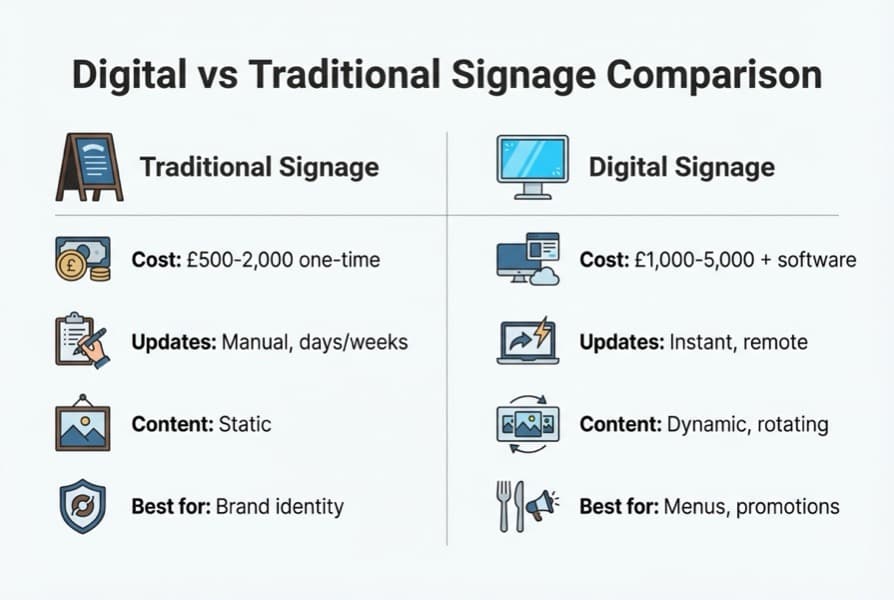
Digital restaurant signage setup showing hardware components and connections
Step 5: Install and Configure
- Mount screens at eye level for counter ordering, or slightly above eye level for queue viewing
- Ensure adequate power sockets near each screen location
- Test WiFi connectivity at each screen position (or run ethernet cables for reliability)
- Configure your software with your menu content and scheduling
- Test the full setup during a quiet period before going live during service
- Ensure any street-facing screens comply with UK advertising standards and local planning rules: see gov.uk guidance on advertisements
The 7 Key Elements of Effective Digital Signage
Moving on from setup, this is where you make your investment pay off. What are the 7 key elements of digital signage? These components determine whether your screens actually drive results or just display expensive wallpaper.
Content strategy: Plan what appears on each screen and why. Menus, promotions, brand content, and informational displays should each serve a clear purpose.
Display placement: Position screens where customers naturally look. Behind the counter for ordering, in queues for entertainment and upselling, at entrances for brand impact.
Screen quality: Commercial-grade displays with appropriate brightness. Indoor screens need minimum 350 nits. Outdoor or window-facing screens need 700+ nits to remain visible in daylight.
Software platform: Choose software that matches your technical confidence and budget. It needs to handle scheduling, remote updates, and content templates at minimum.
Connectivity: Reliable internet access for cloud-based updates. Have a backup plan for WiFi outages. Many media players can store content locally and continue displaying when offline.
Content scheduling: Automate dayparting so your breakfast menu appears in the morning without staff intervention. Schedule promotional content for peak hours and brand content for quieter periods.
Analytics and measurement: Track which promotions drive the most sales. Some platforms integrate with EPOS systems to measure the direct revenue impact of specific screen content.
For instance, a pizza chain might discover through analytics that showing a video of fresh dough being stretched increases large pizza orders by 12% compared to a static menu display.
Data-driven promotional strategies using digital signage outperform static campaigns by up to 30% in revenue efficiency (QSR Magazine, 2025). The restaurants getting the strongest returns treat their screens as marketing tools, not just menu displays. A digital screen is not a TV on the wall. It is a salesperson that never forgets the specials.
Digital Signage Costs and UK Suppliers
Additionally, you need to budget realistically. Here are the numbers broken down by component.
Hardware Costs
| Component | Typical Range |
|---|---|
| 43" commercial screen | £350-£1,200 |
| 55" commercial screen | £500-£1,500 |
| Media player | £30-£350 depending on type |
| Wall mount bracket | £20-£150 |
| Cabling and installation | £100-£600 |
Software Costs
Monthly subscription models dominate. Expect £0-£30 per screen per month depending on features. Free options exist but typically limit you to one screen and basic templates. If you cannot tell whether your current software drives sales or just displays a menu, that's usually a sign that your analytics need attention.
Start Small
Start with a free software tier to test the concept. Upgrade to paid only when you need multi-screen management or EPOS integration.
Total Setup Cost (Single Screen)
- Budget: £500-£800 (consumer TV + Fire Stick + free software)
- Standard: £800-£1,500 (commercial screen + dedicated player + paid software)
- Premium: £1,500-£2,500 (high-brightness commercial screen + BrightSign + premium software + professional installation)
UK Suppliers
- Luminati (luminati.co.uk): UK-based, specialises in digital menu boards and enclosures
- AllSee Technologies (allsee-tech.com): Commercial displays and media players
- ScreenCloud (screencloud.com): Software platform with UK support
- Digital Signbox (digitalsignbox.co.uk): Display screens for hospitality
- Gardiff EPOS (gardiffepos.com): EPOS-integrated digital signage for takeaways and cafes
Free Digital Signage Options
If you're only looking to test digital signage before committing to a larger investment, several platforms offer free tiers:
- Yodeck: Free for one screen with basic features
- Rise Vision: Free community plan with templates
- Poster Booker: Free basic plan for single displays
The free options work well for a single screen displaying a static or slowly rotating menu. For multiple screens, dayparting, or EPOS integration, you will need a paid plan.
What Is QSR Signage
Furthermore, if you run a fast-paced takeaway or counter-service operation, QSR signage deserves special attention. QSR signage refers to digital signage systems designed specifically for quick-service restaurants: think fish and chip shops, burger joints, kebab houses, and fast-casual chains. QSR stands for Quick Service Restaurant.
What makes QSR signage different from general restaurant digital signage is the focus on speed, order accuracy, and queue management. QSR digital menu boards typically:
- Display a complete menu with pricing in a format optimised for quick ordering
- Integrate with EPOS systems to remove sold-out items automatically
- Support dayparting for breakfast, lunch, and dinner menus
- Include drive-through compatible options with outdoor-rated screens
For example, a fish and chip shop using QSR digital signage might display their standard menu during the day, automatically switch to an evening specials board at 5pm, and remove the cod from the menu when stock runs out, all without any staff intervention.
If you're only using printed boards in your takeaway you'll always lose to competitors who use digital displays that react in real time. The speed advantage compounds with every price change, every sold-out item, and every seasonal promotion.
If You Only Have 30 Minutes a Week
Consequently, here is how to take the first step without losing a full day.
Info
This week, explore digital signage for your restaurant:
- Day 1-2: Sign up for a free Yodeck or Rise Vision account. Upload your current menu as a test. See how it looks on a screen template.
- Day 3-4: Measure the wall space behind your counter or beside your ordering point. Note the distance customers stand from that wall.
- Day 5-7: Research one UK supplier (Luminati, AllSee, or Digital Signbox). Request a quote for a single commercial screen setup including installation.
A takeaway might discover they can run a single-screen digital menu for under £500 using a consumer TV and free software, enough to test the concept before investing in commercial hardware. A casual dining restaurant might realise they already have a spare TV that could display promotional content in the waiting area using just a £30 Fire Stick.
If you're reading this thinking "I can barely keep the kitchen running, let alone add screens." You are not alone. Start with one screen and grow from there.
Weekly Action
Review your digital restaurant signage content once a week. Check for outdated prices, sold-out items still displayed, and seasonal promotions that have passed. A 5-minute weekly review prevents your screens from showing stale content.
Digital Signage Checklist
- Define your primary objective (menu display, promotions, or both)
- Measure wall space and viewing distance at your planned screen location
- Test a free software platform (Yodeck or Rise Vision) with your menu
- Get quotes from two UK suppliers for commercial screen options
- Design menu content specifically for screen display (not a PDF upload)
- Plan your dayparting schedule (breakfast, lunch, dinner menus)
- Budget for ongoing software costs (£0-£30 per screen per month)
Key Takeaway
If you run a restaurant and want to see how Local Brand Hub can support your marketing, explore our restaurant marketing tools.
Key Takeaway
Digital restaurant signage typically increases average sales by 3-5% and drives unplanned purchases for 80% of viewers. 88% of QSR restaurants are planning to switch to digital menu boards. Start with one screen: a single commercial display with cloud software costs £800-£1,500 total. Free software options like Yodeck and Rise Vision let you test the concept before committing. Content quality often matters more than screen quality: invest in good food photography and clear design. The 7 key elements are content strategy, placement, screen quality, software, connectivity, scheduling, and analytics. UK suppliers including Luminati, AllSee, and ScreenCloud offer hospitality-focused solutions. Dayparting and EPOS integration separate effective digital restaurant signage from expensive decoration.
For restaurants, salons, and local businesses
Need help with your marketing?
We help UK businesses turn social media into real results, not busywork.
Start freeFAQ
How much does digital signage cost for a restaurant?
A basic single-screen digital restaurant signage setup using a consumer TV and free software costs £500-£800. A standard commercial-grade setup with paid software runs £800-£1,500 per screen. Multi-screen installations with professional content and EPOS integration typically cost £3,000-£8,000 for a small restaurant.
What is QSR signage?
QSR signage covers digital signage designed for quick-service restaurants such as takeaways, fast-food outlets, and casual dining chains. It focuses on fast menu display, EPOS integration for automatic stock updates, and dayparting to switch menus at different times of day. QSR stands for Quick Service Restaurant.
What are the 7 key elements of digital signage?
The seven key elements are content strategy, display placement, screen quality and brightness, software platform, network connectivity, content scheduling (including dayparting), and analytics for measuring performance. Getting all seven right determines whether your digital signage drives revenue or just displays expensive wallpaper.
How do I set up a digital display in my restaurant?
Start your digital restaurant signage setup by choosing a commercial-grade screen (43-55 inches), a media player (built-in SoC or external device like BrightSign), and a cloud software platform. Design your menu content for screen display, mount the screen at eye level near your ordering point, connect to WiFi, and configure your content schedule. Most UK digital restaurant signage suppliers offer full installation services.
Is there free digital signage software for restaurants?
Yes. Yodeck offers a free plan for one screen, Rise Vision has a free community plan, and Poster Booker provides a basic free tier. These work well for testing digital restaurant signage with a single display and simple menu content. Paid plans (£12-£30 per screen per month) unlock features like multi-screen management, scheduling, and EPOS integration.
Get More Marketing Tips
Practical marketing tips for UK business owners, straight to your inbox. No spam, unsubscribe anytime.
About the Author
Local Brand Hub
Empowering UK Businesses
Local Brand Hub provides comprehensive business management tools designed specifically for UK local businesses to streamline operations, automate marketing, and grow revenue.
More articlesRelated Articles
 Tutorials
E-Gift Card Restaurant Guide: UK Costs and Setup
Compare e-gift card restaurant platforms for UK venues. Square, Toggle and Giftpro setup costs, commission fees, redemption steps and gifting tips.
 Marketing Tips
Restaurant Interior Signage: Menu Boards & Upselling
Plan your restaurant interior signage strategy. Compare menu boards, wayfinding signs, hygiene displays and upselling signage with UK costs and rules.
 Marketing Tips
Restaurant Outdoor Signage: A-Boards & More
Choose the right restaurant outdoor signage for your UK venue. Compare A-boards, projecting signs, fascia options, costs and planning permission rules.