Restaurant automation software handles inventory, scheduling and invoices without you. See which UK tools run on autopilot for independent restaurants.
You finished a 12-hour shift. You still need to count stock, build next week's rota, and match a stack of supplier invoices. It is half ten. You are tired. And you know at least one of those jobs will have errors because your brain clocked off two hours ago.
Restaurant automation software handles these tasks without you touching them. It reorders stock when levels drop, builds staff rotas from booking data, and scans invoices straight into your accounts. Unlike general restaurant management software, which still needs your input at every step, restaurant automation software runs while you sleep.
Info
Related: Restaurant Technology, our complete guide to building a modern tech stack
What You'll Learn
- The three areas where restaurant automation software replaces manual work
- How automated inventory reordering cuts food waste by 2-3%
- What scheduling automation does versus a basic rota builder
- Why invoice processing automation saves hours every week
- How to spot platforms offering real automation versus just dashboards
- A 30-minute plan to start automating your biggest time drain
What Counts as Real Restaurant Automation?
First, let's separate genuine automation from a fancy dashboard. The restaurant automation software market splits into two camps: tools that alert you to problems and tools that fix problems on their own.
If you still check stock levels each morning, that is management software. If the system checks levels, compares them to forecasted demand, and sends a purchase order to your supplier, that is restaurant automation software.
According to Square's Future of Commerce report (2025), 85% of UK restaurant leaders plan to invest in AI or automation tools.
Two-thirds believe automation can improve areas like inventory and payments, meaning a third remain unconvinced.
If you're thinking "I've tried tech before and nothing stuck," you're not alone. SaaS pricing has now brought these tools within reach for single-site restaurants, not just chains with IT teams.
For example, a neighbourhood bistro spending £200/month on restaurant automation software can now access the same inventory forecasting and rota-building tools that a 50-site chain paid thousands for just a few years back. The technology trickled down. The price followed.
Three areas deliver the clearest return:
- Inventory reordering: purchase orders triggered by real usage
- Staff scheduling: rotas built from booking and sales data
- Invoice processing: scan, digitise, reconcile without typing
Each replaces a task you likely do after service, when errors are most common. For more on how AI is reshaping restaurant operations, we cover that in a separate guide.
Automated Inventory Reordering
Now that you know what counts as real automation, where does it save the most money? For most restaurants, inventory comes first.
Manual stock-taking is slow, error-prone, and happens when you are tired. Automated inventory management software tracks what leaves the kitchen in real time, compares it to par levels, and reorders before you run out.
According to MarketMan (2025), restaurants using automated inventory tracking typically reduce food costs by 2-3% and cut pour costs by 3-5%. Stock counting time drops by roughly half.
For example, a gastropub doing 200 covers on a Saturday might burn through its steak allocation faster than expected. With manual tracking, you find out Monday morning, after the delivery window closes. With restaurant automation software, the system flags low stock during Saturday service and sends a reorder before you cash up.
| Feature | Manual Process | Automated Process |
|---|---|---|
| Stock check | Staff counts shelves daily | System tracks in real time |
| Reorder trigger | Manager spots shortage | Software sends PO on its own |
| Waste tracking | End-of-week guesses | Logged as it happens |
| Supplier comms | Phone calls and emails | Integrated ordering portal |
UK hospitality wastes roughly £3 billion worth of food each year, with some restaurants losing up to 20% of what they buy (Hospitality Tech360, 2026).
Automation does not fix everything, but it closes the gap between what you order and what you use.
Real-time stock tracking
If you're only counting stock once a week you'll always lose to competitors who track in real time. They catch waste before it hits the bin, not after. Would you trust last Tuesday's mental count of how many chicken breasts sit in the walk-in? Neither would your GP margin.
Scheduling Automation That Builds Rotas for You
Next, let's look at the other task eating your evenings. A basic rota builder lets you drag shifts around. That is not automation. Real scheduling automation analyses your sales history, upcoming bookings, and local events, then builds a rota matching labour to demand, without you.
With 132,000 unfilled hospitality roles across the UK and vacancies 48% above pre-pandemic levels (UKHospitality, 2025), squeezing the most from your team is not a nice-to-have. It is how you stay open.
Automated scheduling can save managers up to 15 hours weekly on admin tasks (SmartWorkforce, 2026). That is nearly two full shifts spent on rotas, shift swaps, and holiday maths.
What genuine scheduling automation handles:
- Demand forecasting: predicts busy periods from POS data
- Auto-rota building: creates compliant rotas matching demand curves
- Break and holiday compliance: calculates entitlements per UK law
- Shift swap management: staff handle swaps via app, no manager input
- Overtime alerts: flags when labour costs pass your threshold
For instance, a curry house near a football ground could have its restaurant automation software pull fixture data and automatically schedule two extra front-of-house staff on match days. No manager needed to check the calendar.
If you're reading this thinking "my team would never use an app", fair enough. But most staff already manage their lives on their phones. A scheduling app is less of a leap than you might expect.
Invoice Processing Without the Spreadsheets
Stock is tracked. Rotas build themselves. What about the pile of paper on the desk? This is the feature most owners overlook.
Pro Tip
If you spend Sunday afternoons matching paper invoices to delivery notes, that's usually a sign your back-of-house processes need updating.
Modern restaurant automation software lets you snap a photo of a supplier invoice. The system reads every line (quantity, SKU, price, VAT) and matches it to what was delivered. No typing. No spreadsheet. No shoebox for your accountant.
For instance, a family-run Italian receiving deliveries from five suppliers each week might process 20-25 invoices monthly. Manually, that takes 3-4 hours of matching and entry. With automation, it takes the time to photograph each page.
The benefits build on each other:
- Cost tracking: real-time, not after the fact
- Supplier errors: flagged straight away, not at month-end
- GP margins: visible per dish, updated daily
- VAT returns: pulled from verified data, fewer mistakes
Traditional card fees eat up to 2.5% of thin margins (Restaurant Online, 2026). Combine payment automation with invoice processing, and you see your real numbers, not ones you piece together from memory two weeks later.
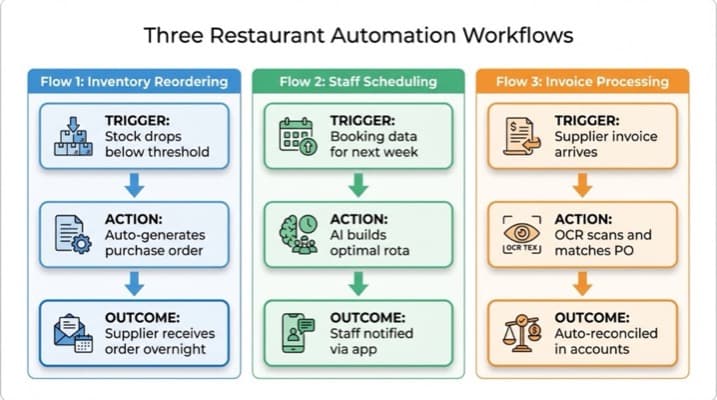
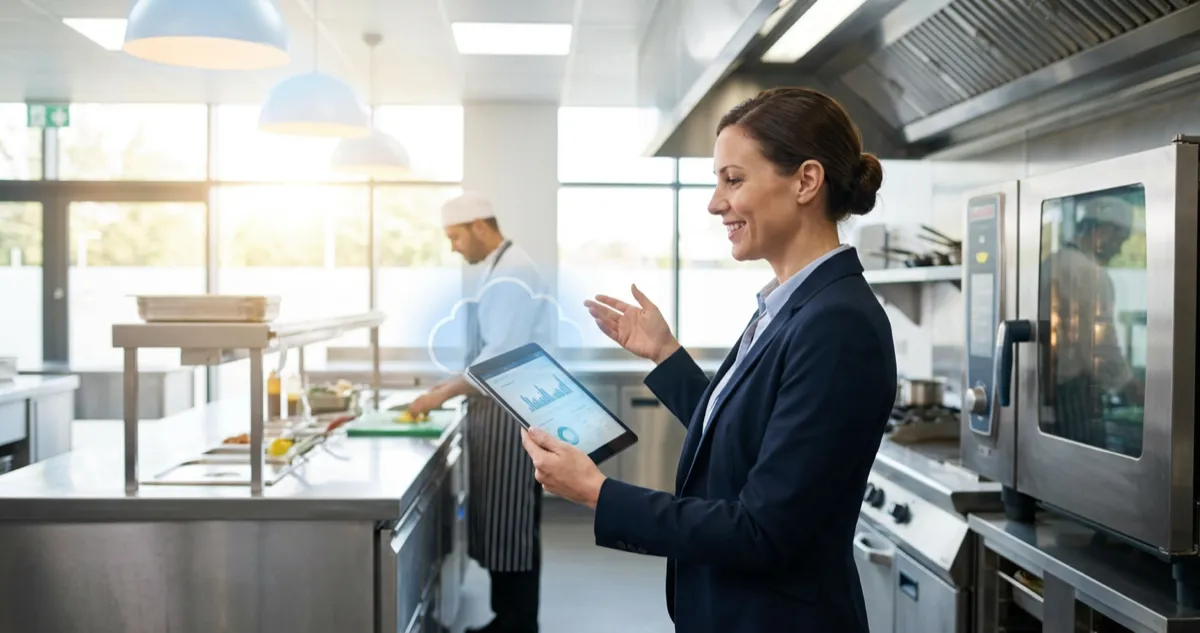
Three core restaurant automation workflows: inventory, scheduling, and invoices
How to Choose the Best Restaurant Automation Software
With that understanding of what each type does, here's the problem: not every platform that says "automation" on the tin actually automates anything.
Some are dashboards that move work from paper to screen without removing it. Here is how to tell.
Use this checklist before signing up:
- Does it trigger actions on its own, or just send alerts?
- Does it connect to your POS, suppliers, and accounting software?
- Is pricing clear: monthly SaaS fee, no hidden per-transaction charges?
- Does it handle UK compliance (HMRC, employment law, allergens)?
- Can you trial it free for at least 14 days?
For example, a fish and chip shop owner testing new restaurant automation software should import their top five supplier catalogues during the trial. If the system cannot auto-generate a purchase order from a stock alert within the trial, it is a dashboard, not automation.
Key evaluation areas for restaurant automation software in the UK:
| Criteria | What to look for | Red flag |
|---|---|---|
| Automation depth | Triggers, rules, auto-actions | "Alerts" needing manual follow-up |
| UK compliance | HMRC, employment law, allergen regs | US-centric defaults |
| Integration | POS, accounting, supplier APIs | CSV exports required |
| Support | UK hours, live chat | Email-only, US timezone |
| Scalability | Works for 1 site or 5 | Minimum seat requirements |
For most UK independent restaurants, starting with inventory automation often delivers the best return before adding scheduling and invoices.
Demo day tip
Ask the sales team to demo a real automation workflow, not just screens. If they can only show dashboards, that tells you what you need to know.
Free and Budget Options for UK Restaurants
However, knowing what to look for is only half the equation: what if the budget is tight? If you're thinking "this sounds expensive," there are routes at every price point.
- POS-integrated tools: Many UK POS systems include basic inventory and scheduling at no extra cost. Check what you already have before buying new software
- SaaS free tiers: Some restaurant automation software providers offer limited features free, with full automation from around £30-50/month
- Spreadsheets: Free, but not automation. Useful as a baseline to measure what you are actually spending time on
The real question is not "can I afford restaurant automation software?" but "can I afford the time I spend doing these tasks by hand?" If you lose 10-15 hours weekly to stock counts, rota building, and invoice matching, even a £100/month tool pays for itself in week one. Before you commit, it is worth taking a moment to work out how much time you could save, the figure often surprises owners.
Info
This sounds simple on paper. In practice, when you're down two staff and the Saturday rush is building, adding new software feels like one more plate to spin.
If you're only using spreadsheets and memory you'll always lose to competitors who let software handle the numbers. Start small. Pick the single task that eats the most time and automate that first.
If you can't tell whether your inventory system is saving you money or just moving the paperwork around, that's usually a sign you need proper automation, not just another login.
If You Only Have 30 Minutes a Week
Finally, let's make this practical. Ask yourself: how many hours did you spend this week on tasks a machine could do? If the answer is more than one, read on.
If you only have 30 minutes a week, do this:
This week, audit your restaurant's automation readiness
- Day 1-2: Time yourself on three tasks: stock counting, rota building, and invoice processing. Write down how long each one takes
- Day 3-4: Check whether your POS has built-in automation features you are not using. Most UK systems have inventory or scheduling modules included
- Day 5-7: Sign up for one free trial. Import your supplier list and test the invoice scanning with three recent invoices
That gives you real data on where restaurant automation software would save the most time, and hands-on experience before you spend anything.
If you run a restaurant and want to see how Local Brand Hub can support your marketing, explore our restaurant marketing tools.
Key Takeaway
Key Takeaway
- Restaurant automation software runs tasks without human input: inventory, scheduling, and invoices are the three biggest wins
- Automated inventory cuts food costs by 2-3% and halves counting time
- Scheduling automation saves managers up to 15 hours weekly on admin
- Invoice automation ends manual data entry, giving you real-time margins
- Start with one area: automate your biggest time drain first, then expand
- Budget options exist: SaaS plans start from £30-50/month, and many POS systems include basics free
Your competitors don't have bigger tech budgets. They have smaller gaps between spotting a problem and automating it away.
FAQ
What is restaurant automation software?
Restaurant automation software handles operational tasks (inventory reordering, staff scheduling, invoice processing) without human input. It uses triggers and rules to complete jobs that would otherwise need manual effort after every shift.
How much does restaurant automation software cost in the UK?
UK restaurant automation software typically costs between £30 and £200 per month on SaaS plans for a single site. Many platforms offer free tiers with limited features, and most POS systems include basic automation tools at no extra cost.
Can small independent restaurants benefit from automation software?
Yes. Smaller operations often see the greatest benefit because they start with higher waste percentages and more manual processes. Automating inventory alone can cut food costs by 2-3%, and scheduling automation saves managers up to 15 hours weekly.
What is the difference between restaurant management software and automation software?
The difference is about costs of time, not features. Management software provides dashboards that still need manual input. Automation software triggers actions on its own: it reorders stock when levels drop, generates rotas from demand data, and digitises invoices from a photo.
Is there free restaurant automation software available?
Some platforms offer free tiers with limited automation features, and many UK POS systems include basic inventory tracking and scheduling at no extra cost. Full automation typically starts from around £30-50 per month.
For restaurants, salons, and local businesses
Need help with your marketing?
We help UK businesses turn social media into real results, not busywork.
Start freeGet More Marketing Tips
Practical marketing tips for UK business owners, straight to your inbox. No spam, unsubscribe anytime.
About the Author
Local Brand Hub
Empowering UK Businesses
Local Brand Hub provides comprehensive business management tools designed specifically for UK local businesses to streamline operations, automate marketing, and grow revenue.
More articlesRelated Articles
 Tutorials
Restaurant Tech Stack: UK Integration Guide
Build a restaurant tech stack that works together. Covers the five essential systems, integration priorities and realistic costs for UK independents.
 Industry Insights
All-in-One Restaurant Software: UK Comparison
Compare all-in-one restaurant software for UK venues. See top platforms, UK pricing, and what to look for when choosing an integrated system.
 Industry Insights
Cloud Restaurant Management Software: Complete UK Guide
Cloud restaurant management software accounts for 60% of the market. Cut costs and streamline UK restaurant operations with our complete guide.