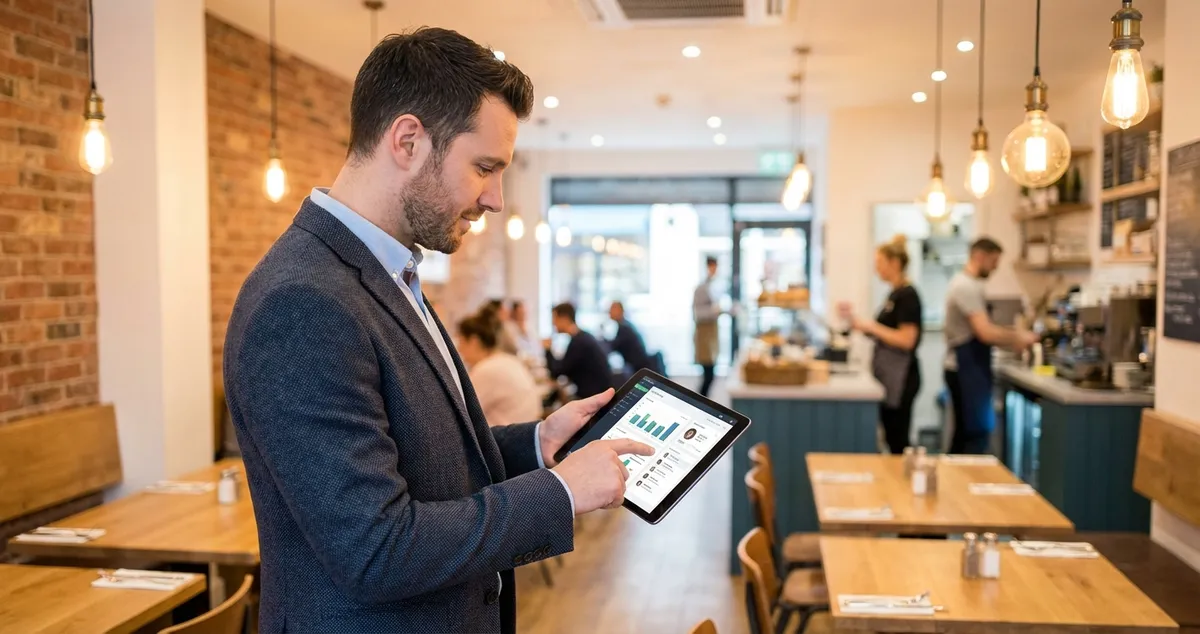
Learn how a restaurant CRM system helps UK restaurants boost repeat visits by up to 67%. Discover which features matter for indies and how to choose.
Full house last Saturday. Great Google reviews. But this Tuesday? Three tables all night. A restaurant CRM (customer relationship management) system is software that helps you collect, organise, and use guest data to build stronger relationships. For UK restaurants, this means tracking preferences, automating birthday offers, and turning one-time diners into regulars.
Plenty of one-time visitors, not enough regulars coming back. Sound familiar?
You know some regulars by name. That couple who ask for the corner table. The family who come for Sunday roast. But what about the other 80% of your customers? The ones who visited once, enjoyed themselves, then never came back?
That is where many independent restaurants leave money on the table. Research shows that 60-80% of restaurant revenue comes from repeat customers (Olo, 2025). Yet without a system to track guests, most first-time visitors simply forget you exist.
Info
Related: See our Restaurant Marketing Ideas guide for strategies that bring customers back.
A restaurant CRM solves this by capturing guest information and helping you communicate at the right moments. Birthday coming up? Send a free dessert offer. Haven't visited in two months? A "we miss you" message. Simple. But doing it manually across hundreds of customers is impossible when you're already working 12-hour shifts.
Why This Matters
According to UKHospitality, independent restaurants face rising costs across labour, ingredients, and utilities (UKHospitality, 2025). Customer retention is one of the few levers you control directly. Keeping existing customers costs far less than finding new ones.
What You'll Learn About Restaurant CRM
Here's what this guide covers:
- What CRM actually means for restaurants and how it differs from generic systems
- The four types of CRM and which one suits your restaurant
- Real examples from Ritz-Carlton, Starbucks, and UK independents
- How to choose the right CRM based on your budget and goals
- A practical framework for implementation without overwhelming your team
What CRM Do Restaurants Use?
So you've decided you need better customer tracking. But what does that actually look like in practice?
Restaurants use CRM systems ranging from simple built-in POS features to dedicated hospitality platforms. For UK independents, practical options include integrated POS-CRM solutions, reservation platforms with guest profiles, and UK-specific platforms like Cheerfy.
The reality is you're probably already using some form of CRM. If your reservation system tracks visit history, that's basic CRM. If your email list lets you send promotions, that's CRM functionality.
The question isn't whether you need restaurant CRM, it's whether your current setup captures enough data to improve relationships.
For example, a gastropub in Manchester might use Square's built-in customer directory. Every card payment creates a profile. After three months, they can see who visits weekly versus who came once. That alone tells them who deserves a loyalty reward.
Popular restaurant CRM approaches in the UK:
- All-in-one POS systems (Toast, Square, Lightspeed) - Combine payment processing with customer tracking
- Reservation platforms (OpenTable, ResDiary, SevenRooms) - Focus on booking management with guest profiles
- Dedicated restaurant CRM (Cheerfy, Flipdish) - Purpose-built for hospitality marketing
- General CRM adapted for restaurants (HubSpot, Zoho) - More customisable but require setup
For a gastropub with 100 covers doing 200-300 customers weekly, an integrated POS system makes most sense. You capture transaction data anyway, so CRM functionality happens automatically.
If you're thinking "I don't have time to learn another system," you're not alone. But a good restaurant CRM reduces your workload rather than adding to it. Automated birthday emails, loyalty tracking, and segmented marketing run in the background once set up.
From our experience: Restaurant owners who spend 2-3 hours on initial CRM setup typically save 4-5 hours monthly on manual customer tracking and follow-up tasks.
If you're only posting on social media when the restaurant is quiet that never works for building a customer database. CRM gives you a system that runs whether you're on the floor or not.
Info
Related: Build your guest database with Email Marketing for Restaurants.
What Are the 4 Types of CRM?
That's the theory. Here's where it gets more specific.
The four types of CRM are operational, analytical, collaborative, and strategic. Each serves different purposes. Understanding them helps you choose features that matter rather than paying for tools you'll never use.
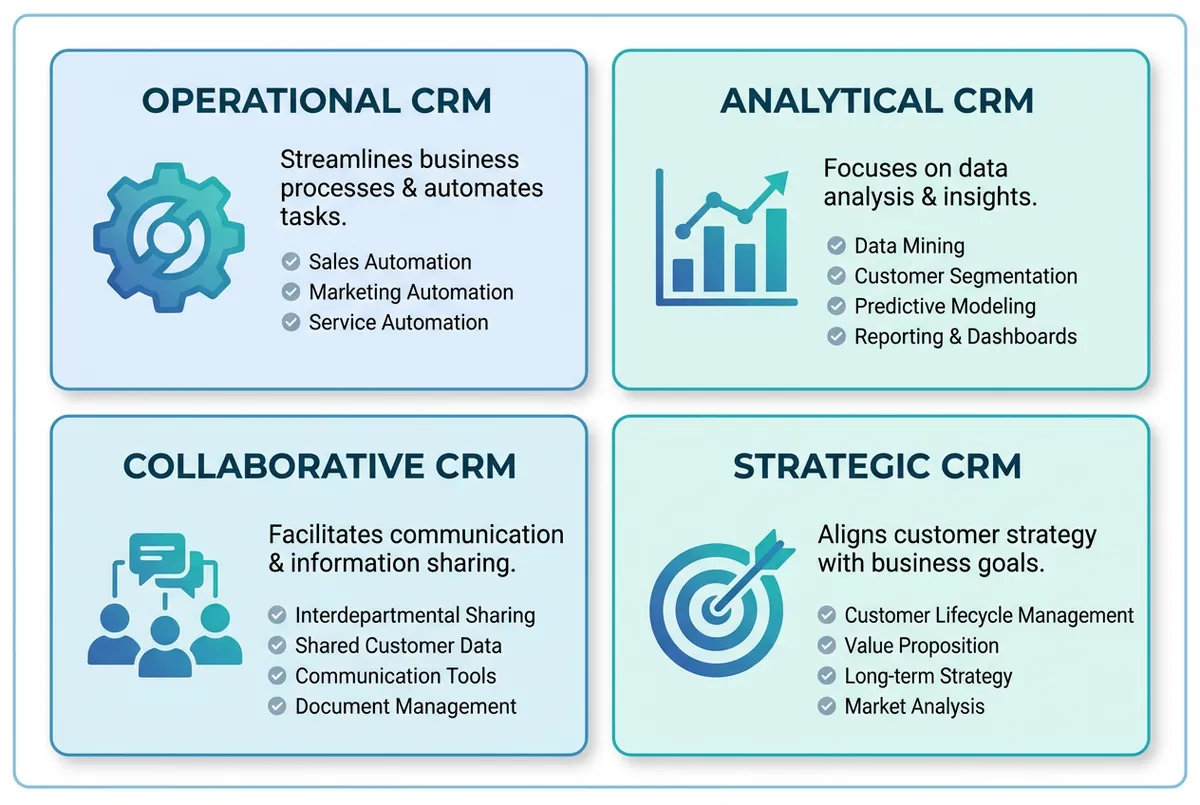
Choose the CRM type that matches your restaurant's needs
The Four CRM Types Explained
Operational CRM handles day-to-day automation. This is often where most restaurant value comes from:
- Automated email campaigns
- Loyalty tracking
- Reservation reminders
- Follow-up messages after visits
For instance, a bistro might set up an automatic "thank you" email that sends 24 hours after each visit with a 10% off voucher for next time.
Analytical CRM turns data into insights. Which dishes do your best customers prefer? When do high-spenders typically book? This becomes useful once you've tracked customers for 6-12 months.
Collaborative CRM breaks down information silos. When a customer mentions a dietary need to the host, can your server see that note? For larger restaurants or groups, this matters.
Strategic CRM focuses on long-term loyalty rather than individual campaigns. It's the philosophy behind retention: understanding why customers stay and strengthening those bonds.
Which type do most restaurants need?
| Restaurant Type | Primary CRM Need | Secondary Need |
|---|---|---|
| Independent (under 100 covers) | Operational | - |
| Multi-site independent | Operational | Collaborative |
| Growing restaurant group | Analytical | Collaborative |
| Fine dining | Strategic | Analytical |
For most UK independents reading this, start with operational CRM. Get automated marketing working before worrying about advanced analytics.
What is the 30/30/30 Rule for Restaurants?
With CRM types covered, where does CRM fit in your overall budget?
The 30/30/30 rule is a budgeting framework: 30% revenue to food costs, 30% to labour, 30% to overheads, and 10% to profit. CRM falls under marketing overhead and should reduce acquisition costs by improving retention.
This matters because acquiring new customers often costs 5-7 times more than keeping existing ones (Joliapp, 2025). Every pound turning a one-time visitor into a regular delivers better ROI than ads for new customers.
How restaurant CRM improves your 30/30/30 balance:
- Reduces marketing spend within overhead - Targeted campaigns cost less than broad advertising
- Increases average spend per customer - Loyal customers often spend 67% more than new visitors
- Improves labour efficiency - Staff spend less time on manual marketing tasks
- Protects profit margin - Higher retention means more consistent revenue
For example, a neighbourhood Italian restaurant spending £300/month on Facebook ads might instead invest £50/month in CRM software. The ads bring new faces who may never return. The CRM nurtures existing customers into regulars who visit twice monthly instead of twice yearly. That's a better return on a lower spend.
The 30/30/30 breakdown is increasingly a rough guideline, labour costs have risen closer to 35% for many UK restaurants. But the principle holds: costs should work towards profitability, and CRM pays for itself through better customer lifetime value.
If you're only looking at CRM as software cost without considering retention revenue, you're missing the point. A £50/month CRM bringing back two extra covers weekly at £25 average spend pays for itself eight times over.
Info
Related: Complement your CRM with Restaurant Social Media Marketing.
What CRM Does Ritz-Carlton Use?
The budget framework is helpful. But what about real-world examples?
The Ritz-Carlton uses a system called Mystique to track guest preferences, visit history, and past issues. Their approach shows how data transforms service quality, with lessons for independents at any scale.
What makes their approach notable isn't the software but how they use it. During daily "line-up" meetings, staff review the database to discuss arriving guests, their preferences, and concerns from previous stays (CustomerThink, 2025).
Lessons independents can apply:
- Pre-shift briefings - Share information about expected regulars with your team
- Preference tracking - Note dietary requirements, seating preferences, celebration occasions
- Issue resolution - Record complaints and ensure follow-up on subsequent visits
- Proactive service - Use visit history to anticipate needs before guests ask
You don't need enterprise software to do this. A simple shared document or basic CRM feature in your booking system achieves the same outcome.
The value comes from consistently using the information, not from the technology itself.
For instance, a pub in Yorkshire might note in their reservation system: "Table 4 - Smith family - daughter allergic to nuts, always ask for high chair, prefer quiet corner." When the Smiths return months later and the server already knows their needs, they feel valued.
If you can't tell whether a customer has complained before or what they typically order, you're missing opportunities.
Which CRM Does Starbucks Use?
Ritz-Carlton shows what's possible with staff training. But Starbucks shows what automation can achieve.
Starbucks uses its Rewards programme as the core CRM strategy. It integrates mobile ordering, payment, and personalised marketing into one system. Their app reportedly drives 40% of total sales (CRMSide, 2025).
What Starbucks gets right:
- Frictionless data collection - Customers willingly share information in exchange for rewards
- Tiered loyalty structure - Welcome, Green, and Gold levels create progression
- Personalised recommendations - The app suggests drinks based on purchase history
- Predictive analytics - They forecast demand based on customer behaviour patterns
For independent restaurants, the relevant lesson isn't to build an app, that's impractical for most.
The key insight: customers happily share their information when there's clear value in return.
A simple loyalty scheme where regulars accumulate points toward a free meal captures the same principle.
Applying Starbucks' restaurant CRM approach at smaller scale:
| Starbucks Feature | Independent Restaurant Version |
|---|---|
| App-based rewards | Loyalty card or simple digital punch system |
| Birthday rewards | Automated email with free dessert offer |
| Purchase history | POS system tracking past orders |
| Personalised offers | Segment-based emails (families, couples, solo diners) |
For example, a cafe in Bristol might create a simple loyalty card: buy 9 coffees, get 1 free. They collect email addresses at sign-up. After three months, they email everyone who hasn't visited in 30 days: "We miss you, here's 20% off your next visit." That's the Starbucks principle without the app.
A common mistake is thinking you need sophisticated technology. Starbucks succeeds because of consistency, not complexity. Send birthday offers reliably for a year and you'll likely see results.
Info
Related: Learn more about Restaurant Loyalty Programs for independent restaurants.
What is the Best CRM for Restaurants?
So what should you actually use? Here's the honest answer.
The best CRM for restaurants is a system that integrates with your existing tools and that you'll use consistently. For most UK independents, POS-integrated solutions like Square or Toast typically offer the best balance of value and simplicity. Restaurants wanting deeper automation may benefit from dedicated hospitality platforms.
There's no single "best" because restaurants differ significantly. A busy city brasserie handling 500 weekly covers has different needs than a village gastropub doing 150. Here's a decision framework to find what fits your situation.
For example, a family-run Indian restaurant in Birmingham might start with Square's free customer directory. No extra cost, automatic profile creation from card payments, and basic email marketing included. They could add a dedicated CRM like Cheerfy later if they outgrow it.
Start Simple
For most UK independent restaurants, start with your existing POS's CRM features. This is typically the best combination of value and practicality.
Decision Framework for UK Restaurants
If you already have a 2024-2025 POS (Square, Toast, Lightspeed):
- Enable the built-in CRM features first
- Add email marketing integration (Mailchimp, Klaviyo)
- Consider dedicated CRM only if you've outgrown built-in tools
If you rely heavily on reservations:
- Choose a platform with strong CRM features (SevenRooms, ResDiary)
- Prioritise guest profile depth and automated communications
- Ensure integration with your POS for spending data
If you're starting fresh or replacing systems:
- Look for all-in-one platforms designed for hospitality
- Prioritise ease of use over feature count
- Consider UK-based options for GDPR compliance and support
Key Features to Prioritise
- Customer profile creation from transactions
- Automated email/SMS capabilities
- Loyalty programme functionality
- Segmentation based on visit frequency and spend
- Integration with your existing systems
Features You Can Probably Skip
- Advanced AI prediction (often overkill for most independents)
- Social media management (use dedicated tools like our AI social post generator)
- Extensive reporting dashboards (simple metrics typically suffice)
If you're unsure where to start, enable whatever CRM functionality your current POS offers and commit to using it for three months.
If you're buying expensive CRM software before using the free features in your current POS that never works. Most restaurants abandon CRM tools not because the tools fail but because they never properly implement them.
How to Choose and Implement Your Restaurant CRM
You've seen the options. Here's how to make this practical.
Choosing the right CRM matters less than using it consistently. Start simple: capture customer data and send basic automated messages before expanding to advanced features.
Weekly Action
If you only have 30 minutes this week, do this:
- Check your POS for customer tracking features (10 mins)
- List how many email addresses you've collected in the past month (5 mins)
- Set up one automatic email, a welcome message or post-visit follow-up (15 mins)
That's enough to start. You can build from there.
Structured Implementation Plan
Week 1-2: Audit your current data capture
Check your POS for features you might not be using. Review booking system guest profiles. List email addresses you've gathered. Most restaurants find they're collecting more than they realise, they're just not using it.
Week 3-4: Define your minimum viable CRM
What would make the biggest difference with restaurant CRM? For most, it's automated follow-up. A customer visits, you capture their email, they receive a thank-you with incentive to return. That single workflow drives real results.
This week, start your CRM journey:
- Day 1-2: Enable customer tracking in your POS if available
- Day 3-4: Set up email capture (tablet at host stand or QR code on receipt)
- Day 5-7: Create one automated email: welcome message or post-visit follow-up
A spreadsheet tracking regulars with birthdays beats a sophisticated CRM that sits unused. The goal is building the habit.
Common mistakes when setting up restaurant CRM:
- Capturing too much data too quickly (customers get annoyed)
- Setting up complex automations before mastering basics
- Not training staff on why CRM matters (they won't use it)
- Expecting instant results (retention takes 3-6 months to show)
If you're reading this after a 12-hour shift thinking "I don't have time for this," you're right that setup takes effort. But CRM should save time, not add to it. Automated birthday emails don't require you to remember birthdays. Campaigns run whether you're on the floor or not.
Quick Check
Would you rather spend 30 minutes this week setting up automation, or keep manually trying to remember who deserves a loyalty reward? Ask yourself: if a regular customer walked in this evening, would your team know their name, their usual order, or their last visit date? If not, that's usually a sign you need systems, not more hours.
Frequently Asked Questions
Finally, here are answers to common questions about restaurant CRM systems.
What is a CRM in a restaurant?
A restaurant CRM is a system that collects guest information, tracks dining history, and sends automated messages to encourage repeat visits. In practical terms, it remembers your guests so you don't have to. When a customer books, the CRM flags their birthday, prompting a free dessert offer that drives a return visit.
How much does restaurant CRM software cost?
Restaurant CRM software costs range from free (basic POS features) to £200+ monthly for enterprise platforms. Most UK independents find adequate restaurant CRM solutions between £30-80 monthly. Many reservation and POS systems include CRM features in their standard pricing.
Can small restaurants benefit from CRM?
Small restaurants often benefit greatly from CRM because customer relationships matter more when you have fewer covers. Even simple systems, tracking regulars, sending birthday offers, and following up after visits, can increase repeat visits significantly.
How long does it take to see results from restaurant CRM?
Expect 3-6 months before seeing measurable retention improvements. Automated marketing needs time to accumulate contacts and touchpoints. However, individual wins, like a customer returning after a birthday offer, appear much sooner.
Do I need a separate CRM or can I use my POS?
Start with your POS's built-in features before investing in separate software. Systems like Toast, Square, and Lightspeed (2024-2025 versions) include customer tracking and basic marketing. Add dedicated CRM only when you've genuinely outgrown these capabilities.
Key Takeaways: Restaurant CRM
If you run a restaurant and want to see how Local Brand Hub can support your marketing, explore our restaurant marketing tools.
Key Takeaways: Restaurant CRM
Let's summarise what we've covered. Restaurant CRM isn't about complex software, it's about systematically building relationships with guests so they return more often and spend more when they do.
What we covered:
- CRM captures and organises guest data to enable personalised communication and service
- 60-80% of restaurant revenue comes from repeat customers, making retention essential
- The four CRM types (operational, analytical, collaborative, strategic) serve different purposes, most independents need operational first
- Ritz-Carlton's Mystique system shows that consistent use of data matters more than sophisticated technology
- Starbucks' rewards approach demonstrates that customers share data when they receive clear value
- The best CRM depends on your existing systems and priorities, start with what you have
Your next step:
Don't try to implement everything at once. This week, identify one way to capture customer contact information you're missing, and set up one automated communication, even if it's just a monthly email to your subscriber list.
If you only have 30 minutes this week, spend it enabling customer tracking in your POS. Every transaction then builds your customer database automatically, and you can add marketing automation later.
For UK restaurants
Need Help With Customer Retention?
Local Brand Hub helps independent restaurants automate customer tracking and personalised campaigns, without requiring hours of your time.
Start freeGet More Marketing Tips
Practical marketing tips for UK business owners, straight to your inbox. No spam, unsubscribe anytime.
About the Author
Local Brand Hub
Empowering UK Businesses
Local Brand Hub provides comprehensive business management tools designed specifically for UK local businesses to streamline operations, automate marketing, and grow revenue.
More articlesRelated Articles
 Marketing Tips
Digital Menu Boards for Restaurants: UK Costs and Guide
Compare digital menu board costs from £499-£7,000, see 38% sales uplift stats, and learn setup requirements. UK pricing and supplier guide for restaurants.
 Marketing Tips
Digital Menu Screens: A Practical Guide for UK Restaurants
Learn how digital menu screens can boost UK restaurant sales by 3-10%. Get realistic costs from £2,000, ROI timelines, and honest UK supplier advice.
 Marketing Tips
Digital Menu Technology: Guide for UK Restaurants
Digital menu technology boosts sales by 3-9% for UK restaurants. Compare QR codes, digital boards, screens and kiosks with costs and ROI.