What a UK restaurant POS system has to record, export and prove, plus the five demo requests that quietly disqualify the wrong till before you sign one.
A restaurant POS system is your till, your kitchen ticket and your sales record in one. Staff key the order, the kitchen sees it, the card clears, the sale is logged. In a UK venue it is also the place your tax records and your tipping record begin, which is why the wrong choice costs more than its monthly fee.
Ask a UK operator what went wrong with their last till and nobody mentions features. They mention the Saturday the card reader dropped and no one could split a bill six ways. They mention the accountant wanting a report the system does not produce. They mention the fortnight retyping totals because the only export is a screenshot.
Most guides on this search rank a shortlist of vendors. This one does not. A feature list tells you what a system advertises; what decides whether you regret the contract is what it refuses to give back. Our best restaurant POS system round-up does the ranking. This page hands you the tests that disqualify.
Related: Restaurant Management Software, our complete hub guide.
What is a POS system in a restaurant?
A restaurant POS system is the software and hardware that takes an order, sends it to the kitchen, processes the payment and records the sale. Point of sale is the moment money changes hands; the system is everything around it, from the modifier a server taps to the report your accountant opens in March.
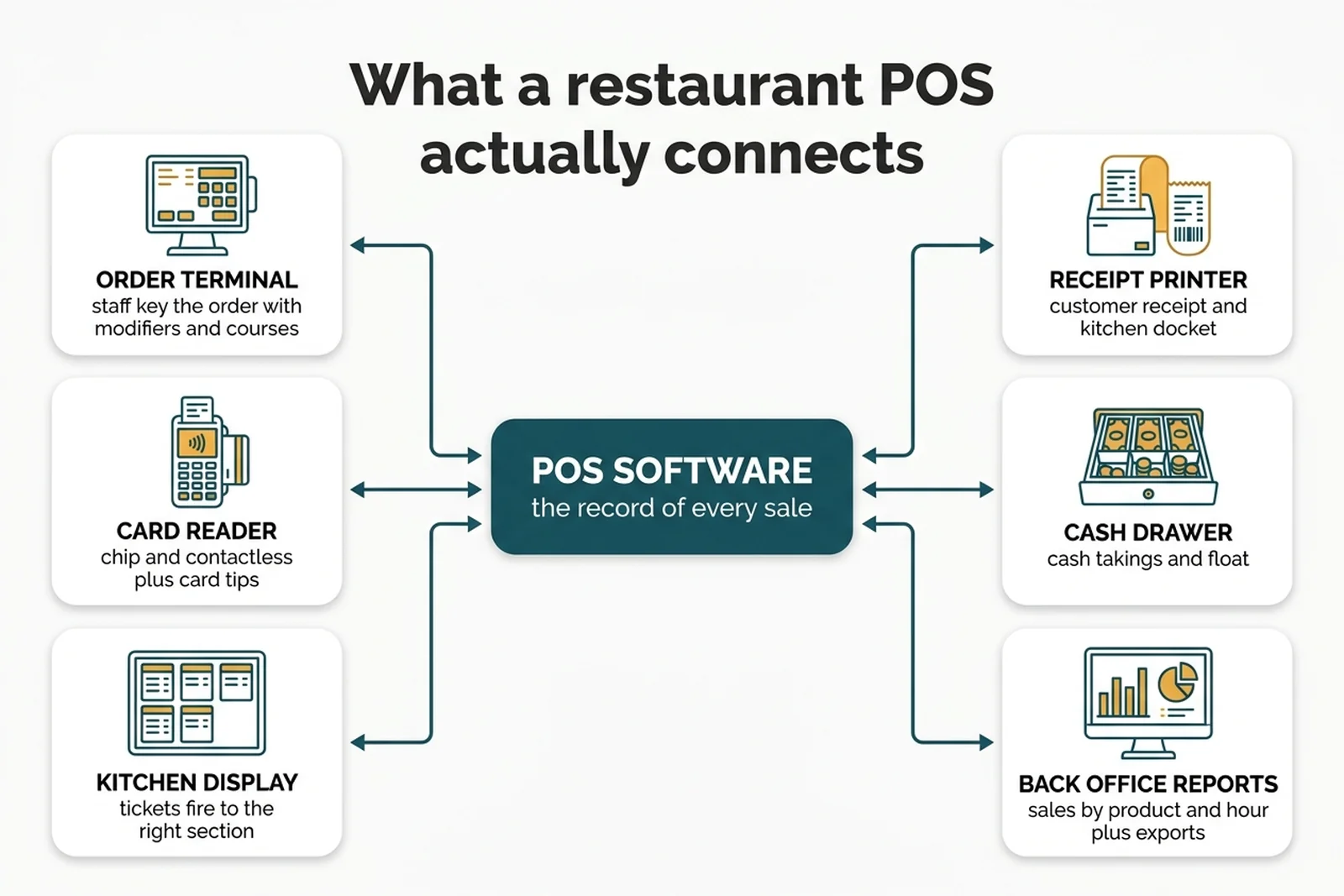
The till is the visible part. The connections either side of it are what you are actually buying.
- Order terminal: where staff build the order, with modifiers, courses and covers.
- Card reader: chip, contactless and card tips, tethered or carried to the table.
- Kitchen display or printer: the ticket that fires to the right section at the right time.
- Cash drawer: float, takings and the reconciliation nobody enjoys.
- Back office: sales by product, hour and staff member, plus the exports that leave the building.
Picture a Sunday lunch order: two roasts, one with the gravy on the side, a child's portion, a bottle of red twenty minutes later. The till holds all of it, fires the right parts to the right sections, and still produces one bill that splits three ways.
Anything can take money. Only some of these are a record keeper, and the difference shows up in month three, not week one.
What are the five types of restaurant POS system?
Five shapes cover almost every UK venue: electronic tills, on premise POS, cloud POS on tablets, handheld tableside POS, and self service or QR ordering. They suit genuinely different rooms, and the wrong shape costs you in staff hours long before it costs you in pounds.
| Type | Suits | The trap |
|---|---|---|
| Electronic till | Fixed menus, coffee bars, kiosks | Gives you the total, never the story |
| On premise POS | Shaky broadband, groups wanting control | You own the upgrades and the backups |
| Cloud POS on tablets | New independents, owners with a day job | Your history sits on someone else's server |
| Handheld tableside | Gardens, upstairs sections, long rooms | Battery, signal and breakages across a service |
| Self service and QR | High volume, simple menus | Moves labour rather than removing it, and changes how tips land |
Rule of thumb, not a ranking: fit depends on your room, your menu and your broadband.
Two are opposites. On premise POS keeps working when the line drops, and when the vendor changes their pricing. Cloud systems on tablets are the default for new independents, covered in our cloud POS system for restaurants guide.
Many venues end up hybrid anyway. A twenty seat cafe with a fixed list and a sixty cover gastropub with a daily specials board are not shopping in the same aisle, though both typed the same search.
The two records your till has to produce
In the UK a restaurant POS is not only a payment device. It is where two records begin that you carry the can for, and both are checkable in a demo before you sign.
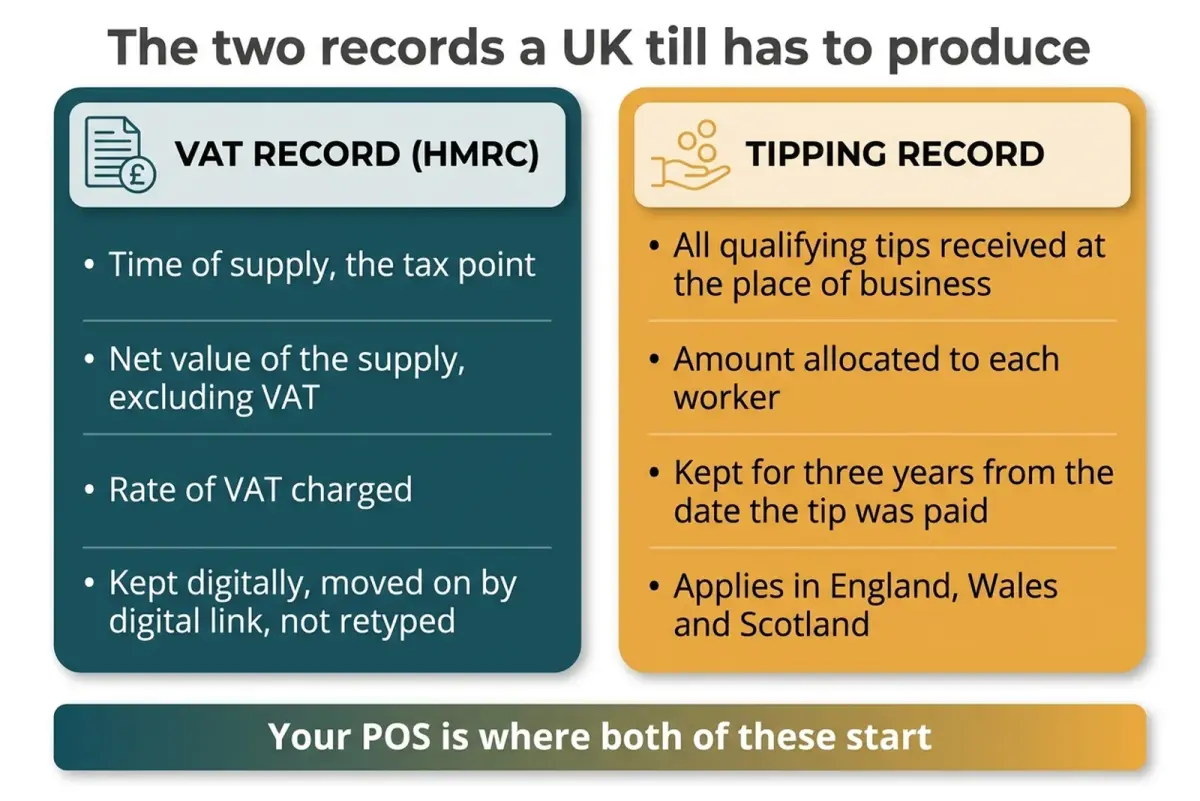
Two records, both starting at the till. Ask to see each one before anyone mentions the loyalty module.
The tax record. Making Tax Digital for VAT requires all VAT registered businesses to keep their VAT records digitally and to file their VAT Returns using compatible software (HMRC).
For each supply you make, the record has to carry the time of supply (the tax point), the net value of the supply excluding VAT, and the rate of VAT charged. That is a specification, not a preference, and a till that rolls a whole service into one daily figure does not produce it.
The rule that catches people out. Once data has been entered into the software that keeps your electronic account, any further transfer, recapture or modification of it must be done using digital links, and HMRC does not consider copy and paste to be a digital link.
Why this matters: a till whose only output is a number on a screen at midnight is not a record keeper. It is a generator of retyping, and retyping is precisely the step those rules were written to remove.
The tipping record. Under the Employment (Allocation of Tips) Act 2023, all qualifying tips must be distributed to staff at the latest by the end of the month following the month in which the customer paid them (statutory code of practice).
The record itself has to include every qualifying tip received at the place of business and the amount allocated to each worker, and it has to be kept for three years from the date the tip was paid.
Where it applies. That law sits inside the Employment Rights Act 1996, which covers England, Wales and Scotland. Operators in Northern Ireland should check their own position rather than assume the same deadline lands on them.
So your till has a payroll job now. Card tips land in your bank account rather than a jar, so the system has to say who was on, what came in and where it went, in a form you can still produce years later. A POS reporting tips as one lump per day has handed you a spreadsheet you will keep by hand until you replace it.
How much does a restaurant POS system cost in the UK?
A restaurant POS system costs money in five places, and only two of them reach the pricing page.
- Hardware: terminals, card readers, printers, a kitchen screen.
- Software: a subscription, usually per terminal.
- Card processing: a percentage of everything you take.
- Setup: menu build, integrations, training, sometimes cabling.
- Exit: notice period, hardware ownership, what happens to your data.
The percentage is the line that moves. It decides your five year total. Subscriptions sit still; processing scales with your success, so a good year costs you more, and many comparison tables leave it off entirely.
Do the arithmetic before the demo, not after. Take last month's card takings off your bank statement, multiply by the quoted rate, multiply by twelve, then put that beside the annual subscription.
Imagine a bistro taking £40,000 a month on cards. At a quoted 1.6%, processing runs to roughly £7,700 across the year, against something like £700 for a software plan. The percentage line is more than ten times the software line. Those figures are invented to show the shape of the arithmetic, not a benchmark to aim at: put your own takings and your own quoted rate in their place before you conclude anything.
Two places to go deeper. Our restaurant POS system cost breakdown walks each line, including the setup fees that arrive after signature, and the POS system for a small restaurant guide covers minimum viable kit.
Cloud POS or on premise: which suits your restaurant?
Where the data lives is the least interesting difference between cloud and on premise POS. Two questions decide it: what happens when the line drops, and how you get your data back out.
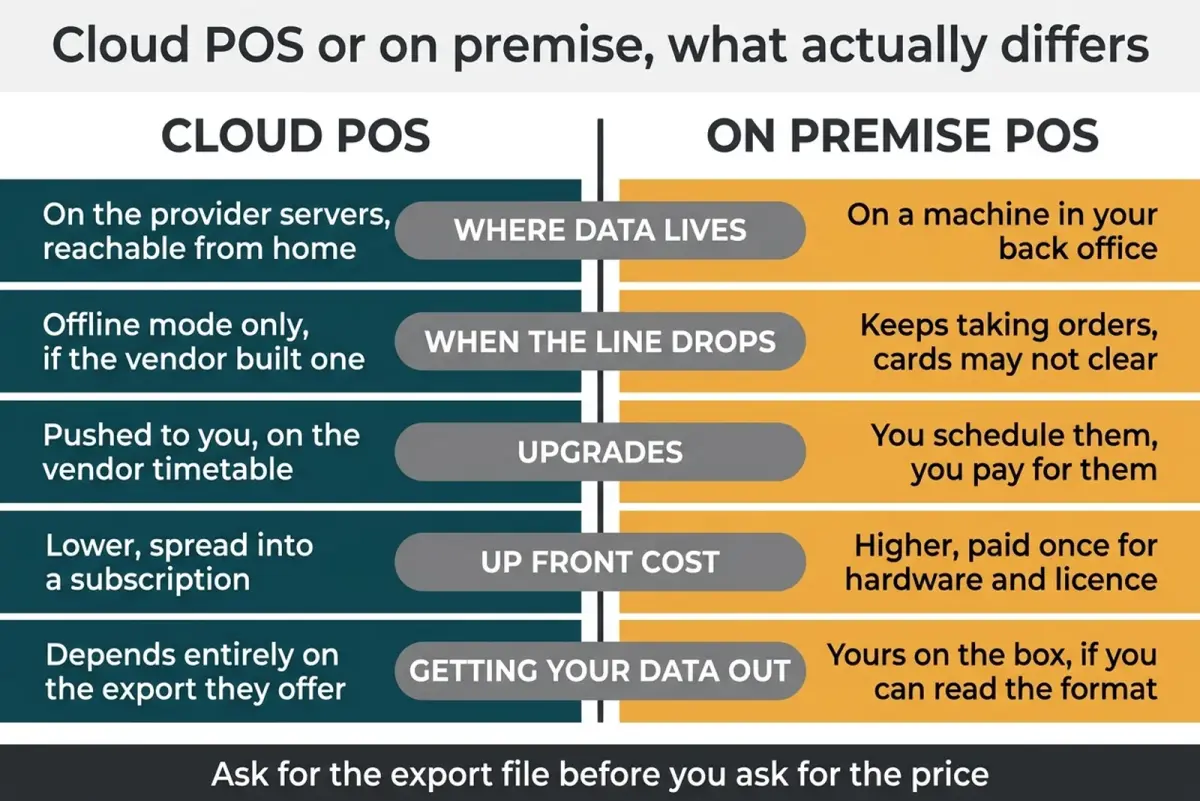
Every row on this chart is answerable in a demo. Three of them are only answerable in a demo.
Offline behaviour is where vendors turn vague. "Works offline" can mean the terminal keeps taking orders and queues the card payments, or that the screen still loads while nothing clears. Imagine the broadband dying at seven on a Friday: on one system the team keeps seating and sending food and the cards catch up later, and on another the screens go white and somebody is writing on a pad. Both were sold as working offline.
Data export is the second question. On a cloud system your history sits on somebody else's server and the only route to it is the export they chose to build. On premise it is on your box, if you can read the format. Neither is safe by default; both are answerable by asking.
Cloud is cheaper to start and lets you check the room from anywhere. On premise costs more upfront and keeps running when the connection does not. Pick the failure you can live with.
Is a POS system hard to learn?
Order entry is not hard. A new starter can ring in an ordinary table within a shift on any modern system, which is why every demo opens with it.
The back office is where people stall. Building a menu with the right tax rates, writing modifier logic that stops the kitchen guessing, wiring the tips report, connecting the accounting export: that lands on one person, usually you, in the fortnight you are also opening.
So audition the hard part. Say your specials change daily: adding a dish with two modifiers and a dietary flag is a job you will do hundreds of times a year, so time it once while somebody is still trying to sell you something.
The demo that disqualifies
A vendor demo is built to show you what works. Turn it round and make it show what does not. Five requests, each answerable yes or no, in the room, inside half an hour.
- Show me the export. Not a screenshot. A file, downloaded while you watch, of last week's sales, opened in a spreadsheet. If it needs a support ticket, that is your answer.
- Show me the tips report. By worker, by period, with what came in and what was allocated. Watch for the hesitation.
- Unplug the router. Ring in a table, send it to the kitchen, take a card. Note which of those three still happens.
- Show me year two. Renewal price, notice period, who owns the hardware, what leaving looks like. Contract terms are a feature.
- Hand the tablet to my newest staff member. Picture a table of six with two allergies and a split bill. Four minutes of that teaches you more than the whole slide deck.
Ask for the export file before you ask for the price. A system you can leave is a system you can negotiate with, and the ones that make leaving awkward are rarely the ones that make Tuesday easier. The restaurant POS features guide goes deeper, and restaurant POS integration covers the wiring.
Frequently Asked Questions
What is a POS system in a restaurant?
A POS system is the software and hardware that takes an order, sends it to the kitchen, processes the payment and records the sale. In practice: a touchscreen terminal, a card reader, a kitchen display or ticket printer, a cash drawer, and a back office that produces reports and exports.
What POS system do most restaurants use?
No reliable published count exists of which POS system UK restaurants use most, so treat any article naming a single winner with suspicion. The shape of the market is easier to describe than to count: cloud on tablets is the usual starting point for a new independent, larger groups lean on premise or hybrid, and kiosks still run simple electronic tills. Choose by what your room has to produce, not a popularity claim nobody can source.
How much does a restaurant POS system cost in the UK?
Cost splits across hardware, a software subscription per terminal, card processing charged as a percentage, setup work such as menu build and training, and exit terms. Published prices usually cover the first two. Above a modest card turnover the processing percentage becomes the biggest line over several years, because it grows with turnover while the subscription does not.
Does a restaurant POS system need to be Making Tax Digital compatible?
Making Tax Digital for VAT requires all VAT registered businesses to keep records digitally and file their VAT Returns using compatible software. Your till does not have to file the return itself; what matters is that the sales data can reach whatever does, without being retyped. Find out which accounting packages a vendor links to, and watch the link work.
Can a POS system handle tips properly under the tipping rules?
Some can and some cannot, which is worth checking rather than assuming. The record you need shows every qualifying tip received at the place of business and the amount allocated to each worker, kept for three years from the date the tip was paid. A system reporting only a daily tips total leaves you building that record by hand. Request a worker level tips report during the demo.
Can I keep my old till and just add a card reader?
You can, and for a fixed menu kiosk that may be the sensible answer. The question is what you give up: product level sales history, allergen flags on the ticket, a per worker tips report, and an export that moves your figures on without retyping. If two of those matter, you are already paying for a POS system in staff hours.
Buy the record keeper, not the touchscreen
Key Takeaway
Back to that Saturday when the card reader dropped and nobody could split a bill six ways. The till was not really the problem. Nobody had asked, before signing, what the thing does when service goes sideways and what it hands back when you want your own numbers.
This week, in under an hour:
- Pull last month's card takings off your bank statement and work out your annual processing cost.
- Book two demos and send both vendors the five requests above in advance.
- Ask your current provider for a sales export and a worker level tips report, and time how long it takes to arrive.
Start with the third. It is the cheapest experiment here, because the answer tells you whether you need a new till at all.
LocalBrandHub does not touch your till and will not pretend otherwise. It handles the marketing side of the same business: your social posts and calendar, a visibility score for how easily nearby customers find you, and a Monday email on what worked. See what it covers.
Guide reviewed and last updated 12/08/2026. Sourced figures come from the named public sources; the worked example is illustrative arithmetic, not a benchmark.
For restaurants, salons, and local businesses
Need help with your marketing?
We help UK businesses turn social media into real results, not busywork.
Start freeSources
Get More Marketing Tips
Practical marketing tips for UK business owners, straight to your inbox. No spam, unsubscribe anytime.
About the Author
Local Brand Hub
Empowering UK Businesses
Local Brand Hub provides comprehensive business management tools designed specifically for UK local businesses to streamline operations, automate marketing, and grow revenue.
More articlesRelated Articles
 Technology
Cafe POS System: UK Guide to Costs, Features & Fees
Compare UK cafe POS systems: Square, Clover, Toast costs and fees explained. Find the best system for your coffee shop with our practical comparison guide.
 Technology
EPOS Systems for Restaurants UK: A Practical Guide for 2026
Find the right EPOS system for your UK restaurant. Compare features, costs, and key benefits that help streamline your operations and serve more customers.
 Technology
Hospitality POS Systems: The Complete UK Guide for 2026
Compare UK hospitality POS systems: cloud, mobile, and kiosk options. Discover real costs, key features, and find which system fits your restaurant or bar.