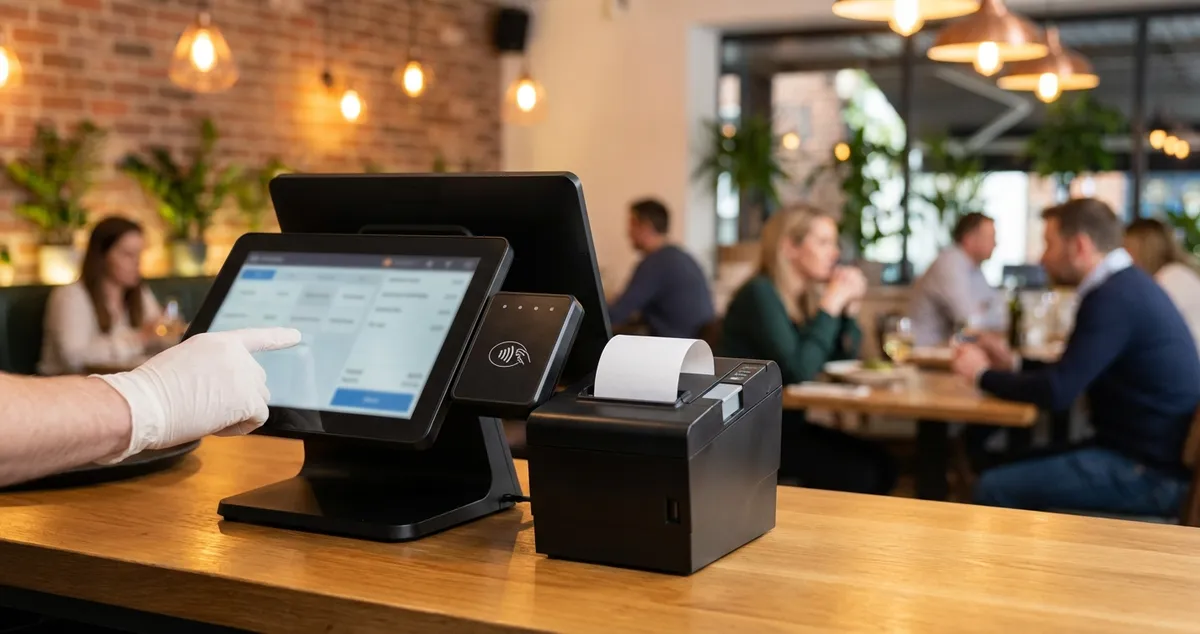
Find the best restaurant POS system for your UK venue. Compare Square, TouchBistro, and others with pricing, features, and recommendations.
You've worked a double shift. Orders went missing twice. The kitchen blamed the floor. Now you're counting stock at midnight on scraps of paper. Sound familiar? A restaurant POS system connects your floor to the kitchen. It handles orders, payments, stock, and reports in one place.
The right restaurant POS system changes daily operations. The wrong one wastes time and money. Prices range from free to several thousand pounds. Many options target UK restaurants. This guide helps you choose.
What You'll Learn
- What a restaurant POS system actually does
- The best POS systems for UK restaurants
- How much you should expect to pay
- Essential features vs nice-to-haves
- How to choose the right system for your venue
What Is a Restaurant POS System?
A restaurant POS system is a framework that combines hardware and software to run your venue. It handles orders, payments, and sales tracking in one setup. Let's break down what's inside.
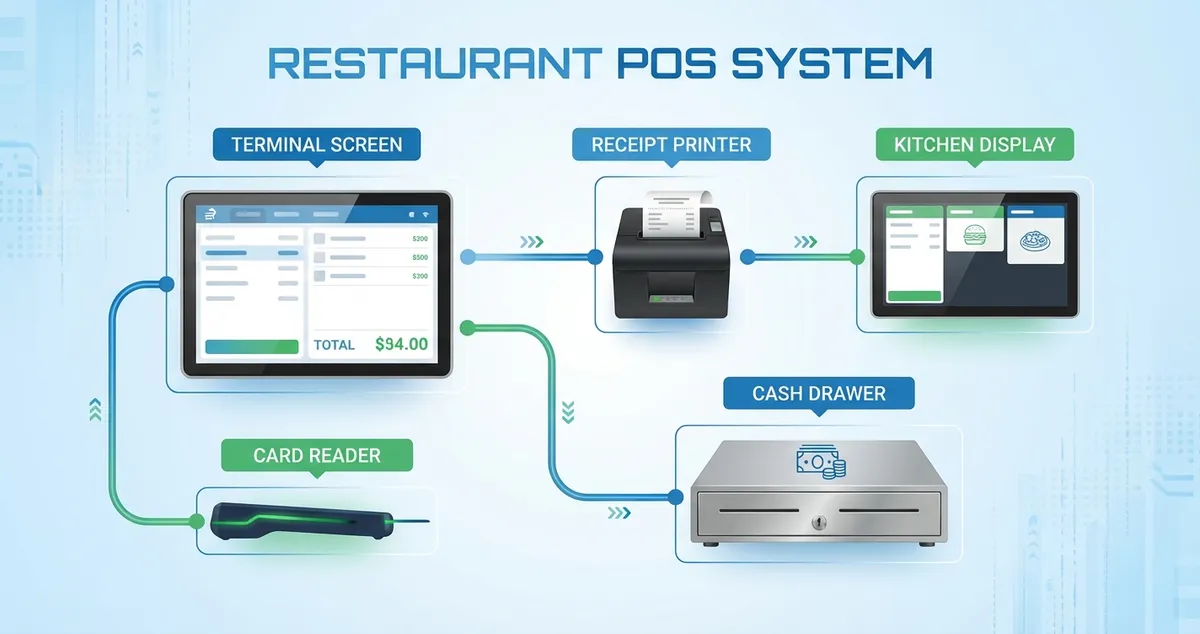
Core components of a modern restaurant POS system
Core Components:
- Terminal/Screen: Touchscreen where staff enter orders
- Card Reader: Processes card and contactless payments
- Receipt Printer: Prints customer receipts and kitchen tickets
- Kitchen Display System (KDS): Shows orders to kitchen staff
- Cash Drawer: Secures cash takings
- Software: The brains connecting everything together
These systems run on iPads, Android tablets, or dedicated hardware. Cloud options let you check data from anywhere. Some systems work offline too.
For example, a busy gastropub switched from a basic till to a proper restaurant POS system. Order errors dropped sharply. Kitchen wait times fell. End-of-day cashing up went from 45 minutes to 10. That's the difference a good system makes.
If you can't tell whether your current setup costs you money through errors and slow service, that's usually a sign you need to look at a proper POS system.
The Best Restaurant POS Systems for UK Restaurants
Now you know what a POS system does. Here's how the top UK options compare based on features, pricing, and fit.
Top Picks Comparison
| System | Best For | Starting Price | Hardware |
|---|---|---|---|
| Square for Restaurants | Budget-conscious, small venues | Free (transaction fees only) | iPad |
| Epos Now | UK-based support, expanding operations | £325 one-time | Dedicated/iPad |
| TouchBistro | Tableside ordering, cafés | Custom quote | iPad |
| Lightspeed Restaurant | Advanced analytics, multi-location | Custom quote | iPad |
| Toast | High-volume, full-service restaurants | Custom quote | Android |
| Clover | Flexibility, customisation | Custom quote | Dedicated |
Square for Restaurants
Best for: Small restaurants, cafés, and budget-minded operators.
Square offers clear pricing. No monthly fees on the basic plan, just 1.75% per card payment. It runs on iPads and includes online ordering.
Strengths:
- No monthly software fees
- Easy setup, minimal training
- Integrated online ordering
- Transparent pricing
Limitations:
- Limited features on free plan
- Less customisation than competitors
- Transaction fees add up at high volumes
For instance, a café processing £10,000 monthly pays roughly £175 in Square fees. That's often less than monthly software costs elsewhere.
Epos Now
Best for: UK restaurants wanting local support and a proven restaurant POS system.
Epos Now is a UK-based company with cloud POS and local support. Hardware starts at £325. Software runs on a subscription. They work with over 100 apps.
Strengths:
- UK-based customer support
- Kitchen Display Systems included
- Over 100 app integrations
- Works on dedicated hardware or iPad
Limitations:
- Hardware costs add up
- Some features require additional subscriptions
TouchBistro
Best for: Tableside ordering at small-to-medium restaurants.
TouchBistro runs on iPads for tableside ordering. Servers take orders at the table. Orders go straight to the kitchen. It's built for restaurants, not adapted from retail.
Strengths:
- Purpose-built for restaurants
- Excellent tableside ordering
- Works offline
- Intuitive interface
Limitations:
- Requires custom quote
- iPad-only
Lightspeed Restaurant
Best for: Restaurants wanting detailed analytics and multi-site management.
Lightspeed offers features like ingredient costing, reports, and loyalty tools. Their "Menu of the Day" feature helps push specials.
Strengths:
- Advanced analytics and reporting
- Multi-location management
- Ingredient-level costing
- Strong loyalty features
Limitations:
- Higher price point
- May be overkill for simple operations
Why This Matters
The best restaurant POS system fits your operation, not the one with the most features. A café doesn't need enterprise-level inventory, according to UKHospitality guidance on technology adoption.
How Much Does a Restaurant POS System Cost?
You've seen the options. Now the key question: what will it cost? Here's what UK restaurants typically budget.
Typical Cost Breakdown:
For full pricing details, see our restaurant POS system cost breakdown.
| Cost Type | Budget Option | Mid-Range | Premium |
|---|---|---|---|
| Hardware | £0-500 | £500-1,500 | £1,500-3,000+ |
| Monthly Software | £0-50 | £50-150 | £150-300+ |
| Transaction Fees | 1.5-2.5% | 1.5-2% | Negotiable |
| Installation | DIY | £200-500 | £500-1,500 |
Real-World Example:
A 40-cover restaurant might pay:
- Square (budget): £300 hardware + £0 monthly + ~£200/month fees = £2,400 first year
- Mid-range UK system: £800 hardware + £50/month + fees = £3,000 first year
- Premium system: £2,000 hardware + £200/month + fees = £5,000+ first year
If you're only looking at monthly costs, you'll often lose to competitors who calculate total cost of ownership including hardware, fees, and hidden charges.
Essential Features Every Restaurant POS Needs
Price matters, but so do features. Not all features matter equally, though. If you're reading this thinking "I just need something that works", you're not alone. Here's what counts most in a restaurant POS system.
Must-Have Features
For detailed feature comparison, see our restaurant POS features guide.
Order Management:
- Easy order entry with modifiers
- Split bills and table transfers
- Course management (starters, mains, desserts)
- Kitchen ticket printing or KDS
Payment Processing:
- Card and contactless payments
- Cash handling with drawer integration
- Tipping functionality
- VAT-compliant receipts (see GOV.UK VAT requirements for hospitality businesses)
Basic Reporting:
- Daily sales summaries
- Staff performance tracking
- Product-level sales data
- Cash up reports
For example, a busy pub might use sales reports to spot which beers sell best on Fridays. Then adjust stock orders to match.
Nice-to-Have Features
- Inventory tracking: Ingredient-level stock management
- Online ordering integration: Direct orders to your POS
- Loyalty programmes: Points and rewards built-in
- Table management: Visual floor plan with booking integration
- Multi-location: Central control of multiple venues
Feature Priority by Restaurant Type (Rule of Thumb):
| Restaurant Type | Priority Features |
|---|---|
| Café/Quick Service | Speed, simplicity, low cost |
| Casual Dining | Table management, course timing |
| Fine Dining | Detailed checks, wine pairing notes |
| Pub | Tab management, multiple payment types |
| Takeaway | Online ordering, delivery integration |
Your priorities may differ, these are starting points based on common patterns.
A casual dining spot might need table management. A café wants speed and simplicity. Would you choose the same tools for both? Your answer guides your priorities.
Weekly Action
- Day 1-2: List your current pain points (order errors, slow payments, stock guessing)
- Day 3-4: Request demos from 2-3 systems matching your needs
- Day 5-7: Calculate total first-year cost for each option
Cloud POS vs Traditional Systems
With features sorted, consider how your data is stored. Restaurant POS systems come in two main types.
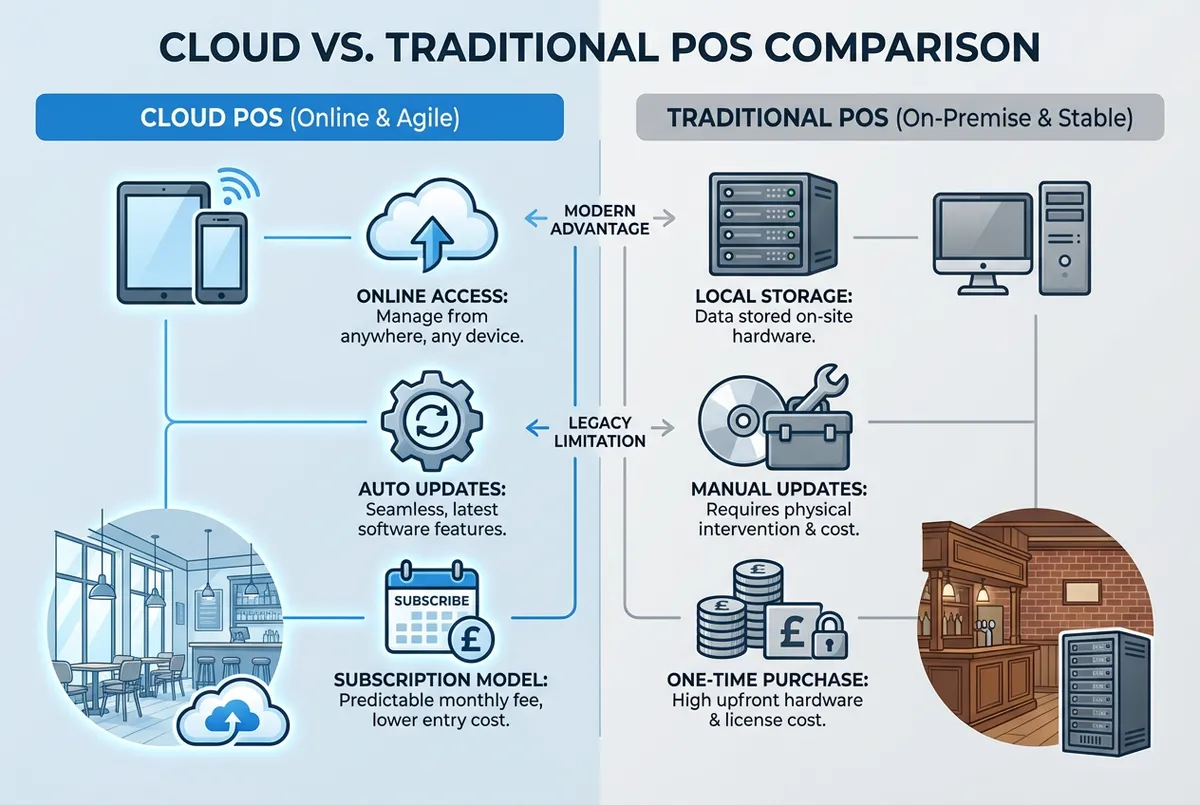
Cloud vs traditional: choose based on your internet reliability and data preferences
Cloud-Based POS:
- Data stored online, check from anywhere
- Regular updates and cloud backups
- Lower upfront costs (subscription model)
- Needs internet connection
- Examples: Square, Toast, Lightspeed
Traditional/On-Premise POS:
- Data stored locally on your hardware
- One-time software purchase
- Works offline reliably
- You manage backups and updates
- Higher upfront, lower ongoing costs
Best for Most UK Restaurants
For many UK restaurants, cloud-based systems often work well for features, support, and total cost. Traditional systems can make sense if you have unreliable internet or want data control.
Would you trust your paper order pad if the internet went down? Many cloud systems include offline modes. It's worth checking.
If you're only comparing cloud vs traditional without checking each vendor's offline mode, that rarely works. Test offline mode during your demo.
What POS Integrations Do Restaurants Need?
With storage sorted, think about connections. A restaurant POS system that doesn't link to your other tools creates double-work. Key integrations to look for:
Accounting:
- Xero
- QuickBooks
- Sage
Online Ordering:
- Deliveroo
- Uber Eats
- Just Eat
- Direct ordering (commission-free)
Reservations:
- ResDiary
- OpenTable
- Quandoo
Staff Management:
- Deputy
- Planday
- RotaCloud
Payments:
- SumUp
- Zettle
- Worldpay
If your POS syncs sales to Xero, you save hours of bookkeeping weekly. That one link can justify the system cost.
Common POS Mistakes to Avoid
Integrations matter. But so does avoiding common errors. Watch out for these pitfalls when choosing a restaurant POS system.
- Buying on features alone: More features doesn't mean better fit
- Ignoring total cost: Monthly fees are just part of the picture
- Skipping training: Even "easy" systems need proper staff training
- No backup plan: What happens when the internet fails?
- Forgetting growth: Will this system work when you expand?
If you're only choosing based on the lowest monthly price, you'll often lose to competitors who calculate total cost including hardware, fees, and switching costs.
If you're thinking "we'll just figure it out as we go", that's how restaurants end up switching systems twice in three years. Plan properly.
Minimum Viable POS Setup
Now you know what to avoid. Here's how to start small. Running a small operation? See our POS system for small restaurant guide.
If you only have 30 minutes a week and a small budget, here's your plan:
Set up your first POS system in 7 days:
- Day 1-2: Sign up for Square for Restaurants (free tier, takes 10 minutes)
- Day 3-4: Use your existing iPad or buy a refurbished one (~£200)
- Day 5-6: Add a card reader (~£20-50) and test a few orders
- Day 7: Print your first kitchen tickets (basic thermal printer ~£100)
Total: Under £400 to start, paying only transaction fees.
This restaurant POS system setup handles orders, payments, and basic reporting. It's enough to see benefits quickly. Upgrade as you grow.
How to Choose the Right POS for Your Restaurant
With setup options clear, here's how to decide. Follow this process:
Step 1: Define Your Needs
- What's your biggest operational pain point?
- How many terminals do you need?
- Do you need online ordering integration?
- What's your realistic budget?
Step 2: Shortlist Options
- Match 2-3 systems to your needs
- Check UK support availability
- Verify integration with your existing tools
Step 3: Test Before Committing
- Request demos with your actual menu
- Ask about contract terms and exit fees
- Check reviews from similar UK restaurants
Step 4: Plan Implementation
- Schedule during quiet period
- Train all staff before go-live
- Keep backup payment method ready
For instance, a 60-cover casual dining spot might follow this process. First, they identify table management as their main pain point. Then shortlist TouchBistro and Square. Run demos on a Monday afternoon. Implement the winner during their quietest week.
Quick Check
Ask yourself: would I trust this restaurant POS system to run a busy Saturday service without me watching? If the answer isn't yes, keep looking.
If you can't explain why one system suits your operation better, you likely need more research.
Key Takeaways
If you run a restaurant and want to see how Local Brand Hub can support your marketing, explore our restaurant marketing tools.
Key Takeaways
A restaurant POS system is key technology for smooth operations. The right choice depends on your needs, budget, and growth plans.
Start with:
- Identify your biggest operational pain points
- Request demos from 2-3 suitable systems
- Calculate total first-year cost, not just monthly fees
For deeper learning:
- Compare the best restaurant POS systems in detail
- Understand restaurant POS features you actually need
- See POS system costs broken down
- Read our small restaurant POS guide
For UK restaurants
Need Help Choosing a POS System?
Local Brand Hub helps UK restaurants navigate technology decisions and build marketing systems that integrate with your POS.
Start Free TrialAbout the Author
Local Brand Hub
Empowering UK Businesses
Local Brand Hub provides comprehensive business management tools designed specifically for UK local businesses to streamline operations, automate marketing, and grow revenue.
More articlesRelated Articles
 Technology
Cafe POS System: UK Guide to Costs, Features & Fees
Compare UK cafe POS systems: Square, Clover, Toast costs and fees explained. Find the best system for your coffee shop with our practical comparison guide.
 Technology
EPOS Systems for Restaurants UK: A Practical Guide for 2026
Find the right EPOS system for your UK restaurant. Compare features, costs, and key benefits that help streamline your operations and serve more customers.
 Technology
Hospitality POS Systems: The Complete UK Guide for 2026
Compare UK hospitality POS systems: cloud, mobile, and kiosk options. Discover real costs, key features, and find which system fits your restaurant or bar.