
Mothers day florist marketing run as a countdown: what to publish and when, what your order page must say before an order, and when to close orders.
Mothers day florist marketing is won in the three weeks before Mothering Sunday, not on the day. Fix your range and prices, open orders a fortnight out, publish a cut off you can hold, set your Google hours and delivery patch, then spend the weekend delivering promises you already made.
Mother's Day is not won on the weekend. The weekend is when you find out whether you won it, and by then the variables left are mostly traffic and rain.
The ceiling on that weekend is not how fast you can make. It is how many promises you can keep. A shop that can build sixty bouquets and deliver thirty has a thirty bouquet weekend, and the other thirty are apologies.
Where Mother's Day is actually won
The usual advice on this subject is to post earlier. Fine advice, wrong constraint. On the Friday and Saturday you are a small logistics company that happens to own flowers, and no amount of reach fixes a round you cannot drive. So the question is which decisions get made while the shop is quiet.
Mother's Day does not sit on the same UK date each year, so look this year's up before copying last year's calendar. Your stock list moves with it, which is why the seasonal flower calendar sits alongside this.
When should florists start Mother's Day marketing?
Start three weeks out and work backwards. Range and pricing at twenty one days. Orders open and a published cut off at fourteen. Google hours and delivery patch at seven, orders closed and rounds built at two. The marketing and the fulfilment are one plan, run in that order.
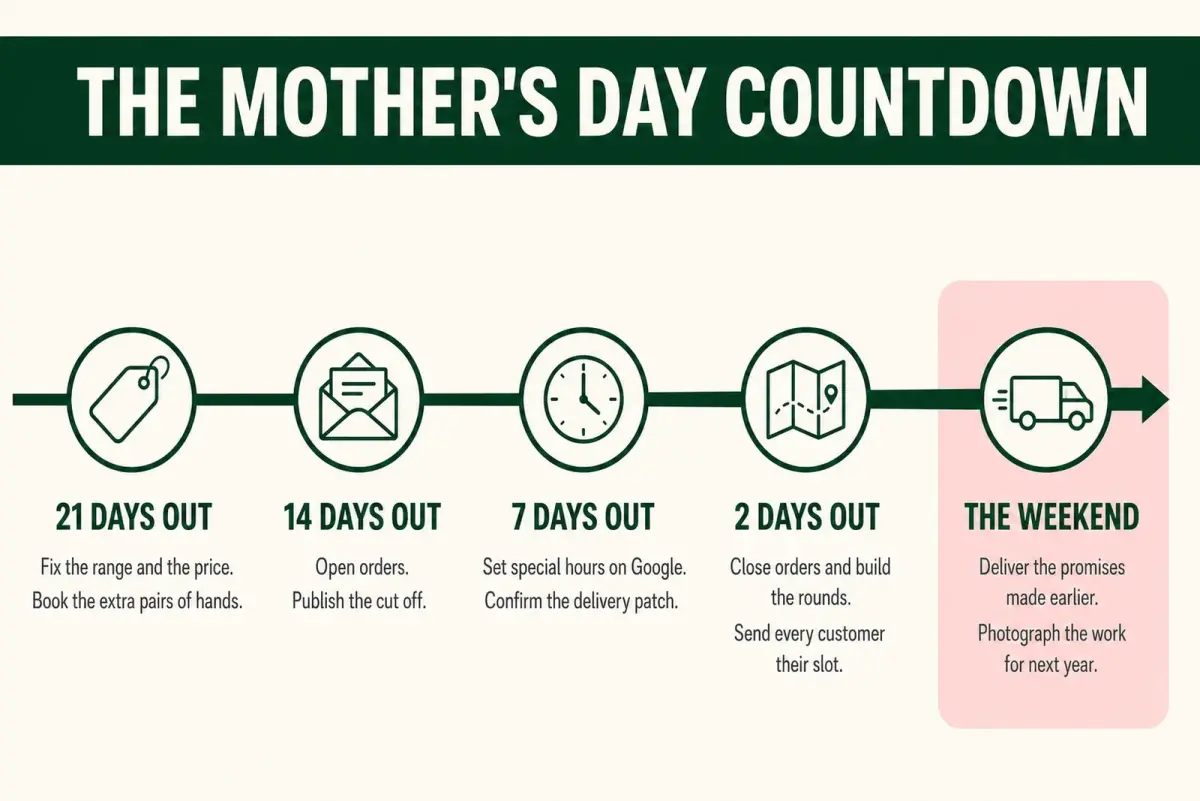
Five decisions, in the only order that lets each one hold.
Twenty one days out: fix the range and the hands
Decide the bouquets you will sell and what they cost, then stop deciding. Three or four options at clear price points beat a full menu on a weekend like this one: every extra choice is a conversation on a day you have none to spare.
Then work out how many you can make and deliver, and book the extra pair of hands. That number is your cut off, and knowing it early is the difference between a deadline and a guess.
Fourteen days out: open orders and publish the cut off
Open orders and say in public when they close. A cut off that appears on the Thursday reads as panic. Published a fortnight ahead it reads as a shop that knows what it is doing, and it protects your Saturday.
Then remind people: a reminder is not nagging when the date moves every year. More mechanics in our guides to florist pre-orders and reminder marketing.
Seven days out: tell Google when you are open and where you deliver
Two Google Business Profile settings decide what next week's searchers are told about you, and both take minutes.
Your hours. Google Business Profile Help states that you can set special hours if your business temporarily adjusts its hours of operation or remains closed for up to six days in a row, and that it is a good idea to confirm your hours for official holidays even if they are the same as your regular hours. If you are opening on a Sunday you normally close, the profile needs to say so before anyone sets off.
Your delivery patch. Google Business Profile Help states that you can set up to 20 service areas based on the cities, postcodes or other areas that you serve, and that you cannot set your service area as a radius distance around your business. So describe the patch by postcode and town. You are typing districts you already advertise in, not customer addresses, so nothing personal leaves the shop. Check what the account currently holds before the week starts.
Two days out: close orders and build the rounds
Close when you said you would. Build the rounds from the orders you actually hold, grouped by area, and tell each customer which part of the day to expect.
A round built on Thursday evening from a closed list is a plan. One built on Saturday morning from a list still growing is a rumour.
The weekend: deliver what you already sold
Nothing left to market. Photograph the good bouquets on the bench, and write down what ran out. That note is next year's twenty one day decision, already made.
What your Mother's Day order page has to say
Taking orders by phone, by message or through your website is distance selling, and the guidance is short enough to read in a tea break.
GOV.UK's distance selling guidance for businesses states that before an order is placed you must provide delivery arrangements, costs and how long goods will take to arrive, and how the customer can cancel and when they lose the right to cancel. It also states that this information must be easy to understand and on paper, in an email or another format the customer can save for future reference.
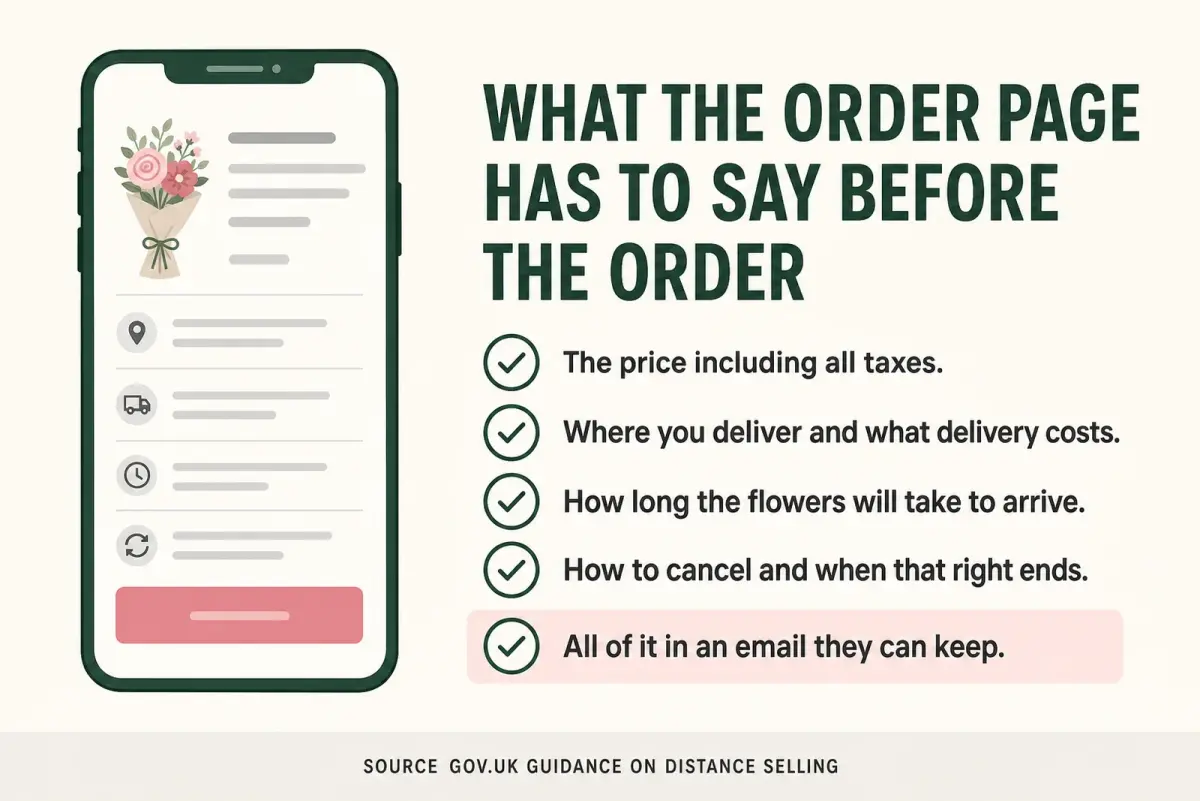
The last row is the one worth checking first.
Read that second requirement precisely. The duty is that the information can be saved: a confirmation email meets it, and so does a printed order slip. Nothing says you have to buy software.
Where it bites: a story that disappears is not a format anyone can save, so a cut off, delivery area and charge living only there were never given to the customer who ordered from them.
Why this matters: the cut off is where marketing and law meet. You publish it for capacity reasons; the terms around it go out beforehand for a different one.
Do you have to refund a Mother's Day order?
Not for a change of mind, in most cases. GOV.UK's guidance on accepting returns and giving refunds states that there are certain items where you only have to offer a refund if they are faulty, and lists perishable items, giving frozen food or flowers as its example.
Note its edges:
- It covers a change of mind, not a fault with the flowers.
- Something faulty is still a refund.
- It says nothing about an order you never delivered.
So write your own line and publish it before orders open, alongside the cancellation information the distance selling guidance already requires.
Imagine a shop whose order page carries one plain sentence: fresh flowers are made to order for a fixed date, so orders cannot be cancelled after the cut off, and anything wrong with the flowers will be put right. Every conversation it prevents is one you would otherwise have on the busiest morning of the year. Whatever you write, it has to describe what your shop will actually do.
If writing all this each season is what slips, LocalBrandHub has ready made seasonal campaigns for UK dates like this one, so you edit rather than start from blank.
Frequently Asked Questions
How do florists market Mother's Day?
As a countdown, not a campaign: a short range at fixed prices three weeks out, orders and a firm cut off at a fortnight, Google settings in the final week, orders closed two days before. Promotion converts only as far as fulfilment can carry it.
How do florists handle Mother's Day deliveries?
From a closed order list, not a live one. Group drops by postcode into tight loops, build the rounds the evening before, and tell customers when to expect theirs. A promise you cannot keep costs more than an order you never took.
What flowers sell best for Mother's Day?
The honest answer is whatever is in season, and Mothering Sunday lands in spring: tulips, daffodils, narcissi, ranunculus and stocks. The more useful answer is that the range beats the list. A narrow set of fixed bouquets is easier to buy for, faster to make in batches and quicker to sell over the phone than an open menu.
Can I refuse a refund on a cancelled Mother's Day order?
For a change of mind you usually can. GOV.UK guidance lists perishable items, its example being frozen food or flowers, among the goods you only have to refund if they are faulty. Faulty flowers still need putting right. Publish your position before orders open, with the cancellation information the guidance requires you to give beforehand.
Should I open on Mothering Sunday?
Only if you can staff it and it earns more than it costs you on Monday. If you do, say so where people look: Google Business Profile Help states you can set special hours when your business temporarily adjusts its hours of operation, and recommends confirming hours for official holidays even when they match your regular ones. An unlisted Sunday leans entirely on passing trade, and the profile is where everyone else looks.
The Short Version
Mother's Day is a deadline with flowers attached, and every decision that changes the outcome is made while the shop is quiet.
Key Takeaway
- Fulfilment is the ceiling. Reach cannot deliver a round you have no driver for.
- The cut off is a capacity number, worked out three weeks early and published a fortnight early.
- The order page carries the terms. Delivery, costs, timings and cancellation go out before the order, in something the customer can keep.
- Fresh flowers sit in the perishable exception, so a change of mind is usually not a refund.
- Set your Google hours and delivery patch in the final week, not the Saturday.
If you only have thirty minutes this week, and thirty minutes is a starting point rather than a target: work out how many bouquets you can make and deliver, then publish that number as a dated cut off. Every other job hangs off it.
Weekly Action
Three weeks of work, one job at a time.
- Look up this year's Mothering Sunday date and count back twenty one days
- Write your three or four bouquets and their prices, then stop editing them
- Work out how many you can make and deliver, and make that your cut off
- Publish the cut off, delivery area and charge where a customer can save them
- Set your special hours and service areas on your Google Business Profile
For restaurants, salons, and local businesses
Need help with your marketing?
We help UK businesses turn social media into real results, not busywork.
Start freeThe same countdown runs the next peak day, so see our guide once this one is done.
Sources
Get More Marketing Tips
Practical marketing tips for UK business owners, straight to your inbox. No spam, unsubscribe anytime.
About the Author
Local Brand Hub
Empowering UK Businesses
Local Brand Hub provides comprehensive business management tools designed specifically for UK local businesses to streamline operations, automate marketing, and grow revenue.
More articlesRelated Articles
 Marketing Tips
Valentines Day Florist: How Many Orders Can You Take?
Valentines day florist planning for UK flower shops: work out how many orders your bench and van can handle, then set your cut off, prices and staffing.
 Marketing Tips
Social Media for Florists: Run It on the Occasion Year
Social media for florists, run on the occasion calendar: which platform your buyers use, when to open each run-up, and why Instagram forgets Mother's Day.
 Marketing Tips
Marketing to Engaged Couples: A Wedding Florist Guide
Marketing to engaged couples for wedding florists: aim at the dates your diary still needs, work local venues, and log where every enquiry came from.