
How to get more Google reviews for restaurant success: 6 proven steps UK owners use, including staff scripts, timing tips, and response templates.
You just served a table of four the best Sunday roast they have had in months. They smiled, tipped well, said they would be back. Three days later you check your reviews. Nothing. Meanwhile, the customer who complained about waiting twelve minutes for a starter has already posted a two-star review with photos.
If you're thinking "that happens every week," you're not alone. This gap between happy customers and actual reviews costs UK restaurants thousands in lost bookings. Getting more Google reviews for your restaurant requires a system, not luck. This guide covers the exact six-step method UK restaurant owners use to turn satisfied diners into consistent reviewers.
What You'll Learn in This Guide
- Why Google reviews directly impact your restaurant's revenue and visibility
- The exact timing and methods that actually get customers to leave reviews
- A step-by-step system for training your staff to ask naturally
- How to respond to Google reviews in ways that build trust
- What Google allows (and prohibits) when requesting restaurant reviews
Why Google Reviews Matter More Than Ever for Restaurants
So why bother with all this effort? According to BrightLocal's 2025 Local Consumer Review Survey, 83% of consumers use Google to read reviews about local businesses before visiting. The UK Government's guidance on online reviews confirms that authentic customer feedback drives consumer purchasing decisions.
For example, a seafood restaurant in Brighton jumped from page two to the local three-pack after increasing their review count from 47 to 180 over six months. Their bookings increased by 34% despite no other marketing changes. That is the power of getting more Google reviews for your restaurant.
The Revenue Connection
Harvard Business School research on Yelp reviews found that a one-star increase leads to a 5-9% revenue increase for independent restaurants. While this study focused on Yelp, the principle applies across review platforms: higher ratings correlate with increased bookings.
The bottom line: More positive reviews means more visibility in local search, which our local SEO tools help you climb, more trust from potential diners, and ultimately more bookings for your restaurant.
Step 1: Create Your Google Review Link
With the importance established, here is where to start. Before you can ask anyone for a review, you need to make leaving one effortless. If a customer has to search for your business, find the review button, and navigate multiple screens, most will give up.
How to create your direct review link:
- Sign into your Google Business Profile
- Click "Ask for reviews" in the menu
- Copy the unique link Google generates
- Test it on your phone to ensure it opens directly to the review screen
For example, a bistro in Manchester created their link and saw review submissions increase by 40% within the first month simply because customers no longer had to search for the restaurant name.
This link becomes your primary tool for getting more Google reviews. Print it as a QR code, add it to receipts, include it in follow-up emails. The fewer steps between "I enjoyed that meal" and "review submitted," the more reviews you collect.
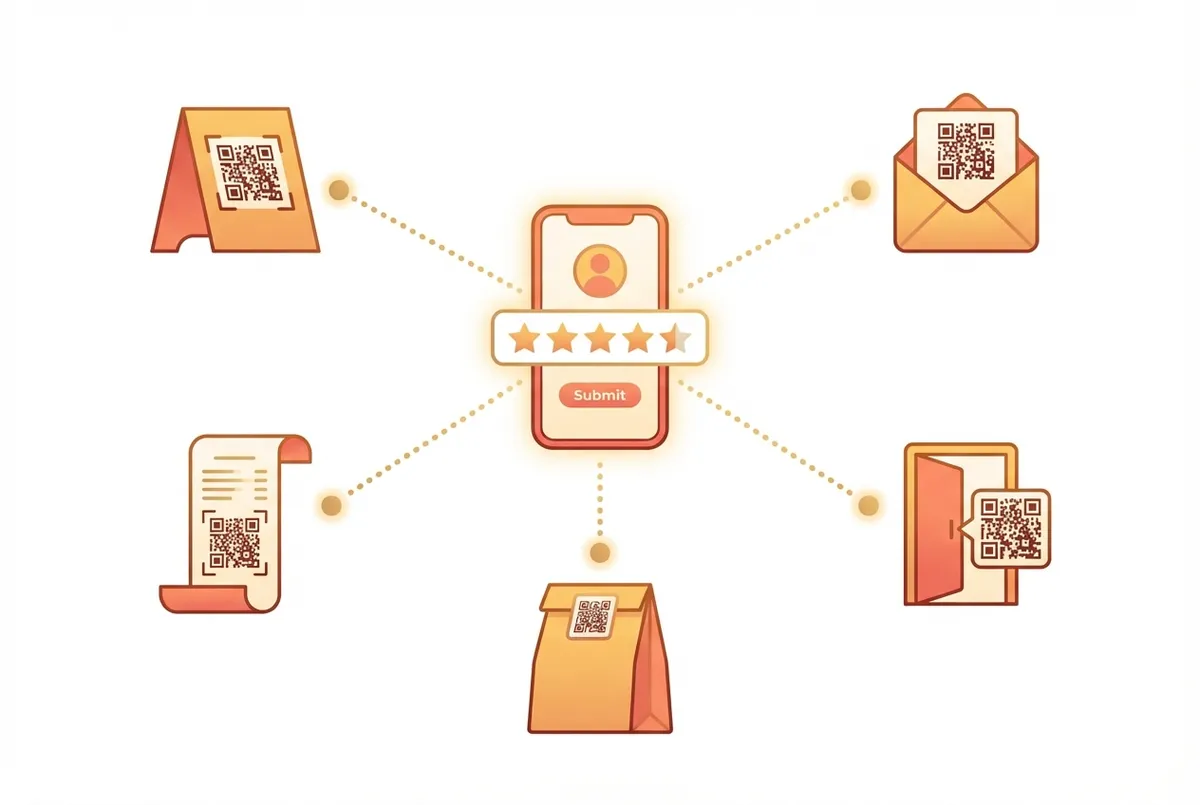
A direct review link via QR code removes friction and increases review completion
Step 2: Master the Timing
Now that you have your link, the next step is knowing when to use it. Timing your review request is everything. Ask too early and the customer feels pressured. Ask too late and they have forgotten the experience.
The sweet spots:
| Moment | Why It Works |
|---|---|
| After the bill is paid | They have mentally closed the transaction and are reflecting |
| During a genuine compliment | Natural opportunity to redirect enthusiasm |
| Within 24 hours via email/SMS | Still fresh but not intrusive |
What to avoid:
If you're asking for reviews only when you're down two staff and the place is half-empty, you're not alone. But reviews collected during your quietest periods often reflect that energy. Prioritise asking during your best service moments when your team is performing well.
Match Reviews to Your Best Service
A cafe owner in Bristol noticed their Monday reviews averaged 3.8 stars while Saturday reviews averaged 4.6. The difference was staffing levels and kitchen speed. They shifted review requests to their strongest service days and saw their overall rating climb from 4.1 to 4.4 within three months.
Step 3: Train Your Staff to Ask Naturally
Building on your timing strategy, this next step makes or breaks your review collection. Your front-of-house team are your review generators. But "Can you leave us a Google review?" feels awkward for everyone involved.
The natural script approach:
When a customer says something positive like "That was delicious" or "We'll definitely be back," your staff can respond:
"Thank you so much, that really means a lot. If you have a moment, we'd love if you could share that on Google. There's a QR code on your receipt that takes you straight there."
The key elements:
- Acknowledge the compliment genuinely
- Make the request feel like a favour, not a demand
- Remove friction by mentioning the QR code or link
Training tips:
- Role-play during team briefings
- Share review wins in staff meetings
- Avoid making it feel like a target or pressure
For instance, a gastropub in Leeds using this approach tracks which staff members generate the most reviews. Rather than creating competition, they frame it as recognition: "Sarah helped us get five new reviews this month" creates different energy than "You need to hit review targets." Their team now sees review requests as part of great service, not an add-on task.
Step 4: Use Multiple Touchpoints
Once your team knows how to ask, the next step is creating multiple opportunities for reviews to happen. Relying on a single method rarely produces consistent results. Successful restaurant owners typically use multiple touchpoints that reinforce each other.
Physical touchpoints:
- Table tents with QR codes
- Review requests printed on receipts
- Small cards handed with the bill
- Signs near the exit or toilets
Digital touchpoints:
- Follow-up email within 24 hours of booking
- SMS message if you collect mobile numbers
- Link in your email signature
- Social media bio and posts
Industry research consistently shows that customers are significantly more likely to leave reviews when prompted by businesses. The prompting matters. Without it, even satisfied customers rarely think to leave feedback.
For example, a Thai restaurant in Edinburgh implemented table tents, receipt QR codes, and a follow-up SMS system simultaneously. Their monthly review count increased from 3-4 to 15-20 reviews. Multiple touchpoints mean customers encounter the request at their most convenient moment.
Step 5: Respond to Every Review
With reviews coming in, the next critical step is what you do with them. Research consistently shows that most review readers pay attention to how businesses respond. In fact, 93% of consumers expect businesses to respond to their reviews, yet many restaurants still leave reviews unanswered.
Responding to reviews also builds trust. According to industry research, 89% of consumers say they are more likely to use a business that replies to all of its reviews.
How to Respond to Positive Reviews
Thank the guest specifically, mention something from their review, and invite them back. Keep it personal.
"Thank you Sarah! We're so glad you enjoyed the Sunday roast. The beef was from a farm just 20 miles from here. Hope to see you again soon."
For instance, a wine bar in Shoreditch responds to every five-star review with a personal note mentioning the specific dish or wine the guest ordered. Their response rate is 100% and their average rating has stayed at 4.7 for eighteen months.
How to Respond to Negative Reviews
Stay calm. Apologise briefly, acknowledge the issue, and explain what you will do differently. Never argue or get defensive.
"We're really sorry your starter took longer than expected. That's not the experience we aim for, and we've spoken to the kitchen about pacing during busy periods. We'd love the chance to make it up to you."
Research indicates that many customers will still engage with your business after seeing a negative review if you respond professionally. A well-crafted response demonstrates accountability and can actually strengthen trust with potential customers.
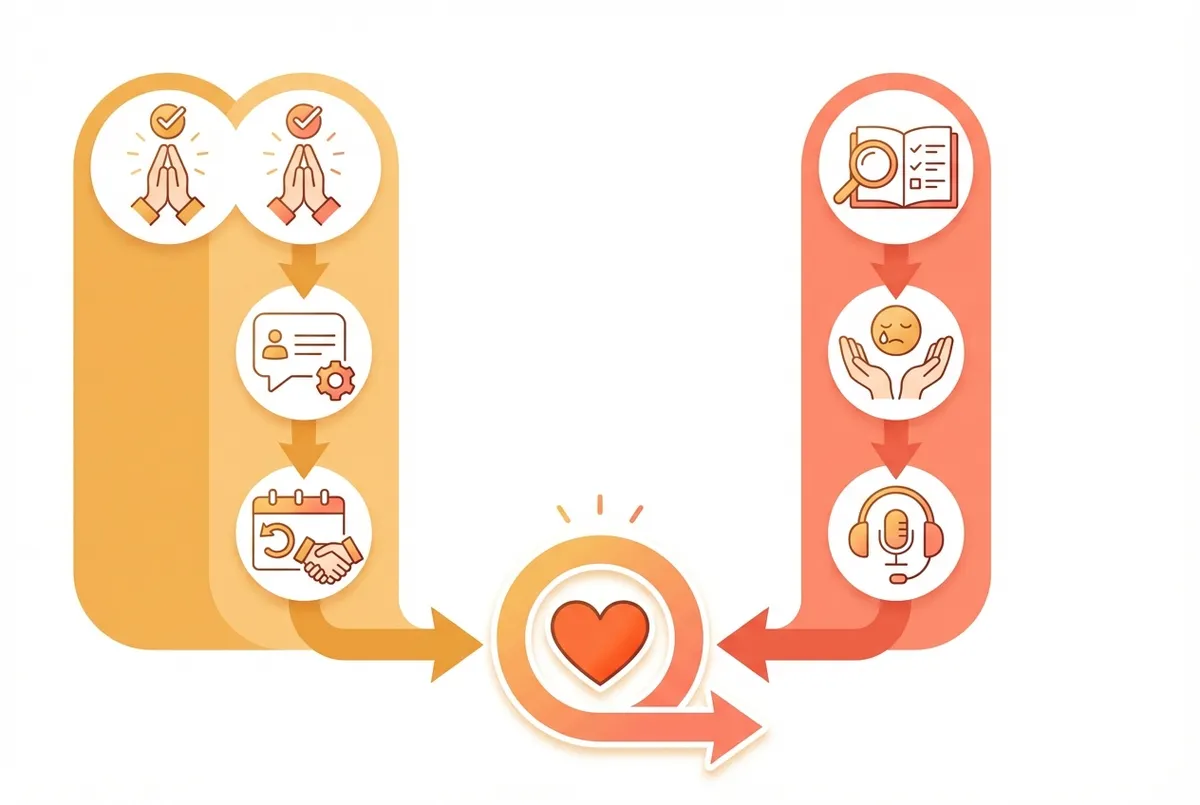
Templates for responding to positive and negative reviews
For more response templates and examples, see our guide on restaurant review response examples.
Step 6: Know What Google Allows
Before you scale your review collection efforts, you need to understand the boundaries. Violating Google's guidelines can result in reviews being removed, warning banners on your profile, or even suspension.
What you CAN do:
- Ask all customers for reviews
- Share your review link on receipts, emails, and table tents
- Create QR codes for easy access
- Request 3-5 reviews per week consistently
- Respond to all reviews within 24-48 hours
What you CANNOT do:
- Offer incentives for reviews (discounts, free items, loyalty points)
- Only ask customers who had a positive experience
- Post reviews on behalf of customers
- Buy fake reviews or use review services
- Use AI to generate reviews
For example, a curry house in Birmingham lost 23 reviews overnight after Google's AI detected they had received 15 reviews in a single day following an email blast offering a free starter for feedback. They had to rebuild their review count from scratch over four months.
In January 2025, Google signed undertakings with the UK Competition and Markets Authority to enhance enforcement against fake reviews.
Check Your Methods
If you can't tell whether your review collection methods follow guidelines or cross the line, that's usually a sign to review Google's official business profile policies on their support site.
Common Mistakes to Avoid
With the system in place, here are the pitfalls that derail even well-intentioned efforts.
Mistake 1: Asking Once and Stopping
Review collection is a system, not a campaign. Aim for consistent, ongoing requests rather than bursts of activity.
Mistake 2: Only Responding to Negative Reviews
Customers notice when you only engage with complaints. If you're only responding when someone complains, you'll always lose to restaurants that celebrate every piece of positive feedback too.
Mistake 3: Making It About You
"Please help us get more reviews" feels desperate. "We'd love to hear your feedback" feels genuine.
Mistake 4: Forgetting Review Recency
73% of consumers only trust reviews from the last 30 days, according to Trustmary's research. A flood of reviews from six months ago is less valuable than a steady stream of recent ones.
For instance, a pizza restaurant in Newcastle had 200 reviews but none from the past three months. A competitor with only 80 reviews but 12 from the past month was ranking higher in local search. Recency signals freshness and reliability to both Google and customers.
The Reality: No Time? Start Here
If you're reading this thinking "I don't have time for this" after a 12-hour shift, you're not alone. The reality for most independent restaurants is that marketing always feels like it comes last.
For example, a fish and chip shop owner in Whitby told us she manages reviews during the 3pm lull between lunch and dinner service. Ten minutes, three days a week. Her review count went from 67 to 142 in four months using this approach.
This Week: Set Up Your Review System
Day 1-2: Create your Google review link and generate a QR code.
Day 3-4: Print QR codes for receipts or table tents.
Day 5-7: Brief staff on the natural ask approach and track your first week.
That's 30 minutes of setup. After that, the system runs on its own. If you only have 30 minutes a week going forward, spend it responding to new reviews.
Key Takeaway
If you run a restaurant and want to see how Local Brand Hub can support your marketing, explore our restaurant marketing tools.
Key Takeaway
Getting more Google reviews for your restaurant comes down to removing friction, asking at the right moments, and responding consistently. Create a direct review link and share it everywhere. Train your team to ask naturally after genuine compliments. Use multiple touchpoints (QR codes, receipts, follow-up messages). Respond to every review within 48 hours. And stay within Google's guidelines: no incentives, no fake reviews. 83% of consumers check Google reviews before visiting, so a steady stream of authentic feedback is your most powerful marketing tool.
Frequently Asked Questions
How many Google reviews should a restaurant aim for?
The average local business has 39 Google reviews. However, businesses with 200 or more reviews have been shown to generate twice the revenue. Aim for consistent growth rather than a specific number, targeting 3-5 new reviews per week. For example, a tapas bar in Cardiff went from 45 to 156 reviews in eight months using this steady approach.
Can I ask only happy customers to leave reviews?
No. Google's guidelines require you to ask all customers equally. Selectively soliciting only positive reviews violates their policies and can result in penalties.
How quickly should I respond to reviews?
Aim to respond within 24-48 hours. Most customers expect a response quickly, often within the same day. Speed demonstrates you value feedback.
Do negative reviews hurt my restaurant's Google ranking?
Negative reviews do not directly hurt your ranking. Ignoring them does. A well-handled negative review can actually boost your credibility with potential customers. See our guide on handling negative restaurant reviews for templates.
What if someone leaves a fake review?
You can report fake or policy-violating reviews to Google for removal. Document why you believe the review is fake and submit through your Google Business Profile. See our guide on fake restaurant reviews for the full process.
For UK restaurant owners
Automate Your Review Collection
LocalBrandHub helps UK restaurants build a consistent review pipeline with automated follow-up requests and response templates designed for hospitality.
Start FreeGet More Marketing Tips
Practical marketing tips for UK business owners, straight to your inbox. No spam, unsubscribe anytime.
About the Author
Local Brand Hub
Empowering UK Businesses
Local Brand Hub provides comprehensive business management tools designed specifically for UK local businesses to streamline operations, automate marketing, and grow revenue.
More articlesRelated Articles
 Marketing Tips
How to Get More Google Reviews: 7 Proven Strategies
How to get more Google reviews for your UK business. 7-step system covers legal methods, optimal ratings, and strategies that fit your busy schedule.
 Marketing Tips
Restaurant Google Reviews: Build Your Online Reputation
How restaurant Google reviews impact your visibility and revenue. Proven UK strategies to earn more reviews, respond well, and boost bookings.
 Marketing Tips
Can You Delete Google Reviews? Honest UK Answer
Can you delete Google reviews as a business? No, but here's what UK restaurants can do about unfair reviews, removal costs, and reputation.