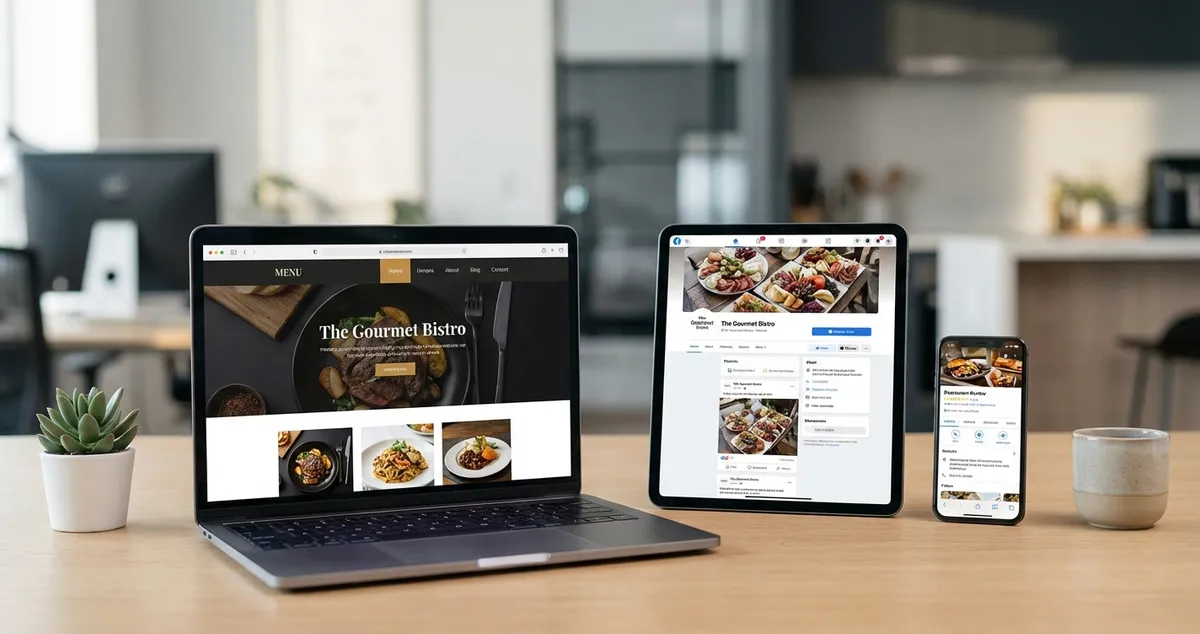
Build a strong restaurant digital presence that attracts local customers. Essential platforms, 15-minute audit, and realistic time investment for owners.
Why do 98% of diners check online reviews before choosing a restaurant? Because they're deciding where to spend their money before they ever walk past your door, and if they can't find you online, they'll choose somewhere else, even if your food is better.
You've poured everything into your restaurant. The menu is spot-on, the regulars love you, and Friday nights run like clockwork. But when someone new searches "restaurants near me," you're invisible. Meanwhile, the place down the road (mediocre food, half your experience) shows up first. That's not fair, but it's fixable.
Your restaurant digital presence is the collection of online touchpoints where potential customers discover, evaluate, and engage with your business. This includes your Google Business Profile, social media accounts, website, review platforms, and anywhere else your restaurant appears online. A strong digital presence ensures you're visible when hungry customers are actively searching.
This guide walks you through exactly what you need to build your restaurant digital presence, what you can skip, and how to create a foundation that works even when you're too busy running service to think about marketing.
Info
Related: See our restaurant digital marketing guide for a broader view of online marketing channels beyond your presence foundation.
What you'll learn:
- The five essential platforms that actually matter for restaurants
- How to audit your current digital presence in 15 minutes
- Which elements to prioritise when time is tight
- A minimum viable approach for busy restaurant owners
- Common mistakes that hurt your online visibility
What Makes Up a Restaurant Digital Presence?
First, let's define what we're actually building. Your digital presence isn't just your website. It's every place online where customers might encounter your restaurant, and form an opinion before they've even tasted your food.
Think about the last time you chose a restaurant you'd never visited. You probably checked Google reviews, scrolled through their Instagram, and maybe glanced at their menu online. That entire journey is their digital presence working (or not working) for them.
According to Brightlocal research, 98% of consumers read online reviews for local businesses. For restaurants specifically, that first impression often happens before anyone steps through your door.
The Five Essential Platforms
Not every platform deserves your attention. Focus on these five first:
| Platform | Purpose | Priority |
|---|---|---|
| Google Business Profile | Appearing in local searches and maps | CRITICAL |
| Showcasing food and atmosphere | HIGH | |
| Your website | Menu, booking, and information hub | HIGH |
| TripAdvisor/Yelp | Review management and credibility | MEDIUM |
| Community building and events | MEDIUM |
For most independent UK restaurants, Google Business Profile typically delivers the best return on time invested. It's free, it appears in local searches, and it directly influences whether someone walks through your door.
For example, a bistro owner might spend three hours setting up all five profiles properly. That's time well spent: those profiles work around the clock, even during your Saturday rush.
If you're thinking "I don't have three hours spare", that's understandable. Most owners don't. But here's the reality: the competitor getting those bookings probably doesn't have more time than you. They just front-loaded the effort once.
So you understand what makes up a digital presence. But how do you know where you stand right at this moment?
How to Audit Your Current Digital Presence
With the components clear, let's assess where you stand. This quick audit takes about 15 minutes and reveals your biggest gaps.
The 15-Minute Presence Audit
For instance, a curry house in Manchester might discover they're appearing for "curry Manchester" but nowhere for "Indian restaurant Manchester", that's a gap worth fixing.
Step 1: Search yourself (3 minutes)
Open an incognito browser window and search for:
- Your restaurant name
- "[your cuisine] restaurant [your town]"
- "restaurants near [your location]"
Note where you appear and where you don't.
Step 2: Check your Google Business Profile (5 minutes)
Verify:
- Business name, address, and phone number are correct
- Opening hours are accurate (including bank holidays)
- You have at least 10 photos uploaded
- Your menu is attached or linked
- You've responded to recent reviews
Step 3: Review your social accounts (5 minutes)
For each platform:
- Profile photo is your logo or recognisable image
- Bio includes what you serve and your location
- Contact information is visible
- Most recent post is less than 2 weeks old
- Link to menu or booking page works
Step 4: Test your website (2 minutes)
On your phone:
- Site loads in under 3 seconds
- Menu is easy to find and read
- Booking or contact method is obvious
- Address and hours are clearly displayed
If you're reading this after a 12-hour shift and thinking "I'll do this tomorrow", that's fair. But mark 15 minutes in your calendar to audit your restaurant digital presence. The gaps you find might explain why tables stay empty on quiet Wednesday nights.
Right, that's the audit sorted. Next comes the question everyone asks: what do I fix first?
Building Your Digital Presence: Priority Order
With that assessment complete, here's where to focus your energy. You can't do everything at once. Here's the order that typically delivers results fastest:
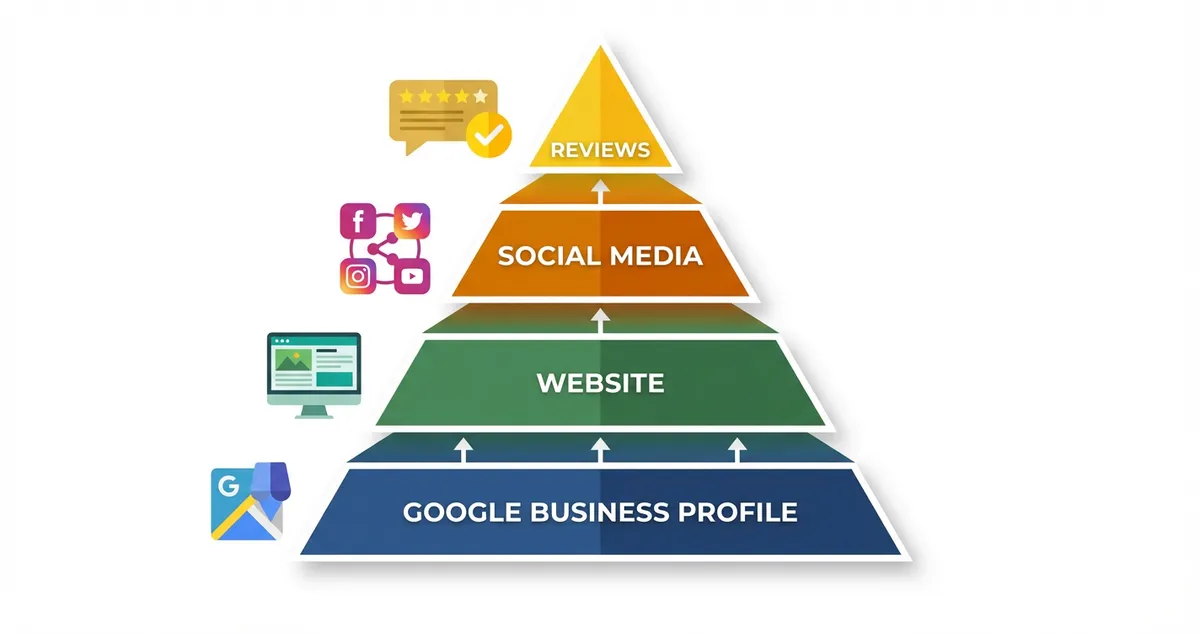
Focus on foundations before expanding
Priority 1: Google Business Profile (Week 1)
This is non-negotiable. According to Google's official guidelines, businesses with complete profiles are significantly more likely to attract location visits and customer engagement.
Essential actions:
- Claim and verify your listing (if not already done)
- Add complete business information
- Upload 10-20 quality photos (food, interior, exterior, team)
- Write a compelling business description
- Enable messaging and booking features
A gastropub, for instance, might prioritise photos of their Sunday roast, their beer garden, and their specials board: the things that differentiate them from chains.
Info
Why This Matters: Your Google Business Profile appears in the "local pack", those three business listings shown at the top of local search results. If you're not there, you're invisible to customers searching "restaurants near me."
That's your Google presence sorted. Next, let's make sure your website doesn't undo that good work.
Priority 2: Website Essentials (Week 2)
Your website doesn't need to be fancy. It needs to work.
Must-have elements:
- Mobile-friendly design
- Clear menu (PDF is fine, but text is better for SEO)
- Booking method (phone, form, or third-party link)
- Location with map
- Opening hours
Nice-to-have elements:
- Online ordering integration
- Photo gallery
- About/story page
- Email signup
Website basics covered. Here's where many owners stumble: trying to be everywhere on social media at once. For detailed social strategies, see our guide to restaurant social media marketing.
Priority 3: One Social Platform (Week 3)
Pick Instagram or Facebook, not both initially. Instagram often works better for many restaurants because food is visual.
Quick setup:
- Convert to a business account
- Complete your bio with location and cuisine
- Plan your first 9 posts (this creates a good first impression)
- Set up a simple posting schedule (3 times per week is enough)
Priority 4: Review Platforms (Week 4)
Claim your TripAdvisor and Yelp listings. You don't need to post content here: just ensure your information is correct and you're responding to reviews.
For instance, a seafood restaurant might find they have three unclaimed listings on TripAdvisor with outdated menus. Claiming and updating these takes 20 minutes but prevents customer confusion for years.
The platforms are set up. But there's no point building a presence if you're making mistakes that actively push customers away.
Common Mistakes That Hurt Your Restaurant Digital Presence
However, building the right platforms isn't enough. These errors silently cost you customers, and most owners don't realise they're making them:
Inconsistent information across platforms. If your website says you close at 10pm but Google says 9pm, customers lose trust. Worse, they might arrive to locked doors.
Ignoring negative reviews. A thoughtful response to a one-star review can actually improve your reputation. Silence looks like you don't care.
Posting only when you have something to promote. Followers tune out accounts that only appear when there's a special offer. Mix in behind-the-scenes content, staff spotlights, and everyday moments. If you're only posting promotional content you'll always lose to competitors who share authentic behind-the-scenes moments.
Outdated photos. If your menu has changed significantly, your online images should too. Showing dishes you no longer serve creates disappointed customers. For example, a pizza restaurant that's moved to Neapolitan-style but still shows deep-pan photos is confusing their ideal customers. Your restaurant digital presence should reflect what customers will actually experience.
If you're only updating your digital presence when it's quiet in the restaurant, you'll always lose to competitors who treat it as part of daily operations.
If you're only responding to reviews once a month you'll always lose to competitors who respond within 24 hours: customers notice the silence.
That's what to avoid. Let's get practical about what you can realistically maintain.
Minimum Viable Restaurant Digital Presence
Let's be realistic. If you only have 30 minutes a week for your restaurant digital presence, here's your floor, not the ideal, but enough to stay visible.
This Week: Build Your Foundation
- Day 1-2: Update your Google Business Profile hours, photos, and description (15 minutes)
- Day 3-4: Check your website works on mobile and your menu is current (10 minutes)
- Day 5-7: Post one photo to Instagram with your location tagged (5 minutes)
For example, a fish and chip shop might use Day 1-2 to finally add those missing photos to Google, even phone photos work, and Day 3-4 to ensure their menu PDF actually loads on mobile (many don't).
Ongoing weekly minimum:
- Respond to any Google reviews (5 minutes)
- Post 1-2 times on Instagram (10 minutes)
- Check that Google Business Profile information is still accurate (2 minutes)
This won't make you an online sensation. But it keeps you visible, ensures customers find accurate information, and maintains a baseline presence that many competitors neglect.
The honest truth: a restaurant digital presence that's maintained consistently, even twice-weekly posts plus review responses, will typically outperform one with a "proper" strategy that only happens when the owner remembers.
You're doing the work. But how do you know if it's actually making a difference?
Measuring Your Restaurant Digital Presence Success
Finally, let's talk about tracking results. You don't need complex analytics, though our visibility score rolls your online presence into a single number worth watching. Track these three things monthly:
1. Google Business Profile views
Log into your profile and check "Performance." Note how many people viewed your profile and how many requested directions or called.
2. Website visits
If you have Google Analytics, check total visitors. If not, even your hosting provider's basic stats show monthly traffic.
3. Social media reach
Instagram and Facebook both show how many accounts you reached each week. A simple upward trend means your presence is growing.
A wine bar owner, for instance, might check their Google Business Profile monthly and notice direction requests doubled after adding 15 new photos. That's concrete evidence the effort is paying off.
If you can't tell whether your digital presence brings bookings or just likes, that's usually a sign you need to start tracking these numbers, even roughly.
Action Checklist: Your Restaurant Digital Presence Foundation
Before moving on, ensure you've completed these essentials:
- Google Business Profile claimed, verified, and complete
- Website loads on mobile with clear menu and contact
- At least one social platform active with consistent posting
- Review sites claimed with accurate information
- System in place to respond to reviews within 48 hours
- Monthly check scheduled to verify all information is current
Frequently Asked Questions
How long does it take to build a strong restaurant digital presence?
Building a solid restaurant digital presence typically takes 2-4 weeks of focused effort, dedicating roughly 3-5 hours per week. For example, a café owner might complete their Google Business Profile in week one, sort their website in week two, and launch Instagram in week three. Ongoing maintenance requires 30 minutes to 2 hours weekly depending on your goals.
Do I need a professional website for my restaurant digital presence?
You need a functional website for your restaurant digital presence, but it doesn't have to be expensive or professionally designed. For instance, many successful independent restaurants use Squarespace or Wix: a £15/month template with your menu, location, hours, and booking method works perfectly well for establishing a solid restaurant digital presence. What matters most is that it loads quickly on mobile and provides accurate information.
Which social media platform typically works well for restaurants?
Instagram often works well for many UK restaurants because of its visual focus: people eat with their eyes first. However, if your customers skew older or you rely heavily on local community events, Facebook may serve you better. A pub with a strong local events calendar, for instance, might find Facebook drives more bookings than Instagram ever could. Start with one platform and do it consistently rather than spreading yourself thin across several.
Key Takeaways
If you run a restaurant and want to see how Local Brand Hub can support your marketing, explore our restaurant marketing tools.
Key Takeaways
Here's what matters most. Your restaurant digital presence is how customers discover and evaluate you before ever walking through your door. Getting it right doesn't require being a marketing expert; it requires consistency and accuracy.
Remember:
- Google Business Profile is typically your most critical platform
- Consistent, accurate information builds trust
- Start with one social platform and do it well
- 30 minutes weekly maintains your baseline presence
- Responding to reviews often matters more than posting frequency
The restaurants that win online aren't necessarily the ones with the biggest budgets. They're the ones that maintain their digital presence consistently, keep their information accurate, and remember that every online touchpoint is a chance to make a good impression.
Weekly Action
Complete Your 15-Minute Audit
- Search for your restaurant in incognito mode and note where you appear
- Verify your Google Business Profile has accurate hours and 10+ photos
- Check your website loads on mobile in under 3 seconds
- Respond to any unanswered reviews from the past month
Start with your Google Business Profile this week. Everything else builds from there.
Info
Explore our detailed guides:
- Restaurant Digital Marketing - Complete marketing overview
- Restaurant Social Media Marketing - Platform strategies
- Restaurant Online Visibility - Getting found online
For UK restaurants
Need Help Building Your Digital Presence?
Local Brand Hub helps UK restaurants build and maintain their digital presence without the complexity: from Google Business Profile to social media management.
Start freeGet More Marketing Tips
Practical marketing tips for UK business owners, straight to your inbox. No spam, unsubscribe anytime.
About the Author
Local Brand Hub
Empowering UK Businesses
Local Brand Hub provides comprehensive business management tools designed specifically for UK local businesses to streamline operations, automate marketing, and grow revenue.
More articlesRelated Articles
 Marketing Tips
Digital Marketing for Restaurants: A Practical UK Guide
Learn how digital marketing helps UK restaurants attract more customers. Covers the 4 P's, 70/20/10 rule, and practical strategies you can start this week.
 Marketing Tips
Restaurant Internet Marketing: A Guide for UK Owners
A practical internet marketing guide for UK restaurant owners. Covers local SEO, social media, Google Business Profile, and website essentials.
 Marketing Tips
Restaurant Online Visibility: Get Found by Local Diners
Improve your restaurant online visibility with practical steps. Get found by hungry customers via Google profiles, reviews, and local SEO.