
Compare the best restaurant management software for UK restaurants. POS, inventory, scheduling and CRM tools with honest pricing and recommendations.
You're closing up after a fourteen-hour shift. The till doesn't match the stock count. Three suppliers need reordering by morning. Sound familiar? Your staff rota for next week is still a mess of scribbled notes. Running a restaurant shouldn't mean drowning in admin at midnight.
The right restaurant management software handles the operational chaos so you can focus on food and service. But the market is flooded with options, and many guides are written by the software companies themselves. This one isn't.
The global restaurant management software market reached USD 6.69 billion in 2025 and is projected to reach USD 20.75 billion by 2032 (Data Bridge Market Research, 2025). That growth reflects a simple truth: restaurants that digitise their operations typically outperform those that don't.
What You'll Learn
- What restaurant management software actually does and why it matters
- The key categories: POS, inventory, scheduling, CRM, and all-in-one platforms
- How to choose the right system for your UK restaurant's size and budget
- Which specific software tools suit different restaurant types
- How to avoid common pitfalls when switching systems
What Is Restaurant Management Software?
First, let's define what we're talking about. Restaurant management software is a framework that digitises your restaurant's daily operations: from taking orders and processing payments to tracking stock, scheduling staff, and managing customer relationships. It replaces the spreadsheets, paper rotas, and mental arithmetic that many UK independents still rely on.
Here's the thing. Many restaurant owners don't need one system that does everything. They need the right combination of tools that actually talk to each other.
Info
The right system saves hours every week. The wrong one becomes another thing your team ignores.
Cloud-based solutions now account for roughly 61% of the market (Mordor Intelligence, 2025), which means you can check sales, stock levels, and staff schedules from your phone. No more driving back to the restaurant at 11pm because you forgot to check tomorrow's bookings.
For example, a two-site bistro chain in Manchester might use Square for payments, MarketMan for restaurant inventory management software, and Deputy for restaurant scheduling software. Each tool handles its job well, and they sync data between them.
If you're thinking "this sounds expensive," you're not alone. But consider what you're already spending on food waste, overtime from poor scheduling, and lost regulars who never come back. That's usually a sign your current approach costs more than you realise.
Pro Tip
Before committing to any platform, write down three tasks that eat your time every week. Match each to a software category. That's your shortlist.
Ask yourself: how many hours each week do you spend on tasks that software could handle in seconds? If you're weighing up a switch, it helps to put a number on the hours you'd win back before committing to any platform.
The Core Categories You Need to Know
Let's break down what's available. Restaurant management software falls into distinct categories, and understanding the differences saves you from buying an all-in-one system when you only need two specific tools.
POS Systems
Your point-of-sale system is the backbone. It processes orders and payments, sends tickets to the kitchen, and generates sales reports. For UK restaurants, options like Square, Epos Now, and TouchBistro dominate.
For example, a busy fish and chip shop might use Square's free plan for simple counter service, while a multi-room gastropub with tableside ordering would benefit from TouchBistro's iPad-based approach.
TouchBistro processes over USD 13 billion in payments annually (Galley Solutions, 2025), making it one of the larger restaurant-specific POS platforms globally.
Inventory Management
Tracks stock levels, monitors food costs, and automates reordering. This is where many restaurants haemorrhage money without realising it. Dedicated tools like MarketMan and Restaurant365 connect to your POS so stock updates automatically when you sell a dish.
47% of operators plan to invest in inventory management software in 2025 (National Restaurant Association (US), 2025). If you're not among them, your competitors likely are.
Read more: Restaurant Inventory Management Software
Staff Scheduling
Handles rotas, shift swaps, holiday requests, and payroll integration. Poor scheduling costs UK restaurants thousands in unnecessary overtime and agency staff.
Read more: Restaurant Scheduling Software
CRM and Customer Management
Tracks guest preferences, manages loyalty programmes, and powers targeted marketing. A gastropub that remembers a regular's favourite wine sells more than one that doesn't.
Read more: Restaurant Table Management Software
All-in-One Platforms
Systems like Restaurant365 and Lightspeed bundle multiple functions together. They're powerful but often more expensive and complex than mixing specialist tools.
Read more: All-in-One Restaurant Software
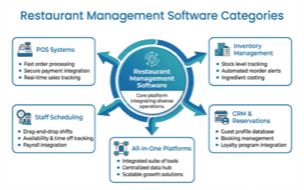
Restaurant management software categories for UK restaurants
If you're only using a paper diary you'll always lose to competitors who have automated their back-of-house operations. That rarely works long-term in a market where even small cafes are going digital.
What Is the Best Software for Restaurant Management?
Now that you understand the categories, here's how the top platforms compare. Choosing the right platform is a strategy that depends on your restaurant type, size, and budget. There's no universal "best" option.
Several platforms consistently perform well for UK restaurants: here's how they compare.
Top Platforms Compared
| Software | Ideal For | UK Availability | Starting Price |
|---|---|---|---|
| Square for Restaurants | Small venues, cafes | Yes | Free (1.75% per transaction) |
| Lightspeed Restaurant | Multi-location, analytics | Yes | Custom quote |
| TouchBistro | Tableside ordering | Yes | Custom quote |
| Restaurant365 | Enterprise, accounting integration | Limited | Custom quote |
| Epos Now | UK-based support | Yes (UK HQ) | From £325 |
For many UK independent restaurants, Square or Epos Now often offer a strong combination of affordability, UK support, and essential features.
For instance, a family-run Italian restaurant with one location and a simple menu might do perfectly well with Square's free plan. A multi-site group needing integrated accounting would benefit from Restaurant365's enterprise capabilities.
87% of Lightspeed users report they would recommend it to others, citing easy setup and reliable support (EatApp, 2025). That kind of satisfaction rate is uncommon in restaurant tech.
What Is a CRM for Restaurants?
When it comes to repeat business, this is the category that matters most. A restaurant CRM (Customer Relationship Management) is a framework that organises guest data (visit history, preferences, dietary requirements, and spending patterns) to help you deliver personalised service and targeted marketing.
Here's why it matters. The difference between a restaurant that remembers your name and one that doesn't? Repeat visits. And repeat customers are significantly more profitable than new ones. For example, a neighbourhood Italian restaurant might use CRM data to send birthday discount emails to regulars, a small touch that drives bookings without paid advertising.
Key CRM features for restaurants:
- Reservation management with automated reminders
- Guest profiles tracking preferences and dietary needs
- Loyalty programme integration
- Targeted email and SMS marketing
- Review and feedback management
Top CRM options for UK restaurants:
- OpenTable: Industry standard for reservations, starts at around £149/month (EatApp, 2025)
- Square for Restaurants: Well rated, with built-in CRM features on its POS platform
- Lightspeed: Strong CRM features with affordable entry point
Restaurant management software isn't about selling food. It's about knowing who's eating it and why they come back. The restaurants that thrive aren't the ones with the fanciest tech. They're the ones where the software disappears and the hospitality stays.
What Is the Best Restaurant Inventory Software?
Next, let's look at dedicated inventory tools. Inventory management is a framework that tracks stock levels, automates ordering, and reduces food waste. Leading platforms for UK restaurants include MarketMan, Restaurant365, Galley Solutions, and Kitchen CUT. Each specialises in different areas.
Quick comparison:
| Platform | Speciality | Ideal For |
|---|---|---|
| MarketMan | Supply chain management | Multi-site operations |
| Restaurant365 | Financial integration | Accounting-heavy operations |
| Kitchen CUT | Supplier pricing | Hospitality groups |
| Galley Solutions | Recipe-first approach | High-volume catering |
For instance, a two-site Indian restaurant group could use MarketMan to track spice inventory across both kitchens, automatically reordering when cumin or turmeric drop below set levels.
A KFC and Taco Bell franchisee saved approximately 20 hours per month on bank reconciliation after implementing Restaurant365 (Restaurant365, 2025). That's real time back in your week.
Read more: Restaurant Inventory Management Software
How to Choose the Right System for Your Restaurant
Next, let's talk about making a decision. With dozens of options available, the selection process can feel overwhelming. Here's a practical framework.
Step 1: Audit Your Current Pain Points
Before looking at any software, write down where you lose time and money. Common UK restaurant pain points:
- Manual stock counts taking hours each week
- Staff scheduling conflicts and overtime costs
- No customer data beyond a paper booking diary
- End-of-day cashing up taking 30+ minutes
If you can't list specific pain points and keep saying "everything takes too long," that's usually a sign that your operation needs a proper systems audit before buying any software.
Step 2: Match Solutions to Problems
Don't buy features you won't use. A small cafe doesn't need enterprise analytics. A high-volume takeaway doesn't need tableside ordering.
For example, if your biggest pain point is a 45-minute cashing-up process, a better POS system solves that. If it's food waste, you need inventory software, not a CRM.
Step 3: Check UK-Specific Requirements
- VAT compliance: Does the system handle UK VAT rates correctly?
- Payment processing: Does it support UK payment providers?
- GDPR compliance: Critical for storing customer data
- Local support: Can you reach someone during UK business hours?
Step 4: Test Before Committing
Don't just sign up for the flashiest demo or you'll regret it when staff can't figure out the interface mid-service. Bring your team into free trials: even great software means nothing if your staff refuse to use it.
Info
If you're thinking "I don't have time to test four different systems," that's understandable. Start with one area that causes the most pain and address it first.
Read more: Cloud Restaurant Management | Restaurant Kitchen Display System
What POS Does Gordon Ramsay Use?
Here's a question we get asked constantly. This is one of the more frequently searched questions in restaurant tech, and the answer is surprisingly unclear. Lavu POS has been associated with Ramsay's restaurants and appeared on "Kitchen Nightmares" (Lavu, 2025). TouchBistro was featured on his show "24 Hours to Hell and Back" (TouchBistro, 2025).
The truth? Major restaurant groups often use different systems across different locations. What works for a Ramsay fine-dining venue in London won't suit your neighbourhood bistro.
Rather than copying a celebrity chef's tech stack, focus on what solves your specific problems. A tired owner-operator after a twelve-hour shift needs software that's simple, reliable, and supported in the UK.
Actionable Checklist
Here's your step-by-step plan to move forward.
- List your top three operational pain points
- Identify which software category addresses each one
- Research two to three options per category
- Check UK availability, VAT compliance, and GDPR support
- Request free trials or demos
- Involve your team in testing
- Compare total cost of ownership (not just monthly fees)
- Check integration capabilities with your existing tools
If You Only Have 30 Minutes This Week
Here's what to tackle first.
Weekly Action
This week, audit your restaurant management setup:
- Day 1-2: Write down every manual process you do daily: orders, stock, scheduling, payments. Note how long each takes.
- Day 3-4: Pick the one process that wastes the most time. Research two software options that solve it. Check if they offer UK trials.
- Day 5-7: Sign up for one free trial. Set it up on a quiet afternoon. Test it through one service.
If you only have 30 minutes a week, start with your POS system. Everything else connects to it. For instance, a cafe owner might discover that switching from a basic till to Square's free plan saves 20 minutes on cashing up alone.
Frequently Asked Questions
What is a restaurant management software?
Restaurant management software is a framework that handles your venue's daily operations: orders, payments, stock tracking, staff scheduling, and customer management. Modern platforms are cloud-based, meaning you access them from any device with an internet connection. They replace manual processes and paper systems with automated, real-time data.
What software is used in restaurants?
UK restaurants typically use a combination of POS systems (Square, Epos Now), inventory tools (MarketMan, Kitchen CUT), scheduling platforms (Deputy, Planday), and reservation systems (OpenTable, ResDiary). Some opt for all-in-one restaurant software like Lightspeed or Restaurant365 that bundle these together.
Which is the top-rated software for inventory management?
MarketMan is often rated highly for restaurant inventory management, scoring 5/5 for advanced features and ease of use (TheRestaurantHQ, 2025). However, Restaurant365 excels for financial integration, and Kitchen CUT suits hospitality groups needing supplier management. See our full guide to restaurant inventory management software.
Is a free POS system really free?
No. Free POS systems shift costs to higher processing fees, typically 2.75% to 3.5% per transaction compared to around 2.25% for paid alternatives (VMS, 2025). For a restaurant processing £25,000 monthly, those extra fees add up significantly. Free plans also lack advanced features like detailed inventory management and restaurant staff management software integration.
What is a good CRM for restaurants?
A restaurant CRM is a framework that tracks guest preferences, manages bookings, and powers targeted marketing. For UK restaurants, OpenTable remains the industry standard for reservation-based CRM, while Lightspeed offers strong CRM at a more accessible price point. Square's built-in CRM is ideal for smaller venues already using their POS. Your choice depends on whether you prioritise reservations, marketing, or loyalty features.
If you run a restaurant and want to see how Local Brand Hub can support your marketing, explore our restaurant marketing tools.
Key Takeaway
Key Takeaways
- Start with your biggest pain point: don't try to digitise everything at once
- Cloud-based software dominates the market at roughly 61% share, offering flexibility and remote access (Mordor Intelligence, 2025)
- UK-specific factors matter: check VAT compliance, UK payment processing, GDPR, and local support hours
- Specialist tools often beat all-in-ones for independent restaurants with simpler needs
- 47% of operators are investing in inventory management software in 2025 (National Restaurant Association (US), 2025): falling behind on technology means falling behind on costs
The right restaurant management software isn't the priciest or the feature-richest. It's the system your team will actually use, every single shift.
For restaurants, salons, and local businesses
Need help with your marketing?
We help UK businesses turn social media into real results, not busywork.
Start freeGet More Marketing Tips
Practical marketing tips for UK business owners, straight to your inbox. No spam, unsubscribe anytime.
About the Author
Local Brand Hub
Empowering UK Businesses
Local Brand Hub provides comprehensive business management tools designed specifically for UK local businesses to streamline operations, automate marketing, and grow revenue.
More articlesRelated Articles
 Industry Insights
All-in-One Restaurant Software: UK Comparison
Compare all-in-one restaurant software for UK venues. See top platforms, UK pricing, and what to look for when choosing an integrated system.
 Industry Insights
Cloud Restaurant Management Software: Complete UK Guide
Cloud restaurant management software accounts for 60% of the market. Cut costs and streamline UK restaurant operations with our complete guide.
 Industry Insights
Restaurant Kitchen Display System: UK Buyer's Guide
72% of venues use POS-to-KDS systems. Compare UK kitchen display system pricing from £300 and cut order errors by 40%. Full buyer's guide.