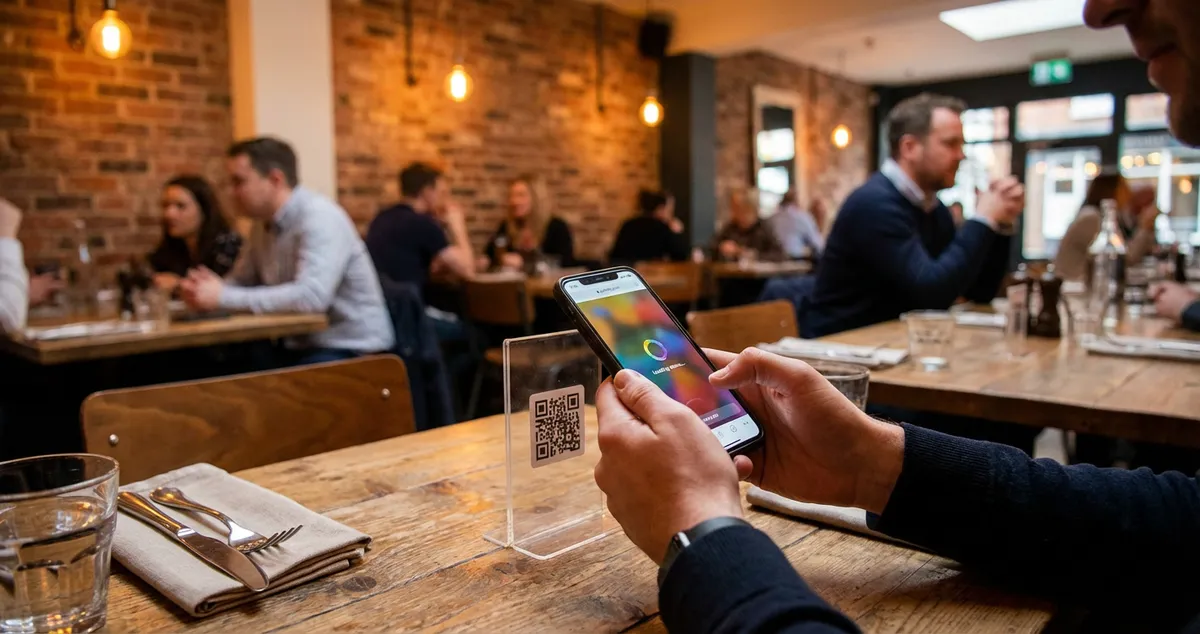
Learn how QR code menus can streamline restaurant operations, address customer concerns, and boost efficiency. Practical tips for UK owners.
You're watching a couple in their sixties squint at the QR code on Table 4. Meanwhile, your lunch rush just walked through the door, and your only server is explaining to a frustrated customer why the menu won't load on his phone. QR code menus were supposed to make your life easier. Right now, they're making it harder.
You spent three hours updating your printed menus last month. New prices, seasonal specials, removing dishes you can no longer source. The printer quoted you over a hundred pounds for fifty copies. Meanwhile, your competitor down the road updates their QR code menu from their phone in two minutes flat.
QR code menus changed how restaurants handle this daily reality. But somewhere between the pandemic rush and the backlash that followed, the conversation got messy. Some customers love the convenience. Others refuse to scan anything. And you're left wondering whether QR code menus are worth the hassle.
Here's what most guides won't tell you: The best restaurants don't choose between QR codes and paper menus. They offer both, because hospitality has never been about the menu format. It's about how you make customers feel when they order.
The real question isn't "should I use QR code menus?" It's "am I making ordering easier or just cheaper?"
What You'll Learn About QR Code Menus
- Why customer complaints about QR code menus often have nothing to do with the technology itself
- The real security concerns and what authorities actually said about QR codes
- How different age groups actually use digital menus via QR codes
- Practical implementation strategies that keep both tech-savvy and traditional customers happy
- Free QR code menu options that work for small restaurants
Info
Why Do People Hate QR Code Menus?
People hate QR code menus when the experience is worse than paper. The technology itself rarely causes the frustration. Poor implementation does.
The most common complaints fall into three categories:
- Slow or broken menu websites. The menu loads slowly on mobile, displays text too small to read, or crashes on certain devices.
- Access barriers. Customers with older phones, limited data, or visual impairments struggle to use QR codes.
- Missing the personal touch. Many diners prefer the tactile experience of holding a physical menu and interacting with staff about recommendations.
According to UKHospitality research, approximately 60% of restaurant customers still prefer having at least the option of a physical menu. That preference becomes stronger among diners over 55, where the figure rises to around 75%.
For example: A Birmingham gastropub removed all physical menus to save on printing costs. Within three months, they noticed a drop in repeat visits from older customers. After reintroducing laminated backup menus, regular bookings from that demographic recovered.
The disconnect happens when restaurants force QR-only policies. If you're only offering a QR code menu with no alternative you'll always lose customers who feel the dining experience has become impersonal.
Here's an uncomfortable truth: That never works long-term. Hospitality businesses that eliminate customer choice in the name of efficiency tend to find their "efficiency gains" erased by declining repeat visits.
If you're reading this thinking "but my customers seem fine with QR codes," you're probably right. The key word is "seem." Customers who struggle with the technology often don't complain directly. They just don't return.
The Simple Fix
Keep a few laminated physical menus behind the bar. Train your staff to offer them proactively to anyone who hesitates at the QR code.
Info
Related: Digital Menu Boards for Restaurants
What Is the QR Code Controversy?
So what's actually driving the debate? The QR code controversy is a framework that captures three intersecting concerns: accessibility, privacy, and hospitality standards.
Accessibility Concerns
Not everyone carries a smartphone. Those who do may have visual impairments, limited data plans, or devices too old to scan codes reliably. Under UK disability law, businesses must make reasonable adjustments for disabled customers.
For example: A Leeds restaurant received a complaint from a visually impaired diner who couldn't scan the QR code with her screen reader. They now train staff to offer to read the menu aloud as a standard accommodation.
Inclusivity Signal
Place a small sign near your QR codes saying "Physical menus available on request" to immediately signal inclusivity.
Privacy Worries
Some QR menu systems collect customer data, track behaviour, or require app downloads before showing the menu. Diners who value their privacy understandably push back.
For instance: A London wine bar switched QR providers after customers complained about being asked to create an account just to view the drinks list. Their new system displays the menu directly in the browser with no registration required.
The Hospitality Argument
Critics argue that pointing customers to a screen removes the human element from dining. When a server describes the specials, recommends wine pairings, or warns about spice levels, that interaction becomes part of why people eat out.
These concerns share a common thread. They're not about QR code menus being inherently bad. They're about restaurants implementing them without considering the customer experience.
A balanced approach works well. Use QR codes to handle routine menu browsing, but train staff to engage with tables personally. Let technology handle the transaction while humans handle the experience.
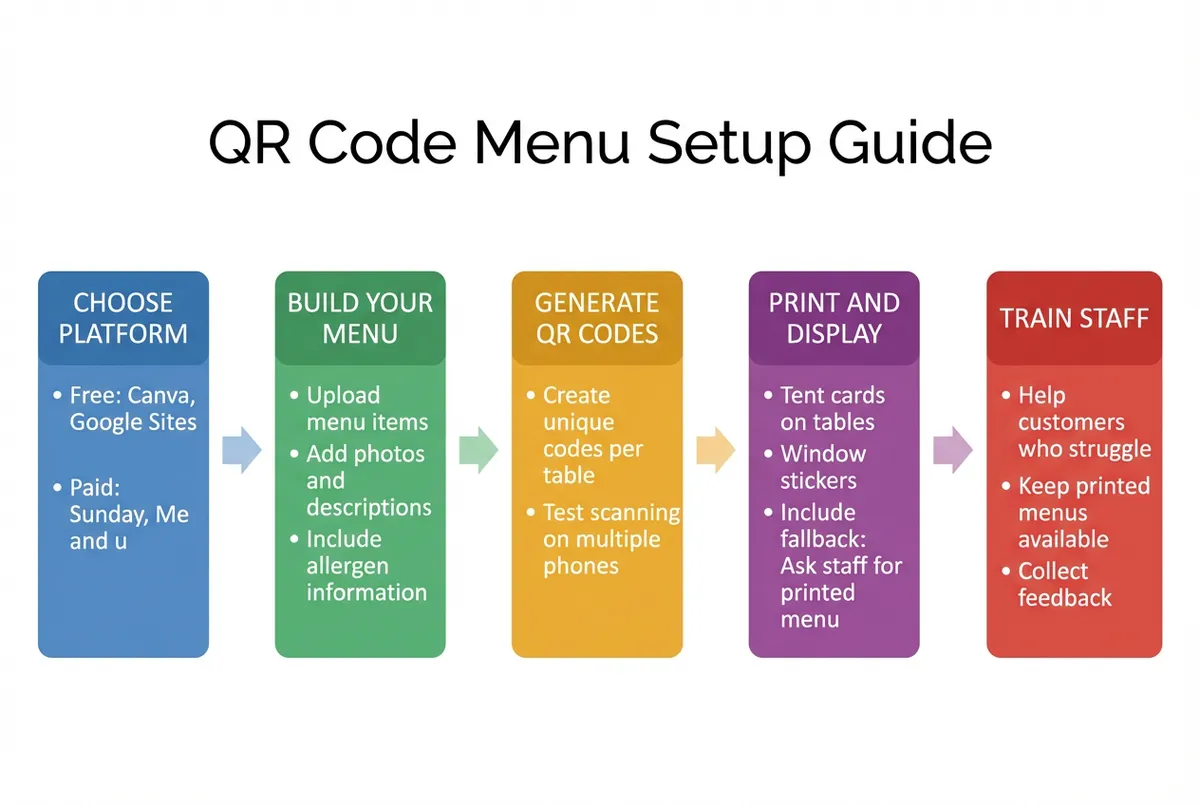
QR code menu setup process for restaurants
What Is the FBI Warning About QR Codes?
Moving from hospitality concerns to security, let's address the elephant in the room. The FBI warning refers to a public advisory highlighting that criminals can exploit QR codes by placing fraudulent stickers over legitimate ones. This applies to all public-facing QR codes, including restaurant menus.
The actual risk scenario involves criminals placing fake QR code stickers over legitimate ones in public spaces. When scanned, these fraudulent codes can lead to phishing sites designed to steal personal information or financial details.
For example: A Glasgow hotel discovered someone had placed overlay stickers on their lobby restaurant's QR codes. The fake codes redirected guests to a convincing phishing page asking for credit card details. They now conduct weekly physical checks of all QR displays.
For restaurants, the practical risk remains relatively low provided you control your QR codes. Here's a checklist for keeping your QR code menus secure:
- Print QR codes directly on your materials rather than using stickers that could be replaced
- Check table cards weekly for signs of tampering or overlay stickers
- Use a branded short URL that customers can recognise (e.g., menu.yourrestaurant.co.uk)
- Display your menu URL in text alongside the QR code so customers can type it manually if preferred
- Test each QR code monthly to verify it still works correctly
The National Cyber Security Centre (NCSC) recommends that businesses using QR codes should regularly verify their codes work correctly and lead to the intended destination.
Context on QR Security
QR code fraud remains far less common than other forms of payment fraud. But acknowledging the concern and taking visible precautions builds customer trust.
Info
Related: Self-Ordering Kiosk
Does Gen Z Use QR Codes?
With security covered, let's look at who actually uses these codes. Yes, Gen Z not only uses QR codes, they often prefer them. Research from Statista indicates that approximately 87% of Gen Z consumers have scanned a QR code, with restaurant menus ranking among the most common use cases.
But what really matters for your restaurant isn't age stereotypes. It's meeting different customers where they are.
| Age Group | Typical QR Code Comfort Level | Often Best Approach for Your Restaurant |
|---|---|---|
| Gen Z (16-26) | Very high | QR default |
| Millennials (27-42) | High | QR prominent |
| Gen X (43-58) | Moderate | Both equal |
| Baby Boomers (59-77) | Lower | Physical default |
Note: These are general patterns based on industry surveys. Individual preferences vary within each group.
For example: A Manchester cafe found that during Saturday brunch (popular with families), physical menus saw heavy use. During weekday lunches (mostly young professionals), 80% of customers used the QR code without prompting. They now adjust their default approach based on service timing.
The generational divide isn't as sharp as headlines suggest. Plenty of over-60s comfortably scan QR code menus, while some younger diners prefer paper menus for the experience.
Read the Room
Train staff to read the room during the Saturday rush. A group of students will likely reach for their phones before you finish explaining where the QR code is. A couple celebrating an anniversary might appreciate having the physical menu placed in their hands.
QR Code Menu Free: What You Need to Know
Now that you understand the customer landscape, let's talk implementation costs. Free QR code menu solutions exist, and many work perfectly well for small restaurants. But "free" comes with trade-offs.
What you get with free QR menu generators:
- Basic menu display with text and images
- Downloadable QR code graphics
- Simple updates through a web interface
- Mobile-responsive menu pages
What free versions typically lack:
- Custom branding (your menu appears on their platform with their logo)
- Analytics on how customers use your menu
- Integration with your digital menu screens or POS system
- Priority support when something breaks on a Friday night
For example: A Bristol cafe started with a free QR menu tool. It worked well initially, but when they tried to add allergen information and nutritional details, they hit the platform's limits. They upgraded to a paid solution that cost £15/month but saved hours of workarounds.
For a small restaurant testing QR code menus for the first time, free options like Square's QR code menu generator or Canva's QR tools provide a sensible starting point. Many restaurants pair these with digital menu screens for in-venue display. To keep the menu and your seasonal offers organised as they change, our menu management tools give you one place to update them.
The Real Cost
The real cost consideration isn't the software subscription. It's the time spent maintaining an additional system. If your menu changes weekly with seasonal specials, you need a solution that makes updates genuinely quick. A "free" tool that takes 20 minutes to update costs more than a paid tool that takes two minutes.
Before choosing any platform, ask yourself: Can I update prices in under five minutes while prepping for a 3pm lull? If the answer is no, keep looking.
Making QR Menus Work for Your Restaurant
Now that you understand why some QR code implementations fail, let's look at what success looks like. The restaurants that succeed with QR code menus treat them as one tool among many, not a replacement for good hospitality.
For example: A Newcastle pizza restaurant increased their table turnover by 15% after implementing QR code ordering, but kept laminated menus for tables that preferred them. Their approach: technology speeds things up for those who want speed; personal service remains for those who value the interaction.
Design your menu for mobile viewing first. If you simply upload a PDF of your printed menu, customers will spend more time pinching and zooming than reading. Create a mobile-first version with clear sections, readable fonts (minimum 16px), and images that load quickly even on poor connections. This becomes especially important if you're also using digital menu boards for restaurants to maintain visual consistency across platforms.
Place QR codes where they're visible but not intrusive. The best placements include table tents, the corner of table cards, or subtle stickers on tables. Avoid making the QR code the dominant visual.
Train staff to handle the transition naturally. "Would you like to scan for the menu, or shall I grab you one?" sounds welcoming. "The menu is on that QR code" sounds dismissive. Small phrasing differences shape the entire customer experience.
Test your QR codes monthly. Codes can degrade on sun-faded table cards, and links can break during website updates. A quick monthly scan from each table catches problems before customers encounter them.
Key Takeaway
Key Takeaway
QR code menus work when implemented thoughtfully: they fail when restaurants treat them purely as a cost-cutting measure at the expense of customer experience. The best approach is offering both QR and physical menus, because hospitality has never been about the format. Customer complaints usually stem from poor implementation, not the technology itself. Free QR tools work for testing, but budget for a paid solution (from £15/month) if your menu changes weekly. Train staff to read the room: "Would you like to scan for the menu, or shall I grab you one?" makes all the difference.
If you run a restaurant and want to see how Local Brand Hub can support your marketing, explore our restaurant marketing tools.
This Week's Action Plan
Day 1-2: Scan your own QR code from a customer's perspective. Time how long the menu takes to load. Check if it displays correctly on different phones.
Day 3-4: Ask three regular customers (ideally different ages) for honest feedback on your QR menu experience. Listen for hesitation, not just complaints.
Day 5-7: Make one improvement based on what you learn: whether that's adding physical menu backups, improving mobile load times, or training staff on how to offer alternatives.
If you only have 30 minutes a week, do this: scan your QR code on your phone during a quiet Wednesday afternoon. If anything frustrates you, it's frustrating your customers too.
For UK restaurant owners
Streamline Your Restaurant Marketing
LocalBrandHub helps independent restaurants manage digital menus, social media, and local marketing from one simple dashboard, so you can focus on serving great food.
Start FreeGet More Marketing Tips
Practical marketing tips for UK business owners, straight to your inbox. No spam, unsubscribe anytime.
About the Author
Local Brand Hub
Empowering UK Businesses
Local Brand Hub provides comprehensive business management tools designed specifically for UK local businesses to streamline operations, automate marketing, and grow revenue.
More articlesRelated Articles
 Marketing Tips
Digital Menu Boards for Restaurants: UK Costs and Guide
Compare digital menu board costs from £499-£7,000, see 38% sales uplift stats, and learn setup requirements. UK pricing and supplier guide for restaurants.
 Marketing Tips
Digital Menu Screens: A Practical Guide for UK Restaurants
Learn how digital menu screens can boost UK restaurant sales by 3-10%. Get realistic costs from £2,000, ROI timelines, and honest UK supplier advice.
 Marketing Tips
Digital Menu Technology: Guide for UK Restaurants
Digital menu technology boosts sales by 3-9% for UK restaurants. Compare QR codes, digital boards, screens and kiosks with costs and ROI.