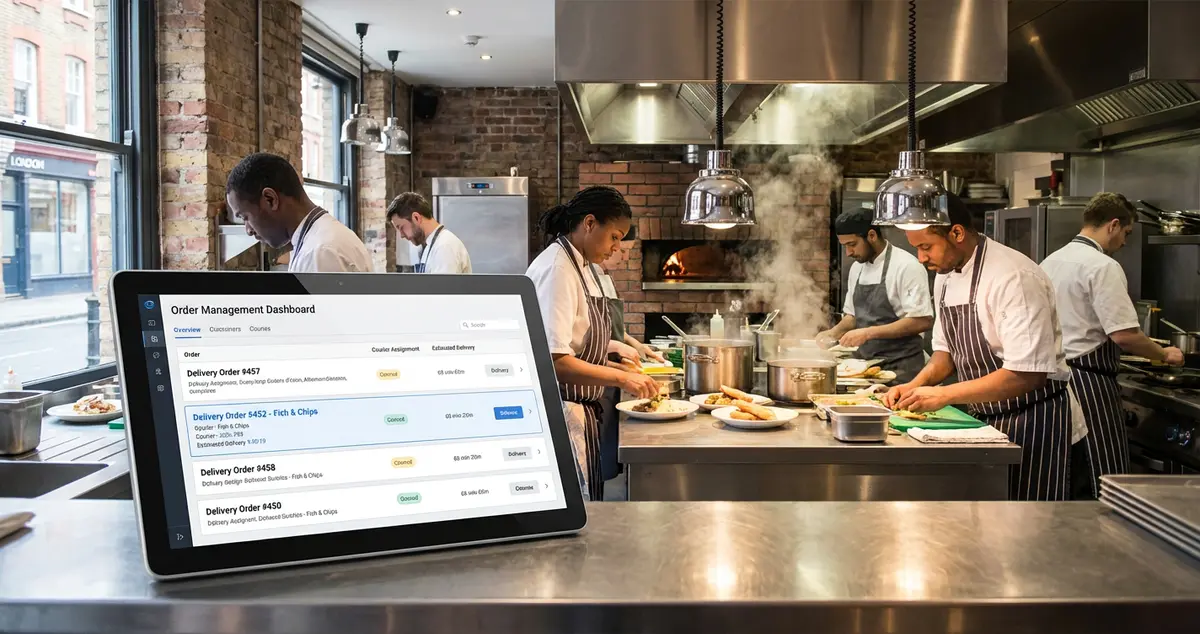
Compare restaurant delivery system options for UK restaurants. Discover POS integration, costs from £0-200/month, commission-free ordering setup and tips.
You're running between the kitchen and the front counter while three tablets from different delivery apps ping simultaneously. Your phone buzzes with a customer asking why their order is late while dine-in customers wait for their bill. This chaos costs you more than sanity.
A restaurant delivery system consolidates your delivery operations into one manageable platform, combining order management, driver dispatch, and POS integration so you stop juggling devices and start running a smoother operation.
Related: Restaurant Online Ordering Guide - Complete hub for all ordering solutions
This guide is brought to you by LocalBrandHub, helping UK restaurants build their local brand presence.
In this guide, you'll learn:
- What a restaurant delivery system actually includes (beyond just taking orders)
- How to choose between third-party aggregators and commission-free alternatives
- UK-specific costs and the POS systems restaurants use most
- How enterprise systems differ from single-location setups
What Is a Restaurant Delivery System?
A restaurant delivery system manages food orders from placement to doorstep. It handles order intake, kitchen communication, driver dispatch, and customer updates in one platform.
Think of it as the central hub that connects your point of sale, kitchen display, and delivery logistics. Understanding what this system does is the first step toward running delivery operations that work during the Saturday rush.
If you're thinking 'I've managed with separate apps for years', you're not alone. But here's the reality: while you copy orders between tablets after a 12-hour shift, your competitor's system has already sent the driver.
A restaurant delivery system typically includes:
- Order management dashboard (consolidating all delivery platforms)
- POS integration for seamless payment processing
- Kitchen display system (KDS) connection
- Driver dispatch and tracking
- Customer notification tools
- Reporting and analytics
According to the American Customer Satisfaction Index (2025, US data), quick-service restaurants scored around 78% for customer satisfaction. Full-service restaurants reached roughly 80%. The gap often comes down to delivery execution.
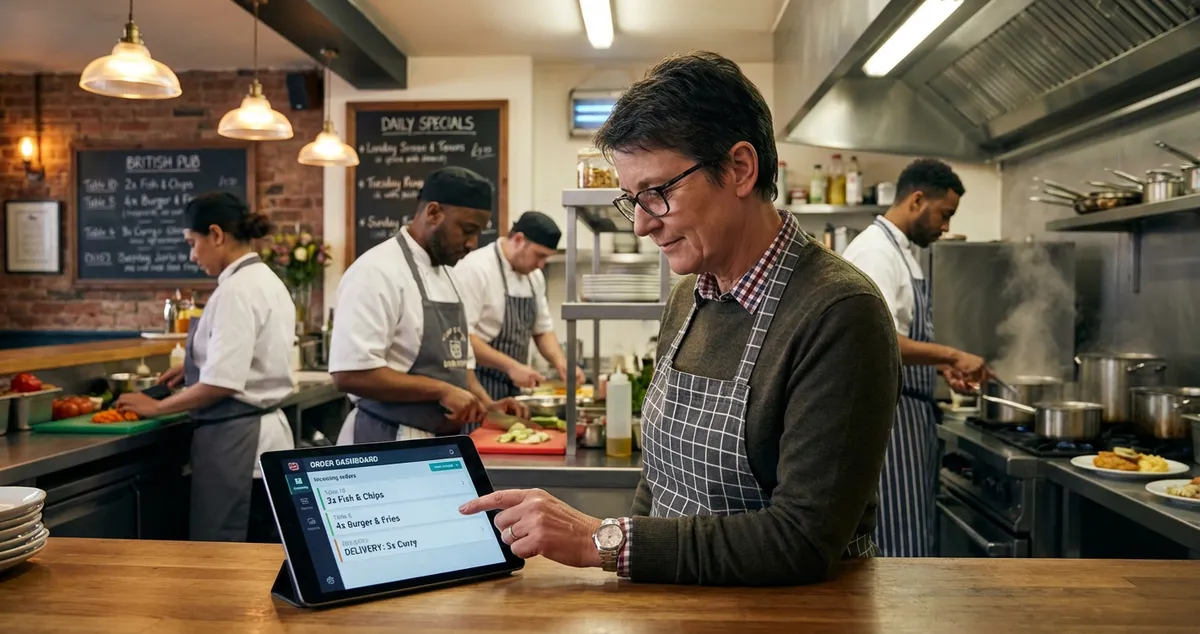
Example: A busy Manchester takeaway receives orders from Just Eat, Deliveroo, and their own website. Without a delivery system, staff toggle between three tablets. With one, all orders appear on a single screen and print to the kitchen automatically.
The UK food delivery market has grown substantially, reaching billions annually according to Statista. That growth means more orders, but also more complexity to manage.
So you understand what a restaurant delivery system does. Next, let's examine which type suits your operation.
What POS System Do Most Restaurants Use?
Now that you understand what a restaurant delivery system does, let's look at the specific platforms UK restaurants typically choose.
UK restaurants commonly use Square, Lightspeed, and TouchBistro for integrated delivery management. These systems handle both in-house transactions and delivery order processing.
The answer depends heavily on business size. Square and Toast often lead for independent restaurants. Chains typically use Oracle MICROS or Aloha POS for their enterprise needs.
Related: What Is a POS System? - Complete guide to POS types and costs
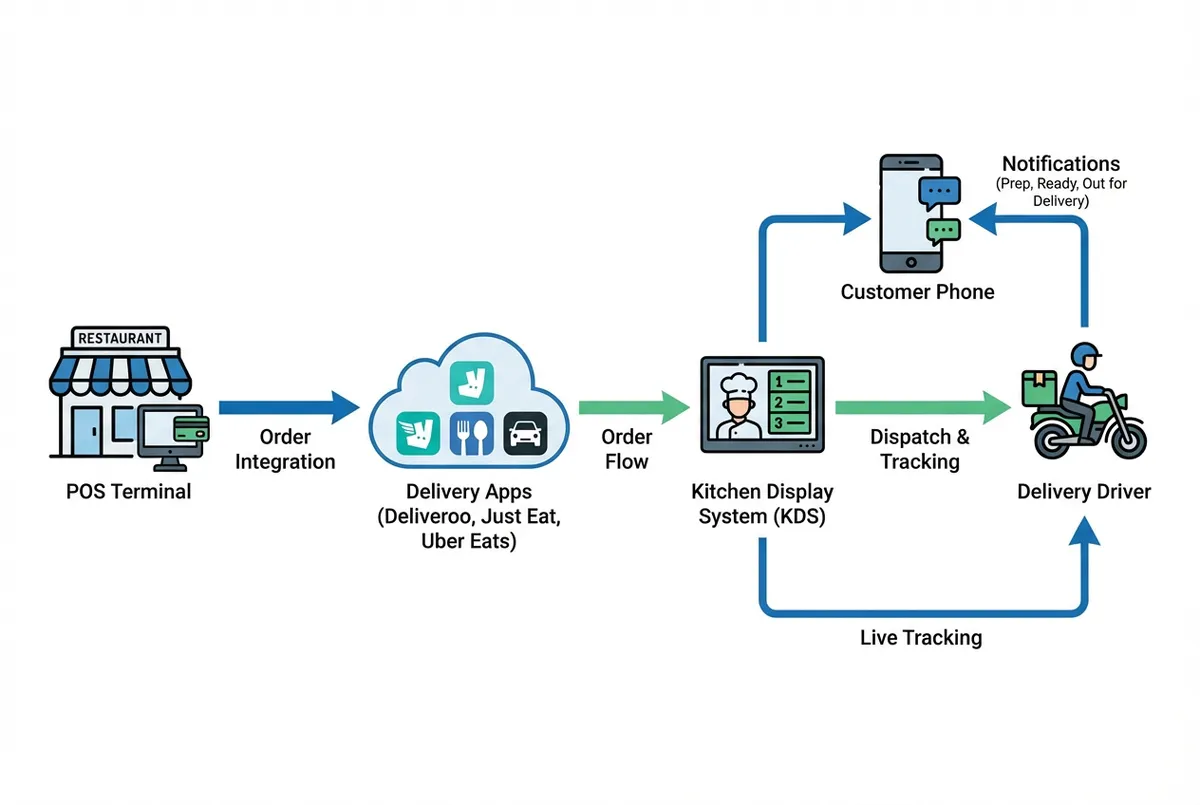
How a restaurant delivery system integrates with your existing technology stack
Popular UK restaurant delivery system options:
| System | Best For | Monthly Cost | Delivery Integration |
|---|---|---|---|
| Square for Restaurants | Small-medium restaurants | From £0/month | Yes, plus own ordering |
| Lightspeed Restaurant | Multi-location operations | From £59/month | Yes, via integrations |
| TouchBistro | Full-service restaurants | From £69/month | Yes, with add-ons |
| Zettle by PayPal | Takeaways, quick service | From £0/month | Limited |
| Deliverect | Aggregator consolidation | From £49/month | Primary function |
Note: Prices are typical UK market rates and may vary by provider and features selected.
If you're only using one delivery app and a basic till you'll always lose to competitors who consolidate everything into one system. The efficiency gap compounds with every order.
For most UK independent restaurants, cloud-based systems with built-in delivery integration often offer the best balance. If you're primarily a takeaway operation, a simpler setup with Deliverect or a similar aggregator tool might be sufficient.
Pro Tip: If you can't tell whether your current setup saves you time or costs you more in stress and errors, that's usually a sign you need to calculate what manual processes actually cost you weekly.
For instance, a fish and chip shop in Leeds switched from three separate tablets to one consolidated system and cut order errors by half within the first month.
Related: Restaurant Ordering Systems - Compare the leading platforms
What Are the 4 Types of POS Systems?
Here's how the four main types compare: legacy, tablet-based, mobile, and cloud-based. Each offers different delivery capabilities.
1. Legacy On-Premises Systems
Traditional systems that store data locally. Reliable and work without internet. However, they cost more upfront and can be harder to integrate with delivery apps.
Best for: Large restaurant groups with dedicated IT support.
2. Tablet-Based Systems
Run on iPads or Android tablets. They offer portability with familiar interfaces. Square and TouchBistro fall into this category. Many connect directly with delivery apps.
Best for: Independent restaurants wanting simplicity with full features.
3. Mobile POS Systems
Turn smartphones into order terminals with compact card readers. Useful for food trucks, pop-ups, and delivery drivers taking payment at the door.
Best for: Mobile operations and cash-on-delivery services.
4. Cloud-Based Systems
Store data online, so you can access it from anywhere. Cloud adoption in UK restaurants is growing. Multi-location management and remote access drive this trend.
Best for: Multi-location businesses needing centralised reporting.
For most delivery-focused restaurants, tablet-based or cloud-based systems work best. Mobile systems suit drivers but lack kitchen order management features.
How Much Is a POS System for a Restaurant?
So you've narrowed down the type of system you need. Now comes the budget question. UK restaurant delivery system costs vary widely depending on your operation size and feature needs.
Typical UK pricing tiers:
- Budget: Free POS tiers with basic delivery features (Square, Zettle)
- Mid-range: Full restaurant systems from £50-150/month
- Premium: Enterprise systems with substantial upfront investment
Transaction fees typically run around 1.5-1.75% for card payments. Some delivery systems charge per-order fees instead of monthly subscriptions.
Example: A small takeaway might pay a modest monthly fee for Square plus Deliverect to consolidate Just Eat, Deliveroo, and Uber Eats orders into one screen.
Thinking 'I don't have budget for this'? Consider: manual order errors often cost restaurants real money in remakes and refunds. A system that stops double-keying typically pays for itself, so it's worth taking a moment to work out how much time and money you could save.
Budget option for small restaurants:
Some restaurants start with a free POS tier (Square, Zettle) plus direct integrations with delivery apps. This works if you only use one or two platforms.
Related: Online Ordering vs Delivery Apps - Compare commission costs
What Is an Enterprise Delivery System?
For larger operations, the game changes entirely.
Definition: An enterprise delivery system manages high-volume restaurant delivery across multiple locations. It combines order routing, fleet management, and cross-location analytics in one platform.
Unlike single-location systems, enterprise platforms handle:
- Multi-location order routing: Central dashboard showing all sites
- Aggregator consolidation: One integration for all third-party apps
- Fleet management: Dispatch own drivers or hybrid with aggregators
- Centralised menu management: Update all locations simultaneously
- Advanced analytics: Cross-location performance comparison
Multi-restaurant operations face unique challenges. They must balance consistency across locations with delivery speed. Enterprise systems help by providing standard workflows and real-time visibility.
Enterprise systems differ from standard POS in these key areas:
| Feature | Standard POS | Enterprise System |
|---|---|---|
| Locations | Single site | Multiple |
| Menu updates | Per-device | Centralised |
| Reporting | Single location | Cross-location |
| Driver dispatch | Basic or none | Advanced fleet tools |
| Aggregator integration | Limited platforms | All major platforms |
Example: A restaurant group with five London locations might use an enterprise system to route orders to the nearest kitchen. They can dispatch drivers from a central pool and compare performance across sites.
For single-location restaurants, enterprise features are overkill. But if you're planning to expand, choose a system that scales. It saves the pain of switching later.
Commission-Free Restaurant Delivery Alternatives
Here's where many restaurant owners feel the real pinch. Third-party apps typically charge 15-30% commission per order. On a typical order, that's several pounds going to the platform, not your margin.
Related: Restaurant Takeaway System - Build your own ordering channel
Commission-free alternatives:
- Direct ordering website with your own delivery drivers
- Click-and-collect eliminating delivery costs entirely
- Hybrid approach: Own ordering for regular customers, aggregators for discovery
Building your own ordering channel requires upfront investment. But you keep full margin on most orders. Systems like Square Online, Flipdish, and Slerp offer commission-free ordering for a flat monthly fee.
For example, a curry house in Birmingham moved regulars to their own website. They cut third-party commissions while keeping aggregators for new customer discovery.
The trade-off is clear: aggregators bring new customers but take big commission. Your own channel keeps margin but needs marketing effort.
If you're only relying on Deliveroo and Just Eat you'll always lose margin to competitors who've built direct ordering relationships. The restaurants that thrive often use aggregators for acquisition and nudge repeat customers to order direct.
Key Takeaways
If you run a restaurant and want to see how Local Brand Hub can support your marketing, explore our restaurant marketing tools.
Key Takeaways
A restaurant delivery system is more than a tablet on your counter. It connects orders, kitchen, drivers, and customers into one operation.
- Restaurant delivery systems consolidate multiple order sources into one dashboard
- UK restaurants commonly use Square, Lightspeed, and TouchBistro for integrated delivery
- Costs range from £0-200/month for independent restaurants, with enterprise systems running significantly higher
- Commission-free ordering through your own channel retains full margin but requires customer acquisition
Weekly Action
Complete these tasks to evaluate your restaurant delivery system needs:
- Monday-Tuesday: Count how many separate devices you use for delivery orders
- Wednesday-Thursday: Calculate your monthly delivery platform commissions
- Friday-Weekend: Request demos from two integrated systems
Restaurant Delivery System Checklist
Use this when evaluating options:
- Does it integrate with your current POS?
- Does it consolidate all your delivery platforms?
- Can it send automatic customer updates?
- Does it connect to your kitchen display system?
- Is UK-based support available?
If you only have 30 minutes a week, do this:
This week, audit your restaurant delivery system setup:
- Day 1-2: List every tablet, app, and platform receiving delivery orders
- Day 3-4: Calculate total monthly commissions paid to aggregators
- Day 5-7: Research one consolidation tool that fits your order volume
The restaurants that thrive use the right tools, not the most expensive ones. They reduce peak hour chaos without overcomplicating quiet shifts.
Would you order from your own delivery experience? If the answer is 'probably not', that's the clearest sign your system needs upgrading.
Next step: If you're evaluating your complete ordering technology, explore our restaurant online ordering guide for a comprehensive breakdown of all options.
Frequently Asked Questions
What POS does Gordon Ramsay use?
Gordon Ramsay's restaurant group uses enterprise systems like Oracle MICROS. For independent UK restaurants, cloud-based systems like Lightspeed offer similar features at lower cost.
Do restaurants use ERP systems?
Large restaurant chains use ERP (Enterprise Resource Planning) systems for inventory, staff, and financials. Most independent restaurants don't need ERP. Modern POS systems cover the basics.
What system do restaurants use to take orders?
UK restaurants use POS systems (Square, Lightspeed), delivery apps (Deliveroo, Just Eat), and consolidation tools (Deliverect, Otter). The combination depends on your size and order volume.
What is the EPoS system for restaurants?
EPoS (Electronic Point of Sale) is the UK term for digital POS systems. It includes order management, payment processing, and kitchen display integration. Cloud-based EPoS adds remote access and automatic updates.
Is there a free restaurant delivery system?
Some POS systems offer free tiers (Square, Zettle) with basic delivery features. Full delivery management with aggregator consolidation typically starts around £49/month.
How do I choose between own delivery and third-party apps?
Consider your customer base and margins. Third-party apps handle logistics but take 15-30% commission. Own delivery keeps margins but needs drivers. Many restaurants use both: apps for discovery, direct for repeat orders.
Can I use a restaurant delivery system without a POS?
Yes. Tools like Deliverect and Otter work without a POS. Integration helps efficiency, but some restaurants start standalone and add POS later.
How long does it take to set up a restaurant delivery system?
Basic setup with Square or Zettle takes 1-2 hours. Full integration with multiple aggregators and kitchen displays needs 2-5 days. Enterprise deployments can take weeks.
Get More Marketing Tips
Practical marketing tips for UK business owners, straight to your inbox. No spam, unsubscribe anytime.
About the Author
Local Brand Hub
Empowering UK Businesses
Local Brand Hub provides comprehensive business management tools designed specifically for UK local businesses to streamline operations, automate marketing, and grow revenue.
More articlesRelated Articles
 Operations
Best Online Ordering System for Restaurant: UK Prices
Compare the best online ordering system for restaurant use in the UK on the prices Square, storekit and GloriaFood publish, plus the checks first.
 Operations
Restaurant Online Ordering: UK Guide for Independents
Set up restaurant online ordering that keeps more profit. Compare systems, avoid commission fees, find the right solution for your UK restaurant.
 Operations
Restaurant Ordering Systems: Complete Guide for UK Venues
Compare restaurant ordering systems that cut third-party fees by 30%. Free vs paid options, features, and setup for UK restaurants.