
Build a restaurant KPI dashboard on one screen: which tabs to make, how to pull numbers from your till and rota, and the Monday review that keeps it alive.
The rota app knows how many hours you paid for last week. The till knows what came through the door. The stock sheet, if anybody filled it in, knows what left the walk in. Three systems, three logins, three different ideas about when a week starts.
A restaurant KPI dashboard is one spreadsheet that puts a week of trading on a single screen: net sales, covers, spend per head, food cost, labour cost and prime cost, in one row per week. Build it in four tabs, feed it from your till and rota exports, and review it in a fixed slot every Monday.
This guide is about assembly, not definitions. The catalogue of metrics lives in the guide above, and restaurant performance metrics covers reading them together. What follows is the thing itself: the tabs, the plumbing, the review rhythm, and an honest answer about when a spreadsheet stops being enough.
What Goes On a Restaurant KPI Dashboard?
Four tabs, and only one of them is the dashboard.
Spreadsheet builds usually fail because everything happens on one sheet. Exports get pasted over last week's figures, formulas break when a column moves, and by week five nobody trusts the numbers enough to argue with them. Separating the jobs is what stops it.
| Tab | Job | Who touches it |
|---|---|---|
| Setup | Fixed facts: seats, tables, trading hours per day, whether you are VAT registered, your stock count day | You, twice a year |
| Paste | Raw exports land here and are never edited, only replaced | Nobody, it is a landing strip |
| Week | One row per trading week. This is the dashboard | You, once a week |
| Month | The slow numbers that mean nothing weekly | You, once a month |
Setup is the tab people skip, and the reason dashboards die. Seat count, table count and weekly trading hours do not change, so they belong in a cell your formulas point at rather than a number you re-type every Monday and eventually mistype. Capacity is a fact about your building, not a measurement.
Related: Restaurant Performance Metrics: how the numbers on these tabs are read together.
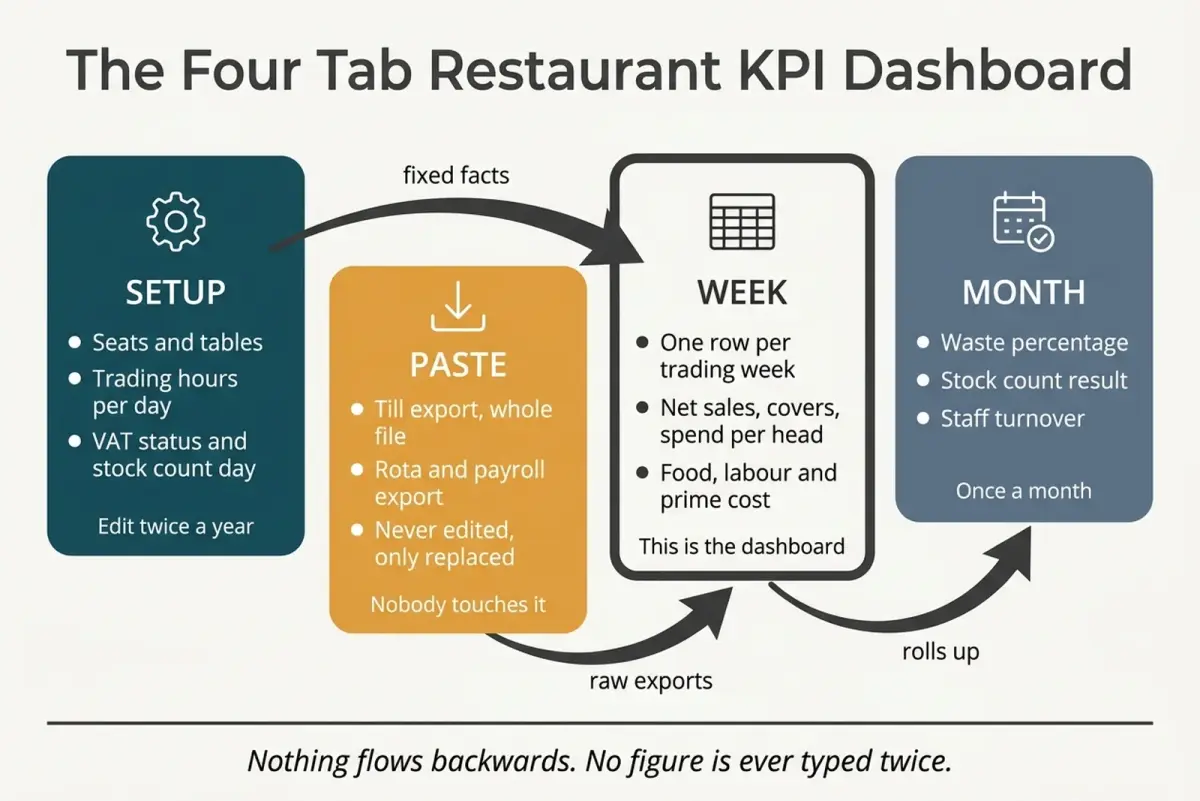
Setup and Paste feed the Week tab. The Week tab feeds the Month tab. Nothing flows backwards, and no figure is ever typed twice.
The ten columns on the Week tab
Five you type or paste, five the spreadsheet works out.
| Column | Typed or calculated | Where it comes from |
|---|---|---|
| Week ending | Typed | Your trading week, whichever day it ends |
| Net sales | Calculated | Gross till takings with VAT stripped |
| Covers | Pasted | Till or booking system |
| Food purchases | Pasted | Bookkeeping software, not the invoice pile |
| Drink purchases | Pasted | Bookkeeping software, coded separately from food |
| Payroll cost | Pasted | Payroll, including employer costs |
| Spend per head | Calculated | Net sales divided by covers |
| Food cost percentage | Calculated | Cost of food used over net food sales |
| Labour cost percentage | Calculated | Payroll over net sales |
| Prime cost percentage | Calculated | Food, drink and labour over net sales |
Two inputs sit behind that list rather than in it. Stock is the first, because cost of food used is not the same quantity as food purchased: count weekly and the formula points at an opening and a closing figure you write in yourself, count monthly and the true percentage lives on the Month tab instead. The food and drink split is the second, and that one arrives with your till export, because food cost belongs against the food line of your net sales rather than against the whole column.
The discipline is easy to state and hard to keep: if a cell is calculated, nobody types into it. A typed number in a calculated column is how a dashboard quietly starts lying.
How Do You Make a KPI Dashboard for a Restaurant?
Build Setup, then Week, then leave it alone for four weeks. One week's numbers tell you nothing you did not already feel during service. The fourth row is where the sheet earns its keep, because that is when a direction appears.
Two formulas are worth getting right before you fill a single row. Both are commonly published wrong, and both produce a number that looks plausible while pointing the wrong way.
Strip the VAT before you calculate anything
Your till reports gross takings. In the UK most goods and services are charged VAT at the standard rate of 20% (GOV.UK), and that portion of the till roll was never your money. Calculate food cost against gross takings and every ratio comes out flatteringly low, which is how an operator concludes they sit comfortably inside a normal range while their accountant is looking at something else entirely.
Watch how operators state the figure when they publish it. Chotto Matte, the Nikkei group founded by Kurt Zdesar with its original site in Soho, has a spend per head reported at around £95 net of service and VAT (Restaurant Online, 2023). That qualifier is doing real work. A spend per head quoted gross is a different quantity wearing the same name, and comparing yours to theirs without checking which one you have wastes an afternoon.
Strip VAT once, in a single Week tab formula, and never let a gross figure and a net figure share a column.
Food cost uses stock, not deliveries
Purchases are not cost of goods sold, and the gap bites hardest at exactly the frequency this dashboard runs at.
Food cost percentage is opening stock, plus purchases, minus closing stock, divided by net food sales. Run it weekly without the stock counts and you are measuring delivery timing rather than consumption. A large Monday drop-in makes week one look catastrophic and week two look brilliant, and the operator quite reasonably concludes the dashboard is broken.
If a weekly stock count is genuinely beyond you, take the honest middle path: count stock monthly, calculate a true food cost percentage for the month, and treat the weekly purchases line as a drift signal beside it. Label that column "purchases", never "food cost". A number with an honest name beats a precise one with a misleading one.
Related: Restaurant Food Cost Percentage: the full mechanics, including why theoretical and actual food cost separate.
Table turns deserve the same care. Turns are parties served divided by tables available across the service period. Covers divided by seats is a different measure, seat utilisation, and it is blind to party size. A sixty seat room serving one hundred and twenty covers reports the same figure whether it seated forty parties or sixty, and those are two very different evenings for your kitchen.
How Do You Get the Numbers Out of the Till and Rota?
This part decides whether the dashboard survives. Manual re-entry is a design problem rather than a discipline problem, and every minute of typing is a minute of Monday you will eventually reclaim by skipping the review.
Three routes, in rising order of effort.
The scheduled email. Most till platforms will send a report to your inbox on a timer, though the frequencies on offer vary: a daily summary is close to universal, a weekly one landing on the day your trading week ends is not. Turn on whatever yours offers and the number arrives before you think to look for it, which removes the step where you decide whether you can be bothered to log in.
The export. Nearly every UK till system and rota app produces a CSV or Excel file of the underlying data. Pasting that file whole into the Paste tab is the highest-value habit in this article. Do not tidy it, delete columns or sort it. Point your Week tab formulas at the columns you need, then replace the whole file next week. Tidying an export introduces errors nobody thinks to look for.
The direct pull. A spreadsheet can also import a file straight from a link, turning the paste into a refresh. Worth twenty minutes of setup if your platform offers a stable export URL, and not worth an afternoon of fighting if it does not.
Purchases have their own route, and it is not the invoice pile. VAT registered businesses must use compatible software to keep their VAT records and file their VAT Returns (GOV.UK), so your supplier spend already sits coded and dated in a system that exports. Pull the food and drink totals from there. Re-keying invoices to feed a dashboard, when the same figures are already in your bookkeeping, is work done twice.
What your rota app calls labour cost
Scheduling software often carries a cost figure of its own, built from the hourly rates you typed in and the hours it has recorded, and it is genuinely useful mid-week. What it is not, necessarily, is the number your accountant means by labour cost.
Before that figure goes into the Week tab, find out whether employer National Insurance and pension contributions sit inside it. If they do not, either take the labour line from payroll or ask your accountant for the uplift to apply to the rota figure, since payroll itself usually runs monthly and the dashboard runs weekly. Skip that step and you will run a percentage that is consistently and comfortingly too low.
Related: Restaurant Labour Cost Percentage: what belongs in the total, and what quietly gets left out.
Square's case study of Ezra & Gil in Manchester has operations manager Liz Harper describing the split neatly: "I don't have to dig for information. I can check sales every Sunday, and our managers use it throughout the week to monitor takings and top-selling items" (Square). Two jobs, two rhythms. Managers glance in-week at what is selling; one person sits down once, on a known day, with the whole picture.
Good Restaurant KPI Dashboards Are Short and Honest
Short is the easier half. Honest means every column you left off was left off on purpose.
A dashboard that scrolls is a report. The test is whether last week's row and the seven before it are visible at once without moving anything, because comparison is the whole point. One week's food cost percentage is a number. Eight weeks of it is information.
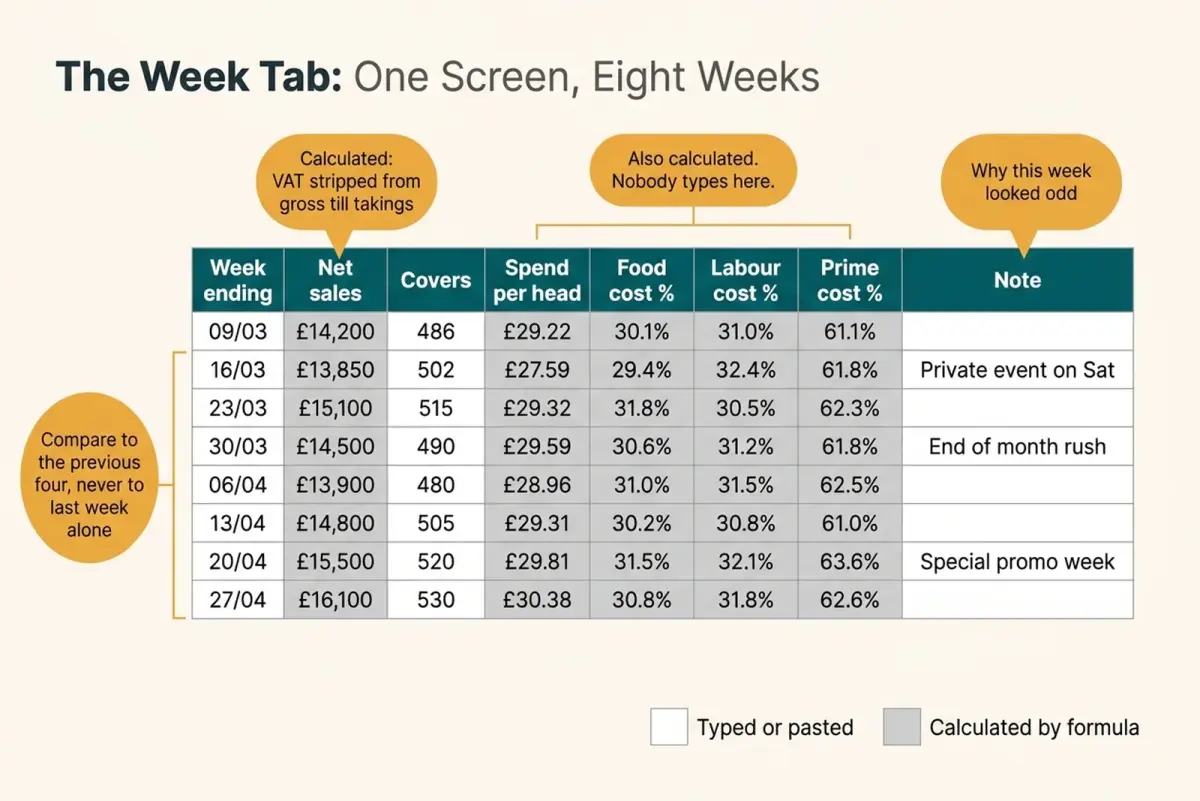
Layout only, with illustrative figures. Eight weeks visible at once, calculated columns shaded so nobody types into them, and one note column for the reason a week looked odd.
Three things worth leaving off
Each of these looks like a metric and behaves like a distraction.
Tips. Tip income is not your revenue and does not belong on a sheet measuring your trading performance. Where qualifying tips are paid at a place of business on more than an occasional and exceptional basis, an employer in England, Wales or Scotland must have a written policy on dealing with those tips (Employment Rights Act 1996, section 27I). They are administered under that policy with their own records, and a tips column beside net sales blurs whose money you are looking at.
Server league tables. Ranking staff by average spend per head loses the confidence of a floor team fast, because the number is mostly a fact about section allocation. Whoever has the window four tops on a Saturday wins that table most weeks, regardless of how they sell.
Anything nobody will act on. Footfall past the door, follower counts, weather. Interesting, uncontrollable, and every extra column makes the eight-week comparison harder to read.
Two lines that do earn their place
Waste earns its place, and the honest benchmark is worse than most operators assume. Food waste in the UK hospitality and food service sector runs at 18% of the amount of food purchased, House of Commons Library research shows (CBP-7552). That is a national picture rather than a target, and it sits a long way above the low single-digit figures circulating on vendor pages.
Weigh your own bins for a fortnight before deciding where you sit, and keep the comparison straight while you do it: that benchmark is weight against weight, not waste against your purchase spend.
Purchase lines deserve weekly attention for the same reason: supplier prices move faster than accounts do. James Thomson, owner of Wild Flor in Brighton, told The Caterer in June 2023 that cheese and dairy had risen between 10% and 30%, while a fortnightly delivery of cooking oil then cost £140 against £60 a year earlier (The Caterer). Those figures belong to their moment, which is the point. A cost line that can double inside a year is one your quarterly accounts describe far too late to act on.
How Often Should You Review the Dashboard?
Once a week, on a named day, for about twenty minutes. Every part of that sentence is load-bearing.
The named day matters more than which day. A review that happens "when things are quiet" happens in February and never again. Pick the morning after your trading week closes and put it in the diary as a recurring appointment.
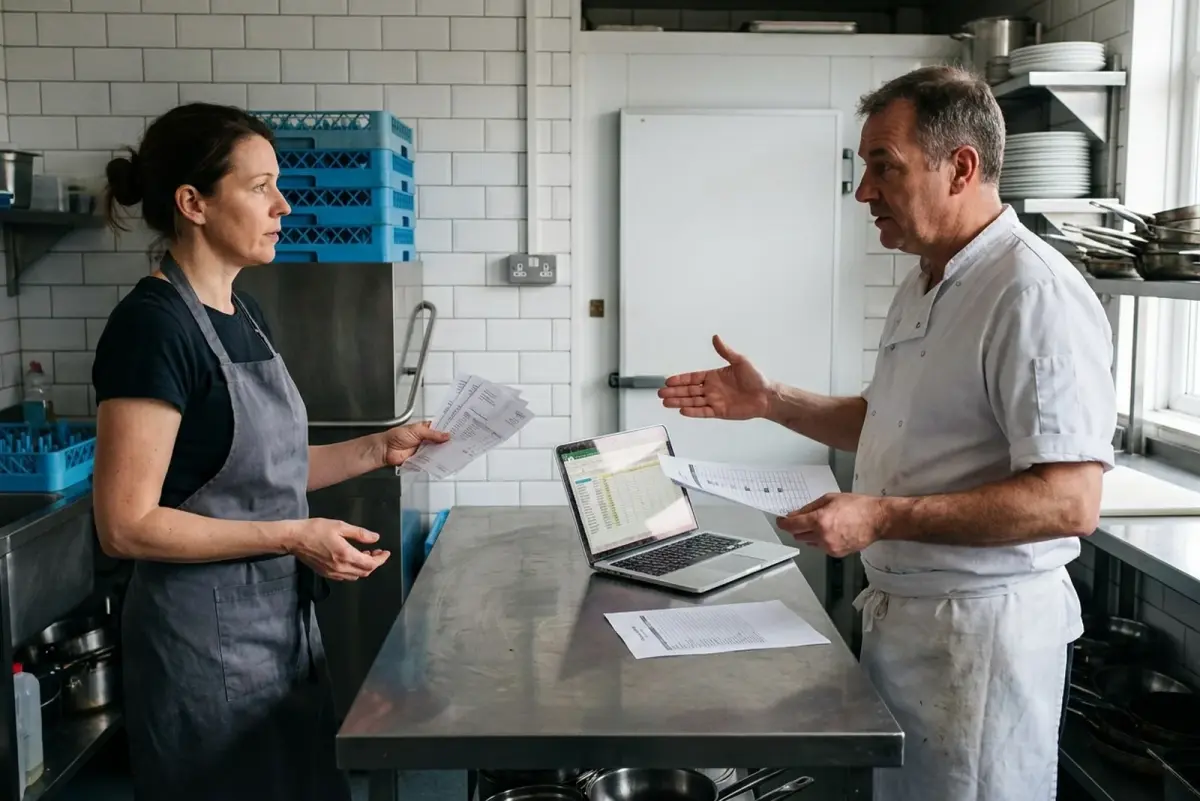
Twenty minutes before the first delivery, with the invoices to hand. The slot is protected because it is short, not despite it.
Twenty minutes is enough because you ask three questions and nothing else.
- Which number moved? Compare the new row to the average of the previous four, not to last week alone. One week is noise.
- Do I know why? A bank holiday, a chef off sick, a price rise you signed off. Write the reason in the note column while you still remember it.
- What am I doing about it this week? One action, written down. No action is a legitimate answer when the movement is explained and small.
Then close the laptop. Analysis that produces no decision is a hobby.
Keep the monthly numbers out of the weekly slot. Staff turnover, review averages and repeat trade need a quarter to say anything, and dropping them into a weekly review invites you to read weather as climate.
What a live one looks like. Imagine a forty cover neighbourhood bistro, four weeks into the sheet. Net sales are flat, covers are flat, spend per head has not moved. Food cost percentage, though, has walked from twenty-nine to thirty-three across those four rows while nothing on the menu changed.
The note column holds the answer, though it takes a minute to see it: week two records a new dairy supplier, week three records a chef starting. Two candidates, and the sheet cannot pick between them. So the following Monday she weighs the three best sellers as they leave the pass, and finds the ragu going out roughly a third heavy.
A strip of tape on the correct ladle, and the number settles back inside a fortnight. The dashboard fixed nothing. It told her which of two suspects to go and stand next to, turning a job that could have absorbed a month into ten minutes with a set of scales.
When Should You Move Off the Spreadsheet?
Later than software vendors suggest, earlier than stubborn operators admit. Three rungs, and most independent restaurants belong on the first two for years.
| Rung | What it costs | The trigger to climb | Where it stops working |
|---|---|---|---|
| Spreadsheet | Your Monday morning | Nothing yet. Start here | Multiple sites, multiple editors |
| Your till's own reporting | Nothing extra for the reports already in your plan | You are re-typing figures the till already calculates | Anything the platform does not measure, notably food cost without stock setup |
| Paid stock or reporting software | A real monthly cost plus setup time | Several sites, or admin hours you can name | Nothing, once the setup work is genuinely done |
Rule of thumb: the trigger to climb is admin hours you can put a number to, not turnover. Where any given site sits varies with how many people touch the numbers.
Most articles skip the middle rung, which is odd, because you are already paying for it. Before buying anything, spend an hour in your till's reporting menu finding out what it already produces. Sales by daypart, covers, spend per head and top sellers are usually there.
Food cost is usually available too, through a stock module, and that figure only means something once recipes, portion sizes and current supplier prices are entered and kept current. Your setup hours go there whichever product you buy.
Related: EPOS Systems for Restaurants in the UK: what to check in a till's reporting before you pay for anything extra.
Evidence for the top rung comes from scale. Pieminister, the Bristol pie company, put reporting software across 15 sites in the UK, and the team reported: "We now have numbers at a click of a button in terms of turnover, margin, labour, sales mix, average spend & many more measures. We have reduced hours spent on building spreadsheets by 50% and we are discovering trends that we never knew existed" (Tahola).
Read what that benefit is. Administrative hours removed at fifteen sites, not insight conjured from nowhere at one. If you run a single restaurant and your Monday takes twenty minutes, you are buying back very little.
Pro tip on pricing. A headline monthly price and your monthly price are rarely the same number once site count, modules and setup time are in it. Ask any supplier for a written price for your specific setup, dated, including setup fees and the cost of the stock module if food cost is what you came for. A verbal ballpark that omits the stock module is how a reporting tool arrives without the one number you wanted.
Frequently Asked Questions
What are the KPIs for restaurants?
The working weekly set is net sales, covers, spend per head, food cost percentage, labour cost percentage and prime cost, with waste and a slower group behind them. A dashboard does not introduce a different list; it decides where those numbers live and how often somebody looks at them. Our restaurant KPI examples guide is the full catalogue with definitions and data sources.
What are examples of good KPI dashboards?
A good one fits on a single screen, shows the last eight weeks side by side, shades calculated cells so nobody types into them, and carries a note column explaining why an odd week was odd. Anything longer stops being a dashboard and becomes a report, and reports get filed rather than read.
Is Excel or Google Sheets better for this?
Either works, and the choice matters far less than where the file lives. Both open on a phone, and both save changes automatically once the file sits in their cloud storage, so the decision worth making is keeping it there rather than on one office computer, which gets updated only when you are in the office. Both handle everything described here without a single advanced feature.
Should the figures include VAT?
No. Your till reports gross takings, and most of what a restaurant sells carries VAT at the standard rate of 20%, so every cost ratio has to be calculated on net revenue. Strip it once in the Week tab and keep gross and net figures in separate, clearly labelled columns. Mixing them is the most common reason a food cost percentage looks comfortable when it is not.
Can my till system just build the dashboard for me?
It can produce most of the sales side and often the labour side, and that reporting is already inside your subscription. Food cost is the one that asks for work, because the calculation depends on recipes, portions and current supplier prices somebody keeps up to date, and on several platforms it sits in a separate paid module. Ask any supplier to show you food cost calculated live on a demo account before you assume it arrives switched on.
How long does building one take?
Budget an afternoon for the Setup and Week tabs, then roughly an hour on the first Monday while you hunt for where each export lives. The second Monday is quicker. From the third it settles to about twenty minutes, which is where the habit survives a bad week.
Key Takeaway
Key Takeaways: Your Restaurant KPI Dashboard
- Four tabs, one dashboard. Setup holds fixed facts, Paste receives untouched exports, Week is the screen you read, Month holds the slow numbers.
- Net revenue, always. The till reports gross, and the standard VAT rate is 20%. Strip it once, in one formula, and never mix gross and net in a column.
- Food cost needs stock counts. Opening stock plus purchases minus closing stock. On purchases alone you are charting delivery timing, so name that column "purchases" and count stock monthly at minimum.
- Plumbing beats discipline. A scheduled email report and a whole export pasted into a landing tab outlast any resolution to re-type figures weekly.
- Twenty minutes, one named day, three questions. Which number moved, do I know why, what am I doing about it. Then close the laptop.
- Climb the ladder in order. Spreadsheet, then the reporting you already pay for, then paid software once you can name the admin hours it removes.
Your operational numbers stay exactly where they are: in your own till, your own payroll and your own spreadsheet. Nothing here imports, syncs or automates them, and any tool claiming to should show you the integration working on your own account before you sign anything.
Marketing is the other half of the picture, and rather easier to hand over. LocalBrandHub sends a Monday morning email telling you what is working, gives you a visibility score for how easily nearby customers find you online, and tracks up to five nearby competitors alongside you.
Its promise is "no dashboards needed", which only sounds like a contradiction if you think every number deserves a screen. Your food cost does. How you compare to the place two streets over does not. See what it covers.
For restaurants, salons, and local businesses
Need help with your marketing?
We help UK businesses turn social media into real results, not busywork.
Start freeRelated reading: Restaurant KPI Examples · Restaurant Performance Metrics · Restaurant Food Cost Percentage · Restaurant Labour Cost Percentage
Sources
- GOV.UK, How VAT works: how much VAT you must charge
- GOV.UK, Find software that is compatible with Making Tax Digital for VAT
- Employment Rights Act 1996, section 27I, Written policy
- House of Commons Library, Food waste in the UK (CBP-7552)
- Restaurant Online, Kurt Zdesar on his international Nikkei restaurant group Chotto Matte
- The Caterer, Chefs drop set menus and remove dishes amid cost of living crisis
- Square, Ezra and Gil case study
- Tahola, data analytics in the food industry case study
Get More Marketing Tips
Practical marketing tips for UK business owners, straight to your inbox. No spam, unsubscribe anytime.
About the Author
Local Brand Hub
Empowering UK Businesses
Local Brand Hub provides comprehensive business management tools designed specifically for UK local businesses to streamline operations, automate marketing, and grow revenue.
More articlesRelated Articles
 Operations
Restaurant KPI Examples: 12 Metrics to Track
Twelve restaurant KPI examples UK operators track, with cited benchmarks, real cases from Flat Iron and Pizza Pilgrims, and a weekly tracking routine.
 Operations
Restaurant Performance Metrics: 12 KPIs That Actually Matter
The 12 restaurant performance metrics UK operators actually use: how to calculate prime cost, covers, cash days and repeat visits, without fake benchmarks.
 Operations
Restaurant Sales Metrics: The 6 Numbers That Actually Matter
The 6 restaurant sales metrics that predict profitability. The 30/30/30 rule, POS tracking systems, and real examples for UK restaurants.