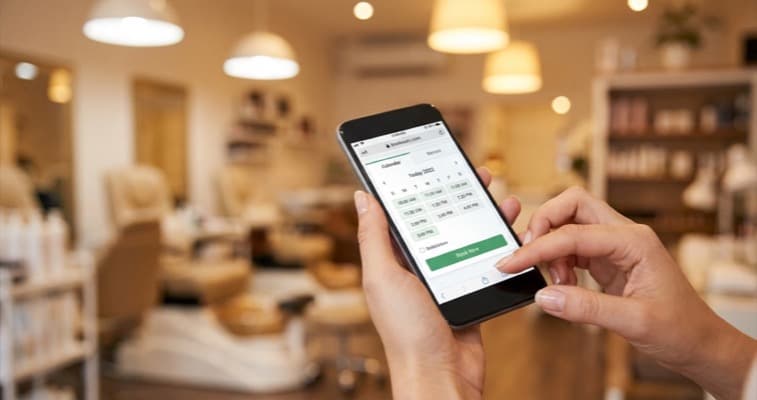
Set up salon online booking in 6 steps: choose a platform, build your service menu, add deposits, embed on your site, and promote to clients.
You're walking a client to the door after a colour appointment when you notice two missed calls. No voicemail. By the time you call back, one of them has booked elsewhere. The other found your Instagram and booked a competitor with salon online booking. According to Timely (2025), 46% of bookings happen outside business hours.
Salon online booking is the process of allowing clients to view your availability and book appointments directly through your website, social profiles, or a booking app, without calling the salon. When set up properly, it runs 24 hours a day and takes manual admin off your hands entirely.
That's the reality of running a salon without online booking. According to Timely (2025), 46% of all salon bookings happen outside business hours: 28% in the evening, 18% before the salon opens. If your only option is a phone call, those clients are booking someone else.
The switch to salon online booking isn't complicated. Most salons go from sign-up to live in a single afternoon. This guide walks through every step so you know exactly what to do, and what to avoid along the way.
What You'll Learn
- How to choose the right booking platform for your salon
- How to build your treatment menu and configure deposits
- How to embed your booking widget on your website and social channels
- How to train your team and promote online booking to existing clients
If you can't film someone following these steps, it's not a real process. Every step here is something you can do on screen this week.
Related: Beauty Salon Booking System, our complete guide to how these systems work and what they cost
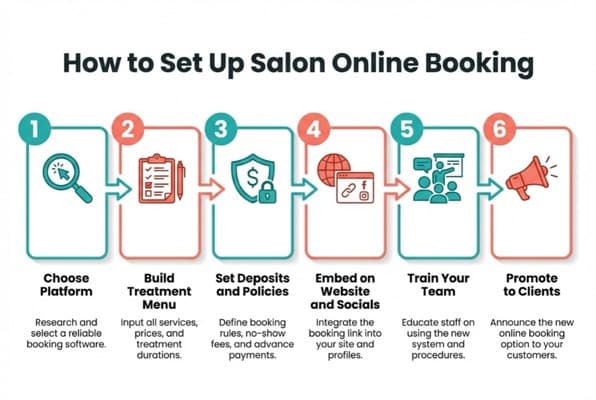
Step 1: Choose Your Salon Online Booking Platform
First, let's pick your platform. This choice shapes everything that follows: your payment processing, your client database, how your widget looks on your website. Get this right, and the remaining steps are straightforward.
The main options for UK beauty salons in 2025:
- Fresha: free to use (commission on paid features), strong UK market share, good for independent salons
- Booksy: popular in the UK, client-facing marketplace included, subscription-based
- Timely: starts at £21/month per calendar, clean interface, strong reporting
- Square Appointments: free for individuals, integrates with Square payments, easy to embed
Related: Beauty Salon Booking Systems Compared, a full side-by-side breakdown of features and pricing
What to check before committing:
- Does it integrate with your existing website platform (Wix, WordPress, Squarespace)?
- Does it support deposits and cancellation policies?
- Does it send automated SMS and email reminders?
- Can clients book through Instagram and Facebook, not just your website?
- Is there a free trial or free tier before you pay?
Most platforms take 20 to 30 minutes to set up an account. You can usually have a working salon online booking page within a day.
For example, a nail salon running on Fresha might use the free tier for the first six months, then switch to Fresha's paid features (card fees apply per transaction) once they're confident with the system. A larger beauty salon with four staff members and multiple service categories might find Timely's reporting tools worth the monthly fee from day one.
For most independent UK beauty salons starting out, Fresha is the default recommendation. It's free, has strong UK adoption, and integrates with Instagram, Facebook, and Google. Start there unless you have a specific reason to choose otherwise.
Related: Salon Online Booking System, if you're still deciding which system suits your salon type
Once you've committed to a platform, the next step is what clients actually see: your service menu.
Step 2: Build Your Treatment Menu and Pricing
Next, building your treatment menu. This is your first real content task: it's what clients browse when they land on your booking page, and it's worth doing carefully.
What to include for each service:
- Service name (be specific: "Gel Manicure" not just "Nails")
- Duration (block the right amount of time, don't underestimate)
- Price (or "price from" if it varies)
- Brief description (2 to 3 sentences, include what's included)
- Which staff member(s) perform this treatment
A nail salon offering both manicures and pedicures might list: Classic Manicure (45 min, £25), Gel Manicure (60 min, £35), Luxury Pedicure (75 min, £45). Each service gets its own time block so nothing overlaps.
Common mistakes to avoid:
- Vague service names cause clients to book the wrong thing and then call to clarify, defeating the point
- Underestimating duration leads to double-booking and stress for your team
- Missing "add-on" services (nail art, paraffin treatments) means lost revenue from clients who'd happily spend more
The biggest mistake is rushing the menu setup. A poorly labelled treatment list means more phone calls, not fewer, and that's the opposite of what you're trying to achieve.
Clients who book online are significantly more likely to add extra services than those who call. A well-structured menu with clear add-ons does much of that upselling for you.
Step 3: Set Up Deposits and Cancellation Policies
Here's the step most salons skip, and then regret. No-show appointments cost the UK beauty industry millions of pounds each year. Deposits are the most effective tool you have.
How deposits work: When a client books, they pay a percentage upfront. If they cancel with enough notice, they get it back. If they cancel last-minute or don't show, you keep it.
What to configure:
- Deposit amount: Most salons charge 20 to 30% of the treatment cost. For higher-value treatments (e.g., £120 semi-permanent lashes), 50% is reasonable.
- Cancellation window: 24 to 48 hours' notice is standard. Anything inside that window, you keep the deposit.
- Non-refundable booking fee: Some salons charge a flat fee (£10 to £20) rather than a percentage, simpler to communicate.
Automated reminders combined with a deposit requirement can significantly reduce no-shows. Even a simple 24-hour SMS reminder dramatically changes client behaviour.
Write your policy in plain English. Something like: "We require a £15 booking fee to secure your appointment. This is fully refundable if you cancel at least 48 hours before. Cancellations within 48 hours or missed appointments will forfeit the booking fee."
If you're thinking "my regulars will be annoyed by this", most won't. Most clients understand it once you explain it's there to protect appointment slots for everyone.
Related: Free Salon Booking System UK, if budget is a concern, here's what's available for free and what the trade-offs are
So you've got your policy in place. Let's make sure clients can actually find the booking page.
Step 4: Embed Booking on Your Website and Socials
Here's where salon online booking becomes visible. Your system is only useful if clients can actually find it: this step is about placing your booking widget where clients already are.
On your website:
Every platform generates an embed code: a snippet of HTML you paste into your site. On Wix, Squarespace, or WordPress, this takes about 10 minutes. If your website is managed by someone else, send them the embed code and ask them to add it to:
- Your homepage (a "Book Now" button above the fold)
- Your services page
- Your contact page
On Instagram:
In your Instagram profile settings, go to "Edit Profile" then "Action Buttons" then "Book Now." Connect your booking platform (Fresha, Booksy, and Square all support this). Clients can book without leaving the app.
On Facebook:
Add a "Book Now" button to your Facebook Page. Go to your page, select "Add a Button," choose "Book with you," and connect your platform.
On Google:
If you've claimed your Google Business Profile, you can connect a supported booking provider so clients can book directly from Google Search results. This is worth doing: it reduces friction at exactly the moment someone is searching for your services.
Once all four are live, you've removed every barrier between a potential client and a confirmed appointment.
For example, an aesthetics clinic might add the embed code to their WordPress services page on Monday, connect Booksy to their Instagram profile on Tuesday, and have clients booking from both channels before the week is out. The embed code itself is usually five lines of HTML: your platform provides it, you paste it in.
If you're only putting the booking link in one place (say, just on your website) you'll always miss the clients who find you through Instagram or Google. Cover all channels in week one.
The booking widget is live on every channel. What happens next depends on your team using it consistently.
Step 5: Train Your Team on the New System
The system is only as good as how consistently your team uses it. One receptionist who keeps taking bookings by phone, without adding them to the system, creates gaps in the calendar and undermines the whole setup.
What training should cover:
- How to add manual bookings into the system (for walk-ins and phone calls that still happen)
- How to check the day's schedule
- How to manage rescheduling and cancellations
- How to process deposits and refunds
- What to do if the system shows a conflict
Keep the training session short and practical. A 30-minute walkthrough using real scenarios works better than a long manual. Most platforms have video tutorials. Use them.
Assign one person as the system owner: the person who knows it best, handles edge cases, and becomes the internal resource when teammates have questions. On a small team, this is often the owner.
Salons that rely on phone-only booking typically spend several hours each week on manual scheduling tasks alone. That's time your team could spend on clients.
For example, a three-person beauty salon in Leeds set up a 30-minute team walkthrough using Timely's built-in video tutorials. Within a week, all three stylists were adding walk-in bookings directly, and phone calls to the front desk dropped noticeably. The key was treating the training as a team exercise rather than expecting staff to figure it out individually.
If you're rolling out the system but haven't told your team clearly who's responsible for adding phone bookings, that's usually a sign the manual and online calendars will drift apart within days.
Your team is ready. The final step is making sure your clients know salon online booking exists.
If you're only promoting your booking link on your website you'll always miss the clients who find you through Instagram, Google, or word of mouth. The link needs to be everywhere they look.
Step 6: Promote Online Booking to Existing Clients
Finally, let's tell people your salon online booking is available. The final task is spreading the word, especially to existing clients who are used to calling.
If you're thinking "I'll get to the promotion side later", that's the trap. The system sitting unused for three weeks is the most common reason salons decide online booking "didn't work." It works when clients know about it.
First week: Direct outreach
Send a message to your client list (email or SMS). Keep it short: "We've set up online booking so you can book at any time, no need to call. Here's the link: [link]. Your first online booking takes about 2 minutes."
In the salon:
- Add a QR code at your front desk and treatment stations that links directly to your booking page
- Update your email signature with "Book online:" and the link
- Change your voicemail to say "You can also book 24/7 at [website], no waiting on hold"
On social media:
Post a short reel or story showing how to book in under a minute. Most of your followers won't read a text post about this, show them.
Ongoing:
After each appointment, add a line to your post-visit message: "Book your next appointment online at [link], we're available 24/7."
Related: Salon Booking Software, more on choosing the right software for your salon
For example, a nail salon in Manchester sent a single WhatsApp broadcast to their existing client list with the message: "We've added online booking, takes 2 minutes, available any time." Within 48 hours, 30% of their next month's appointments were booked online. They hadn't changed their services, their prices, or their platform. They'd just told people about it.
If you've set up your salon online booking system but aren't actively promoting it you'll always rely on clients thinking to check your website. They won't. Tell them directly.
Salon Online Booking Launch Checklist
Here's your pre-launch checklist. Before you go live, run through these:
- Account created and verified on your chosen platform
- All services listed with correct name, price, duration, and staff member
- Deposit amount set (recommended: 20 to 30%)
- Cancellation window configured (recommended: 48 hours)
- Automated SMS and email reminders enabled
- Embed widget added to website homepage and services page
- "Book Now" button added to Instagram profile
- "Book with you" button added to Facebook page
- Google Business Profile booking connected (if platform supports it)
- QR code printed and displayed at front desk
- Voicemail updated to mention online booking link
- Welcome message sent to existing client list
If You Only Have 30 Minutes This Week
Don't let perfect be the enemy of live. Getting your salon online booking set up imperfectly this week is better than a perfect version three months later. Here's the minimum:
Day 1-2: Sign up for Fresha (free) or start a Timely trial. Upload your logo and list your top 5 services with prices and durations.
Day 3-4: Set up a 20% deposit on all bookings. Configure a 48-hour cancellation window. Enable automated SMS reminders.
Day 5-7: Add the booking link to your Instagram bio, Facebook page, and your website homepage button. Send one message to your client list.
That's it. You're live. You can refine the menu, add more services, and polish the policy language later. Getting something live this week is worth more than a perfect setup next month.
Weekly Action
This week, complete Steps 1 and 2: choose your platform and build your full treatment menu. Set a 30-minute block on your calendar and don't let other tasks interrupt it. By Friday, you should have a working booking page, even if you haven't promoted it yet.
Next week: configure deposits (Step 3) and embed the widget on your website and socials (Step 4).
Looking to fill your booking calendar consistently? A steady stream of social media posts keeps your salon front of mind between visits, see our beauty salon marketing guide for strategies that work alongside your online booking system.
Frequently Asked Questions
How long does it take to set up salon online booking?
Most independent salons can go from account creation to a live booking page in a single afternoon: typically 1 to 3 hours for the basic setup. The longest part is usually building the treatment menu. Adding the booking widget to your website and socials takes about 30 minutes once you have the embed code.
Which is the best salon online booking system for UK beauty salons?
For most independent UK beauty salons, Fresha is the default starting point: it's free, widely used, and integrates with Instagram, Facebook, and Google. Timely is worth considering if you want stronger reporting and don't mind a monthly fee (starting around £21/month per calendar). See our beauty salon booking systems compared guide for a full breakdown.
Should I charge a deposit for salon bookings?
Yes, in most cases. Deposits protect your time when clients cancel last-minute or don't show. A 20 to 30% deposit with a 48-hour cancellation window is standard practice for UK salons. For higher-value treatments like semi-permanent lashes or full-colour services, 50% is common. Write the policy in plain English and display it clearly during the booking flow.
Can clients book through Instagram?
Yes, if you're using Fresha, Booksy, or Square Appointments. In your Instagram profile settings, go to "Edit Profile," then "Action Buttons," then "Book Now" and connect your booking platform. Clients can complete the entire booking without leaving the app.
What if some clients still prefer to phone?
That's fine, keep taking phone calls. The key is to add those bookings into your salon online booking system immediately so your calendar stays accurate. Over time, most clients who discover online booking prefer it for the convenience. Change your voicemail to mention the online option and most habitual phone bookers will switch within a few months.
Considering booking systems for your beauty salon? Explore our full range of guides covering salon booking systems in the UK, booking apps, and specialist systems for hair salons and nail salons.
For restaurants, salons, and local businesses
Need help with your marketing?
We help UK businesses turn social media into real results, not busywork.
Start freeKey Takeaway
Salon online booking removes the biggest barrier between a potential client and a confirmed appointment: the phone call. Choose your platform, build a clear treatment menu with accurate durations and prices, set up deposits to reduce no-shows, embed the booking widget on your website, Instagram, Facebook, and Google, train your team to use it consistently, and promote it directly to your existing client list. Most salons can go live in a single afternoon. The system that's live this week will always outperform the perfect setup you never launch.
Get More Marketing Tips
Practical marketing tips for UK business owners, straight to your inbox. No spam, unsubscribe anytime.
About the Author
Local Brand Hub
Empowering UK Businesses
Local Brand Hub provides comprehensive business management tools designed specifically for UK local businesses to streamline operations, automate marketing, and grow revenue.
More articlesRelated Articles
 Tutorials
Salon Online Booking System: 12 Essential Features
Choosing a salon online booking system? This guide covers 12 essential features: deposits, reminders, Google sync, plus a scorecard to rate your options.
 Tutorials
Salon Booking Software: Full Operations Guide 2026
Salon booking software does more than fill your calendar. Explore the full stack (POS, CRM, inventory, reporting) plus UK pricing tiers for 2026.
 Industry Insights
Salon Software Pricing UK 2026: What It Actually Costs
Compare salon software pricing in the UK. Per-staff, flat rate and commission models explained with Fresha, Timely, Phorest and Square plus hidden costs.