Choosing a salon online booking system? This guide covers 12 essential features: deposits, reminders, Google sync, plus a scorecard to rate your options.
You're comparing three booking platforms, each claiming to do everything. One charges commission, one charges monthly, one charges both. Every sales page looks identical. Choosing a salon online booking system shouldn't require a lie-down, but here you are. This guide identifies the 12 features that actually matter for client-facing booking, so you can stop comparing and start deciding.
Related: Beauty Salon Booking Systems: full market overview and platform comparison
What You'll Learn
- The 12 essential features every salon online booking system should include
- How deposit tools and no-show protection work in practice
- Which automation features save real time, and which are just marketing copy
- How to score your current or shortlisted system before committing
What Makes a Good Salon Online Booking System?
Based on our experience evaluating booking platforms used by independent UK beauty salons, the difference between a good salon online booking system and a mediocre one isn't the number of features: it's whether those features solve problems your clients actually have.
Clients want to book at 10pm, choose their preferred therapist, see clear pricing, and receive a reminder. Salon owners want fewer no-shows, less admin, and a system that doesn't demand their constant attention. For example, a well-configured salon online booking system means a beauty therapist finishes her last client on Friday evening with Saturday's appointments already confirmed, deposits collected, and reminders queued, without sending a single message herself.
The features below divide into three groups. Every salon online booking system you evaluate should pass all three, not just the ones featured on the pricing page.
| Group | Focus | Key Features |
|---|---|---|
| Core Booking | Table stakes | Calendar, menu, staff, mobile |
| Protection | Revenue protection | Deposits, reminders, tracking, waitlist |
| Growth | Scale what works | Reviews, rebooking, Google, analytics |
Rule of thumb: Core Booking gets clients in. Protection keeps revenue intact. Growth scales what's working.
Ask yourself: does your current system score across all three groups, or just one?
Last reviewed: March 2026. Pricing tiers and feature availability change frequently: consult each platform directly before committing.
12 Essential Features to Look For
Now that you know what to look for in principle, here's how each feature works in practice.
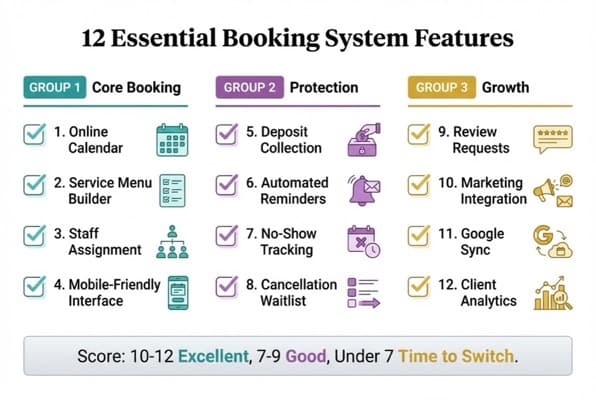
12 Essential Booking System Features Scorecard
Group 1: Core Booking (Features 1-4)
1. 24/7 Online Booking Calendar
Your salon online booking system should accept appointments at any hour without your involvement. Booking software providers serving UK salons consistently report that a significant share of appointments are made outside business hours, particularly Sunday evenings when clients are planning their week (Fresha, 2025). If clients can only book when you're answering the phone, you're leaving those slots unfilled.
For example, a beauty salon in Leeds might add an online booking button to Instagram at 9pm on a Sunday. By Monday morning, four new lash appointments are confirmed, none of which required a single message from the therapist.
Test: Can a new client complete a full booking from your website without any input from you?
2. Service Menu Builder
Clients need to see treatment name, duration, price, and which staff members offer each service. A weak service menu causes misbookings: a client who books a "tint" when they want balayage wastes a slot and frustrates your team. Look for a system that separates service duration from processing time, so your nail technician isn't booked back-to-back without buffer.
3. Staff Assignment and Preference
Clients book people, not just services. A booking system that doesn't let clients request a specific therapist will see lower conversion, particularly for treatments like lash extensions or brows where the client-therapist relationship matters. Look for staff-level availability calendars and the ability to restrict services to qualified team members.
4. Mobile-Friendly Interface
The majority of UK website traffic comes from mobile devices, and booking flows are no exception. If your widget requires pinching and zooming, you'll lose bookings before the client reaches the date selector. Test any shortlisted salon online booking system on your own phone: if you can't complete a booking in under 90 seconds, your clients won't either.
Once the core booking features are solid, the next group, protection, determines whether confirmed appointments actually show up.
Group 2: Protection (Features 5-8)
5. Deposit Collection
Deposits are a consistently reliable measure for reducing no-shows in beauty salons. A partial upfront payment creates genuine financial commitment. Industry practice for higher-value treatments (microblading, semi-permanent make-up, lash extensions) commonly runs 25 to 50% of the service price as a non-refundable deposit. Your salon online booking system should let you configure deposits by service type, not apply a single blanket rule to everything.
For example, a nail salon might require no deposit for a basic manicure (low opportunity cost if no-showed) but a £30 deposit for gel extensions. That's a configuration the system must support.
6. Automated Reminders (SMS and Email)
Reminders prevent the no-shows caused by forgetfulness, which is the majority of them. A two-stage reminder sequence works well: a message 48 hours before the appointment, then a final nudge on the morning of the visit (Treatwell, 2025). Some platforms add a third prompt one hour before for prep-intensive treatments. SMS typically outperforms email for response rates because it's immediate and harder to ignore. Avoid salon online booking systems where reminders are a paid add-on on the basic tier.
7. No-Show Tracking Per Client
One no-show is unfortunate. Three from the same client is a pattern. Your system should track no-show and cancellation history per client, so you can decide whether to require full payment upfront next time. GDPR note: any client data you store, including attendance records, must comply with UK GDPR. Check that your platform stores data on UK or EU servers and provides a data processing agreement.
8. Cancellation Waitlist
When a client cancels, that slot doesn't have to go empty. A cancellation waitlist automatically notifies other clients who wanted that time. If you're only managing cancellations manually, that's usually a sign the system is missing a feature your occupancy level genuinely needs. This feature is more common in mid-tier and premium booking platforms than free tiers, something to weigh when evaluating cost.
Protection keeps revenue intact. Growth features are what help a well-running salon extend its reach.
Group 3: Growth (Features 9-12)
9. Automated Review Requests
Online reviews drive bookings directly. A beauty salon marketing strategy built on consistent Google review volume outperforms social media alone, because reviews affect both search visibility and client trust. It's worth checking how visible your salon is in local search to see where more reviews would move the needle.
The best salon online booking systems send an automated review request 24 to 48 hours after a completed appointment, with a direct link to your Google Business Profile. Several leading salon platforms offer this as a named feature. For example, a nail bar sending automated post-visit review requests across 150 monthly appointments could realistically accumulate 10 to 20 new Google reviews per month without any manual follow-up.
10. Rebooking and Lapsed Client Nudges
A booking system that only books appointments is half a system. Automated rebooking nudges ("It's been 6 weeks since your last colour, ready to rebook?") and lapsed client re-engagement at 12 weeks are what turn one-time visitors into regulars. For salons running promotions, connecting your booking system to your salon promotion ideas strategy creates a loop: book, visit, post-visit offer, rebook.
11. Google and Social Booking Integration
Reserve with Google (part of Google Business Profiles) allows clients to book directly from your Google Maps listing, without visiting your website. A number of UK booking platforms support this integration: check directly with each shortlisted system whether it's included and available on your tier.
This is particularly valuable for beauty salon Google My Business profiles in competitive local markets. A "Book" button in search results captures intent at the exact moment a client is comparing salons, before they've visited anyone's website.
12. Client Analytics and Reporting
You can't grow what you can't measure. At minimum, your salon online booking system should report: most popular services, revenue per therapist, peak booking windows, and client retention rate. If you're deciding whether to add a new treatment or extend opening hours, that data replaces guesswork with evidence. More advanced platforms integrate with salon booking software covering full POS and CRM workflows.
Deposits and No-Show Protection
However, features 5 to 8 only work if the mechanics are set up correctly. Here's what that looks like in practice.
No-shows are the most preventable revenue loss in a beauty salon. A client who doesn't appear costs both the appointment fee and the slot that could have been filled.
The mechanics matter. A deposit that's easy to collect but difficult to enforce is nearly useless. Your booking system should:
- Charge the deposit automatically at the time of booking, not via a payment link sent afterwards
- Hold it against the final service total
- Apply your cancellation policy clearly before the client confirms
- Allow you to retain it if the client cancels inside your policy window
If you're asking for deposits but still seeing no-shows, that's usually a sign the deposit isn't being collected at booking: it's being requested afterwards, where completion rates drop sharply.
If you're thinking "I can't ask clients for deposits, they'll go elsewhere", you're not alone in that worry. The reality is different. Clients who book online expect deposits for higher-value treatments. Salons that don't require them are often the ones with the worst no-show rates.
If you're only requesting deposits manually afterwards you'll always lose to salons where the system collects them automatically at the point of booking.
Deposit thresholds by treatment value
Set deposit thresholds by treatment value. Treatments under £30 with high demand rarely need deposits. Treatments over £80 where your time is hard to fill almost always do.
Automation: Reminders, Follow-Ups, and Reviews
Furthermore, deposits alone don't fully protect your calendar. Automation completes the picture.
Automation works when it's invisible. The goal isn't to send more messages: it's to reach clients at exactly the right moment.
A well-configured salon online booking system runs three automated sequences:
- Pre-visit: Reminder 48 hours before, reminder on the morning of the appointment (SMS), optional final nudge one hour before for prep-intensive treatments.
- Post-visit: Thank-you message with review request, rebooking prompt 4 to 6 weeks later, lapsed client re-engagement at 12 weeks.
- Triggered: Birthday offer, waitlist notification when a slot opens.
If you're only doing one thing: SMS reminder 24 hours before every appointment, plus an automated Google review request 24 hours after. Those two features alone justify most booking system subscription costs. If you're running a salon online booking system that doesn't offer both, even on a paid tier, that's worth factoring into your evaluation.
The challenge is that setting this up properly takes an hour you probably don't have on a busy Tuesday between clients. But it's not always easy to find a quieter moment. Block a morning, set it up once, and let it run. Research shows that salons using automated reminder sequences see meaningful reductions in forgotten appointments compared to those relying on clients to remember independently (Treatwell, 2025).
Integration: Website, Google, and POS
Additionally, the features above only perform well if the booking system is properly connected to your digital presence. Here's what good integration looks like.
A booking system that redirects clients away from your own website to a third-party URL creates friction, and friction loses bookings. Clients who have to leave your salon website builder page and navigate elsewhere abandon the process at meaningfully higher rates.
The integrations that matter most:
- Embedded widget: Looks native to your site, not a jarring third-party redirect. Check whether it's white-labelled or prominently carries the platform's branding.
- Google Reserve: Direct booking from your Google Business Profile.
- Instagram and Facebook: "Book Now" button that feeds directly into your booking flow.
- POS sync: Completed appointments recorded automatically: no double-entry between systems.
For example, a brow bar using an embedded widget sees 100% of booking traffic stay on its own domain. A brow bar using a redirect link to a third-party platform page sees a percentage abandon at that redirect, every time. The difference compounds over thousands of bookings. POS sync becomes critical at scale and is covered in depth in our salon booking software guide.
Score Your Current System
Now that you know all 12 features, use this checklist to evaluate your current or shortlisted salon online booking system. For example, a nail salon scoring 5/12 might find that all five passes are Core Booking features, leaving the entire Protection and Growth groups uncovered. That pattern is common and it's why so many busy salons still struggle with no-shows despite having a booking system in place. Tick every feature your system includes:
Group 1: Core Booking
- 24/7 online booking calendar: no manual intervention required
- Service menu with durations, prices, and per-staff assignment
- Clients can request a preferred therapist
- Mobile interface completes a booking in under 2 minutes on a smartphone
Group 2: Protection
- Deposit collection configured per service type (not blanket)
- Automated SMS and email reminders with customisable timing
- No-show and cancellation history tracked per client
- Cancellation waitlist notifies waiting clients automatically
Group 3: Growth
- Automated Google review request sent post-appointment
- Rebooking nudges and lapsed client re-engagement
- Google Reserve / social booking integration
- Revenue and retention reporting per therapist
Your score:
- 10-12: Strong system: focus on optimising what you have
- 7-9: Good foundation with clear gaps: prioritise Group 2 protection features
- Under 7: Time to evaluate alternatives
If you're planning to set up a new system or migrate from your current one, see our step-by-step guide to salon online booking for the full implementation process.
When Free Isn't Enough
Finally, when it comes to choosing your tier: free is a starting point, not a destination. But free tiers typically exclude: automated SMS reminders, advanced deposit configuration, waitlist management, analytics, and marketing automation, precisely the Group 2 and Group 3 features that protect and grow revenue.
If you're only using free features and wondering why no-shows haven't dropped, that's usually a sign the system isn't the problem. The tier is.
The calculation isn't "what does it cost per month?" It's "what does one recovered appointment per week cost, versus the subscription?" A system at £30/month that prevents four no-shows at £50 each represents a £170/month net positive.
If you pick just one upgrade: prioritise automated SMS reminders. Every other premium feature matters, but none more immediately than keeping confirmed appointments confirmed.
For newer salons on tighter budgets, our guide to free salon booking system UK reviews what each free tier includes and where the limits bite. For salons ready to invest in a full platform, beauty salon booking systems covers the paid comparison.
Frequently Asked Questions
What features should I look for in a salon online booking system?
The 12 essential features fall into three groups: Core Booking (24/7 calendar, service menu, staff assignment, mobile UX), Protection (deposits, reminders, no-show tracking, waitlist), and Growth (review requests, rebooking nudges, Google sync, analytics). Most salons see the fastest return from the Protection group, particularly deposits and automated SMS reminders.
Is a free salon booking system good enough for a beauty salon?
Free tiers work well for sole traders and new salons getting online for the first time. However, they typically exclude automated SMS reminders, per-service deposit configuration, waitlists, and analytics. If you're wondering whether the free tier is limiting your growth, check whether no-shows are still a regular problem: that's usually the first sign it's time to upgrade. See our free salon booking system UK guide for what each free tier actually includes.
Can clients book directly from Google using my salon booking system?
Yes, through Reserve with Google (part of Google Business Profiles), clients can book directly from your Google Maps listing. A number of UK booking platforms support this integration. For example, a beauty salon in a competitive high street market might add 10 to 15% more bookings simply by having a "Book" button in search results, capturing intent before a client visits any website. Check whether your shortlisted system includes this on your tier.
How much do salon booking systems cost in the UK?
Pricing varies widely. Some platforms offer free tiers with commission on new clients or payment processing fees. Others charge a flat monthly subscription (typically £10 to £50/month depending on team size and features). When comparing cost, focus on total cost including transaction fees, not just the headline subscription price.
Weekly Action
This week, audit your salon online booking system against the 12-feature scorecard:
- Day 1-2: Complete the checklist above for your current system. Note every unchecked item.
- Day 3-4: Identify your biggest revenue leak (no-shows, abandoned bookings, or missed reviews) and check whether missing features are the cause.
- Day 5-7: If you scored under 7, request a free trial from one alternative platform. Test the mobile booking flow on your phone, start to finish.
One focused evaluation session is worth more than months of hoping your current system improves on its own.
Explore more salon booking guides: from salon booking systems UK compliance to choosing a beauty salon booking system, beauty salon booking apps, hair salon booking systems, and nail salon booking systems. You can also browse our full beauty salon resources for marketing, SEO, and growth strategies tailored to UK salons.
For restaurants, salons, and local businesses
Need help with your marketing?
We help UK businesses turn social media into real results, not busywork.
Start freeKey Takeaway
A salon online booking system needs to cover three groups: Core Booking (calendar, service menu, staff, mobile), Protection (deposits, reminders, no-show tracking, waitlist), and Growth (reviews, rebooking, Google sync, analytics). Score your current system against all 12 features. If you're under 7, it's time to evaluate alternatives. Prioritise the Protection group first, starting with automated SMS reminders and per-service deposit collection.
Get More Marketing Tips
Practical marketing tips for UK business owners, straight to your inbox. No spam, unsubscribe anytime.
About the Author
Local Brand Hub
Empowering UK Businesses
Local Brand Hub provides comprehensive business management tools designed specifically for UK local businesses to streamline operations, automate marketing, and grow revenue.
More articlesRelated Articles
 Tutorials
How to Set Up Salon Online Booking: A Step-by-Step Guide
Set up salon online booking in 6 steps: choose a platform, build your service menu, add deposits, embed on your site, and promote to clients.
 Tutorials
Salon Booking Software: Full Operations Guide 2026
Salon booking software does more than fill your calendar. Explore the full stack (POS, CRM, inventory, reporting) plus UK pricing tiers for 2026.
 Industry Insights
Salon Software Pricing UK 2026: What It Actually Costs
Compare salon software pricing in the UK. Per-staff, flat rate and commission models explained with Fresha, Timely, Phorest and Square plus hidden costs.