
Salon booking software does more than fill your calendar. Explore the full stack (POS, CRM, inventory, reporting) plus UK pricing tiers for 2026.
You're running a beauty salon. You've set up online booking. Clients are booking themselves in. That's all the salon booking software needs to do, right? Most beauty salon owners think their software is managing their business. It isn't. It's managing one part of it. Proper salon management software runs your whole operation, not just your calendar.
What you'll learn:
- What salon booking software actually does beyond appointments
- The core and advanced features that matter for beauty salons
- Cloud vs desktop: a plain comparison
- UK pricing tiers for 2026: from free to full-featured
- When to upgrade from a basic or free system
Beyond Just Booking: What Salon Software Actually Does
The word "booking" undersells what salon booking software is designed to do. Based on how salon owners describe their experience with management platforms, the gap is almost always wider than expected. Yes, it fills your appointment column. But a proper salon management platform also:
- Tracks what each client bought last visit
- Tells you when your tint stock is running low
- Shows which therapist is generating the most retail revenue
- Handles card payments at checkout
All from the same dashboard.
Think of it this way: a booking system is a diary. Salon software is a business tool.
The distinction matters because most beauty salon owners hit a ceiling, typically around the time they hire their second or third member of staff, where a basic tool stops being enough. Appointments start clashing. Staff hours become a spreadsheet nightmare. You can't tell at a glance which treatments are most profitable. That's not a staffing problem. It's a software problem.
If you're reading this on your phone between clients thinking "I'm probably fine." That's usually a sign it's worth spending five minutes checking whether you can actually pull the data that would confirm it.
If you can't answer "which service made the most money last month" in under 60 seconds, that's usually a sign you're using a diary, not a management platform. The data exists; your software just isn't surfacing it.
Cloud-based salon booking software has become the dominant deployment model, with adoption accelerating as mobile-first solutions make complex features accessible to small independent teams.
Related: Beauty Salon Booking System, the hub overview covering all types of booking and management platforms for UK salons.
Core Features Every Salon Needs
First, before you compare platforms, get clear on what "core" actually means. These are the five features a beauty salon cannot operate well without:
Minimum requirement check: Before paying for any platform, verify it covers all five of these features. Some free-tier plans limit client database size or restrict reporting, confirm the limits before signing up.
1. Appointment Calendar and Scheduling
A real-time booking grid showing all staff columns, service durations, and buffer times. Not a shared Google Calendar with colour coding. A proper calendar that prevents double-bookings, respects setup/cleanup time, and updates the moment a client reschedules online.
A nail salon with three therapists, for example, might use a three-column booking grid where each column represents a treatment table, with 15-minute setup buffers between gel appointments built in automatically. For niche-specific considerations, see our guide to nail salon booking systems.
2. Online Booking Widget
Clients book themselves. You're not on the phone at 7am. This is table stakes in 2026: if your salon booking software doesn't offer an embeddable widget for your website, look elsewhere. See our guide to salon online booking for what to look for specifically in the client-facing flow.
3. Automated Reminders and Confirmations
SMS and email reminders reduce no-shows. The best systems let you customise timing (24 hours, 48 hours) and message content. Many beauty salon owners report meaningful reductions in no-show rates after switching to automated reminders: anecdotally, some see drops of a third or more in their first few months.
4. Client Database
Every client stored with contact details, booking history, allergy notes, and service preferences. This is the foundation everything else builds on. Without it, you're starting from zero with every booking.
5. Basic Reporting
Revenue by day, week, or month. Appointment volume. Cancellation rate. If your salon booking software can't show you these three numbers in under a minute, you're making decisions without data.
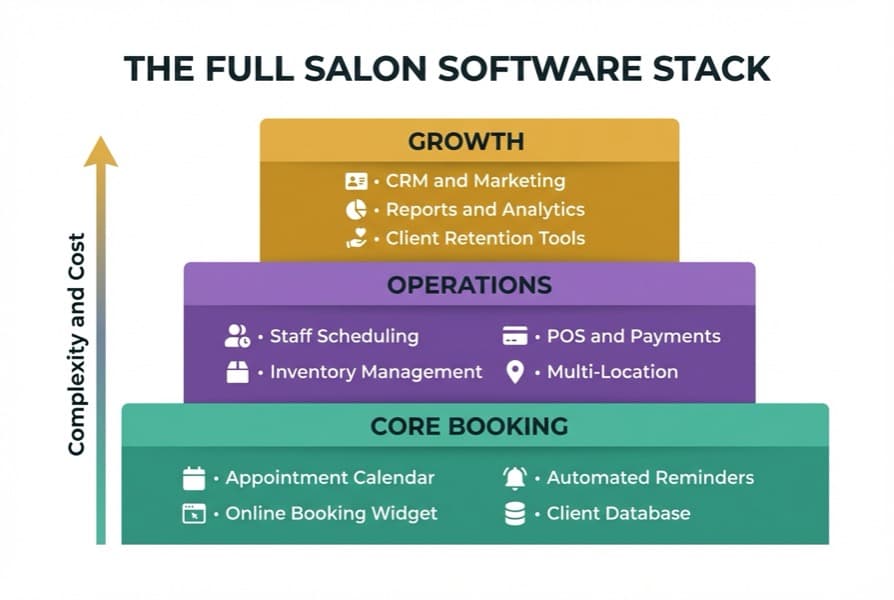
The full salon software stack: three layers from basic booking to growth tools
Advanced Features: CRM, Reporting, and POS Integration
So, you've got the core covered. Here's what separates a basic tool from salon booking software that actually drives revenue. The difference between a £0 and a £60/month platform becomes obvious once you see what's possible.
Pro Tip: Most salons discover their biggest operational gaps in the reporting section, not the booking flow. If you're demoing a new platform, ask to see the revenue by staff member report first. That tells you more about a platform's business intelligence than any other feature.
CRM and Client Retention
A proper CRM (Client Relationship Management) module goes beyond storing names and numbers. It tracks:
- Service history: what treatments, how often, by which therapist
- Product preferences: what they've bought retail, what they've declined
- Rebooking patterns: how long between visits, when they're likely to lapse
- Marketing segments: clients who haven't visited in 90 days, or who've spent over £500 in the past six months
A beauty salon using CRM data effectively, for instance, might set up an automatic "we miss you" message to clients who haven't rebooked within eight weeks of their last facial, timed to go out on a Tuesday morning when booking enquiries typically peak.
For a beauty salon, this translates directly to revenue. A client who bought a luxury facial and hasn't been back in six weeks is a warm lead, not a cold one. Good salon booking software flags this automatically.
If you're running email campaigns alongside your software, this CRM data integrates directly, see beauty salon email marketing for how to put client segments to work.
Reporting Dashboards
Salon owners consistently find these the most valuable reports once they start using them:
- Revenue by service category: treatments vs retail vs add-ons
- Staff performance: revenue generated, utilisation rate, retail conversion
- Client retention rate: what percentage of first-time clients return within 90 days
- Peak and off-peak analysis: which hours consistently underperform
- Retail stock movement: what products are selling, what's sitting on the shelf
The shift from "I think Tuesday mornings are slow" to "Tuesday mornings cost us £340/week in unutilised chair time" is the difference between guessing and managing. That's what salon booking software with proper reporting gives you.
POS and Integrated Payments
A built-in POS (Point of Sale) system means your checkout connects to your booking record. When a client pays, the transaction is automatically logged against their appointment, the therapist's revenue tally updates, and stock levels adjust if retail products were sold.
Platforms without integrated POS create a gap: you take payment separately, then manually reconcile at the end of the day. That gap is where errors happen and retail sales go uncounted. For beauty salons taking card payments (which is nearly all of them in 2026), an integrated card reader that syncs with your salon booking software is worth the monthly cost on its own.
Inventory Management
Inventory management is often overlooked, and one of the highest-ROI features once you start using it. Track professional stock (colour, developer, retail products) with par levels and automatic low-stock alerts. For salons spending £500 to £2,000/month on supplies, knowing exactly what's being used vs wasted vs going missing has a measurable impact on margins.
An aesthetics clinic, for example, might track their retail skincare range by SKU, with an automatic alert when any product drops below two units in stock, preventing the awkward moment a client wants to buy something you've run out of.
Staff Scheduling
Beyond booking columns, proper staff management includes rota planning, holiday tracking, commission calculation, and target monitoring. For a three-person team it's useful. For a team of eight or more, it's essential. See our overview of beauty salon booking systems for how platforms handle multi-staff environments differently. If your team needs a mobile-first option, our beauty salon booking app guide covers app-based platforms specifically. For hair salon booking systems, staff scheduling complexity is often the deciding factor.
Cloud vs Desktop: Which Suits Your Salon?
Once you know which features you need, the next decision is where your software lives.
The short answer: For most UK beauty salons, cloud-based salon booking software is the better starting point. Here's why, and when desktop still makes sense.
| Feature | Cloud-Based | Desktop |
|---|---|---|
| Access | Anywhere: phone, tablet, laptop | On-site machine only |
| Updates | Automatic, included | Manual, often paid |
| Data backup | Continuous, off-site | Manual or local |
| Cost model | Monthly subscription | One-off licence + annual support |
| Internet dependency | Required | Not required |
| Multi-location | Often built in | Typically requires extra setup |
| Setup time | Hours | Days |
For most UK beauty salons, cloud-based salon booking software is the better starting point. You can check bookings from home at 9pm. Your therapists can see their columns on their phones. If your tablet screen cracks, you log in from the spare one. Nothing is lost.
For example, a two-therapist beauty salon running cloud-based salon booking software might have one therapist check the next day's column from her phone at home, add a note to a client's record, and message a late cancellation, all before the other therapist has locked up.
Desktop software tends to suit salons with genuinely unreliable internet in rural areas, or established businesses using Salon Iris or similar platforms where years of data and a working workflow already exist. For a broader look at what's available across the UK market, see salon booking systems UK.
Bottom line: If you're choosing a system from scratch in 2026, cloud is generally the stronger option. If you're already on desktop and it's working well, there's no urgent reason to switch.
UK Pricing: What to Expect in 2026
Here's what you'll actually pay. Salon booking software pricing in the UK falls into four clear bands.
Note on "free" platforms: Some platforms advertise free pricing but charge commission on bookings. Factor this in when comparing total cost across tiers.
| Tier | Monthly Cost | What You Get | Ideal For |
|---|---|---|---|
| Free | £0 | Basic booking, limited clients, platform branding | Solo therapists testing the market |
| Entry | £15-£30 | Booking + reminders + basic client records | Solo or 2-chair salons |
| Mid | £35-£60 | Full CRM, POS, reporting, staff management | 3-8 staff salons |
| Professional | £70-£120+ | Multi-location, advanced analytics, integrations | 8+ staff or multiple sites |
Pricing tiers based on market comparison and research of UK-available platforms, March 2026. Some professional platforms price on application. Consult each provider for current pricing before committing.
Fresha is free for salons but takes a 20% commission on new clients acquired through their marketplace. That model works if you're not actively using Fresha to acquire clients; it becomes expensive if you are.
Phorest, widely used among UK independent salons, sits in the professional tier with pricing on application. Timely starts at around £20/month and scales with staff numbers. Treatwell charges commission on marketplace bookings rather than a flat monthly fee.
The real cost question isn't the monthly subscription: it's what your salon booking software costs you when it doesn't do what you need. Manually reconciling retail sales, chasing no-shows by phone, and running staff rotas on a whiteboard all have a time cost. Quantify that before deciding a £50/month platform is "too expensive."
For solo therapists and new businesses, our guide to free salon booking systems in the UK covers the zero-cost options in detail.
When to Upgrade From a Free System
Now that you know what different tiers cost, is it actually worth upgrading for your salon at this point? If you're reading this thinking "my free tool does the job." You might be right. But the real question is whether it's doing all the jobs.
Watch for these signs that it's time to upgrade:
- You're spending more than 20 minutes a day on admin that feels like it should be automatic
- You can't answer "which treatment made the most money last month" without manual counting
- You've had two or more no-shows this month that a reminder might have prevented
- You're taking card payments on a separate terminal with no link to your bookings
- You've hired a second member of staff and scheduling is becoming painful
For example, a nail salon owner who can't see at a glance whether her gel extensions or infills are more profitable is missing the kind of data that shapes pricing decisions. That's not a gap you can fill manually. It requires proper salon booking software with reporting built in.
Any two of these signs is typically enough to justify upgrading. If you're already tired of the manual workarounds (the sticky notes, the separate card terminal reconciliation, the guesswork on which treatment to promote), you're probably past the tipping point.
A mid-tier platform at £40 to £50/month often pays for itself when you factor in recaptured no-show revenue, retail tracking, and the hours you stop spending on admin. Before you decide it's an expense you can't justify, work out how much time you could reclaim each week.
If you're also building out your online presence alongside this, salon website and SEO covers how your booking widget integrates with your website. And if you're thinking about the broader business picture, a beauty salon business plan covers how your software choice fits into your growth plans.
Frequently Asked Questions
What's the difference between salon booking software and a full salon management system?
Salon booking software typically handles scheduling and client reminders. A full salon management system adds POS integration, CRM, inventory tracking, staff scheduling, and reporting dashboards. Most platforms offer both, but pricing and feature depth vary significantly. For example, a platform like Fresha covers scheduling and marketplace bookings, while a platform like Phorest covers the full operational stack including retail reporting and staff targets.
Is cloud-based salon software safe for client data?
Reputable cloud-based platforms use encrypted storage and regular off-site backups. Look for platforms that are GDPR-compliant and can provide a data processing agreement, particularly important for UK beauty salons storing client contact and health information.
How much does salon booking software typically cost in the UK?
Entry-level plans start around £15 to £30/month. Mid-tier platforms with full CRM and POS typically run £35 to £60/month. Enterprise or multi-location systems range from £70 to £120+ per month. Some platforms like Fresha are free but charge marketplace commission instead.
Can salon software help with no-show clients?
Yes. Automated SMS and email reminders, sent 24 to 48 hours before an appointment, are among the most widely used tools for reducing no-shows. Many salon owners report meaningful improvements after switching from manual reminder calls to automated systems.
Does salon booking software integrate with accounting tools?
Many mid-tier and professional platforms offer integrations with Xero, QuickBooks, or other accounting software. Check integration support before committing, particularly if you're already using a specific bookkeeping tool.
Audit Your Current Software This Week
With all of this in mind, where does your current setup actually stand? Here's a quick audit.
If you only have 30 minutes this week, do this:
- Day 1-2: Log into your current software and answer three questions. Can you see this month's revenue by service type? Can you see which staff member generated the most income? Can you see which clients haven't returned in 60 days? If you can't answer all three, note what's missing.
- Day 3-4: Calculate your no-show rate for the past month. If it's above 5%, estimate the revenue lost and compare it to the cost of a mid-tier platform with automated reminders.
- Day 5-7: Check whether your current system integrates with your card reader. If they're separate, add up how long you spend reconciling payments each week. Multiply by your hourly rate.
For example, a beauty salon owner who can't answer question one in under 60 seconds. That's usually a sign the salon booking software they're using is a scheduling tool, not a business tool. The gap matters more than most owners realise until they see it laid out.
You're not shopping for software. You're diagnosing how much your current setup is costing you.
Ask yourself: would I recommend my current booking system to another salon owner? If the answer isn't an immediate yes, that tells you something.
Weekly Action
This week, run those three reports. If you can't, or if the answers reveal gaps you're not comfortable with, book a demo with one mid-tier platform. You don't need to commit. You need to see what you're missing.
For salons using a system that covers the basics but wanting to improve the client-facing experience, see our breakdown of salon online booking systems for what to look for in the booking flow itself.
For broader marketing strategy that connects with your CRM data, beauty salon marketing covers how to put client segments to work beyond the appointment reminder.
If you're a beauty salon owner exploring how to streamline your business beyond just bookings, take a look at our beauty salons industry page for tools and resources tailored to your sector.
For restaurants, salons, and local businesses
Need help with your marketing?
We help UK businesses turn social media into real results, not busywork.
Start freeKey Takeaway
The best salon booking software isn't the one with the most features: it's the one your team actually uses. Start with what you need right now, and choose a platform with room to grow. Check the five core features first, quantify the cost of your current workarounds, and upgrade when two or more signs tell you it's time.
Get More Marketing Tips
Practical marketing tips for UK business owners, straight to your inbox. No spam, unsubscribe anytime.
About the Author
Local Brand Hub
Empowering UK Businesses
Local Brand Hub provides comprehensive business management tools designed specifically for UK local businesses to streamline operations, automate marketing, and grow revenue.
More articlesRelated Articles
 Industry Insights
Salon Software Pricing UK 2026: What It Actually Costs
Compare salon software pricing in the UK. Per-staff, flat rate and commission models explained with Fresha, Timely, Phorest and Square plus hidden costs.
 Industry Insights
Beauty Salon Booking App: Do Your Clients Need One?
Does your beauty salon need a booking app? Compare app vs mobile website, Treatwell commission rates, push notifications, and what works for UK salons.
 Industry Insights
Beauty Salon Booking System: Complete UK Guide
Everything UK beauty salons need to know about booking systems: key features, no-show protection, top platforms, and choosing the right one.