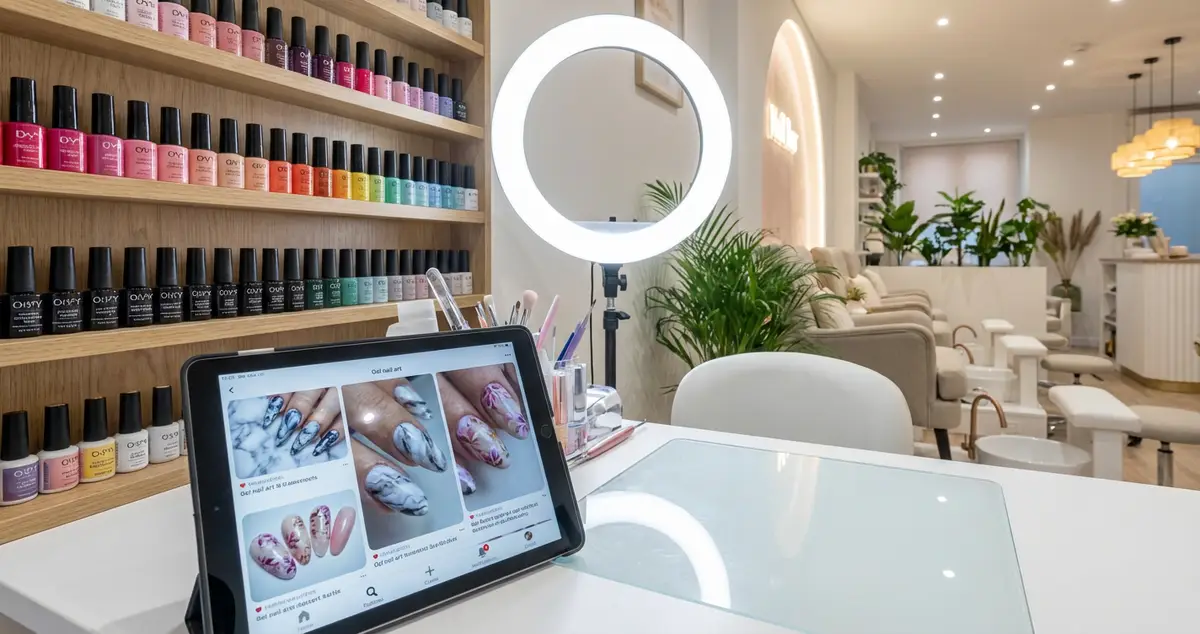
Build a nail salon website that showcases your designs and fills your appointment book. Galleries, booking, pricing, and mobile tips for UK nail bars.
A nail salon website is a set of pages designed to showcase your nail art, display treatment pricing, accept online bookings, and convince potential clients that your work is worth travelling for. Unlike a general beauty salon site, a nail salon website lives or dies by its visual portfolio: your designs are your strongest marketing tool.
You spend hours perfecting gel sets, hand-painting nail art, and keeping up with design trends on Instagram. But when someone searches "nail salon near me" on Google, Instagram doesn't appear in those results. A website does. That's the gap between being found by new clients and relying entirely on walk-ins and referrals.
If you're thinking "I already post everything on Instagram," that's a strong foundation, but it's one you don't own. A nail salon website gives you a permanent, searchable home for your best work. The steps below walk you through what to include, from design galleries to booking setup.
For the full picture on salon websites and SEO, see our salon website and SEO hub.
What You'll Learn
- How to build a nail art gallery that converts browsers into bookings
- Structuring your treatment menu for gel, acrylic, SNS, and art services
- Setting up walk-in vs appointment booking for nail salons specifically
- Which pages your nail salon website needs beyond the basics
- Making your nail salon website work on mobile (where clients browse your designs)
Step 1: Build Your Nail Art Gallery
This is the single most important page on a nail salon website. Your gallery is your portfolio, your proof of skill, and the main reason potential clients choose you over the nail bar next door.
How to organise your gallery:
- By design style: French tips, ombre, chrome, hand-painted art, 3D embellishments, seasonal designs
- By service type: gel extensions, acrylic full sets, BIAB, SNS dip, natural nail overlays
- Latest work first: keep it fresh. A gallery with designs from six months ago suggests you're not busy
For example, a nail technician specialising in hand-painted art might create separate gallery sections: "Floral Designs," "Character Art," "Abstract," and "Seasonal Collections." Each section shows 8-12 of your best photos with a booking link underneath.
Photography tips for nail photos:
- Natural light or a ring light: avoid flash, which creates harsh shadows on nails
- Consistent background (plain white or neutral)
- Multiple angles: top-down, angled profile, hands in a natural position
- Show the full set, not just one nail
Pro Tip
According to BABTAC, potential clients typically decide whether to book within seconds of viewing a nail portfolio. Your gallery photos are doing the selling. Invest in getting them right.
If you're only posting nail photos on Instagram and expecting clients to find you through Google, that rarely works for local search. Your nail salon website gallery ranks in Google Image results and brings in clients that social media alone misses.
Step 2: Structure Your Treatment Menu
With your gallery drawing clients in, the next step is showing them exactly what you offer. Nail services are more varied than most beauty treatments, which makes your menu structure crucial. A beauty studio might list ten treatments. A busy nail salon can easily offer thirty or more variations.
Recommended menu structure:
| Category | Example Services | Price Range |
|---|---|---|
| Gel Manicures | Classic gel, French, ombre, glitter | £25-45 |
| Gel Extensions | Short, medium, coffin, stiletto, almond | £35-55 |
| Acrylic Full Sets | Natural, coloured, French, custom art | £30-50 |
| Nail Art | Hand-painted, chrome, 3D, foil | £5-20 add-on |
| SNS/Dip Powder | Classic, French, ombre | £30-40 |
| Maintenance | Infills, removals, repairs | £15-35 |
| Pedicures | Classic, gel, luxury | £25-50 |
Key rules for nail salon pricing:
- List exact prices, not "from £30." Clients who see vague pricing assume the worst
- Separate add-ons clearly: nail art pricing per nail vs per set
- Include duration so clients can plan their visit
- Add "Book Now" buttons next to each category
If you can't tell whether your nail salon website menu is helping clients choose or confusing them, that's usually a sign you need to restructure by service type rather than listing everything alphabetically.
For more on designing your layout, check out our guides on salon website design and salon website templates.
Step 3: Set Up Walk-In and Appointment Booking
Your gallery and menu are ready. Now let's make sure clients can actually book. Nail salons have a unique booking challenge: many clients want walk-in availability, but you also need to manage appointments for longer services like custom sets.
How to handle both on your nail salon website:
- Online booking for appointments: use Fresha or Timely for services over 30 minutes (extensions, custom art, pedicures)
- Walk-in availability indicator: a simple "Walk-ins welcome for gel manicures" banner or real-time availability display
- Book Now button: persistent in navigation, visible on every page
For instance, a nail bar might set up Fresha for appointment bookings while displaying a banner: "Walk-ins accepted for classic gel manicures: check availability or book ahead online." This captures both the spontaneous client and the planner.
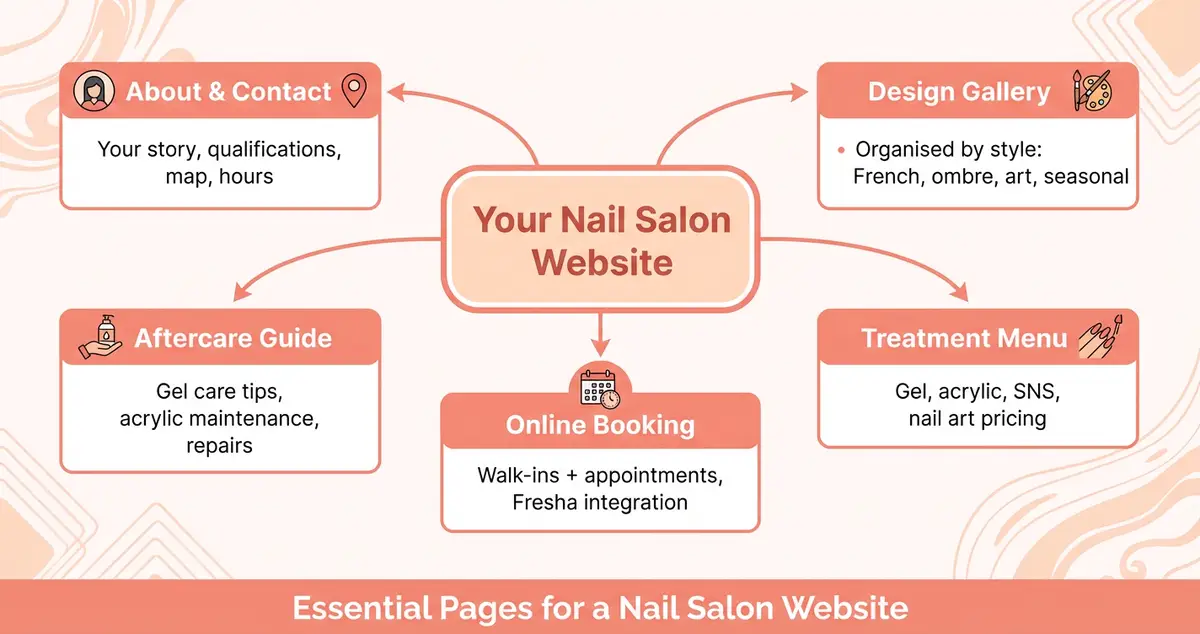
Essential pages every nail salon website needs to convert visitors into bookings.
Step 4: Add Nail-Specific Pages
Now that the essentials are in place, these additional pages set your nail salon website apart from competitors. Beyond the gallery, menu, and booking, a nail salon website benefits from pages that answer common client questions and improve your Google rankings.
Design inspiration page. Show trending designs by season: Christmas nails, wedding nails, festival nails, prom season sets. Update quarterly. For example, a nail technician who created a "Wedding Nail Designs 2026" page with 15 photos of bridal sets started ranking for "wedding nails [her town]" within weeks, bringing in a steady stream of wedding season bookings. These pages rank for searches like "Christmas nail designs [your town]" and bring in seasonal traffic.
Aftercare guide. How to look after gel nails, how long acrylics last, what to do if a nail lifts. This reduces repeat questions and shows expertise. If you're reading this thinking "my clients just message me on Instagram for aftercare," that's exactly why a dedicated page helps. One page answers everyone, freeing you to focus on actual treatments.
About page with portfolio. Your qualifications, training (especially for BIAB, acrylic, or advanced nail art), and personal style. Nail clients often choose a technician for their aesthetic. Show yours clearly.
Pricing FAQ. Explain what affects price: length, shape, design complexity, removal. Transparency builds trust and reduces "how much for..." messages.
For advice on optimising your Google listing alongside your site, see our guides on beauty salon Google My Business and SEO for beauty salons. Working through a local SEO checklist as you build makes sure Google can actually find and rank the site you have just made.
Step 5: Optimise for Mobile
Your pages are built, but where will clients actually see them? Most potential nail salon clients browse on their phones, scrolling through design inspiration, checking prices, and comparing galleries during their commute or lunch break. Your nail salon website must work perfectly on mobile.
Mobile essentials for nail salons:
- Gallery loads fast: compress images to under 200KB each. A gallery full of 5MB photos will drive clients away before they see your work
- Swipeable gallery: let clients swipe through designs naturally, like Instagram
- Tap-to-book: one tap from any page to start a booking
- Prices visible without zooming: if clients have to pinch and zoom your menu, they'll leave
Test your nail salon website on your own phone. Can a client find your gallery, browse designs, check prices, and book, all in under 60 seconds?
If You Only Have 30 Minutes a Week
Building a full nail salon website sounds like a big project, but the minimum viable version is simpler than you think. Between a late cancellation and your next appointment, here's where to start:
- Week 1 (30 min): Pick a platform (Wix for most nail salons: strong gallery templates and free booking integration) and choose a beauty template
- Week 2 (30 min): Upload your 10 best nail photos organised by style and add a "Book Now" button linking to Fresha or your booking system
- Week 3 (30 min): Add your treatment menu with prices for every service. Include duration and a brief description
- Week 4 (30 min): Write your about page (three paragraphs: your story, qualifications, design style) and add contact details with a map
Would you book a nail appointment at a salon whose online presence was just an Instagram account with no prices listed? If the answer gives you pause, your potential clients feel the same way.
If you run a beauty salon and want to see how Local Brand Hub can support your online marketing, explore our beauty salons industry page.
FAQ
How much does a nail salon website cost?
Most nail salon owners spend between £10 and £30 per month on a website builder like Wix or Squarespace. Wix is often the better choice for nail salons because of its strong gallery templates and free Fresha booking integration. A custom website from a developer typically costs £500 to £1,500+. For most independent nail technicians, a DIY builder typically offers the strongest balance of cost, visual quality, and ease of updates.
Do I need a website if I have an Instagram for my nail salon?
Yes. Instagram is excellent for showcasing designs and engaging existing clients, but it doesn't appear in Google search results when someone searches "nail salon near me." A nail salon website ranks in Google, holds your full treatment menu with prices, and lets clients book 24/7. Think of Instagram as your portfolio and your website as your booking engine.
What photos should I put on my nail salon website?
Focus on your best recent work, organised by style (French, ombre, art, seasonal). Use natural lighting or a ring light, a consistent neutral background, and show multiple angles. Include at least 10 photos across different design styles. Avoid heavily filtered images. Clients want to see accurate colours and detail.
Which website builder is best for a nail salon?
For most nail salons, Wix typically offers the strongest combination of gallery templates, booking integration (Fresha embeds directly), and ease of use. Squarespace has more polished design options but slightly weaker booking tools. For how to check which builder actually takes bookings on a domain you own, see our salon website builder guide.
Key Takeaway
Key Takeaways
Here's what matters most for your nail salon website:
- Your design gallery is your most powerful conversion tool. Invest in good photos and keep them updated
- Structure your menu by service type (gel, acrylic, SNS, art) with exact prices and durations
- Handle both walk-ins and appointments clearly: nail salons serve both types of client
- Seasonal design pages (Christmas, wedding, prom) bring in Google traffic year-round
- Mobile is where most clients browse: test every page on your phone
- You can build a functional nail salon website in four weeks at 30 minutes per week
Your nail art speaks for itself, but only if people can find it. A nail salon website puts your best work in front of the local searches that matter most.
For restaurants, salons, and local businesses
Need help with your marketing?
We help UK businesses turn social media into real results, not busywork.
Start freeGet More Marketing Tips
Practical marketing tips for UK business owners, straight to your inbox. No spam, unsubscribe anytime.
About the Author
Local Brand Hub
Empowering UK Businesses
Local Brand Hub provides comprehensive business management tools designed specifically for UK local businesses to streamline operations, automate marketing, and grow revenue.
More articlesRelated Articles
 Tutorials
Website for Beauty Salon: What Pages You Actually Need
Build a website for beauty salon bookings that converts. Which pages you need, what content to include, and how to set up online booking for UK salons.
 Tutorials
Hair Salon Website: Complete Guide for UK Salons
How to build a hair salon website that books clients 24/7. Stylist portfolios, colour galleries, pricing and mobile design for UK salons.
 Marketing Tips
SEO for Beauty Salon: How to Get Found on Google
Step-by-step SEO for beauty salon owners who want to rank on Google. Covers Google Business Profile, keywords, reviews, and local citations.