How to build a hair salon website that books clients 24/7. Stylist portfolios, colour galleries, pricing and mobile design for UK salons.
A hair salon website is a dedicated online presence showcasing your stylists, services, and pricing while letting clients book around the clock. It features stylist portfolios, colour galleries, and clear pricing, giving potential clients the confidence to book before they visit.
You've spent years perfecting balayage, mastering colour corrections, and building a loyal column. But when someone in your area searches "hairdresser near me" at 9pm on a Sunday, your Instagram grid isn't closing that booking. The salon down the road, the one with a proper website and online booking, is.
If you're thinking "my chair's already full from word-of-mouth," brilliant. This guide isn't about replacing what works. It's about capturing the clients who search Google first, and giving them a reason to choose your salon over the three others in the same postcode.
This guide covers everything you need to build a website that brings in bookings, from essential pages to hair-specific features most salon sites miss.
This post is part of our salon website and SEO hub, see also: Website for Beauty Salon.
What You'll Learn
- Which pages every hair salon needs and why each one earns its place
- How to build stylist portfolio pages that showcase individual expertise
- Setting up colour transformation galleries that sell your work visually
- Structuring pricing by service so clients book without messaging you first
- The key differences between hair salon and beauty salon websites, and why they matter
Why Every Hair Salon Needs Its Own Website
First, let's address the obvious question. Social media is brilliant for showcasing your work. But it has limits. Instagram doesn't rank in Google search results. Facebook posts disappear within hours. And neither platform lets a potential client compare your pricing, read about your stylists, and book a colour appointment, all in under 60 seconds.
A dedicated website solves three problems at once:
Visibility. When someone searches "hair salon near me" or "balayage specialist [your town]," Google shows websites, not Instagram profiles. Without a website, you're invisible to search traffic, and pairing one with proper local SEO tools is how you climb above the other salons in your postcode.
Credibility. According to the NHBF, over 70% of UK consumers research a salon online before booking their first appointment (NHBF, 2025). A professional website with real photos, clear pricing, and stylist bios builds trust faster than a social media feed.
24/7 booking. Your phone goes unanswered during a colour appointment. A website with online booking captures those clients at 10pm on a Tuesday, during your lunch break, and on bank holidays.
If you're only relying on referrals you'll always lose to competitors who capture online searchers too. The biggest mistake is assuming word-of-mouth alone will keep your column full forever. The question isn't whether you need a website: it's how quickly you can get one live.
Essential Pages for a Hair Salon Website
So you know you need a website. But what goes on it? Every hair salon needs a core set of pages. Skip one and you create a gap that sends potential clients elsewhere. Here's what to build first, in order of priority.
Homepage. Your homepage is often the first impression. It should communicate three things within five seconds: what you do, where you are, and how to book. A beauty studio or hair salon might feature a hero image of their interior, a one-line value proposition ("Award-winning hair colour in Brighton"), and a prominent "Book Now" button.
Services and pricing. This is the page clients visit to answer two questions: "Do they do what I want?" and "How much?" List every service with exact pricing, not "from £45." Vague pricing drives potential clients to the salon that publishes their full menu. Structure services by category:
| Category | Example Services | Typical Price Range |
|---|---|---|
| Cut & Styling | Ladies' cut, men's cut, children's cut, blowdry | £25-£65 |
| Colour | Full head colour, highlights, balayage, toner | £65-£180 |
| Treatments | Olaplex, keratin, deep conditioning | £20-£85 |
| Bridal & Occasion | Trial, wedding day, prom styles | £45-£150 |
Pro Tip
According to BABTAC, salons that display full pricing on their website typically report higher conversion rates from website visitors to bookings than those requiring clients to enquire (BABTAC, 2025). Transparency removes hesitation.
About page. People book people, not brands. Include your salon's story, each stylist's specialisms, qualifications, and a professional photo. For a hair salon, this page carries more weight than for many other businesses: clients need to trust someone with their hair.
Contact and location. Address, phone number, opening hours, a Google Maps embed, and parking information. For example, a beauty salon or hair salon in a town centre might include "Two minutes from the High Street multi-storey, opposite Costa," the kind of detail that removes hesitation for first-time visitors.
Online booking. This is the feature that turns browsers into booked clients. Most salon booking systems (Fresha, Timely, Phorest) offer embeddable widgets. Place a "Book Now" button in your navigation bar so it's visible on every page.
For a deeper look at choosing the right platform, see our salon website builder comparison.
Stylist Portfolio Pages
You've got the pages sorted. Now let's talk about the feature that sets a hair salon's website apart from every other small business site. Individual stylist portfolio pages let potential clients choose their hairdresser based on style, specialism, and personality, before they walk through the door.
What to include on each stylist page:
- Name and photo: a professional headshot, not a selfie
- Specialisms: "balayage specialist," "colour correction expert," "men's barbering"
- Qualifications and training: Sassoon-trained, L'Oreal colour certified, years of experience
- Gallery of recent work: six to twelve of their best transformations, updated monthly
- Direct booking link: clients should be able to book with that specific stylist from their page
For instance, a nail salon might list technicians by nail art style, but a hair salon benefits from detailed individual pages because the stylist-client relationship drives rebooking. Clients often follow a stylist between salons: giving each stylist a page builds loyalty to your business, not just to the individual.
If you're reading this thinking "I'm a one-person salon, I don't need multiple pages," you still need one. Your portfolio page is your most persuasive sales tool. It shows potential clients what you can actually do, which matters more than any written description.
Colour Transformation Galleries
Next, let's talk about your most powerful visual asset. Your stylist pages showcase the people. Now you need to showcase the work. Before-and-after colour photos are typically the most persuasive content on any salon website. They're proof. A written description of "lived-in balayage" means nothing compared to a photo showing the transformation from box-dye brown to dimensional blonde.
How to structure your gallery:
- By technique: separate sections for balayage, highlights, full colour, colour correction, creative colour
- Before and after side by side: shot in the same lighting, same angle. Consistency builds credibility
- Include the brief: a short note under each transformation: "Client wanted to go from box-dye black to a warm caramel balayage. Three sessions over eight weeks." This helps potential clients with similar hair understand what's possible
For example, a beauty studio offering hair and aesthetic services might combine treatment galleries on one page. But a dedicated hair salon benefits from separating colour work into its own section: it ranks in Google for searches like "balayage before and after" and "colour correction near me."
Photography tips for salon owners:
- Use natural light or a ring light: overhead salon lighting creates shadows
- Photograph against a plain background (a white wall works)
- Capture the same angle before and after
- Update your gallery monthly: galleries with photos from two years ago suggest you're not busy
If you can't tell whether your gallery is helping or just filling space, that's usually a sign you need better photos or more recent ones. Ask yourself: would you book based on what you're showing?
Pricing and Online Booking
Now that your portfolio is doing the selling, what happens when a potential client loves what they see and wants to book? Pricing transparency is where many salon websites fall short. Salon owners worry that publishing prices will scare clients away or invite price comparisons. The opposite is typically true: clients who can see your prices and book immediately are more likely to follow through than those who have to send a message and wait.
Pricing structure that works:
- List every service individually: don't group "colour" as one price when you offer six different techniques
- Specify "from" prices only when genuinely variable: a cut is a fixed price; a full head of highlights might vary by hair length. If it varies, state "from £85 (short) to £120 (long)"
- Include add-ons: Olaplex, toner refresh, blowdry finish. Clients appreciate knowing the full cost upfront
- Note consultation requirements: for colour corrections or major changes, state that a consultation is needed before booking
Booking integration best practices:
A smooth booking journey is three taps: choose service, choose date, confirm. Don't add unnecessary steps because every extra click loses potential clients. If your website requires more steps than that, you're losing bookings to competitors with simpler systems.
For a beauty salon or hair salon, the booking widget should appear:
- In the main navigation bar (every page)
- Next to each service listing
- At the bottom of each stylist portfolio page
- On the contact page
During wedding season or prom season, consider adding a dedicated booking page for bridal or occasion services with longer appointment slots and trial options.
Chair Rental and Freelance Stylist Pages
Additionally, there's one more page worth considering if your salon operates a chair rental model. Your website needs dedicated pages that serve two audiences: clients looking to book treatments, and freelance stylists looking for a chair to rent.
For clients: Each chair renter needs their own stylist page (covered above) with their own booking link. Make it clear which stylists are available and how to book with each one. For example, a beauty salon or hair salon with four chair renters might list each stylist with their specialism ("Sarah: balayage and lived-in colour," "James: precision cuts and barbering") so clients can choose the right person.
For potential renters: Create a "Work With Us" or "Chair Rental" page that includes:
- Chair rental pricing (weekly or monthly)
- What's included (backwash access, products, Wi-Fi, towel service)
- Salon footfall and location benefits
- Photos of available stations
- Contact form for enquiries
For instance, a hair salon in a busy high street location might highlight footfall figures and parking availability on their rental page, details that matter to freelance stylists evaluating whether the location will bring them clients.
This page serves double duty: it fills empty chairs and signals to Google that your salon is an established business, which supports your overall salon website and SEO efforts.
Hair Salon vs Beauty Salon Website: Key Differences
Now that you've got the building blocks for a strong site, it helps to understand what makes hair and beauty salon websites fundamentally different, especially if you also offer beauty treatments or you're benchmarking against competitors. The approach for a hair salon prioritises stylist expertise and visual transformations, while beauty salon sites centre on treatment menus and clinical outcomes.
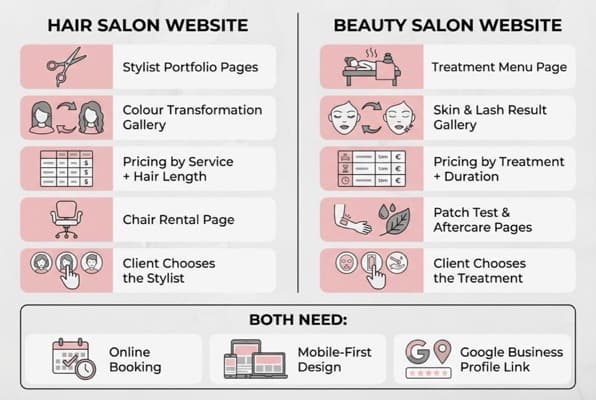
Hair salon websites centre on stylist expertise and visual transformations, while beauty salon sites focus on treatments and outcomes.
| Feature | Hair Salon Website | Beauty Salon Website |
|---|---|---|
| Portfolio focus | Stylist-specific pages, colour galleries | Treatment result galleries, skin transformations |
| Pricing structure | By service + hair length/type | By treatment + duration |
| Key conversion page | Stylist portfolio (clients choose the person) | Treatment menu (clients choose the service) |
| Booking complexity | Service + stylist + duration | Service + time slot |
| Content that ranks | "Balayage near me," "hair colour specialist" | "Facial near me," "lash extensions [town]" |
| Unique pages | Chair rental, colour correction gallery | Patch test info, aftercare guides, skin quizzes |
| Visual emphasis | Before/after hair transformations | Treatment room imagery, product displays |
| Rebooking cycle | 6-8 weeks for colour, 4-6 weeks for cuts | Varies widely: 2 weeks (nails) to 6 weeks (facials) |
The key takeaway: A hair salon site should centre on stylist expertise and visual transformations. A website for beauty salon owners should centre on treatment outcomes and the booking experience. If your salon offers both hair and beauty services, consider separate navigation sections for each, rather than blending everything onto one page.
For example, a beauty studio offering both lash extensions and hair colour should present these as distinct service categories with their own galleries, rather than mixing lash photos with hair transformations. Clients searching for hair services and clients searching for beauty treatments have different expectations.
Mobile Design for Hair Salon Websites
However, none of your content matters if clients can't use your site on a phone. Over 60% of local searches happen on mobile devices (Google, 2025). For hair salons, that number is likely higher: your potential clients are searching on their commute, scrolling during a lunch break, or browsing in bed at 11pm.
Mobile essentials for a salon site:
- Tap-to-call button: one tap to phone you. Don't make people copy your number
- Book Now button visible without scrolling: if a potential client has to scroll past your entire homepage to find the booking link, you're losing them
- Gallery that loads quickly: compress images. A portfolio full of uncompressed 5MB photos will make your site crawl on mobile data
- Readable pricing: no tables that require horizontal scrolling on a phone. Stack your services vertically for mobile
- Maps integration: a tappable map showing your salon location with directions
Test your website on your own phone. Can you find your services in under five seconds? Can you book with a specific stylist in under three taps? If not, your clients can't either.
For layout and visual best practices, see our salon website design guide.
If You Only Have 30 Minutes a Week
If you only have 30 minutes a week, do this. Building a complete website sounds overwhelming, especially when you're back-to-back with clients and your next late cancellation just freed up a slot you need to fill. Start with the minimum viable version and build from there:
- Week 1 (30 min): Choose a platform: Wix or Squarespace for most salons. Pick a salon template. Don't customise yet: just get the structure live. See our salon website template guide for options
- Week 2 (30 min): Add your service menu with full pricing. This page is often where potential clients decide whether to book
- Week 3 (30 min): Upload your five best before-and-after photos and write your about page, three short paragraphs maximum
- Week 4 (30 min): Connect your booking system (Fresha or Timely), add contact details, opening hours, and a Google Maps embed
For example, a beauty salon or hair salon owner starting from scratch might spend Week 1 choosing Squarespace and selecting the "Maru" template, one of their salon-specific designs. By Week 4, they'd have a live site with services, photos, and online booking, enough to start capturing the clients who search Google first.
In practice, when you're down a stylist and your 3 o'clock just cancelled, marketing is the last thing on your mind. But a website that exists and works on a phone will always outperform the "perfect" website you never build.
Would you book an appointment at your own salon based on what your website shows? If the answer makes you hesitate, so are your potential clients.
Weekly Action
- Search your salon name on Google using your phone. What does a new client see? Can they find your services, pricing, and a way to book within 10 seconds? Write down every friction point: those are your priorities for this week.
- Photograph your three best colour transformations this week. Same lighting, same angle, before and after. Upload them to your gallery (or save them for Week 3 if you're starting fresh). For more on how other salons present their work, browse our salon website examples guide.
FAQ
Here's what salon owners ask most about building their website.
How much does a hair salon website cost in the UK?
Most hair salon owners spend between £10 and £25 per month using a website builder like Wix or Squarespace, which includes hosting, templates, and booking integration. A custom-designed website from a developer typically costs between £800 and £3,000 upfront, depending on complexity. For most independent salons, a DIY website builder typically offers the strongest balance of cost, ease of updates, and professional appearance.
What pages should a hair salon's website include?
At minimum: a services page with full pricing, online booking, individual stylist portfolios, a colour transformation gallery, an about page, and contact information with a map. Beyond the basics, a chair rental page and a dedicated bridal or occasion services page can attract additional audiences and improve your Google rankings.
Do I need a website if I already have Instagram?
Yes. Instagram is excellent for showcasing your work and engaging existing clients, but it doesn't rank in Google when someone searches "hairdresser near me." A dedicated website ranks in local search results, holds your complete service menu, and lets clients book 24/7. Think of Instagram as your portfolio and your website as your booking engine: they work together, not as replacements.
What is the difference between a hair salon website and a beauty salon website?
The difference centres on who converts the client: the stylist or the treatment. A hair salon site typically focuses on individual stylist expertise, colour transformation galleries, and service pricing by hair type or length. A beauty salon site emphasises treatment outcomes, patch test information, and aftercare guides. The booking flow also differs: hair clients often choose a specific stylist, while beauty clients typically choose a treatment type first. If your business offers both services, separate navigation sections for hair and beauty help clients find what they need. For beauty-specific guidance, see our guide on beauty salon marketing.
If you're a hair salon owner looking for tools to manage your online presence, explore how LocalBrandHub supports beauty salons with marketing, SEO, and social media features built for your industry.
Key Takeaway
Key Takeaways
- Stylist portfolio pages are often your most persuasive feature: they let clients choose the person, not just the service
- Colour transformation galleries with before-and-after photos sell your expertise more effectively than any written description
- Full pricing transparency typically converts more visitors than "enquire for prices": remove the guesswork
- Online booking that works in three taps captures clients when you can't answer the phone
- Mobile design isn't optional: most of your potential clients will find you on a phone
- Chair rental pages serve double duty by attracting both clients and freelance stylists
- Your hair salon website should centre on people and transformations, while a beauty salon website centres on treatments and outcomes
Your website doesn't need to be award-winning. It needs to load on a phone, show your work, list your prices, and let people book.
For restaurants, salons, and local businesses
Need help with your marketing?
We help UK businesses turn social media into real results, not busywork.
Start freeGet More Marketing Tips
Practical marketing tips for UK business owners, straight to your inbox. No spam, unsubscribe anytime.
About the Author
Local Brand Hub
Empowering UK Businesses
Local Brand Hub provides comprehensive business management tools designed specifically for UK local businesses to streamline operations, automate marketing, and grow revenue.
More articlesRelated Articles
 Tutorials
Nail Salon Website: What You Need to Stand Out Online
Build a nail salon website that showcases your designs and fills your appointment book. Galleries, booking, pricing, and mobile tips for UK nail bars.
 Tutorials
Website for Beauty Salon: What Pages You Actually Need
Build a website for beauty salon bookings that converts. Which pages you need, what content to include, and how to set up online booking for UK salons.
 Marketing Tips
SEO for Beauty Salon: How to Get Found on Google
Step-by-step SEO for beauty salon owners who want to rank on Google. Covers Google Business Profile, keywords, reviews, and local citations.