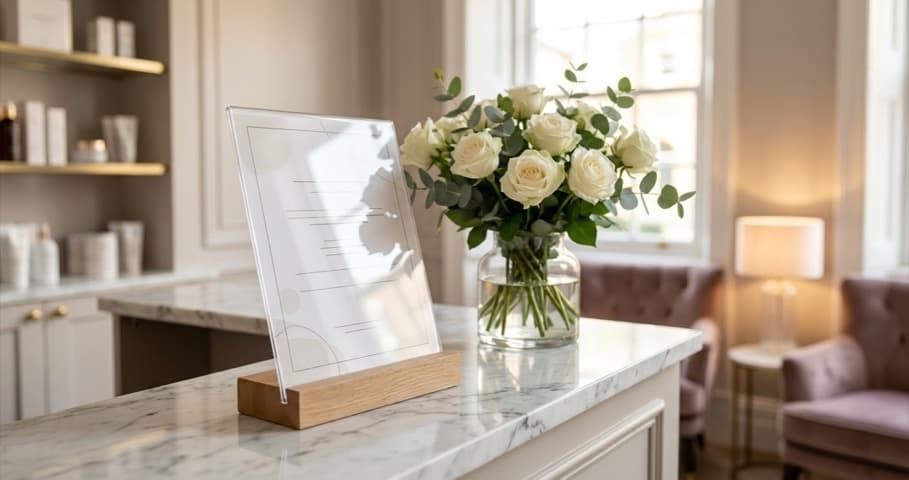
How to create a salon pricing list that wins clients. Templates, layout tips, digital vs printed formats, and mistakes that cost bookings. UK guide.
Your prices changed. But your salon pricing list still shows the old rates, your website has different figures, and a client just questioned you at the desk. A well-structured salon pricing list builds trust before clients arrive, reduces awkward price conversations, and quietly upsells while you focus on the treatment. 13 min read.
Related: Beauty Salon Pricing Strategy, the full guide to setting prices that work for your business.
What you'll learn in this guide:
- What a salon pricing list should include (and what to cut)
- Layout and design tips that signal quality
- Digital vs printed: what works where
- Free template sources to get started today
- The pricing list mistakes most salons make without realising
What to Include on Your Salon Pricing List
First, here's a quick reality check. Many salons list too little (confusing clients) or too much (overwhelming them). The goal is a salon pricing list that feels effortless to read and leaves no unanswered questions.
Every salon pricing list should include:
- Service name: be specific. "Full Head Highlights" tells a client what they're getting. "Highlights" doesn't.
- Short description: one line explaining what's involved. Useful for treatments clients haven't tried before.
- Duration: how long it takes. This helps clients plan their day and sets realistic expectations.
- Price: use "from £XX" where pricing genuinely varies by hair length or complexity. Be honest: if the variation is significant, say so.
- Your salon name or logo: especially on printed menus and PDFs. Clients should know whose list they're holding.
For beauty and nail salons specifically, group your salon pricing list into clear categories: nails, facials, waxing, lashes and brows, body treatments. Mixing everything together forces clients to hunt, and some won't bother.
If you're thinking "do clients actually read all of this?", they don't. But they scan. And what they scan for is reassurance that you know your craft and your prices are fair. Salons that display full service information, including duration and pricing, tend to convert more enquiries into bookings because clients feel informed rather than ambushed (Booksy, 2025).
What takes your list from adequate to excellent:
Add brief upgrade options next to relevant service entries. A "Gel Manicure" entry might note: "Add nail art from £5." That's passive upselling. It plants the idea without you having to say a word. For example, a nail bar might list: "Classic manicure (45 mins) £28, upgrade to gel for £10" as a single entry, giving clients a clear decision to make before they arrive.
Also include:
- Patch test requirements for relevant services (protects you legally and sets expectations)
- Seasonal or limited-time services, clearly marked
- A brief note on deposits or cancellations, even one line helps
Pro Tip: If you're only listing service names and prices with nothing else, you're leaving your pricing list to do the bare minimum. One sentence of description per service can increase perceived value without raising your prices by a single pound.
Pricing List Design: Layout That Sells
Now that you know what to include, here's how to present it. You could have competitive prices. But if your salon pricing list looks like a spreadsheet printed at home on plain A4, clients will undervalue what you offer before reading a single word. Design matters because presentation signals quality.
Ask yourself: would you book a treatment at your own salon based on how your pricing list looks right now? If the answer is "probably not", that's exactly what this section is for.
Six layout principles make the biggest difference:
- Avoid the wall of text. Use service categories as clear headings, then list treatments beneath with generous white space. A crowded list feels cheap; breathing room feels premium.
- Use hierarchy deliberately. Your most popular or highest-margin services should appear first within each category, not buried at the bottom. Research on menu design suggests services in the top-left position often receive more attention than those lower down (Booksy, 2025).
- Keep typography clean. One or two fonts maximum. A readable body font for service descriptions and a display font for your salon name. Avoid cursive for anything clients need to read quickly.
- Use your brand colours. A neutral background with one accent colour looks intentional. Every colour in the palette looks amateur.
- Rename the title. Replace "Price List" with "Services Menu" or "Treatment Guide." It shifts the feel from transactional to experiential, subtle but effective (Lockhart-Meyer, 2025).
- Use price anchoring. List your most premium tier first. The higher price sets the anchor, making everything below feel more reasonable, a well-documented pricing psychology effect (Booksy, 2025).
If you're only printing on cheap paper to save money, that decision is likely costing you more in lost perceived value than it saves in print costs. A beauty therapist whose treatment menu looks premium charges more, and clients rarely push back.
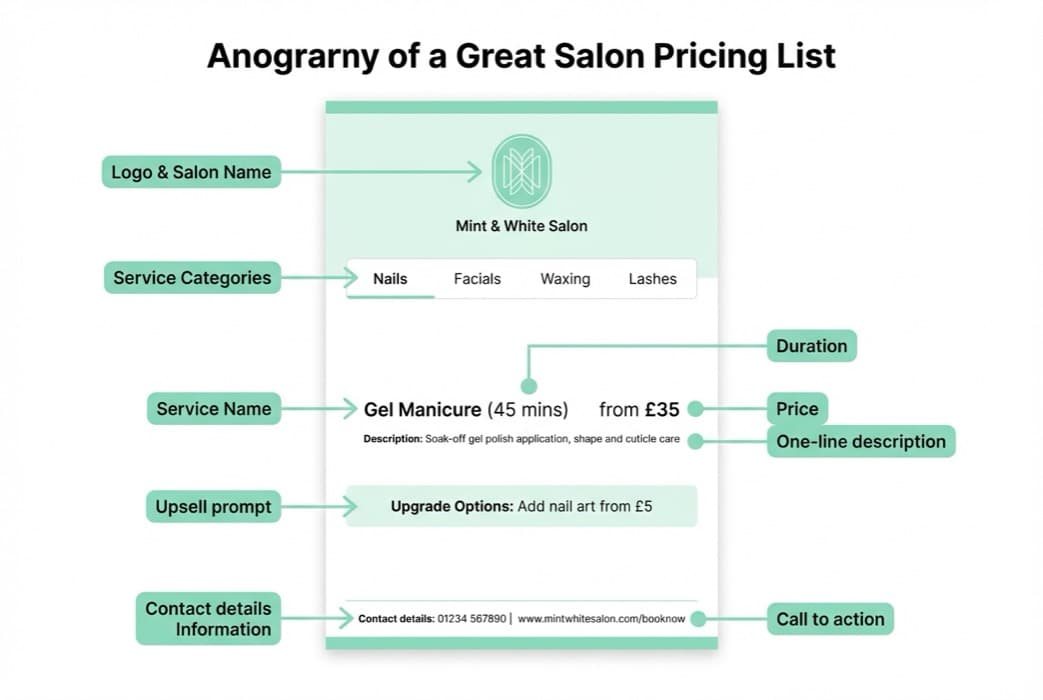
Anatomy of a great salon pricing list: logo, categories, descriptions, duration, prices and upgrade prompts.
Digital vs Printed: Which Format Works Best
Now that the design is sorted, let's look at where your list actually lives. The short answer: both. They serve different purposes, and choosing only one means leaving money on the table.
| Format | Works Well For | Key Advantage |
|---|---|---|
| Printed menu | Reception, waiting area, retail bags | Works in the room, introduces existing clients to new treatments |
| Website pricing page | New client discovery, SEO | Attracts qualified enquiries, clients who've already decided your prices work for them |
| Downloadable PDF | Email enquiries, DMs | Reduces back-and-forth, signals professionalism |
| Social media post | Instagram stories, pinned posts | Answers the price question before clients have to ask |
Printed pricing lists are for the moment a client is already in your space. A display at reception gives walk-in enquiries something to pick up. A menu in your waiting area introduces existing clients to treatments they've never tried. A card tucked into a retail bag plants the seed for the next booking.
As Lockhart-Meyer (2025) notes, a printed price list is a highly effective tool for reminding existing clients of everything else you offer, particularly when clients only book one treatment and don't realise what's available.
If you're thinking "I don't have time to design a printed menu", a single A5 card with your top ten services takes about an hour in Canva and lasts for months.
Digital pricing lists are for the moment a client is finding you. A clearly formatted pricing page on your website can help you appear in "beauty salon near me" and pricing-related searches, a genuine local SEO signal for salons. An Instagram story or pinned post answers pricing questions before a client has to DM you.
The main advantage of digital: you can update it instantly. When you add a service or change a price, you're not reprinting 200 laminated cards.
Which should you prioritise first? If you don't have a pricing page on your website, that's typically the most urgent gap. Clients searching for your services will find you, and immediately look for prices. If prices aren't listed, some will move on.
Once your website pricing is sorted, printed materials become worthwhile because they work in the room, not only online. See our guide to salon website design for practical layout advice on your pricing page.
If you pick just one format to start with, make it a website pricing page. It works around the clock, requires no reprinting when prices change, and helps potential clients find you before they've even decided to book.
Pricing List Templates for Salons
Now let's talk about where to actually build your pricing list. You don't need to design from scratch. Several platforms offer solid free templates:
- Canva: widely used by salon owners. Search "salon price list" and filter by brand colours. The free tier is often enough.
- Venngage: clean, structured templates with easy category editing.
- PosterMyWall: useful for social-media-sized pricing graphics (stories, posts) as well as printable versions.
- Flipsnack: good if you want a digital flipbook version clients can browse on your website.
- Template.net: downloadable Word, Google Docs, and Publisher formats for salons who prefer familiar software.
For a printable salon pricing list, A4 or A5 portrait fits standard reception holders. A4 landscape folded to A5 works well as a folded menu.
Before you publish, checklist:
- All services have prices (no blanks)
- "From £XX" used where pricing genuinely varies
- Duration included for every treatment over 30 minutes
- Patch test requirements noted for relevant services
- Contact details and booking link included
- Salon name and logo are visible
- Readable on mobile if sharing digitally
For many UK beauty salons, Canva offers a strong combination of ease, flexibility, and professional results, especially if you're starting from zero.
If you're unsure whether your current pricing list is working hard enough, that's usually a sign your list needs a structured review rather than just an occasional update. Try the Boss Your Salon pricing calculator for a quick health check on your numbers.
Common Pricing List Mistakes
However, having a template isn't enough if it's built with these common errors. Avoid these traps. Most of these only become obvious when a client mentions it, or doesn't come back.
- Vague pricing. "Prices on request" for standard services reads as "probably too expensive" to many clients. Show the price.
- No descriptions. "Facial" tells a client nothing. "Purifying facial (60 mins): deep cleanse, steam, hydrating mask" tells them exactly what they're paying for.
- Inconsistent prices across formats. Instagram says £45. Reception card says £38. Website says £40. Clients notice, and it erodes trust faster than a bad review. Audit all formats together every time you change a price.
- No upsell pathways. "Upgrade to shellac for £8" or "add a paraffin soak for £6" at the point of decision is low-effort revenue most pricing lists miss entirely.
- Cheap print quality. If you're charging £80 for a luxury facial, a flimsy black-and-white printout undercuts that message before the client sits down.
- Making it too long. A two-page folded card beats a six-page booklet clients won't read. Simplify for print; save the full list for your website.
For example, a nail bar might have perfect prices on their website but an outdated laminated card at reception from eight months ago. A client who spots the discrepancy mid-appointment won't mention it. They'll just rebook somewhere else.
If you're only updating prices when you remember, you'll typically lose ground to competitors who treat their pricing list as part of the client experience, not an afterthought. It's not about perfect design. It's about consistency.
Your salon pricing list isn't just a list of what you charge. It's the first impression that tells a client whether your salon is worth what you're asking.
If your pricing looks different on Instagram, your website, and your reception card, that's usually a sign your pricing list doesn't have a proper update process. Managing your services and prices in one place keeps every channel in sync. A quick audit now saves the awkward client conversation later.
Update Your Pricing List This Week
Finally, here's the part that matters most: actually doing something this week. If you're reading this thinking "I'll get round to it when it's quiet", quiet weeks are exactly when a strong pricing list would have helped you avoid that dip in the first place.
For instance, a beauty studio might discover during their audit that their most popular treatment, a 60-minute facial, has no description on their website. Adding two lines to that single entry could be the difference between a direct booking and a client who bounces to a competitor's site that explains exactly what to expect.
If you only have 30 minutes a week, do this:
- Day 1 to 2: Open your current pricing list (or website pricing page). Write down every service that's missing a description, has an outdated price, or lacks a duration.
- Day 3 to 4: Fix those gaps. Add a one-line description to your top five most-booked treatments. Update any prices that have changed.
- Day 5 to 7: Check consistency. Does your website match your printed list? Does your Instagram bio and booking platform show the same prices?
That's it. One consistent, accurate salon pricing list across all formats is more effective than a beautifully designed one that's six months out of date.
For a deeper look at how your pricing fits within your overall business model, including how to set rates and justify increases, read the full beauty salon pricing strategy guide. And if you're working on your wider online presence, our beauty salon marketing guide covers the full picture.
FAQ
What should a salon pricing list include? A salon pricing list should include the service name, a brief description, duration, and price. Use "from £XX" where pricing varies. Group services into clear categories (nails, facials, waxing, lashes and brows) and add upgrade options where relevant.
Should I list prices on my salon website? Yes. Salons with clear pricing pages on their websites tend to receive more qualified enquiries, clients who've already decided your prices suit their budget. Hidden pricing creates friction and often sends potential clients to a competitor who does show prices.
How often should I update my salon price list? Review your price list at least twice a year, and always update immediately when you change a price. Audit all formats at the same time (website, printed menus, booking platform, and social media) so they stay consistent.
Which format works well for a salon price list? Both digital and printed formats serve different purposes. A website pricing page helps clients find and book you online. A printed menu or card works in reception and waiting areas. Use both where you can.
Should I use "from £XX" or fixed prices on my salon pricing list? Use "from £XX" where pricing genuinely varies: for example, colour services that depend on hair length, or treatments with optional add-ons. For services with a fixed cost regardless of client, show the fixed price. Mixing both approaches on the same list is fine as long as it's clear which is which.
Also in the pricing hub: Beauty Salon Pricing | Hair Salon Pricing | Nail Salon Pricing | Salon Software Pricing | Tanning Salon Pricing | Gender-Neutral Hair Salon Pricing
Explore our beauty salons industry page for more tools and guides tailored to salon owners.
For restaurants, salons, and local businesses
Need help with your marketing?
We help UK businesses turn social media into real results, not busywork.
Start freeKey Takeaway
A salon pricing list that sells isn't about fancy design. It's about clarity, consistency, and quiet upselling. Include service names, descriptions, durations, and prices. Present them with clean layout and price anchoring. Use both digital and printed formats. Audit every channel whenever a price changes. One accurate, well-structured pricing list across all touchpoints builds more trust than any marketing campaign.
Get More Marketing Tips
Practical marketing tips for UK business owners, straight to your inbox. No spam, unsubscribe anytime.
About the Author
Local Brand Hub
Empowering UK Businesses
Local Brand Hub provides comprehensive business management tools designed specifically for UK local businesses to streamline operations, automate marketing, and grow revenue.
More articlesRelated Articles
 Marketing Tips
Beauty Treatment Vouchers: Design Packages Clients Gift
How to create a beauty treatment voucher that outsells monetary ones. Pamper package ideas, pricing strategies, and marketing tips for UK salons.
 Marketing Tips
Nail Salon Gift Voucher Ideas, Packages & Pricing
Set up nail salon gift vouchers that sell. Gel manicure, mani-pedi, nail art and hen party group packages with UK pricing and online sales setup.
 Tutorials
Boss Your Salon Pricing Calculator: A Complete Guide
How the Boss Your Salon pricing calculator by Maddi Cook works, what inputs it needs, and the DIY treatment pricing formula every salon owner needs.